Close Menu

    Subscribe to Updates

    Get the latest creative news from FooBar about art, design and business.

    What's Hot

    New free-to-play MMORPG is now trending on Steam, and it features offline progression with “Very Positive” reviews

    New fantasy RPG enters Steam’s trending charts alongside a launch discount and 95% positive reviews

    This open world game developed by Rockstar Games and enjoyed by 92% of players is 75% off on Steam

    Facebook X (Twitter) Instagram
    • Artificial Intelligence
    • Business Technology
    • Cryptocurrency
    • Gadgets
    • Gaming
    • Health
    • Software and Apps
    • Technology
    Facebook X (Twitter) Instagram Pinterest Vimeo
    Tech AI Verse
    • Home
    • Artificial Intelligence

      AI has become the norm for students. Teachers are playing catch-up.

      December 23, 2025

      Trump signs executive order seeking to ban states from regulating AI companies

      December 13, 2025

      Apple’s AI chief abruptly steps down

      December 3, 2025

      The issue that’s scrambling both parties: From the Politics Desk

      December 3, 2025

      More of Silicon Valley is building on free Chinese AI

      December 1, 2025
    • Business

      Top 10 cloud computing stories of 2025

      December 22, 2025

      Saudia Arabia’s STC commits to five-year network upgrade programme with Ericsson

      December 18, 2025

      Zeroday Cloud hacking event awards $320,0000 for 11 zero days

      December 18, 2025

      Amazon: Ongoing cryptomining campaign uses hacked AWS accounts

      December 18, 2025

      Want to back up your iPhone securely without paying the Apple tax? There’s a hack for that, but it isn’t for everyone… yet

      December 16, 2025
    • Crypto

      Yield Basis (YB) Gains 17% After Securing Upbit Listing

      December 26, 2025

      The Biggest Options Expiry Ever—What $27 Billion Means for Bitcoin and Ethereum

      December 26, 2025

      TRON Network Hits Record User Growth as TRX Price Faces Worst Q4 Decline

      December 26, 2025

      4chan Trader Who Nailed Bitcoin’s October All-Time High Calls $250,000 in 2026

      December 26, 2025

      Ethereum ETFs Bleed for 2 Weeks, But This Key Level Retest Could Flip the Script

      December 26, 2025
    • Technology

      New free-to-play MMORPG is now trending on Steam, and it features offline progression with “Very Positive” reviews

      December 26, 2025

      New fantasy RPG enters Steam’s trending charts alongside a launch discount and 95% positive reviews

      December 26, 2025

      This open world game developed by Rockstar Games and enjoyed by 92% of players is 75% off on Steam

      December 26, 2025

      LG 32GX870A-B 32-inch 4K 240Hz OLED monitor with built-in KVM, anti-glare panel, and webOS at near-holiday low pricing on Amazon

      December 26, 2025

      Affordable OnePlus Turbo surfaces in live images before official announcement

      December 26, 2025
    • Others
      • Gadgets
      • Gaming
      • Health
      • Software and Apps
    Check BMI
    Tech AI Verse
    You are at:Home»Technology»5 tips and tricks for your new Apple Watch
    Technology

    5 tips and tricks for your new Apple Watch

    TechAiVerseBy TechAiVerseDecember 26, 2025No Comments7 Mins Read0 Views
    Facebook Twitter Pinterest Telegram LinkedIn Tumblr Email Reddit
    5 tips and tricks for your new Apple Watch
    Share
    Facebook Twitter LinkedIn Pinterest WhatsApp Email

    5 tips and tricks for your new Apple Watch

    A smartwatch is one of the most meaningful devices you can add to your daily routine, and they make for a fantastic gift option for the Holiday season, as well. And in the realm of wearables, there’s hardly a product that is as refined as the Apple Watch. 

    Apple’s smartwatch is loaded to the brim with advanced health-centric and communication features, and stories about how it saved a person’s life regularly appear on the internet. But there’s a lot that these smartwatches can pull off than just keeping an eye on your heart rate, sleep tracking, and interacting with notifications. 

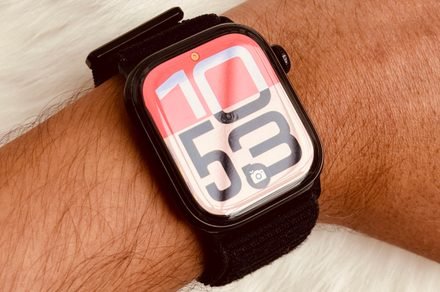
    There are plenty of Apple Watch features out there that add an extra dose of convenience to your daily life. If you’re getting a new Apple Watch, or helping set one up for a family member, here are a few tips and tricks worth giving a shot. 

    Gestures

    The primary mode of operating an Apple Watch is by touching and swiping on the screen. However, you can handle a variety of tasks on it using wrist and finger-tap gestures. For example, you double-tap your thumb and forefinger to perform actions on the Apple Watch without touching the screen.

    For example, you can play/pause music, pick between advance and select while navigating through the smart stack, answer a call, and even reply to an incoming text message. You can enable it by following this path: Settings > Gestures > Double Tap.

    Additionally, the Apple Watch also supports wrist gestures, which are enabled by default. You can quickly turn your wrist over and back to dismiss notifications and go back to the watch face. This gesture lets you handle calls, timers, and notifications, and comes in handy when you can’t quite touch your smartwatch’s screen. 

    This gesture is supported on Apple Watch SE 3, Apple Watch Series 9, Apple Watch Ultra 2, and later models. On a similar note, you can simply cover the smartwatch’s screen for three seconds to mute an incoming alert, as well. This one can also be enabled from the Gestures dashboard in the Settings app. 

    Sleep score  

    With the watchOS 26 update that arrived recently, Apple introduced a new feature called Sleep Score. It’s an easier way to understand the quality of your shut-eye time, instead of giving users a graphical breakdown of scientific terms such as Core and REM. 

    Apple says it’s “a score based on estimates of how long you slept, the consistency of when you fell asleep relative to your recent history, and the amount and duration of awake periods during sleep.” It also takes into account the amount of time you spent in each sleep stage.

    The quality of your sleep is graded on a scale of 0-100 across five tiers, ranging from very low to very high. To use this feature, you will first have to set up your sleep schedule and targets, which can be done on the paired iPhone by following this path: 

    Health app on iPhone > Set Up Sleep > Get Started. You can also set it up and make modifications within the Sleep app on your Apple Watch. But first, you must go to the Watch app on your iPhone, navigate to the Sleep page, and make sure that “Track Sleep with Apple Watch” is enabled. On the same page, you will also find an option to enable sleep score notifications.

    Vitals tracking during sleep 

    The Apple Watch supports dozens of workouts, and it can collect a wide range of biometric data while at it. The smartwatch can measure heart rate, respiratory rate, wrist temperature, and blood oxygen — all of which are important metrics when you are actively tracking your workouts. 

    These biomarkers, however, are also pretty valuable while you are asleep. “To make your Apple Watch data work for you, you’ll need to sleep with it,” Apple’s VP of Health, Dr. Sumbul Desai, recently told CNET, adding that it’s a snapshot of your overnight health.

    Factors such as illness, medications, elevation, and alcohol intake can have an effect on heart rate, respiration, blood oxygen levels, temperature, and sleep quality. The overnight vitals tracking system keeps an eye on all these metrics, and if it detects anything out of your typical range, you will get an alert about it the next morning. 

    All of this data can be accessed within the Vitals app pre-installed on your Apple Watch, and its icon has four circular rings, three of which are blue and the one at the top is purple. You can also keep an eye on your overnight vitals in the Health app on your iPhone. Just keep in mind that you will need to sleep with your Apple Watch for at least seven days straight to create a “normal” range, before the watch starts warning you about any deviations in your body activities while asleep. 

    Water Lock 

    Ap

    The Apple Watch can handle water exposure pretty well and can handle immersion at a depth of up to 50 meters. But water resistance is not permanent, and due to natural wear over time and repeated exposure, it diminishes as the seal weakens. Needless to say, you want to avoid that fate. 

    To that end, the Apple Watch comes with a Water Lock feature that is enabled automatically for water-based workouts such as swimming or surfing. When it’s activated, all touch responses on the screen are temporarily disabled. But more importantly, this feature helps eject water from the speaker cavity. 

    Let’s say you are washing a daily-use object, or engaged in any related activity where the watch inevitably comes in contact with water. All you need to do is open the control center by clicking on the side button and tapping on the waterdrop icon to enable it. 

    Once the task is done, press and hold, or rotate the Digital Crown until you see the Unlocked message appear on the screen. The Apple will play different kinds of music and use the vibration to eject any water from the speaker cavities. 

    Find a misplaced iPhone 

    Nadeem Sarwar / Digital Trends

    I often misplace my iPhone, and finding it can be a hassle because I keep the work focus modes enabled to silence incoming notifications. Thankfully, the Apple Watch can help you find a misplaced iPhone by making it beep loudly and also give a visual alert by blinking the LED flash.

    All you have to do is press the side button and tap on the phone icon. If the phone is within the Bluetooth range, it will ring up, and you will also see a direction guidance view appear on the watch screen with distance estimates. If you tap and hold the button, the iPhone’s LED will also blink, making it easier to find in the darkness. 

    But in scenarios where you simply forgot the Apple Watch away from home, or think it was stolen, the Apple Watch can again come to the rescue. It can even help find iPhones (or other Apple devices with Find My enabled) if they are switched off or in Offline mode. 

    You simply have to open the Devices on your Apple Watch (a green icon with a laptop and and phone), tap on the iPhone you want to locate, and then select “Directions” on the next page. Doing so will open a guided view in Apple Maps, alongside direction cues. 

    On the same page, you will find an option called “Notify when left behind.” This feature shows an alert every time the connected iPhone goes beyond the connection limit of the Apple Watch. You can set up exceptions for places such as home or office, though, to prevent it from triggering accidentally in familiar places or safe spaces. 

    Share. Facebook Twitter Pinterest LinkedIn Reddit WhatsApp Telegram Email
    Previous ArticleSamsung is bringing AI-generated visuals in the humble Calendar app
    Next Article Google might let you adjust the name of your Gmail address, at last
    TechAiVerse
    • Website

    Jonathan is a tech enthusiast and the mind behind Tech AI Verse. With a passion for artificial intelligence, consumer tech, and emerging innovations, he deliver clear, insightful content to keep readers informed. From cutting-edge gadgets to AI advancements and cryptocurrency trends, Jonathan breaks down complex topics to make technology accessible to all.

    Related Posts

    New free-to-play MMORPG is now trending on Steam, and it features offline progression with “Very Positive” reviews

    December 26, 2025

    New fantasy RPG enters Steam’s trending charts alongside a launch discount and 95% positive reviews

    December 26, 2025

    This open world game developed by Rockstar Games and enjoyed by 92% of players is 75% off on Steam

    December 26, 2025
    Leave A Reply Cancel Reply

    Top Posts

    Ping, You’ve Got Whale: AI detection system alerts ships of whales in their path

    April 22, 2025542 Views

    Lumo vs. Duck AI: Which AI is Better for Your Privacy?

    July 31, 2025191 Views

    6.7 Cummins Lifter Failure: What Years Are Affected (And Possible Fixes)

    April 14, 202595 Views

    6 Best MagSafe Phone Grips (2025), Tested and Reviewed

    April 6, 202586 Views
    Don't Miss
    Technology December 26, 2025

    New free-to-play MMORPG is now trending on Steam, and it features offline progression with “Very Positive” reviews

    New free-to-play MMORPG is now trending on Steam, and it features offline progression with “Very…

    New fantasy RPG enters Steam’s trending charts alongside a launch discount and 95% positive reviews

    This open world game developed by Rockstar Games and enjoyed by 92% of players is 75% off on Steam

    LG 32GX870A-B 32-inch 4K 240Hz OLED monitor with built-in KVM, anti-glare panel, and webOS at near-holiday low pricing on Amazon

    Stay In Touch
    • Facebook
    • Twitter
    • Pinterest
    • Instagram
    • YouTube
    • Vimeo

    Subscribe to Updates

    Get the latest creative news from SmartMag about art & design.

    About Us
    About Us

    Welcome to Tech AI Verse, your go-to destination for everything technology! We bring you the latest news, trends, and insights from the ever-evolving world of tech. Our coverage spans across global technology industry updates, artificial intelligence advancements, machine learning ethics, and automation innovations. Stay connected with us as we explore the limitless possibilities of technology!

    Facebook X (Twitter) Pinterest YouTube WhatsApp
    Our Picks

    New free-to-play MMORPG is now trending on Steam, and it features offline progression with “Very Positive” reviews

    December 26, 20250 Views

    New fantasy RPG enters Steam’s trending charts alongside a launch discount and 95% positive reviews

    December 26, 20250 Views

    This open world game developed by Rockstar Games and enjoyed by 92% of players is 75% off on Steam

    December 26, 20250 Views
    Most Popular

    What to Know and Where to Find Apple Intelligence Summaries on iPhone

    March 12, 20250 Views

    A Team of Female Founders Is Launching Cloud Security Tech That Could Overhaul AI Protection

    March 12, 20250 Views

    Senua’s Saga: Hellblade 2 leads BAFTA Game Awards 2025 nominations

    March 12, 20250 Views
    © 2025 TechAiVerse. Designed by Divya Tech.
    • Home
    • About Us
    • Contact Us
    • Privacy Policy
    • Terms & Conditions

    Type above and press Enter to search. Press Esc to cancel.