

Nvidia’s new laptop GPU is 50% slower than desktop. Is it still worth buying?
Laptop gamers, rejoice — Nvidia’s best graphics cards have finally made their way to laptops. With the ongoing rollout of laptops equipped with the RTX 5090, RTX 5080, and the RTX 5070 Ti, those of us who game on the go are faced with a tough choice: Do I upgrade now or wait for the next generation?
Unfortunately, as is often the case, there’s no easy answer. To make your life easier, I’ve looked through reviews of laptops equipped with the RTX 5090, and I’ll attempt to answer that question for you. Be warned, though, that if you’re expecting big generational gains, you might not find them here.
Nvidia’s RTX 5090 laptop GPU benchmarks reveal a worrying trend
Based on the first reviews of RTX 50-series laptops, it seems like there’s not much of an improvement — at least not unless you tap into AI-generated frames with DLSS 4. However, it’s not just gen-on-gen that’s worth exploring here; we should also consider how the RTX 5090 compares between the laptop and the desktop versions.
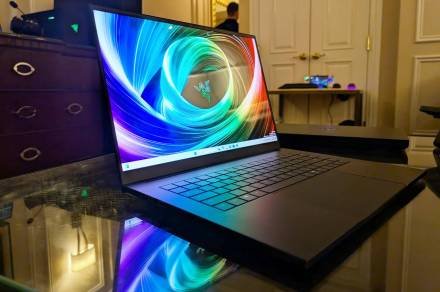
To that end, it’s not looking too good. Notebookcheck compared the RTX 5090 Solid from Zotac to the RTX 5090 found in the Razer Blade 16, and the publication found that the laptop version was over 50% slower in some games. In Dota 2 Reborn at ultra settings, the laptop delivered 137 frames per second (fps) compared to the 291 fps achieved by the desktop model. That’s a 53% drop.
PCMag, on the other hand, gave us a comprehensive comparison to last-gen options. In laptops, it’s hardly ever an apples-to-apples kind of comparison, as the other specs come into play too. However, PCMag tested the 2025 and the 2024 versions of the Razer Blade, which is perhaps the closest match up we’re going to find.
In the above benchmark, the two Razer Blades competed in a game of Cyberpunk 2077. The RTX 5090 version scored a 6% and 11% lead depending on settings, which is … fine, I guess, but not too impressive given that we’re going from one flagship to the next. Other benchmarks in PCMag’s test suite reveal similar scores, with the largest gain being 16% if we’re talking about raw frames.
Things look different when DLSS 4 is toggled on, of course. The improvement is especially notable when using 4x frame generation, or, as Nvidia calls it, Multi-Frame Generation (MFG).
Comparing the frames just within the same laptop GPU, the RTX 5090, is pretty wild. Playing Cyberpunk 2077 on the Ray Tracing Overdrive preset is nearly impossible without frame generation — the game runs at a measly 24 fps when played at 1600p. Enabling DLSS makes it playable, now running at 77 fps; doubling the frame gen brings us to 147 fps, and lastly, MFG gives us a whopping 254 fps.
The last-gen RTX 4090 likely couldn’t have achieved that, not without frame generation.
But these benchmarks only serve to support a theory many people share about the RTX 50-series in general: The cards are riding on the back of successful AI upscaling, not so much a generational upgrade in hardware and rasterization performance.
Why is there a big difference between the laptop and the desktop RTX 5090?
Considering that RTX 5090 laptops still cost an arm and a leg, you’d expect the mobile version of the RTX 5090 to be able to pull its weight a little bit more. I’m not saying it should be as fast as the desktop model — that’d be wild. Still, I’d have liked to see it deliver at least more than just under 50% of the performance of the desktop card.
However, there’s a clear reason why laptop GPUs might feel like they’re at a standstill, bound to smaller gen-on-gen gains than their desktop counterparts. It all comes back to total graphics power (TGP), which is something that many users don’t think of too much, and something that even some manufacturers neglect to mention in spec sheets.
Desktop cards see an increase in power draw in pretty much every generation. The RTX 5090 has a TGP of 575 watts, with overclocked models pushing it to the 600-watt maximum. Unsurprisingly, the laptop version doesn’t have anywhere close to that when it comes to its power headroom; the top configuration maxes out at a 150-watt TGP.
Laptops, unlike desktops, can’t keep growing bigger and bulkier every year. On the contrary, some manufacturers try to make them thinner and thinner; this cuts back on the thermals, and that, in turn, forces the GPU down to a smaller TGP.
Is there any solution to this other than to make laptops thicker and heavier again? Maybe, but there’ll always be a performance loss between desktop and laptop — it’s unavoidable.
With that said, the laptop version of the RTX 5090 serves up a massive increase in VRAM over the RTX 4090 (24GB vs 16GB). Based on that alone, I’d have expected bigger gains … but those gains just might lie in DLSS 4 more than in the GPU itself.
Are RTX 5090 laptops worth the price?
A lot of these laptops are still yet to be available; some are up for preorder, with deliveries around the end of April. With that said, a laptop of this caliber is no impulse purchase, so let’s think about whether this is a worthwhile upgrade or not.
I’ve talked about the Razer Blade 16, so let’s stick to this model. The version with the RTX 5090 and the AMD Ryzen AI 9 HX 370 costs at least $4,500. You can add extra RAM and a bigger SSD to make it pricier, though. That’s a lot of money to spend on anything, but some of Razer’s competitors will have even pricier laptops in store, such as the 18-inch MSI laptop that costs $5,100.
In terms of raw performance, I’m not sure that it’s worth it if you already own a laptop with the RTX 4090. I’d go as far as to say it’s not worth it unless you don’t mind spending $5,000 on a minor upgrade. If you have an older laptop or you’re running one of Nvidia’s midrange GPUs, it’s a different story.
Of course, it’s not about raw frames anymore. DLSS 4 is giving these RTX 50-series laptops a massive boost in frame rates, all the while preserving high visual fidelity. That’s where your money goes, really, into these “artificial frames” as opposed to straight up gen-on-gen upgrades.
The downside of relying on DLSS 4 is that it won’t be available in every game. The upside is that the uplift is massive, but you likely won’t need a $5,000 laptop to bear witness to these gains. While we’re still waiting for benchmarks, it’s possible that many gamers should be able to get away with an RTX 5070 Ti or an RTX 5080 laptop if DLSS 4 is the goal. You’ll still get plenty of frames at a much lower price point.
On the other hand, RTX 4090 laptops are still available, and they’re still some of the best gaming laptops to buy. The downside is that you’ll be missing out on 8GB of VRAM and the access to DLSS 4, so I’m not going to recommend buying those as an alternative. When faced with that choice, it might be best to just buy a cheaper RTX 50-series laptop instead.
Based on these benchmarks, one thing is clear: DLSS 4 is one of the main things driving gaming performance on laptops these days, and I don’t think that’ll change anytime soon.
