Close Menu

    Subscribe to Updates

    Get the latest creative news from FooBar about art, design and business.

    What's Hot

    Get a Samsung OLED gaming monitor for just $350

    Qualcomm Snapdragon X2 Elite tops the Apple M5 in new test video

    Tapo’s 1440p Wi-Fi security cam is 42% off! Grab it now for $70

    Facebook X (Twitter) Instagram
    • Artificial Intelligence
    • Business Technology
    • Cryptocurrency
    • Gadgets
    • Gaming
    • Health
    • Software and Apps
    • Technology
    Facebook X (Twitter) Instagram Pinterest Vimeo
    Tech AI Verse
    • Home
    • Artificial Intelligence

      Read the extended transcript: President Donald Trump interviewed by ‘NBC Nightly News’ anchor Tom Llamas

      February 6, 2026

      Stocks and bitcoin sink as investors dump software company shares

      February 4, 2026

      AI, crypto and Trump super PACs stash millions to spend on the midterms

      February 2, 2026

      To avoid accusations of AI cheating, college students are turning to AI

      January 29, 2026

      ChatGPT can embrace authoritarian ideas after just one prompt, researchers say

      January 24, 2026
    • Business

      New VoidLink malware framework targets Linux cloud servers

      January 14, 2026

      Nvidia Rubin’s rack-scale encryption signals a turning point for enterprise AI security

      January 13, 2026

      How KPMG is redefining the future of SAP consulting on a global scale

      January 10, 2026

      Top 10 cloud computing stories of 2025

      December 22, 2025

      Saudia Arabia’s STC commits to five-year network upgrade programme with Ericsson

      December 18, 2025
    • Crypto

      Bernstein Discusses Bitcoin’s Weakest Bear Market Yet – “Nothing Broke”

      February 9, 2026

      Ethereum Price Hits Breakdown Target — But Is a Bigger Drop to $1,000 Coming?

      February 9, 2026

      Damex Secures MiCA CASP Licence, Establishing Its Position as a Tier-1 Digital Asset Institution in Europe

      February 9, 2026

      Bitget and BlockSec Introduce the UEX Security Standard, Setting a New Benchmark for Universal Exchanges

      February 9, 2026

      3 Meme Coins To Watch In The Second Week Of February 2026

      February 9, 2026
    • Technology

      Get a Samsung OLED gaming monitor for just $350

      February 10, 2026

      Qualcomm Snapdragon X2 Elite tops the Apple M5 in new test video

      February 10, 2026

      Tapo’s 1440p Wi-Fi security cam is 42% off! Grab it now for $70

      February 10, 2026

      This 8BitDo Retro wireless ‘mecha’ keyboard is just $63 today

      February 10, 2026

      Star power, AI jabs and Free Bird: Digiday’s guide to what was in and out at the Super Bowl

      February 10, 2026
    • Others
      • Gadgets
      • Gaming
      • Health
      • Software and Apps
    Check BMI
    Tech AI Verse
    You are at:Home»Technology»Where Is Touch Alternatives On Mac? (And What Is It Used For?)
    Technology

    Where Is Touch Alternatives On Mac? (And What Is It Used For?)

    TechAiVerseBy TechAiVerseApril 6, 2025No Comments4 Mins Read2 Views
    Facebook Twitter Pinterest Telegram LinkedIn Tumblr Email Reddit
    Where Is Touch Alternatives On Mac? (And What Is It Used For?)
    Share
    Facebook Twitter LinkedIn Pinterest WhatsApp Email

    Where Is Touch Alternatives On Mac? (And What Is It Used For?)

    Adnan Ahmed/SlashGear

    Apple has fully transitioned all of its computers, and even certain iPad models, over to its in-house silicon. The M-series of chips bring major improvements in performance and efficiency — both of which have resulted in the MacBook becoming an obvious recommendation for just about anyone.

    Advertisement

    Picking between a MacBook Air and MacBook Pro can be a tough decision for some, but one thing’s for certain — no matter which model you go for, you get to experience impressive app performance with a battery that lasts all day. This is achieved thanks to the newer MacBooks being powered by an ARM chip, which is the same kind that’s used in smartphones.

    A direct advantage that this 64-bit architecture brings to the Mac lineup is the ability to run iPhone and iPad apps natively. Heading to the App Store on your Mac will let you filter search results to include only those apps designed for iPhone and iPad. While some of these, like X (formerly Twitter), work as you’d expect with your mouse or touchpad, apps and games designed primarily around touch-input need some assistance. 

    Advertisement

    This is where Touch Alternatives comes in. It’s essentially a feature baked into apps and games that maps various phone controls to your keyboard and touchpad. This includes actions like tilting your device, swiping, and tapping in the center of the screen. Here’s where you can find this feature on your Mac and how it works to improve compatibility for apps and games.

    How to enable Touch Alternatives on Mac

    Adnan Ahmed/SlashGear

    There is a wide selection of iPhone and iPad apps you can download on your Mac straight from the App Store. If you download and run an app that uses Touch Alternatives, you will be welcomed by a splash screen informing you of the feature on first launch. If you’ve somehow missed this, you can configure these options at any time — though unlike most preferences in macOS, you won’t find this feature in the System Settings app, instead you should follow these steps:

    Advertisement

    1. Launch an app or a game on your Mac that’s designed for an iPhone or iPad.
    2. From the menu bar at the top, click on the app or game’s name.
    3. Click on the “Settings” or “Preferences” option. 
    4. Navigate to the “Touch Alternatives” tab.

    You will find the option to enable or disable Touch Alternatives here, alongside a handy legend displaying which keys on your keyboard perform what action. Additionally, navigating to the “Game Control” tab will let you enable Controller Emulation. This tool is designed to work with macOS games that have controller support like “Among Us” and “Sky: Children of the Light,” and helps you remap these controls so that you can use your keyboard and touchpad to play them. Note that enabling Controller Emulation will disable Touch Alternatives — and some games may work better with the latter.

    How does Touch Alternatives work?

    Adnan Ahmed/SlashGear

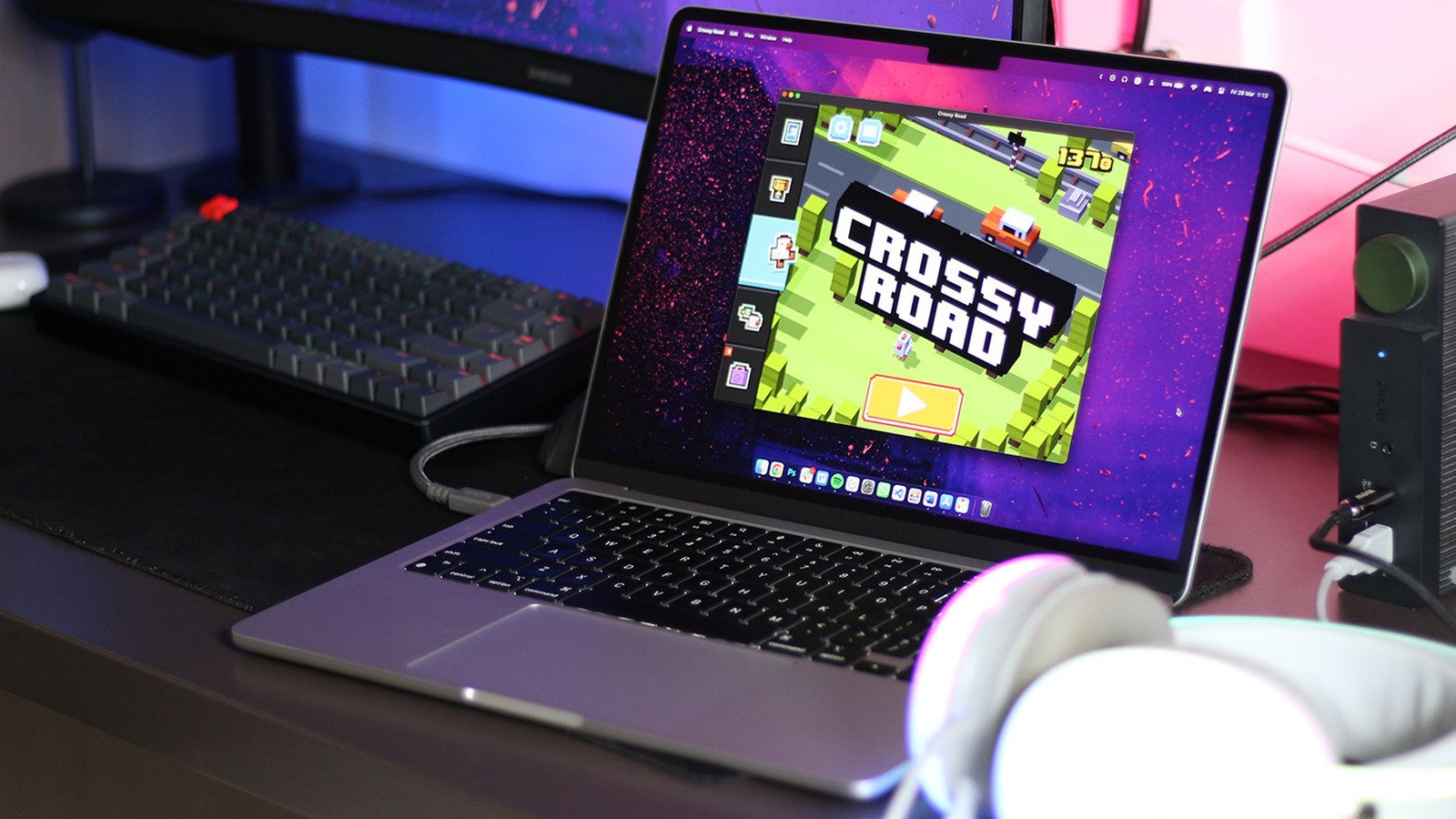
    Most games and apps have Touch Alternatives enabled by default. To better understand what this feature does, let’s fire up everyone’s favorite (and forgotten) game — “Crossy Road.” On an iPhone or iPad, you would control the chicken to move forward or back using swipe gestures. On a Mac, that’s not possible due to the lack of a touchscreen.

    Advertisement

    What Touch Alternatives does is map these actions to the keys on your keyboard. Pressing the space bar will emulate a tap in the center of the screen, and using the arrow keys will trick the game into performing a swipe in that direction. Games that require tilt controls, like “Temple Run,” which is part of Apple Arcade, can be played using the ASDF keys on your keyboard. Touch Alternatives also enables direct touch input via the trackpad when holding down the Option key.

    You can choose to enable Touch Alternatives for apps even if they support native cursor input. Take for example the new “Subway Surfers City” game — sure, clicking and moving your mouse is nifty, but with Touch Alternatives you can play the game using your keyboard as well. Which controls work best depends on how well the developer has implemented them into the app. While you’re in the game’s settings, you can also change the size of the app window, or switch between landscape and portrait modes.

    Advertisement

    Share. Facebook Twitter Pinterest LinkedIn Reddit WhatsApp Telegram Email
    Previous ArticleBBC seeks more prominent credit in Apple and Google News
    Next Article No, Not All Traffic Lights Have Cameras
    TechAiVerse
    • Website

    Jonathan is a tech enthusiast and the mind behind Tech AI Verse. With a passion for artificial intelligence, consumer tech, and emerging innovations, he deliver clear, insightful content to keep readers informed. From cutting-edge gadgets to AI advancements and cryptocurrency trends, Jonathan breaks down complex topics to make technology accessible to all.

    Related Posts

    Get a Samsung OLED gaming monitor for just $350

    February 10, 2026

    Qualcomm Snapdragon X2 Elite tops the Apple M5 in new test video

    February 10, 2026

    Tapo’s 1440p Wi-Fi security cam is 42% off! Grab it now for $70

    February 10, 2026
    Leave A Reply Cancel Reply

    Top Posts

    Ping, You’ve Got Whale: AI detection system alerts ships of whales in their path

    April 22, 2025660 Views

    Lumo vs. Duck AI: Which AI is Better for Your Privacy?

    July 31, 2025249 Views

    6.7 Cummins Lifter Failure: What Years Are Affected (And Possible Fixes)

    April 14, 2025148 Views

    6 Best MagSafe Phone Grips (2025), Tested and Reviewed

    April 6, 2025111 Views
    Don't Miss
    Technology February 10, 2026

    Get a Samsung OLED gaming monitor for just $350

    Get a Samsung OLED gaming monitor for just $350 Image: Samsung To paraphrase a certain…

    Qualcomm Snapdragon X2 Elite tops the Apple M5 in new test video

    Tapo’s 1440p Wi-Fi security cam is 42% off! Grab it now for $70

    This 8BitDo Retro wireless ‘mecha’ keyboard is just $63 today

    Stay In Touch
    • Facebook
    • Twitter
    • Pinterest
    • Instagram
    • YouTube
    • Vimeo

    Subscribe to Updates

    Get the latest creative news from SmartMag about art & design.

    About Us
    About Us

    Welcome to Tech AI Verse, your go-to destination for everything technology! We bring you the latest news, trends, and insights from the ever-evolving world of tech. Our coverage spans across global technology industry updates, artificial intelligence advancements, machine learning ethics, and automation innovations. Stay connected with us as we explore the limitless possibilities of technology!

    Facebook X (Twitter) Pinterest YouTube WhatsApp
    Our Picks

    Get a Samsung OLED gaming monitor for just $350

    February 10, 20263 Views

    Qualcomm Snapdragon X2 Elite tops the Apple M5 in new test video

    February 10, 20263 Views

    Tapo’s 1440p Wi-Fi security cam is 42% off! Grab it now for $70

    February 10, 20264 Views
    Most Popular

    7 Best Kids Bikes (2025): Mountain, Balance, Pedal, Coaster

    March 13, 20250 Views

    VTOMAN FlashSpeed 1500: Plenty Of Power For All Your Gear

    March 13, 20250 Views

    This new Roomba finally solves the big problem I have with robot vacuums

    March 13, 20250 Views
    © 2026 TechAiVerse. Designed by Divya Tech.
    • Home
    • About Us
    • Contact Us
    • Privacy Policy
    • Terms & Conditions

    Type above and press Enter to search. Press Esc to cancel.