

Logitech G915 Keyboard Review: Low Profile, High Praise
Editor’s Note: This is a legacy article, originally published on August 15, 2019. While pricing and availability details may be outdated, the test results and analysis remain accurate and relevant.
It takes a lot for a keyboard to stand out these days.
Where mechanical keyboards were once a specialty, they’re now commonplace and every component vendor has a generic plank. Where RGB LEDs were a highlight feature, they’re now just another bullet point on every other product page.
What’s left to make a keyboard memorable, novel, and maybe even worth replacing your current plank with? The Logitech G915 might be that keyboard.
This sharp-looking piece of tech not only dumps everything including a tasteful kitchen sink into the mix, but it also brings a few standout features of its own.
It’s not cheap, mind you. At $249.99, you’ll want to do a bit of reading before picking the G915 up, but it might be one of my all-time favorite keyboards even after just a week of use.
Design and Build Quality
The core of the Logitech G915 is its low-profile design. This keyboard is skinny and sleek, especially when compared with standard mechanical keyboards.
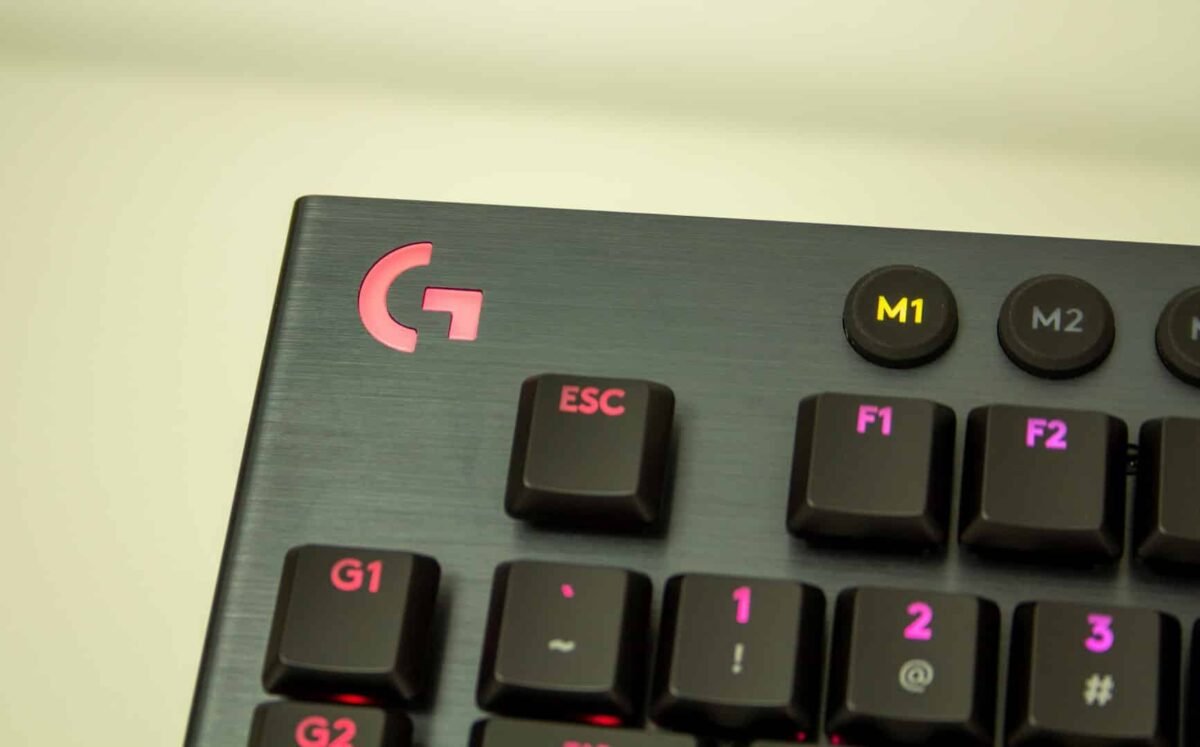
The plastic underside is almost completely hidden by the beveled aluminum faceplate that sits under the raised, low-profile keys. The brushed texture means that the faceplate itself resists things like fingerprints and grease extraordinarily well, and the board itself has very little flex.
Speaking of which, Logitech says the keys themselves have an oleophobic coating. In other words, the keys resist the oil naturally in our hands.
I’d have to use the keyboard for months to get a proper read on this. If it works as advertised, the coating should keep the G915 from developing the worn-in shiny look that even premium keyboards develop after six months of use. At the very least, they should be easy to wipe clean when that time does come.
RGB Lighting
Jumping back to the keyboard’s overall aesthetics, it’s hard not to like the look of this board. When I do choose to light it up, it’s bright and colorful and the animations look great. Honestly, that part isn’t really new – it’s just important they get all of it right on a keyboard this expensive.
The keys themselves have a nice matte look, and light shines clearly through the keys when I have the RGB LED blinkenlights enabled. The only complaint I’d make here is that when the lights are off, the lettering can be a little hard to discern.
Low-Profile Mechanical Switches
Of course, all the media buttons and macro keys in the world won’t substitute for a good keyboard. With the G915, they’re building on an already solid base.
The sleek, low-profile look is more than just aesthetic. I’m used to a different, much taller tying experience compared to the Logitech G915. For once, I don’t feel like I want a wrist rest because the keyboard just isn’t high enough up that I need to rest my wrists. The thin plank and low-profile keys both contribute to this and make for a very different typing experience.
For the purposes of this review, Logitech sent along three different key switch options: Tactile, Linear, and Clicky. Of the three, I ended up preferring the tactile, which gives a slightly more satisfying typing experience without all the noise of the clicky switches.
The GL switches are a variant of Kaihua’s Khail Choc switches, which Logitech has tweaked to improve consistency and quality.
The switches have a shorter travel of about 2.7mm compared to the 4mm of standard Cherry MX Blue switches; the actuation distance is 1.5mm compared to 2mm for the Cherry MX Blue switches.
Like the Cherry MX switches, they require about 50g of force to activate. The keycaps have the same sturdy feeling as Logitech’s standard Romer-G switches. They wiggle a little, but not very much.
The low profile of the keyboard combined with the mechanical switches gives a feeling somewhere between a mechanical keyboard and a laptop keyboard, though it definitely leans toward the latter. This is unmistakably a mechanical keyboard.
Features
This is a great-looking keyboard, but it’s in the feature list where it really starts to shine.
The G915 is a wireless keyboard (though it does come in a wired variant that also offers a USB pass-through) that can be tweaked to fit just about any situation that requires a keyboard.
Connectivity Options
The G915 comes with a Lightspeed dongle packed in, of course, and this is how Logitech likely expects most people to use it. But in addition to that, the keyboard offers Bluetooth and wired connectivity via the USB Micro port on the back used for charging the internal battery.
For my daily work, this means I can connect it to both my Macbook and my PC and switch between the two with the touch of a button.
There’s even a secret third feature; the USB Micro port on the back can connect to yet a third source, though I don’t know that I trust USB Micro ports to stand up to that kind of abuse over time.
That lets the keyboard act as its own sort of KVM switch. You could connect it to your computer via Lightspeed and your home theater PC or Bluetooth-compatible streaming device via Bluetooth.
There’s no doubt that $250 is a lot for a keyboard, but when it can start to act as the keyboard for everything, it starts to become more affordable.
G HUB Software Integration
Like other Logitech G hardware, the G915 has a bunch of options within the G HUB software. You can program the macro keys with countless shortcuts or custom macros. App-specific functions for Discord, OBS, and Overwolf, meanwhile, are sure to please streamers.
Complete Feature Set
Because this is a G900-level keyboard, that means Logitech made sure to put all the keys on this thing. In addition to the standard ten-key layout, it features:
- Five customizable macro keys
- 4 buttons for swapping between stored configurations
- Buttons to switch between Lightspeed and Bluetooth
- A Game Mode button, which disables things like the Windows key when enabled
- A brightness button to toggle between the five levels of key brightness
- An aluminum volume rocker
- Play/Pause, Next, Back and Mute keys
I have very few complaints about the layout of the keyboard. The buttons along the top are a little mushy, but they’re also not keys I’m going to be tapping constantly, so it’s not the end of the world.
Battery Life
One of the biggest concerns with a wireless keyboard is battery life. It sucks to have a keyboard die mid-game, and a built-in battery can be a tough sell in that situation.
A swappable battery means instant-on when a battery dies. With the Logitech G915, though, I’m not very worried.
If you start from a full charge with the lights off, this thing gets an absolutely monstrous battery life of nearly 1200 hours before it needs a recharge. I didn’t type for 1200 hours straight to test this, but usage throughout the week seemed to suggest that this number is realistic.
From there, you can start to turn on lights and mess with it a bit. Logitech’s G HUB software shows the keyboard’s current energy usage at any given time in the keyboard’s gear menu.
While playing with it, I would change lighting settings and then check. For example, when all the lights are off, the keyboard sips power at 1mA.
Turning the lights on with solid color and full brightness multiples that up to 41mA, which brings the battery down to about 30 hours of life. If you crank the brightness down to the lowest setting, the board estimates about 136 hours of charge.
A full-brightness layout using the Starlight effect estimates about 34 hours of usage and my use supports that.
Curiously, some of the lighting power consumption doesn’t quite add up.
For example, turning on Color Wave uses less energy than having a solid color. Putting the keyboard in ripple mode uses less energy than having a solid color selected, despite holding a solid color at the same brightness.
Logitech’s Senior Technical Marketing Manager Andrew Coonrad told me that this is because it’s not calculating just LED usage but the processing power of having the effect on, so the power usage will vary by effect.
I still have some questions there. Why does having a single light on solid take more processing power than a full-keyboard color-wave effect? I’m hoping that Logitech will release some guides to balancing fun lighting and power guides.
The settings menu also lets you decide how the G915 handles other aspects of power.
The keyboard can breathe with red lighting or turn solid red when the battery gets low. This is an elegant warning method, though it can be turned off. Inactivity settings allow for dimming and turning the lights off after a set period to help extend battery life.
Colorful lighting is going to use up tons of battery. It’s as simple as that. But with so many options to customize and monitor lighting, it feels like something I’ll use. If I want to extend that battery, it’s just as simple to turn it off.
Logitech G915 Keyboard Review: Conclusion
In my time with the G915, I’ve loved basically everything about using it, and my concerns are minor. I love the low-profile keys, and the tactile switches feel stellar to me.
I love the full layout of media and macro keys, and the options for various wireless connections. For my setup, this is a must-have feature unless I want my desk to look like a 90s hacker movie (I don’t).
The volume rocker is a nice touch that feels good to use. My setup keeps me from using it much, since a separate amp controls my volume, but it’s still nice hardware. My only complaints are the mushy rubber buttons and how dark the keys get when the lighting is disabled.
Tweaking settings in G HUB is mostly very easy. One key combo I wanted to put in—WinKey+Alt+PrintScn— wouldn’t go in, but every other macro I tried worked well. Having a Discord-specific ‘mute’ function is really handy.
The G915 is my “one keyboard to rule them all.”
It has tons of flexibility in how you can use it (though almost no flex in the plank!), and Logitech seems to have accounted for just about every use case. $250 is a high price to ask for a keyboard, but when you spend 8 hours a day typing, why not have the best?
Disclaimer: We received GL Clicky, GL Tactile, and GL Linear versions of the G915 from Logitech and spent just over a week using it 8-10 hours/day before writing this review.
The Tech Report editorial policy is centered on providing helpful, accurate content that offers real value to our readers. We only work with experienced writers who have specific knowledge in the topics they cover, including latest developments in technology, online privacy, cryptocurrencies, software, and more. Our editorial policy ensures that each topic is researched and curated by our in-house editors. We maintain rigorous journalistic standards, and every article is 100% written by real authors.
