

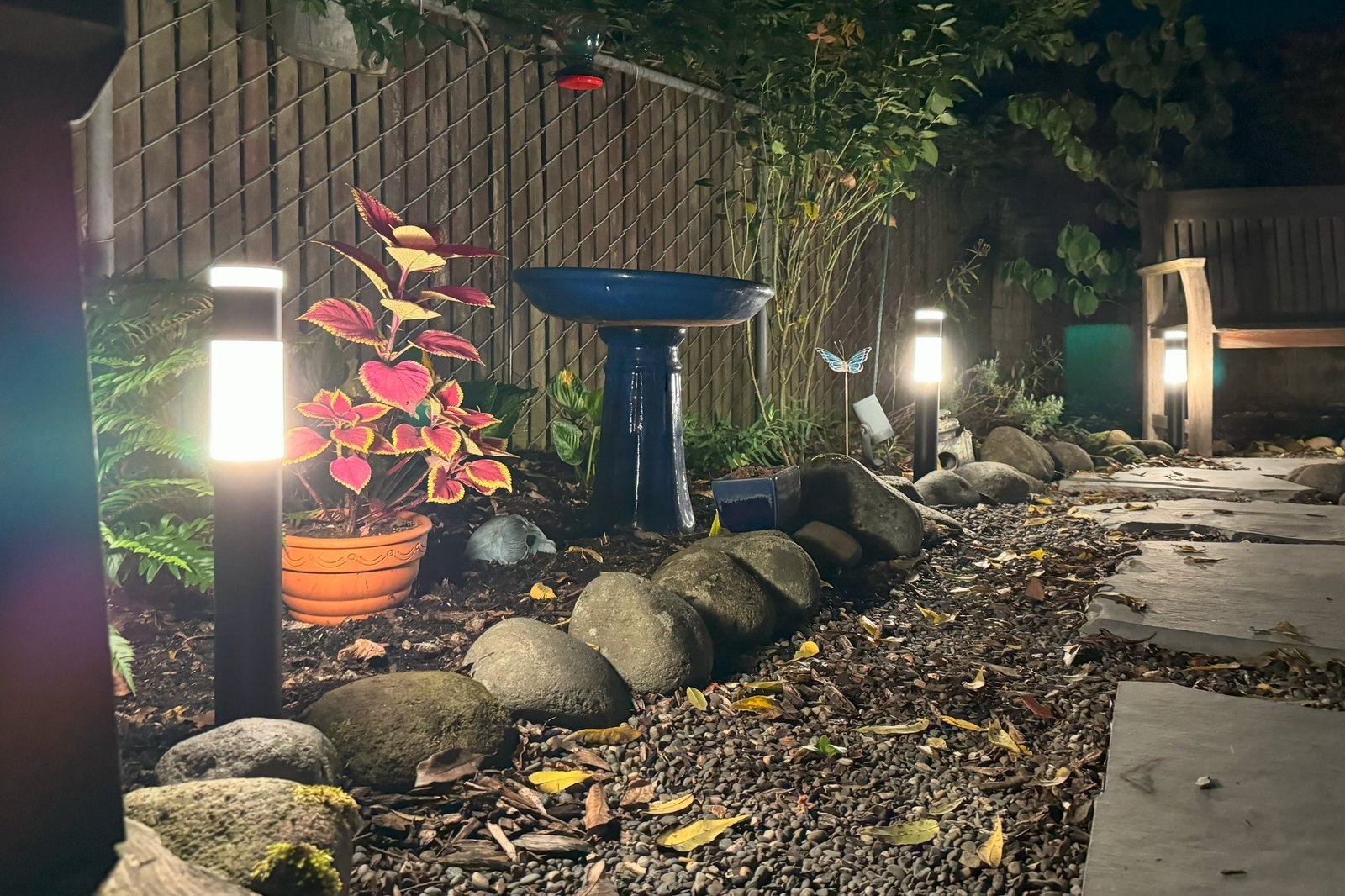
Eufy Outdoor Pathway Lights E10 review: Walk this way
Image: Michael Brown/Foundry
At a glance
Expert’s Rating
Pros
- Attractive industrial design
- RGBWW LEDs deliver millions of colors and selectable white color temperatures
- Individual lights are rated IP65 for protection from the elements
- Can be triggered by Eufy security cameras
Cons
- Lights deliver more ambience than illumination (350 lumens each)
- Maximum reach from the power supply to the fourth and final bollard is 50 feet
- Power supply has only an IP44 weatherization rating
Our Verdict
Eufy Outdoor Pathway Lights E10 are an affordable means of illuminating your walkways, decorating your landscaping, and enhancing your home security when combined with cameras, but they’re not best in class.
Price When Reviewed
This value will show the geolocated pricing text for product undefined
Best Pricing Today
Anker’s Eufy division has been going all out developing new and innovative outdoor lighting products, with its latest offering being the Eufy Outdoor Pathway Lights E10 reviewed here.
As with Eufy’s other landscape lighting products, including the Eufy Outdoor Spotlights E10 we reviewed in December 2024, these path lights connect directly to your 2.4GHz Wi-Fi network (after an initial connection via Bluetooth; 5GHz Wi-Fi networks are not supported). You can also use a Bluetooth-only connection with these lights, but a Wi-Fi connection is needed to unlock their complete feature set. I’ll go into more detail about what you can do with the lights later.
Specifications
These tall and attractive bollard-style lights feature aluminum enclosures with a matte black finish and RGBWW LEDs inside, meaning each light has discrete red, green, blue, and warm white diods to deliver saturated colors and tunable white color temperatures. Each bollard’s light radiates from a 3.5-inch-high band of frosted plastic encircling the enclosure and a second shorter lens of the same style atop the cylinder, so light shines up as well as out.
The Eufy Outdoor Pathway Lights E10 kit consists of four bollard-style lights and stakes, a power supply, and an on/off switch inline of 50 feet of low-voltage electrical cable.
Michael Brown/Foundry
The lights aren’t super bright, however, delivering just 350 lumens each; don’t expect a large pool of light to illuminate a path (the Eufy Outdoor Spotlights E10 are brighter, producing 500 lumens each, but four of those would set you back $200 versus $170 for this kit).
In addition to a rainbow of colors, you can tune these pathlights’ white color temperature from a very warm 1500 Kelvin to an extremely cool 9000K (natural sunlight is roughly between 4000- and 6500K, depending on conditions and the time of day). The lights are individually addressable, so you can choose a distinct shade for each light. You can also assign animation routines that will cycle the colors through the chain. That’s in addition to the many preset lighting effects that I’ll discuss in more detail later.
Eufy Outdoor Pathway Lights E10 are rugged and well protected from the elements, and they produce very good quality light.
Each Eufy Outdoor Pathway Light is about 15 inches tall, and they come with 6-inch stakes for installation in soft soil. Unlike the much more expensive Philips Hue Calla bollard light I reviewed several years ago ($130 for one, not including the power supply or the required Hue bridge), Eufy doesn’t provide any means for installing the lights on hardscape, such as a deck or a concrete patio.
While Eufy gives the individual bollards a weatherization rating of IP65, meaning the lights are impervious to dust ingress and that they can withstand a blast from a pressure washer at a reasonable distance, the power supply they depend on is an ordinary wall wart with a much weaker weatherization rating of just IP44.
Eufy uses rugged DIN-style barrel connectors that are well protected from the elements.
Michael Brown/Foundry
According to TechHive’s IP code guide, that means the power supply is only protected against particulate matter larger than 1 millimeter, but that it can withstand water sprayed from any direction. Given that, you’ll want to ensure the power supply is at least plugged into an outlet with a bubble cover to protect it from rain. The lights have an operating temperature range of -4 degrees Fahrenheit to 104F.
Installation and setup
Eufy uses barrel-type DIN connectors that are well protected from water to make each cable connection. The cable itself carries only 27 volts of electricity, so it can be buried directly in a 6-inch trench, as per the National Electrical Code (specifically, NEC 3000.5(A)). For this temporary installation, I took the easy way out and just covered it with mulch. (Pro gardening tip: mulch also happens to be the best weed deterrent for the money, provided you put it down thick enough to prevent sunlight from reaching any weed seeds in your soil).
The system’s maximum cable run is about 50 feet, with each bollard spaced 9.8 feet apart. You can put the lights closer together if you’d like, but they can be no more than 9.8 feet apart. There’s an 11-inch first segment, leading from the power supply to a 13.4-foot cable that has a small puck-style on/off switch in the middle. The next segment is 4.9 feet long and goes from that cable to the first light in your run. The remaining three lights are then spaced 9.8 feet apart, as I’ve already mentioned.
The first three lights connect to a T junction on the low-voltage cable, but the cable terminates in a single-ended connection; the run cannot be extended beyond four lights.
Michael Brown/Foundry
As does Philips, Eufy uses T-connectors to connect the first three lights to the run of power cable (there’s a single-ended connector at the end of the run). Unlike Philips, however, Eufy’s system cannot be extended beyond four lights—its power supply can’t handle the additional load, and the cable terminates in a single connector (not a T).
If 50 feet isn’t enough to run the length of your walkway, you’ll need to buy another 4-light kit and power supply. But that alone won’t solve your distance issue, because you shouldn’t rely on even an outdoor-rated extension cord for permanent lighting—and you certainly shouldn’t bury such a high-voltage (120V) cord in the ground.
These are some of the reasons I like the Philips Hue approach so much. You can buy larger or smaller power supplies, depending on how many lights you intend to deploy, and Philips Hue cables and connectors are much more versatile when it comes to overall length, the distance between lights, and branching.
Using the Eufy Outdoor Pathway Lights E10
This inline on/off button will be useful for those times when you don’t have your phone and you’re out of range of a smart speaker.
Michael Brown/Foundry
You’ll want to plug in all the lights and add them to either the Eufy app or the Eufy Life app before you place them permanently, just in case you encounter any defects that would prompt you to return the kit. This will also give you an opportunity to install any firmware updates that might be available.
The Eufy app is used primarily for Eufy security cameras, smart locks, video doorbells, and its security system, but you can use it to set up and later control at least some of the features of the Eufy Outdoor Pathway Lights. You’ll need to use the Eufy Life app, however, to access all the features of Eufy’s smart lighting products.
You control Eufy’s pathlights over a Bluetooth connection, but you’ll want to use Wi-Fi to get the full value out of the product, including its AI features.
Michael Brown/Foundry
You can use either app to customize the color or the white color temperature of the lights or to choose from dozens of lighting scenes based on holidays, seasons, emotions, events, or even flags or the weather.
An AI feature, meanwhile, will generate custom lighting scenes based on up to 100-character phrases you type into the app. Some of the phrases the app suggests are: “Today is my birthday;” “My wife loves me;” and “Ocean waves at sunset.” You can use your phone’s camera to capture text for this purpose, but you can’t use its mic to record phrases. This novel AI feature is mildly entertaining, but it doesn’t really add all that much value to the package.
Linking Eufy’s pathlights to a Eufy security camera
The most important feature you’ll want to enable in the Eufy Life app—assuming you also own one of the many Eufy security cameras that features Eufy’s WonderLink technology—is to configure one of those cameras to trigger Eufy smart lights.
This capability isn’t unique to Eufy smart home products; Ring security cameras, for example, can trigger Ring smart lights, and Philips Hue security cameras can do the same with Philips Hue lights. But in all three cases, the cameras can only trigger lights made by the same manufacturer. There are workarounds—you can set up a routine in IFTTT or in the Alexa app, for example—but workarounds are never as easy as using a native app. Perhaps when security cameras become a category in the Matter standard, that limitation will fall away.
If you also own Eufy security cameras, video doorbells, or certain other Eufy products, you can use the Eufy Life app to have those devices trigger the pathlights to light up with your choice of scenes.
Michael Brown/Foundry
In any event, you’ll click on the LuminoLink button at the bottom right-hand side of the Eufy Life app. This will open an IFTTT-like configuration screen that lets you choose devices to serve as triggers and devices that will perform actions when your defined conditions are met.
Within the Eufy Life app, I configured a Eufy S330 security camera to trigger the Eufy Outdoor Pathway Lights to turn on a “Welcome” scene at 100 percent brightness when the camera detects a person in its field of view between sunset and sunrise. You can choose from dozens of such lighting scenes or create your own.
This review is part of TechHive’s in-depth coverage of the best smart lighting.
You can also set up a trigger that sets the pathlights to flashing red if the camera detects a person, but while the camera and the Eufy Homebase 3 NAS box that works with it can discern between friends, family, neighbors, and strangers, you can’t restrict the light’s triggered behavior to when a stranger is detected.
Should you buy Eufy Outdoor Pathway Lights E10?
The Eufy Outdoor Pathway Lights E10 is one of the better smart lighting solutions out there. The lights are rugged and well protected from the elements, and they produce very good quality light in colors and white color temperatures. And its ability to link to Eufy cameras is a very good feature, although it would be even more useful if it could trigger a lighting behavior when the camera detects a stranger.
But a power supply that’s limited to supporting four lights and 50 feet of wire is only enough for a relatively short path. The maximum distance between each bollard is another drawback. If money is no object, Philips Hue landscape lighting is a far superior alternative.
That said, I don’t know anyone for whom money is no barrier to outfitting their home out with the absolute best smart products on the market, and a single Philips Hue Calla light and power supply costs more than a 4-pack of these Eufy lights.
Author: Michael Brown, Executive Editor, TechHive
Michael is TechHive’s lead editor, with 30+ years of experience covering smart homes, home networking, and home audio/home theater. He holds a BA in Multimedia Journalism, authored the book Desktop Video Production, and was awarded Best Online Review by the Computer Press Association. Michael built a smart home in 2007 and used it as a real-world product-testing lab. Now living in the Pacific Northwest, he is converting his 1890 Victorian bungalow into a modern smart home. Michael has worked at CNET, PCWorld, Electronic Musician, and Maximum PC. As a freelancer, he contributed to New Media, Camcorder, MacWeek, and more.
