Close Menu

    Subscribe to Updates

    Get the latest creative news from FooBar about art, design and business.

    What's Hot

    Surprisingly good for entry-level: Soundcore Nebula P1 with screen review

    Get a lifetime license for Microsoft Visio Professional 2024 for just $45

    This PC migration bundle eases computer transfers for just $35

    Facebook X (Twitter) Instagram
    • Artificial Intelligence
    • Business Technology
    • Cryptocurrency
    • Gadgets
    • Gaming
    • Health
    • Software and Apps
    • Technology
    Facebook X (Twitter) Instagram Pinterest Vimeo
    Tech AI Verse
    • Home
    • Artificial Intelligence

      Tensions between the Pentagon and AI giant Anthropic reach a boiling point

      February 21, 2026

      Read the extended transcript: President Donald Trump interviewed by ‘NBC Nightly News’ anchor Tom Llamas

      February 6, 2026

      Stocks and bitcoin sink as investors dump software company shares

      February 4, 2026

      AI, crypto and Trump super PACs stash millions to spend on the midterms

      February 2, 2026

      To avoid accusations of AI cheating, college students are turning to AI

      January 29, 2026
    • Business

      Gartner: Why neoclouds are the future of GPU-as-a-Service

      February 21, 2026

      The HDD brand that brought you the 1.8-inch, 2.5-inch, and 3.5-inch hard drives is now back with a $19 pocket-sized personal cloud for your smartphones

      February 12, 2026

      New VoidLink malware framework targets Linux cloud servers

      January 14, 2026

      Nvidia Rubin’s rack-scale encryption signals a turning point for enterprise AI security

      January 13, 2026

      How KPMG is redefining the future of SAP consulting on a global scale

      January 10, 2026
    • Crypto

      3 Altcoins Crypto Whales are Buying After Supreme Court’s Trump Tariff Ban

      February 22, 2026

      SBI Deepens XRP Bet With Bond Incentives and Venture Studio Plan

      February 22, 2026

      IoTeX Hit by Private Key Exploit, Attacker Drains Over $2 Million

      February 22, 2026

      Solana Price Faces a Bull Trap as 50% Holders Exit

      February 22, 2026

      XRP Flaunts a 3-Week ETF Inflow Streak, So Why is Price Still Stuck Below $1.50?

      February 22, 2026
    • Technology

      Surprisingly good for entry-level: Soundcore Nebula P1 with screen review

      February 22, 2026

      Get a lifetime license for Microsoft Visio Professional 2024 for just $45

      February 22, 2026

      This PC migration bundle eases computer transfers for just $35

      February 22, 2026

      U.S. Cannot Legally Impose Tariffs Using Section 122 of the Trade Act of 1974

      February 22, 2026

      Japanese Woodblock Print Search

      February 22, 2026
    • Others
      • Gadgets
      • Gaming
      • Health
      • Software and Apps
    Check BMI
    Tech AI Verse
    You are at:Home»Technology»Here’s what the new ‘Copilot Mode’ within Edge looks like
    Technology

    Here’s what the new ‘Copilot Mode’ within Edge looks like

    TechAiVerseBy TechAiVerseMay 27, 2025No Comments5 Mins Read0 Views
    Facebook Twitter Pinterest Telegram LinkedIn Tumblr Email Reddit
    Here’s what the new ‘Copilot Mode’ within Edge looks like
    Share
    Facebook Twitter LinkedIn Pinterest WhatsApp Email

    Here’s what the new ‘Copilot Mode’ within Edge looks like

    Image: Mark Hachman / Foundry

    Microsoft has begun adding Copilot to the “new tab” page of Microsoft Edge, as expected — possibly making you yearn for the current crazy-quilt layout instead.

    Generally, browser makers allow you to either open a predetermined home page when you open a new tab, or else populate it with a variety of different content. On Edge, a new tab looks similar to the Widgets menu in the lower left. But a change is coming.

    According to a Microsoft Edge support page, at the end of May Edge users may see a Copilot field, together with suggested prompts, when they open a new tab. According to Windows Latest, this is part of what Microsoft has begun calling “Copilot Mode,” a special toggle that allows you to “try out the latest AI browsing innovations,” according to the site.

    I’m not seeing this in my “live” browser yet, and neither is Windows Latest. However, the site did discover that the option can be turned on via Edge’s built in “flags,” or developer options, to get an idea of what this will look like. You can see the same.

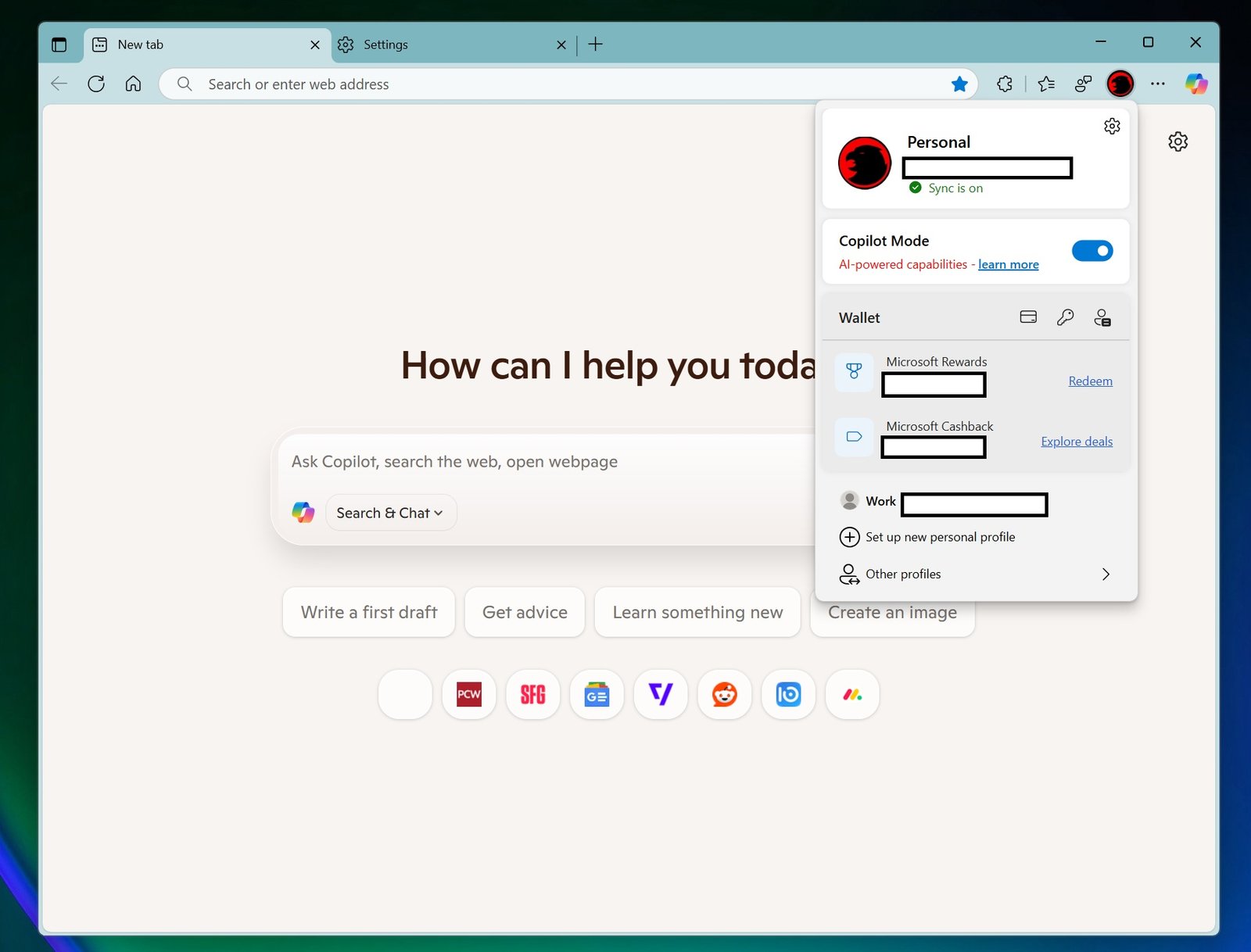
    Essentially, the “new tab” experience within Copilot Mode in Edge opens up a new tab that’s almost entirely bare except for a Copilot prompt underneath the question, “How can I help you today?” Below the prompt field are slightly different choices than Microsoft presents elsewhere, as the first option is to “Search and Chat” rather than a list of models. Edge then presents a series of small icons below, which seem to be sites that you’ve recently viewed.

    Mark Hachman / Foundry

    Your queries seem to be sent to Microsoft’s Copilot site, where they’re answered as part of the Copilot interface, with embedded ads, links, and so on. I also noticed a significant change: Microsoft isn’t providing links at all, unless you specifically ask for them. Put another way, Copilot will happily point you to a list of best laptops for college students, with links to buy them at various online storefronts. When I searched, it wouldn’t tell you the sources for those recommendations without asking.

    Fortunately, Microsoft seems to be making you jump through hoops to enable this new experience. For now, you’ll have to enable the various flags inside the developer mode. Second, you’ll have to manually enable the “Copilot Mode” yourself, even when that experience becomes available.

    How to test Copilot Mode within Microsoft Edge

    Testing Copilot Mode within Microsoft Edge isn’t difficult, and doesn’t require downloading a separate browser. In the search bar, simply type Edge://flags, which will enable the menu. There are dozens of flags to choose from, and the warning at the top applies: Simply enabling flags willy-nilly may cause your browser to crash and for you to lose data.

    In the case of Copilot Mode, however, enabling the “Edge Copilot Mode” and “Allow Copilot Search” seemed to work. Note that you’ll have to restart your browser to get these features to work, even after the flag is toggled on.

    To actually turn on Copilot Mode, you’ll need to toggle on the feature by clicking your user icon and selecting the appropriate icon. Then, when you open a new tab, you’ll see the screen that’s underneath the drop-down menu option.

    Presumably, leaving Copilot Mode on will signal Microsoft to add any new AI-powered features when they’re ready.

    Mark Hachman / Foundry

    Microsoft also includes a small list of settings for you to adjust within the Edge settings menu. I manually searched for “Copilot Mode,” but there appears to be a designated shortcut in the left-hand navigation menu, too.

    Note that the “Context clues” feature appears to allow Edge and Copilot access to your browser history. That might result in better answers, but it’s also a potential privacy risk. However, Microsoft doesn’t allow you to control this feature separately.

    Mark Hachman / Foundry

    Microsoft seems to feel that users will begin turning to AI-powered search, and is pushing Copilot into every nook and cranny of your PC.

    Personally, I find that the current “new tab” page, even with the crazy mix of stories and content, at least showcases the analysts, journalists, and bloggers who create the content that Copilot seems determined to appropriate without attribution. I’m sticking with it for now.


    Author: Mark Hachman
    , Senior Editor, PCWorld

    Mark has written for PCWorld for the last decade, with 30 years of experience covering technology. He has authored over 3,500 articles for PCWorld alone, covering PC microprocessors, peripherals, and Microsoft Windows, among other topics. Mark has written for publications including PC Magazine, Byte, eWEEK, Popular Science and Electronic Buyers’ News, where he shared a Jesse H. Neal Award for breaking news. He recently handed over a collection of several dozen Thunderbolt docks and USB-C hubs because his office simply has no more room.

    Share. Facebook Twitter Pinterest LinkedIn Reddit WhatsApp Telegram Email
    Previous ArticleBest PCIe 4.0 SSDs: Top picks from experts
    Next Article realme Launches Buds Air7 Pro and Magnetic Cooling Clip to Complement GT 7 Series
    TechAiVerse
    • Website

    Jonathan is a tech enthusiast and the mind behind Tech AI Verse. With a passion for artificial intelligence, consumer tech, and emerging innovations, he deliver clear, insightful content to keep readers informed. From cutting-edge gadgets to AI advancements and cryptocurrency trends, Jonathan breaks down complex topics to make technology accessible to all.

    Related Posts

    Surprisingly good for entry-level: Soundcore Nebula P1 with screen review

    February 22, 2026

    Get a lifetime license for Microsoft Visio Professional 2024 for just $45

    February 22, 2026

    This PC migration bundle eases computer transfers for just $35

    February 22, 2026
    Leave A Reply Cancel Reply

    Top Posts

    Ping, You’ve Got Whale: AI detection system alerts ships of whales in their path

    April 22, 2025688 Views

    Lumo vs. Duck AI: Which AI is Better for Your Privacy?

    July 31, 2025277 Views

    6.7 Cummins Lifter Failure: What Years Are Affected (And Possible Fixes)

    April 14, 2025159 Views

    6 Best MagSafe Phone Grips (2025), Tested and Reviewed

    April 6, 2025120 Views
    Don't Miss
    Technology February 22, 2026

    Surprisingly good for entry-level: Soundcore Nebula P1 with screen review

    Surprisingly good for entry-level: Soundcore Nebula P1 with screen review – NotebookCheck.net Reviews Small projector,…

    Get a lifetime license for Microsoft Visio Professional 2024 for just $45

    This PC migration bundle eases computer transfers for just $35

    Former Firaxis Games creative director announces closure of Midsummer Studios

    Stay In Touch
    • Facebook
    • Twitter
    • Pinterest
    • Instagram
    • YouTube
    • Vimeo

    Subscribe to Updates

    Get the latest creative news from SmartMag about art & design.

    About Us
    About Us

    Welcome to Tech AI Verse, your go-to destination for everything technology! We bring you the latest news, trends, and insights from the ever-evolving world of tech. Our coverage spans across global technology industry updates, artificial intelligence advancements, machine learning ethics, and automation innovations. Stay connected with us as we explore the limitless possibilities of technology!

    Facebook X (Twitter) Pinterest YouTube WhatsApp
    Our Picks

    Surprisingly good for entry-level: Soundcore Nebula P1 with screen review

    February 22, 20262 Views

    Get a lifetime license for Microsoft Visio Professional 2024 for just $45

    February 22, 20263 Views

    This PC migration bundle eases computer transfers for just $35

    February 22, 20264 Views
    Most Popular

    7 Best Kids Bikes (2025): Mountain, Balance, Pedal, Coaster

    March 13, 20250 Views

    VTOMAN FlashSpeed 1500: Plenty Of Power For All Your Gear

    March 13, 20250 Views

    This new Roomba finally solves the big problem I have with robot vacuums

    March 13, 20250 Views
    © 2026 TechAiVerse. Designed by Divya Tech.
    • Home
    • About Us
    • Contact Us
    • Privacy Policy
    • Terms & Conditions

    Type above and press Enter to search. Press Esc to cancel.