Close Menu

    Subscribe to Updates

    Get the latest creative news from FooBar about art, design and business.

    What's Hot

    This massive 49-inch ultrawide OLED monitor is just $900

    Google faces lawsuit over Gemini AI’s role in man’s suicide

    Big decision? Here’s the AI prompt to use

    Facebook X (Twitter) Instagram
    • Artificial Intelligence
    • Business Technology
    • Cryptocurrency
    • Gadgets
    • Gaming
    • Health
    • Software and Apps
    • Technology
    Facebook X (Twitter) Instagram Pinterest Vimeo
    Tech AI Verse
    • Home
    • Artificial Intelligence

      What the polls say about how Americans are using AI

      February 27, 2026

      Tensions between the Pentagon and AI giant Anthropic reach a boiling point

      February 21, 2026

      Read the extended transcript: President Donald Trump interviewed by ‘NBC Nightly News’ anchor Tom Llamas

      February 6, 2026

      Stocks and bitcoin sink as investors dump software company shares

      February 4, 2026

      AI, crypto and Trump super PACs stash millions to spend on the midterms

      February 2, 2026
    • Business

      Google releases Gemini 3.1 Flash Lite at 1/8th the cost of Pro

      March 4, 2026

      Huawei Watch GT Series

      March 4, 2026

      Weighing up the enterprise risks of neocloud providers

      March 3, 2026

      A stolen Gemini API key turned a $180 bill into $82,000 in two days

      March 3, 2026

      These ultra-budget laptops “include” 1.2TB storage, but most of it is OneDrive trial space

      March 1, 2026
    • Crypto

      Banks Respond to Kraken’s Federal Reserve Access as Trump Sides with Crypto

      March 4, 2026

      Hyperliquid and DEXs Break the Top 10 — Is the CEX Era Ending?

      March 4, 2026

      Consensus Hong Kong 2026: The Institutional Turn 

      March 4, 2026

      New Crypto Mutuum Finance (MUTM) Reports V1 Protocol Progress as Roadmap Enters Phase 3

      March 4, 2026

      Bitcoin Short Sellers Caught Off Guard in New White House Move

      March 4, 2026
    • Technology

      This massive 49-inch ultrawide OLED monitor is just $900

      March 7, 2026

      Google faces lawsuit over Gemini AI’s role in man’s suicide

      March 7, 2026

      Big decision? Here’s the AI prompt to use

      March 7, 2026

      Keychron’s new ultra-slim wireless keyboard folds in half

      March 7, 2026

      Newegg’s $7,500 RTX 5090 card is a sad, depressing omen

      March 6, 2026
    • Others
      • Gadgets
      • Gaming
      • Health
      • Software and Apps
    Check BMI
    Tech AI Verse
    You are at:Home»Technology»Selling or Replacing Your Old iPhone? Make Sure to Factory Reset It First
    Technology

    Selling or Replacing Your Old iPhone? Make Sure to Factory Reset It First

    TechAiVerseBy TechAiVerseJune 1, 2025No Comments6 Mins Read3 Views
    Facebook Twitter Pinterest Telegram LinkedIn Tumblr Email Reddit
    Selling or Replacing Your Old iPhone? Make Sure to Factory Reset It First
    Share
    Facebook Twitter LinkedIn Pinterest WhatsApp Email

    Selling or Replacing Your Old iPhone? Make Sure to Factory Reset It First

    Replacing your old iPhone is easier than ever, but it could be risky to sell your Apple phone if you don’t wipe all your personal data first.

    David Lumb Senior Reporter

    David Lumb is a senior reporter covering mobile and gaming spaces. Over the last decade, he’s reviewed phones for TechRadar as well as covered tech, gaming, and culture for Engadget, Popular Mechanics, NBC Asian America, Increment, Fast Company and others. As a true Californian, he lives for coffee, beaches and burritos.

    Expertise Smartphones | Gaming | Telecom industry | Mobile semiconductors | Mobile gaming

    If you’re buying the new iPhone 16E to replace your old iPhone, don’t just transfer data and sell your old device — you need to clear out all the personal data first. It’s important to know how  to reset your Apple phone, whether you’re selling your old device or making it a hand-me-down for a relative, you need to make sure it’s wiped clean before you hand it off to a new owner. Here’s how to factory reset your iPhone.

    No matter the reason you want to wipe your iPhone clean, it all boils down to making sure that all your personal data is gone. This can be sensitive and personal information, like family photos you definitely don’t want to hand off to a stranger. It also includes the litany of private details that your iPhone stores, from credit card information to contacts to everything in your apps. 

    Thankfully, it’s easy to factory reset your iPhone, although you’ll be asked several times to make sure you’re ready to clear it completely. You’ll also want to prepare before wiping your phone. Here’s how to do it.

    Read more: Unresponsive iPhone? Here’s How to Force Restart Your Apple Device

    David Lumb/CNET

    Don’t go further without backing up your iPhone

    The first step is to make sure all the data you want to keep is safely backed up. This can easily be done over iCloud, although you can also make a manual backup. 

    The same way you’d want to back up your iPhone before updating to iOS 18, head to Settings > [your name] > iCloud > iCloud Backup and tap Back Up Now. This should take a little while, but you’ll be able to restore from this online backup if you need to. 

    You can also manually create a backup by connecting your iPhone to your computer, although the process differs between PC and Mac. You can still download iTunes to your Windows PC, through which you’ll sync your iPhone and create a backup through that software. With the end of iTunes on Mac in 2019, you’ll have to go through Finder to manage your iPhone, but otherwise, the process of backing up is relatively straightforward. 

    Note that iPhones are good at moving data wirelessly from one device to another in close proximity, making it easy to seamlessly transfer from your old device to a new one. After waking up your new iPhone, follow the on-screen instructions on your new iPhone to use its camera to scan your old device and let the process continue. It’s still smart to save a backup when you’re getting rid of your old iPhone.

    Digitally sign out of every account you can

    This is the most tedious step but a necessary part of the process, but it’s important to sign out of apps and services you’ve logged into. You should prioritize apps with more sensitive data, but it’s a good idea to ensure you’re fully logged out of anything with personally identifiable information.

    You won’t want someone popping into email, contacts and calendar accounts, so head to Settings > Apps > Mail/Contacts/Calendar > Accounts to manually unlink those. 

    Bank and payment apps, external email and messaging apps, workplace software like Slack or authentication apps and even digital community apps like Discord are good to log out of. Lastly, if you’re selling your iPhone or giving it to someone else, make sure to disable Find My before erasing your phone. Go to Settings > [your name] > Find My.

    Apple’s iPhone 16, 16 Plus Show Off Bolder Colors and Buttons

    See all photos

    If you’re moving to a new iPhone, transfer your cell service

    If you’re about to reset an older iPhone that used to be your daily driver linked to your carrier account, you’ll want to transfer service to your new iPhone before factory wiping your device. Why? Because you’ll probably use your older iPhone to call your carrier to switch that service over. Don’t get stuck without a phone like I did.

    You used to be able to yank your SIM card out of your old phone and stick it in the new one to carry service over. Not so much these days, as the iPhone 14 and later models sold in the US don’t come with a physical SIM card — it’s eSIM all the way. You’ll need to call your carrier to transfer your data plan over to your new iPhone, but it’s a pretty effortless process. If worse comes to worst (like if you’ve already wiped your old iPhone), you can bring your new iPhone into any of your carrier’s retail stores and they can digitally transfer service over to it.

    If you’re just clearing out an old iPhone or will still use this one after resetting it, proceed to the next step. 

    Finally, here’s how to factory reset your iPhone

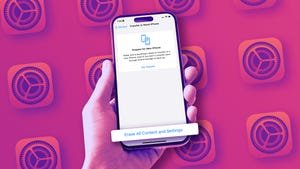
    If you’ve done the above and are ready to reset your iPhone, open up the Settings app. Then tap General > Transfer or Reset iPhone > Erase All Content and Settings and confirm. You’ll be asked to enter your iPhone’s PIN code, then enter your Apple ID password (to unlink the device from your account and turn off Find My capability if you haven’t already). 

    Once you’ve done that, the screen will turn black and you’ll get a black progress bar at the bottom (similar to if you were updating to a new version of iOS). In a few minutes, the word “Hello” will appear on the screen in different languages, just like it did the first time you activated your iPhone. Congratulations, it’s been successfully reset.

    That done, you’re now free to hand it off or send it on its way to a new owner. 

    Share. Facebook Twitter Pinterest LinkedIn Reddit WhatsApp Telegram Email
    Previous ArticleUltra-fast fiber sets global speed record: 1.02 petabits per second over continental distance
    Next Article Chopper Steals the Show in Netflix’s ‘One Piece’ Reveal
    TechAiVerse
    • Website

    Jonathan is a tech enthusiast and the mind behind Tech AI Verse. With a passion for artificial intelligence, consumer tech, and emerging innovations, he deliver clear, insightful content to keep readers informed. From cutting-edge gadgets to AI advancements and cryptocurrency trends, Jonathan breaks down complex topics to make technology accessible to all.

    Related Posts

    This massive 49-inch ultrawide OLED monitor is just $900

    March 7, 2026

    Google faces lawsuit over Gemini AI’s role in man’s suicide

    March 7, 2026

    Big decision? Here’s the AI prompt to use

    March 7, 2026
    Leave A Reply Cancel Reply

    Top Posts

    Ping, You’ve Got Whale: AI detection system alerts ships of whales in their path

    April 22, 2025705 Views

    Lumo vs. Duck AI: Which AI is Better for Your Privacy?

    July 31, 2025291 Views

    6.7 Cummins Lifter Failure: What Years Are Affected (And Possible Fixes)

    April 14, 2025165 Views

    6 Best MagSafe Phone Grips (2025), Tested and Reviewed

    April 6, 2025125 Views
    Don't Miss
    Technology March 7, 2026

    This massive 49-inch ultrawide OLED monitor is just $900

    This massive 49-inch ultrawide OLED monitor is just $900 Image: MSI I like ’em big.…

    Google faces lawsuit over Gemini AI’s role in man’s suicide

    Big decision? Here’s the AI prompt to use

    Keychron’s new ultra-slim wireless keyboard folds in half

    Stay In Touch
    • Facebook
    • Twitter
    • Pinterest
    • Instagram
    • YouTube
    • Vimeo

    Subscribe to Updates

    Get the latest creative news from SmartMag about art & design.

    About Us
    About Us

    Welcome to Tech AI Verse, your go-to destination for everything technology! We bring you the latest news, trends, and insights from the ever-evolving world of tech. Our coverage spans across global technology industry updates, artificial intelligence advancements, machine learning ethics, and automation innovations. Stay connected with us as we explore the limitless possibilities of technology!

    Facebook X (Twitter) Pinterest YouTube WhatsApp
    Our Picks

    This massive 49-inch ultrawide OLED monitor is just $900

    March 7, 20260 Views

    Google faces lawsuit over Gemini AI’s role in man’s suicide

    March 7, 20262 Views

    Big decision? Here’s the AI prompt to use

    March 7, 20262 Views
    Most Popular

    7 Best Kids Bikes (2025): Mountain, Balance, Pedal, Coaster

    March 13, 20250 Views

    VTOMAN FlashSpeed 1500: Plenty Of Power For All Your Gear

    March 13, 20250 Views

    Best TV Antenna of 2025

    March 13, 20250 Views
    © 2026 TechAiVerse. Designed by Divya Tech.
    • Home
    • About Us
    • Contact Us
    • Privacy Policy
    • Terms & Conditions

    Type above and press Enter to search. Press Esc to cancel.