Close Menu

    Subscribe to Updates

    Get the latest creative news from FooBar about art, design and business.

    What's Hot

    Gartner: Why neoclouds are the future of GPU-as-a-Service

    Runlayer is now offering secure OpenClaw agentic capabilities for large enterprises

    Microsoft Copilot ignored sensitivity labels twice in eight months — and no DLP stack caught either one

    Facebook X (Twitter) Instagram
    • Artificial Intelligence
    • Business Technology
    • Cryptocurrency
    • Gadgets
    • Gaming
    • Health
    • Software and Apps
    • Technology
    Facebook X (Twitter) Instagram Pinterest Vimeo
    Tech AI Verse
    • Home
    • Artificial Intelligence

      Read the extended transcript: President Donald Trump interviewed by ‘NBC Nightly News’ anchor Tom Llamas

      February 6, 2026

      Stocks and bitcoin sink as investors dump software company shares

      February 4, 2026

      AI, crypto and Trump super PACs stash millions to spend on the midterms

      February 2, 2026

      To avoid accusations of AI cheating, college students are turning to AI

      January 29, 2026

      ChatGPT can embrace authoritarian ideas after just one prompt, researchers say

      January 24, 2026
    • Business

      Gartner: Why neoclouds are the future of GPU-as-a-Service

      February 21, 2026

      The HDD brand that brought you the 1.8-inch, 2.5-inch, and 3.5-inch hard drives is now back with a $19 pocket-sized personal cloud for your smartphones

      February 12, 2026

      New VoidLink malware framework targets Linux cloud servers

      January 14, 2026

      Nvidia Rubin’s rack-scale encryption signals a turning point for enterprise AI security

      January 13, 2026

      How KPMG is redefining the future of SAP consulting on a global scale

      January 10, 2026
    • Crypto

      Another European Country Bans Polymarket, Threatens Massive Fine

      February 20, 2026

      Why Is The US Stock Market Up Today?

      February 20, 2026

      Is XRP Price Preparing To Breach Its 2026 Downtrend? Here’s What History Says

      February 20, 2026

      “Disgrace” or “Win for American Wallets”? Supreme Court Tariff Bombshell Sparks Political Meltdown in Washington

      February 20, 2026

      Perle Labs CEO Ahmed Rashad on Why AI Needs Verifiable Data Infrastructure

      February 20, 2026
    • Technology

      Runlayer is now offering secure OpenClaw agentic capabilities for large enterprises

      February 21, 2026

      Microsoft Copilot ignored sensitivity labels twice in eight months — and no DLP stack caught either one

      February 21, 2026

      Be Wary of Bluesky

      February 21, 2026

      CERN rebuilt the original browser from 1989

      February 21, 2026

      Across the US, people are dismantling and destroying Flock surveillance cameras

      February 21, 2026
    • Others
      • Gadgets
      • Gaming
      • Health
      • Software and Apps
    Check BMI
    Tech AI Verse
    You are at:Home»Technology»Lenovo promises 17 hours of battery life on its new Chromebook Plus 14
    Technology

    Lenovo promises 17 hours of battery life on its new Chromebook Plus 14

    TechAiVerseBy TechAiVerseJune 23, 2025No Comments5 Mins Read4 Views
    Facebook Twitter Pinterest Telegram LinkedIn Tumblr Email Reddit
    Lenovo promises 17 hours of battery life on its new Chromebook Plus 14
    Share
    Facebook Twitter LinkedIn Pinterest WhatsApp Email

    Lenovo promises 17 hours of battery life on its new Chromebook Plus 14

    For years now, most Chromebooks have run some variety of Intel or AMD processor. The occasional device used a MediaTek chip, but they were often underpowered and cheap devices that were hard to recommend. ARM-based processors have worked tremendously well for Apple on the Mac, and they’re being used in more and more Windows PCs as well. Now, Lenovo (makers of my favorite Chromebook) and Google are giving ARM a real shot with the $649 Chromebook Plus 14.

    The companies say the MediaTek Kompanio Ultra 910 chip and its AI NPU can handle up to 50 TOPS — but more intriguing to me, Lenovo is also promising up to 17 hours of battery life. I’ll believe that claim when I see it; mediocre at best battery life has plagued nearly every Chromebook I’ve used in recent years. But switching to ARM could improve on what Intel-powered Chromebooks have delivered, both in terms of battery life and overall performance.

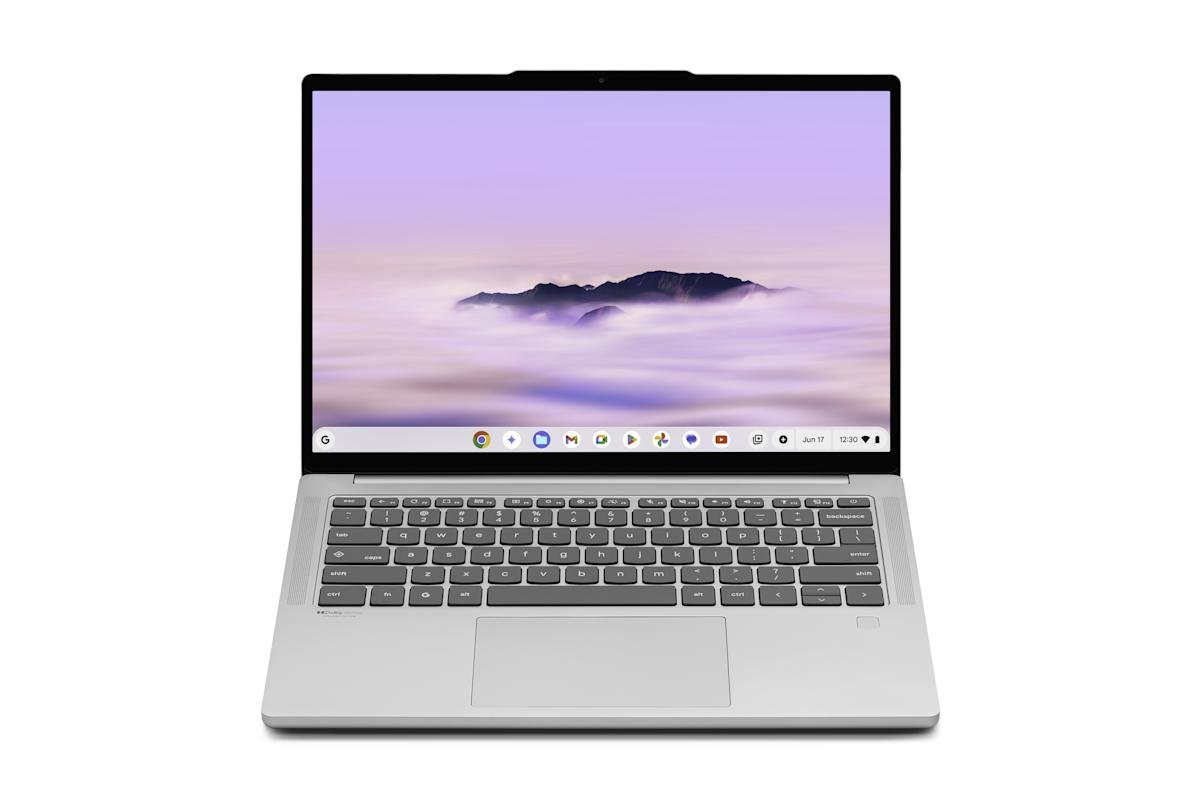
    Time for the nitty-gritty specs. Lenovo’s Chromebook Plus 14 is, as you’d expect, a 14-inch laptop that looks quite similar to a silver MacBook Pro. It’s certainly more stylish and sleek than Lenovo’s more utilitarian (and awkwardly-named) IdeaPad Flex 5i Chromebook Plus. It weighs only 2.58 pounds (about a pound less than the Flex 5i) and is just over .62 inches thick. In addition to the Kompanio Ultra 910 chip, Lenovo is including either 12GB or 16GB of RAM and up to 256GB of storage. Lenovo isn’t skimping on the screen, either. The 14-inch OLED panel can be outfitted with a touchscreen and has a 1,920 x 1,200 resolution. The resolution is relatively modest, but totally in line with what you’d expect for the price.

    Lenovo

    There are a few other nice touches throughout. Lenovo’s latest is the first Chromebook with Dolby Atmos sound via a quad-speaker system that includes two downward-firing woofers. Audio quality on laptops has increased significantly in recent years, so I’m looking forward to hearing what Lenovo can deliver. The 5-megapixel webcam has a much higher resolution than most other Chromebooks, and there’s also a fingerprint reader for secure logins.

    All told, this Chromebook is on the more expensive side compared to many other options. But when you compare its specs and design with other Chromebooks in this price range, Lenovo’s latest comes out looking pretty good. Of course, we’ll need to make sure the MediaTek chip is powerful enough and also see what battery life is like, but Lenovo’s track record is strong enough that I’m looking forward to seeing if we have a new king of the Chromebooks.

    New AI features

    Given that Google is relentlessly focused on adding AI features everywhere you turn, it’s no surprise that there are a handful of new AI tricks here. First are two that are currently exclusive to Lenovo’s Chromebook Plus 14: Smart Grouping and AI image editing in the Chromebook’s Gallery app. Google has been teasing Smart Grouping for a while now; it’ll look at your open tabs and documents and ask if you want to organize them into a separate virtual desk. And the Gallery app now has some AI-powered editing features like removing backgrounds or turning your images into stickers.

    Beyond these are a bunch of AI features that are coming to all Chromebook Plus laptops, many of which will feel familiar if you’ve paid attention to what Google has released to other platforms in recent months. For example, you can now long-press the launcher and select an area of the screen to run a search. As usual, the default example is shopping — see a pair of shoes you want, highlight it and let Google find them for you. The integration does look nice, though, with a pop-over window showing you results so you don’t have to leave the app you’re using.

    Similarly, Text Capture analyzes text in an image and suggests things like calendar appointments based on what it reads. Or highlighting an image of a recipe can pull all of the items you need for it into a Google Docs list.

    Lenovo

    The Quick Insert key, which was first introduced last year on Samsung’s Galaxy Chromebook Plus, can now be used to generate and insert AI images into anywhere your text cursor is pointing — it’s not just limited to Google apps. Finally, Google’s “help me read” tool has a new “simplify” option that can take complex language (think scientific explanations) and put it in plain language to make it easier to understand.

    Anyone buying a Chromebook Plus this year will get a solid perk that Google first introduced last year: a full 12 months of the Google One AI Pro plan, which includes 2TB of Google Drive storage and access to more advanced Gemini features (you can find all the exact details here). Given that this is a $20 per month plan, it’s a solid additional value — at the very least for the storage, if you’re not all that interested in Gemini.

    As for Lenovo’s new hardware, I’m looking forward to trying it soon to see if the ARM architecture can deliver the massive battery life and performance improvements that the company is promising. But if you want to throw down your cash now, Lenovo’s Chromebook Plus 14 is available at Best Buy and on Lenovo’s site to order as of today. (Note that, at least for now, only the more expensive version of the Chromebook Plus 14, with a touchscreen at 16GB of RAM, is available at Best Buy.)

    Share. Facebook Twitter Pinterest LinkedIn Reddit WhatsApp Telegram Email
    Previous ArticleGet a free $30 Amazon gift card when you buy the new Sony WH-1000XM6 headphones
    Next Article Lies of P: Overture sells 3m copies | News-in-brief
    TechAiVerse
    • Website

    Jonathan is a tech enthusiast and the mind behind Tech AI Verse. With a passion for artificial intelligence, consumer tech, and emerging innovations, he deliver clear, insightful content to keep readers informed. From cutting-edge gadgets to AI advancements and cryptocurrency trends, Jonathan breaks down complex topics to make technology accessible to all.

    Related Posts

    Runlayer is now offering secure OpenClaw agentic capabilities for large enterprises

    February 21, 2026

    Microsoft Copilot ignored sensitivity labels twice in eight months — and no DLP stack caught either one

    February 21, 2026

    Be Wary of Bluesky

    February 21, 2026
    Leave A Reply Cancel Reply

    Top Posts

    Ping, You’ve Got Whale: AI detection system alerts ships of whales in their path

    April 22, 2025684 Views

    Lumo vs. Duck AI: Which AI is Better for Your Privacy?

    July 31, 2025274 Views

    6.7 Cummins Lifter Failure: What Years Are Affected (And Possible Fixes)

    April 14, 2025158 Views

    6 Best MagSafe Phone Grips (2025), Tested and Reviewed

    April 6, 2025119 Views
    Don't Miss
    Business Technology February 21, 2026

    Gartner: Why neoclouds are the future of GPU-as-a-Service

    Gartner: Why neoclouds are the future of GPU-as-a-Service Neoclouds are set to change the economcs…

    Runlayer is now offering secure OpenClaw agentic capabilities for large enterprises

    Microsoft Copilot ignored sensitivity labels twice in eight months — and no DLP stack caught either one

    Be Wary of Bluesky

    Stay In Touch
    • Facebook
    • Twitter
    • Pinterest
    • Instagram
    • YouTube
    • Vimeo

    Subscribe to Updates

    Get the latest creative news from SmartMag about art & design.

    About Us
    About Us

    Welcome to Tech AI Verse, your go-to destination for everything technology! We bring you the latest news, trends, and insights from the ever-evolving world of tech. Our coverage spans across global technology industry updates, artificial intelligence advancements, machine learning ethics, and automation innovations. Stay connected with us as we explore the limitless possibilities of technology!

    Facebook X (Twitter) Pinterest YouTube WhatsApp
    Our Picks

    Gartner: Why neoclouds are the future of GPU-as-a-Service

    February 21, 20262 Views

    Runlayer is now offering secure OpenClaw agentic capabilities for large enterprises

    February 21, 20260 Views

    Microsoft Copilot ignored sensitivity labels twice in eight months — and no DLP stack caught either one

    February 21, 20260 Views
    Most Popular

    7 Best Kids Bikes (2025): Mountain, Balance, Pedal, Coaster

    March 13, 20250 Views

    VTOMAN FlashSpeed 1500: Plenty Of Power For All Your Gear

    March 13, 20250 Views

    This new Roomba finally solves the big problem I have with robot vacuums

    March 13, 20250 Views
    © 2026 TechAiVerse. Designed by Divya Tech.
    • Home
    • About Us
    • Contact Us
    • Privacy Policy
    • Terms & Conditions

    Type above and press Enter to search. Press Esc to cancel.