

Acer Swift Go 16 (2025) Review: Affordable OLED Laptop Without Massive Compromises
Acer Swift Go 16 (2025)
Pros
- Gorgeous OLED display
- Excellent productivity performance
- Fairly well priced for what’s on offer
Cons
- Disappointing battery life
- Bizarre, narrow number pad
- Pricing inconsistencies
Acer’s latest iteration of the Swift Go 16 line spans a wide gamut of roles and prices. It’s designed to fill out a large swath of Acer’s thin-and-light catalog below the high-performance Swift X models, offering productivity options for a variety of budgets.
At the low end of the Swift Go 16 series, you’ll find sub-$1,000 machines with a focus on providing large screens in lightweight packages. At the high end, like the machine I reviewed, the focus pivots to providing an attractive OLED screen backed by a high-performance processor, all squeezed into a slim chassis without a bank-breaking price. It’s an improvement across the board from previous generations, including design, performance and specs.
However, as always, some sacrifices are made. Acer chose to eschew dedicated graphics and battery endurance to focus on productivity and the display. While the company’s choices are sensible for a laptop with this profile, they do mean the potential audience is narrower.
Acer Swift Go 16 (SFG16-73)
| Price as reviewed | $1,150 |
|---|---|
| Display size/resolution | 16-inch 2,880×1,800 120Hz OLED |
| CPU | Intel Core Ultra 9 285H |
| Memory | 32GB LPDDR5X |
| Graphics | Intel Arc 140T |
| Storage | 1TB SSD |
| Ports | 2 x Thunderbolt 4, 2 x USB-A 3.2 Gen 1, HDMI 2.1, microSD card reader, combo audio |
| Networking | Wi-Fi 7 and Bluetooth 5.4 |
| Operating system | Windows 11 Home |
| Weight | 3.28 lbs |
The model I tested has an Intel Core Ultra 9 285H at its heart and is built around a 16-inch, 3K (2,880×1,800 pixels) 120Hz OLED display. It comes with a generous 32GB of memory and a 1TB SSD and weighs a slight 3.3 pounds.
It’s affordably priced, but the pricing currently listed on Acer’s US site is misleading. The product page states that this version of the Swift Go 16 retails for $1,150 and provides a link to a single retailer (MicroCenter) with available stock. However, if you click through to the MicroCenter page, the price jumps to $1,200 without any apparent changes to the SKU. Perhaps it’s a tariffs-related price hike.
Most of Acer’s other Swift Go 16 options have IPS panels and also sacrifice storage, RAM and CPU to push the price below the $1,000 mark (in some cases significantly below it, with the least expensive option currently available for $700). There is a single alternate OLED option, though it slashes the RAM allotment to 8GB, drops storage to 512GB, and has a lowly Ultra 5 125H processor. While it’s currently priced at $730, it’s hard to imagine someone willing to shell out for an OLED with so little under the hood to back it up.
While my review model is the most expensive, it’s also the best bargain, especially if it becomes available at the suggested retail price rather than with MicroCenter’s $50 bump). The $1,150 cost puts it squarely in midtier laptop pricing for a thin and light laptop, and that price is largely justified by the excellent OLED screen and components.
The Swift Go 16 is available in the UK on Acer’s website starting at £1,300. Pricing was not available from Acer’s Australian site at the time of this review.
Acer Swift Go 16 performance
Intel’s high-end Core Ultra 9 285H chip, part of its Arrow Lake-H series, is designed to power workstations and creator-focused laptops. On its website, Acer lists the Swift Go 16 under its AI laptops, a designation justified by the Ultra 9’s neural processing unit, which combines with the CPU and integrated graphics to deliver a total of 99 TOPS. This means it provides more than double the 40 TOPS required to earn Microsoft’s Copilot Plus laptop label, opening the doors to Windows’ suite of AI applications like Recall, which captures “screenshots” of your activity and can retrace your steps or search them on demand.
The Ultra 9 delivered both excellent single-core and multicore benchmark test results. This was especially true of tests that focused on CPU loading; 3D rendering results were less spectacular. Also, as expected from the integrated Arc graphics, graphics tests were largely underwhelming. The Swift Go 16 was clearly not designed to be a gaming or content-creation laptop, struggling to hit acceptable frame rates even on Low settings on modern AAA games. While it’s perfectly fine for less graphically demanding or older titles, don’t expect high-end gaming performance or to handle GPU-intensive tasks like video editing on the Swift Go 16.
Another letdown is the battery life. In our video streaming battery test, the Swift Go 16 only survived for less than 8 hours. Contrast this with the Swift 16 AI, another OLED machine from Acer, which lasted more than 12 hours in the same test. This is likely due in part to the variance in integrated graphics: the Swift 16 AI uses the more energy-efficient 140-volt version of Arc, while the Swift Go 16 leans on the 140T version for better performance. Either way, falling short of 8 hours of battery life is disappointing for any laptop that lacks a dedicated GPU.
A sleek-looking, aesthetically pleasing machine
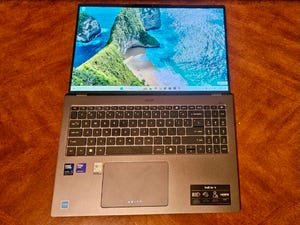
It might not turn heads at the local coffee shop, but the Swift Go looks nice enough. The etching and company logo on the lid are understated but lend an elegant look to the matte black finish, though it does pick up fingerprints fairly easily. It’s svelte and light, though the sharp angles, particularly along the upper edge of the lid, make it slightly unpleasant to hold.
So. Many. Fingerprints.
Alan Bradley/CNETThat said, for a 16-inch machine, it’s portable, clocking in at an impressive 3.3 pounds and only 0.7 inches thick (tapering down to 0.4 at the front). Allowing for a 16-inch screen also means that there’s plenty of real estate for the keyboard and trackpad, which makes some of the design decisions in that department seem baffling.
While the keyboard is responsive with pleasant tactile feedback and key travel, it’s compressed in the center of the laptop to make space for wide borders on each side. This is a particularly odd choice when you consider the number pad, which has been narrowed and crowded in alongside the keyboard to make room for those borders. Using it feels clumsy and awkward, with a lot of opportunity for mistaken inputs. It’s especially confusing given the unused space to either side of the keyboard.
There’s room for the keyboard to extend to the edges of the laptop, but Acer decided to make the numpad keys smaller instead.
Alan Bradley/CNETThe mechanical trackpad is perfectly serviceable. I commend Acer’s restraint here; a lot of manufacturers are plastering huge logos or designs on their trackpads, but Acer has opted for only including the Swift name in a modest font at the bottom.
The OLED is definitely the showpiece. It’s slick, glossy and gorgeous, with rich blacks and vivid, accurate colors. It’s a beautiful display, and the 3K resolution matches well with the 16-inch panel to deliver sharp visuals and highly legible text. The only small letdown is the brightness, which topped out at 409 nits in our testing. This means you’ll likely push the brightness setting to its peak a lot of the time, especially if you’re working outside or in a brightly lit office, putting further strain on an already heavily taxed battery.
While the pair of speakers won’t wow any dedicated audiophiles, I found the speaker quality and volume range to be perfectly acceptable in a laptop this thin. The 1440p webcam, by contrast, delivers a crisp, wide-angle view. It’s bolstered by a handful of AI effects provided by Acer’s Quick Panel overlay, like “gentle light” and “super sharp,” though they, like Windows’ AI Studio Effects, were largely underwhelming. The built-in privacy shutter is a nice touch, and the toggle for it is virtually invisible in the webcam’s housing.
On the security tip, the Swift Go 16 takes advantage of Windows Hello biometrics, allowing you to login via facial recognition or with the fingerprint sensor on the power button. Both worked reliably, which means more kudos for the QHD webcam; we’ve had mixed or inconsistent results logging in with other laptops’ webcams, but the Swift Go 16’s proved to be extremely dependable.
There’s also a fairly standard serving of ports. You get two Thunderbolt 4 USB-C ports that deliver speedy 40Gbps transfer speeds and provide up to 100 watts of charging. There’s also a pair of USB-A 3.2 Gen 1 ports, an HDMI 2.1 port, headphone jack and a microSD slot. The microSD reader is a nice inclusion and notable because previous generations lacked it.
Is the Acer Swift Go 16 a good laptop?
Far from being all looks, the Swift Go 16 has strong core hardware paired with its pretty OLED screen, and at $1,150, it’s a solid value proposition. For photo editing, heavy multitasking or most other productivity use cases, it’s a great fit, though its graphics hardware doesn’t quite do justice to that lovely display. The roomy, 16-inch screen means it’s also a nice option for streaming movies or shows, or going deep down a YouTube rabbit hole, though you may want to opt for headphones for an audio experience that matches the visuals.
That said, if you’re looking for an OLED because you need to do a lot of GPU-heavy editing or rendering, or you want to show off the latest AAA games, you’d be better served by a machine with at least an entry-level graphics chip such as the HP Spectre x360 16, which is discounted right now to $1,240 as HP closes out its Spectre series. That’s only $90 more than the Swift Go 16 (or only $40 if you can’t find it for less than $1,200 at MicroCenter), a reasonable cost to level up your graphics performance with an RTX 4050 GPU.
The review process for laptops, desktops, tablets and other computerlike devices consists of two parts: performance testing under controlled conditions in the CNET Labs and extensive hands-on use by our expert reviewers. This includes evaluating a device’s aesthetics, ergonomics and features. A final review verdict is a combination of both objective and subjective judgments.
The list of benchmarking software we use changes over time as the devices we test evolve. The most important core tests we’re currently running on every compatible computer include Primate Labs Geekbench 6, Cinebench R23, PCMark 10 and 3DMark Fire Strike Ultra.
A more detailed description of each benchmark and how we use it can be found on our How We Test Computers page.
Geekbench 6 CPU (multi-core)
Acer Swift Go 16 (SFG16-73) 15867Dell Inspiron 16 Plus 7640 12388Dell 16 Plus 2-in-1 (DB06250) 11080Acer Swift 16 AI (SF16-51T) 10993HP Envy x360 16 10941Lenovo Yoga 7 16 Gen 9 9507Lenovo IdeaPad Slim 5i 16 8939
Geekbench 6 CPU (single-core)
Dell 16 Plus 2-in-1 (DB06250) 2760Acer Swift 16 AI (SF16-51T) 2716Acer Swift Go 16 (SFG16-73) 2697Lenovo IdeaPad Slim 5i 16 2587HP Envy x360 16 2510Lenovo Yoga 7 16 Gen 9 2378Dell Inspiron 16 Plus 7640 2258
Cinebench 2024 CPU (multi-core)
Dell Inspiron 16 Plus 7640 883Acer Swift Go 16 (SFG16-73) 815HP Envy x360 16 748Acer Swift 16 AI (SF16-51T) 533Dell 16 Plus 2-in-1 (DB06250) 491Lenovo IdeaPad Slim 5i 16 426
Cinebench 2024 CPU (single-core)
Acer Swift Go 16 (SFG16-73) 124Dell 16 Plus 2-in-1 (DB06250) 122Acer Swift 16 AI (SF16-51T) 121Lenovo IdeaPad Slim 5i 16 108Dell Inspiron 16 Plus 7640 103HP Envy x360 16 100
PCMark 10 Pro Edition
Acer Swift Go 16 (SFG16-73) 7263Acer Swift 16 AI (SF16-51T) 6855Dell Inspiron 16 Plus 7640 6829Dell 16 Plus 2-in-1 (DB06250) 6805HP Envy x360 16 6671Lenovo Yoga 7 16 Gen 9 6618Lenovo IdeaPad Slim 5i 16 6067
Online streaming battery drain test
Lenovo IdeaPad Slim 5i 16 15:34Acer Swift 16 AI (SF16-51T) 12:20Dell Inspiron 16 Plus 7640 11:11HP Envy x360 16 11:11Lenovo Yoga 7 16 Gen 9 10:57Dell 16 Plus 2-in-1 (DB06250) 8:58Acer Swift Go 16 (SFG16-73) 7:41
System configurations
| Dell 16 Plus 2-in-1 (DB06250) | Microsoft Windows 11 Home; Intel Core Ultra 7 258V; 32GB DDR5 RAM; Intel Arc 140V; 1TB SSD |
|---|---|
| Acer Swift Go 16 (SFG16-73) | Microsoft Windows 11 Home; Intel Core Ultra 9 285H; 32GB DDR5 RAM; Intel Arc 140T; 1TB SSD |
| Acer Swift 16 AI (SF16-51T) | Microsoft Windows 11 Home; Intel Core Ultra 7 256V; 16GB DDR5 RAM; Intel Arc 140V; 1TB SSD |
| Lenovo IdeaPad Slim 5i 16 | Microsoft Windows 11 Home; Intel Core 7 150U; 16GB DDR5 RAM; Intel Iris Xe; 1TB SSD |
| Lenovo Yoga 7 16 Gen 9 | Microsoft Windows 11 Home; AMD Ryzen 5 8640HS; 8GB DDR5 RAM; AMD Radeon Graphics; 512GB SSD |
| Dell Inspiron 16 Plus 7640 | Microsoft Windows 11 Home; Intel Core Ultra 7 155H; 16GB DDR5 5,600MHz RAM; 8GB Nvidia GeForce RTX 4060; 1TB SSD |
| HP Envy x360 16 | Microsoft Windows 11 Home; AMD Ryzen 7 8840HS; 16GB DDR5 RAM; AMD Radeon Graphics; 512GB SSD |
