

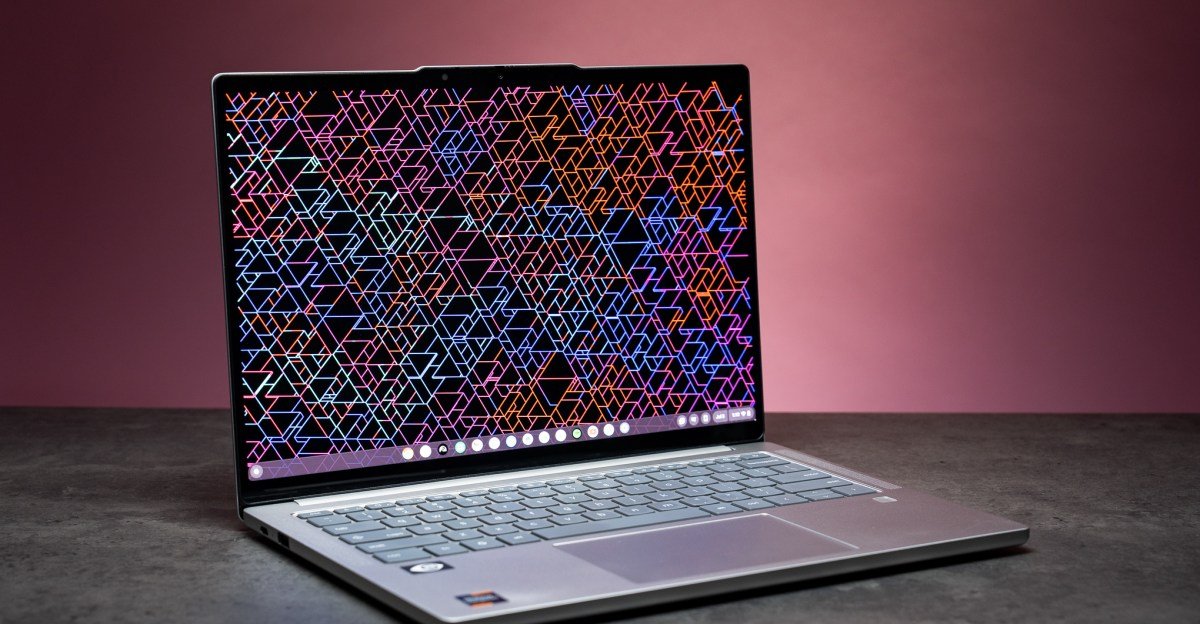
Lenovo Chromebook Plus 14 review: the new king of Chromebooks
The world of Chromebooks has its MacBook Air.
Lenovo’s latest Chromebook Plus 14 is an Arm-based thin-and-light with good specs, excellent battery life, a great keyboard, all-around solid build, and a fantastic OLED screen. But the best part is that its bright and punchy 14-inch panel comes standard on the base $649 configuration or as a touchscreen for $749.
That’s cheaper than both the OLED-equipped Samsung Galaxy Chromebook Plus and Acer Chromebook Plus Spin with an IPS screen. It’s also faster than either with more RAM.
The new Chromebook Plus 14 could be a go-to laptop for just about anyone — if you’re okay living with ChromeOS in the first place, of course.
The Lenovo Chromebook Plus 14 starts at $649 with a MediaTek Kompanio Ultra 910 processor, 128GB of storage, 12GB of RAM, and that excellent OLED. Our review config costs $100 more, but it seems worthwhile for double the storage, 16GB of RAM, a touchscreen, and a fingerprint reader. It just weighs slightly more, at 2.78 pounds instead of the base model’s 2.58 pounds. It’s fairly thin at 0.62 inches, and for ports it’s got two USB-C, one USB-A, and a 3.5mm audio jack. The USB-C ports allow you to use up to two external 4K monitors in tandem with the built-in display, though they’re a slow 5Gbps.
Component report card:
- Screen: A
- Webcam: C
- Mic: C
- Keyboard: A
- Touchpad: C
- Port selection: C
- Speakers: B
- Number of ugly stickers to remove: 2
Hardware-wise, this laptop is nearly faultless, especially for the price. You get a great quality 1920 x 1200 / 60Hz OLED, which isn’t a standout in terms of resolution and refresh rate, but the color and contrast certainly are. There’s plenty of RAM compared to most other Chromebooks, and the keyboard feels just as great as much pricier Lenovo notebooks. The speakers are also quite good, rendering a full sound for music and podcasts, and they can get quite loud. My only small hangups were with the webcam, which looks fine aside from a greenish tint, and the loud, cheap-sounding click of the mechanical trackpad.
The Chromebook Plus 14’s performance is impressive, especially since it’s a completely silent, fanless design like a MacBook Air. The 8-core MediaTek processor paired with 16GB of RAM is powerful enough to easily handle running many Chrome tabs across a couple desktops. I uploaded a few documents to NotebookLM in the background, allowing it to generate some audio overviews, and never bothered to stop using any of my open tabs or Android apps. The Lenovo didn’t break a sweat. I did manage to get the MediaTek chip to slow down a little, but only a couple times. One was an accidental mini torture test — spamming Ctrl+Shift+T a few too many times to reopen a bunch of Chrome tabs and Files app windows.
System |
Lenovo Chromebook Plus 14 / MediaTek Kompanio Ultra 910 8C / 16GB / 256GB |
Samsung Galaxy Chromebook Plus / Intel Core 3 100U 6C / 8GB / 256GB |
Acer Chromebook Plus Spin 714 / Intel Core Ultra 5 115U 8C / 8GB / 256GB |
Microsoft Surface Laptop 13-inch / Snapdragon X Plus 8C / 16GB / 512GB |
Acer Swift 14 AI / Intel Core Ultra 7 258V 8C / 32GB / 1TB |
MacBook Air 13-inch M4 / 10C / 10C / 16GB / 512GB |
|---|---|---|---|---|---|---|
| Geekbench 6 CPU Single | 2448 | 1860 | 1549 | 2437 | 2609 | 3775 |
| Geekbench 6 CPU Multi | 7548 | 5693 | 5493 | 11427 | 10690 | 14899 |
| Geekbench 6 GPU (Vulkan) | 17995 | 8785 | 5392 | N/A | N/A | N/A |
| Price (as tested) | $749 | $699.99 | $799 | $999.99 | $1,299.99 | $1,199 |
Frankly, Chromebooks are mature enough these days that you should expect more than enough performance for everyday multitasking — and the new Lenovo delivers. You can do almost anything in a web browser these days, and the ability to run both Android and Linux apps can fill in a lot of the remaining gaps. But some gaps remain.
Zoom — whether in the browser, the Android app, or the “Zoom for Chromebook” progressive web app — was a buggy mess. The Linux version of Slack didn’t work, since Slack doesn’t have a version of its Linux app compiled for Arm chips. I can get by fine using Slack in a browser, though I much prefer it as a standalone app. So keep in mind this laptop’s architecture may complicate things if you’re planning to use Linux apps.
Unoptimized apps can reduce battery life, but the Lenovo’s 60Wh cell and power-sipping chip make it a battery champ regardless. On a light day running Chrome tabs, progressive web apps, and the Android version of Spotify, I could easily use the Chromebook Plus 14 from the start of my workday around 8AM to deep into the evening. I once started my day with 77 percent battery, used it for around nine hours with minimal standby time, and crossed 5PM with about 20 percent still left in the tank. You can probably get multiple days out of this thing if you’re careful.
1/5
This battery life, combined with the Lenovo’s overall performance and excellent screen, makes it an easy recommendation. An x86 Chromebook will have better Linux compatibility, if that’s important to you, and it’s possible a future Snapdragon X-equipped Chromebook may shake up this space even further. But the fact that you can get the touchscreen version for $749, a lower price than other, slower flagship Chromebook Plus models, makes this Lenovo the best Chromebook offering. It’s not a two-in-one convertible like the Acer Chromebook Plus Spin 714, but it’s more powerful and has a nicer screen. Samsung’s Galaxy Chromebook Plus also has a nice OLED like the Lenovo, but in my testing I found its 16:9 aspect ratio screen irksome (these should have stayed dead on laptops in 2021), and its number pad makes the keyboard feel cramped.
1/3
The Lenovo Chromebook Plus 14 feels like a proper successor to Google’s old Pixelbook, with a great screen and borderline-overkill specs that could actually last the whole 10 years of promised software updates. It’s especially appealing if you want an affordable, mostly hassle-free laptop — with the ability to opt in to some hassle if you want to tinker with Linux. This is the new king of Chromebooks, and overall just a damn good computer.
2025 Lenovo Chromebook Plus 14 (as reviewed)
- Display: 14-inch (1920 x 1200) 60Hz OLED touchscreen
- CPU: MediaTek Kompanio Ultra 910
- RAM: 16GB LPDDR5X
- Storage: 256GB UFS 4.0
- Webcam: 5-megapixel fixed focus, with privacy shutter
- Connectivity: Wi-Fi 7, Bluetooth 5.4
- Ports: 2x USB-C 5Gbps with DisplayPort 1.4 and PD 3.0, 1x USB-A 5Gnps, 3.5mm combo audio jack
- Weight: 2.78 pounds
- Dimensions: 12.37 x 8.63 x 0.62 inches
- Battery: 60Wh
- Price: $749
Photography by Antonio G. Di Benedetto / The Verge
