Close Menu

    Subscribe to Updates

    Get the latest creative news from FooBar about art, design and business.

    What's Hot

    The strange animals that control their body heat

    In puzzling outbreak, officials look to cold beer, gross ice, and ChatGPT

    How to Free Up iPad Storage Without Buying a New One

    Facebook X (Twitter) Instagram
    • Artificial Intelligence
    • Business Technology
    • Cryptocurrency
    • Gadgets
    • Gaming
    • Health
    • Software and Apps
    • Technology
    Facebook X (Twitter) Instagram Pinterest Vimeo
    Tech AI Verse
    • Home
    • Artificial Intelligence

      What the polls say about how Americans are using AI

      February 27, 2026

      Tensions between the Pentagon and AI giant Anthropic reach a boiling point

      February 21, 2026

      Read the extended transcript: President Donald Trump interviewed by ‘NBC Nightly News’ anchor Tom Llamas

      February 6, 2026

      Stocks and bitcoin sink as investors dump software company shares

      February 4, 2026

      AI, crypto and Trump super PACs stash millions to spend on the midterms

      February 2, 2026
    • Business

      FCC approves the merger of cable giants Cox and Charter

      February 28, 2026

      Finding value with AI and Industry 5.0 transformation

      February 28, 2026

      How Smarsh built an AI front door for regulated industries — and drove 59% self-service adoption

      February 24, 2026

      Where MENA CIOs draw the line on AI sovereignty

      February 24, 2026

      Ex-President’s shift away from Xbox consoles to cloud gaming reportedly caused friction

      February 24, 2026
    • Crypto

      Palladium Price Approaches a Critical Turning Point

      February 28, 2026

      Trump to Takeover Cuba, Iran War Tensions Rise, Bitcoin Crashes Again

      February 28, 2026

      A 40% XRP Crash Couldn’t Shake Its Strongest Holders — Is $1.70 Still Possible?

      February 28, 2026

      Why Is the US Stock Market Down Today?

      February 28, 2026

      SoFi Becomes First US Chartered Bank to Support Solana Deposits

      February 28, 2026
    • Technology

      The strange animals that control their body heat

      March 1, 2026

      In puzzling outbreak, officials look to cold beer, gross ice, and ChatGPT

      March 1, 2026

      How to Free Up iPad Storage Without Buying a New One

      March 1, 2026

      Google quantum-proofs HTTPS by squeezing 15kB of data into 700-byte space

      March 1, 2026

      The compact smartphone I actually want: Xiaomi 17 in a Galaxy S26 world

      February 28, 2026
    • Others
      • Gadgets
      • Gaming
      • Health
      • Software and Apps
    Check BMI
    Tech AI Verse
    You are at:Home»Technology»How to Free Up Your iPhone’s Storage by Deleting Data You Don’t Need
    Technology

    How to Free Up Your iPhone’s Storage by Deleting Data You Don’t Need

    TechAiVerseBy TechAiVerseJuly 10, 2025No Comments6 Mins Read2 Views
    Facebook Twitter Pinterest Telegram LinkedIn Tumblr Email Reddit
    How to Free Up Your iPhone’s Storage by Deleting Data You Don’t Need
    Share
    Facebook Twitter LinkedIn Pinterest WhatsApp Email

    How to Free Up Your iPhone’s Storage by Deleting Data You Don’t Need

    Gain back your storage space with minimal agony over what you need to delete forever.

    I started my career with CNET all the way back in 2005, when the (original) Motorola Razrs were all the rage. Since then, I’ve written about everything from consumer electronics to internet culture for outlets like CNET, Engadget and Yahoo. Outside of work, I’m a big fan of baseball, board games, tabletop RPGs and improv comedy.

    If you’ve owned your iPhone for a long time, you know the f when you’re about to snap a photo, download an app or update your phone, when suddenly a notification pops up warning you that your iPhone storage is almost full. Maybe you’ve frantically tried to figure out how to free up as much space as possible without just nuking everything. 

    But don’t panic. There are several ways to regain storage space from your iPhone that don’t involve starting from scratch. From offloading apps to using the cloud, we’ve compiled a helpful list of ways to help you make more room on your iPhone and manage your storage in a smarter, more efficient way. 

    How to check what’s taking up the most storage

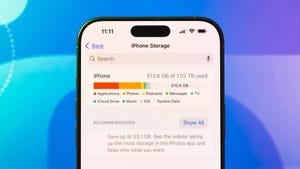
    Before you do any serious iPhone excavation, it’s best to find out just what is taking up so much space in it. To do so, go to Settings, then General and then select iPhone Storage. You’ll then see a colored bar chart breaking down the types of files and media that are on your phone. This is a great starting point because it’ll tell you which type of storage is taking up the most space and you can choose to tackle that first. 

    Additionally, Apple also makes recommendations in this section to help you free up more space, such as reviewing downloaded media or removing automatic downloads in podcast apps. 

    James Martin/CNET

    Deleting or offloading apps you don’t use much

    The aforementioned iPhone Storage page will also list apps according to how much space they take up in your phone. It’ll also tell you the last time you used it. You can scroll through this list to see if you should be deleting any of the apps that you haven’t used in a while. You can delete them manually and redownload them later if you change your mind. 

    An easier way to handle this, however, is to have your iPhone automatically remove unused apps. On that iPhone Storage page, you can tap Enable next to Offload Unused Apps. Those unused apps will live on iCloud Drive (you can find them in the Files app). If you want to use them again, simply tap them (they’ll be marked with a cloud symbol) and they’ll be redownloaded. 

    James Martin/CNET

    Optimize photo storage by using the cloud

    If the bulk of your storage issues lies in your photo library, you’re certainly not alone. Fortunately, you can mitigate this by using iCloud to automatically upload and store your photos and videos. You can then choose to store the original, full-resolution version of them in iCloud while keeping just smaller versions of them locally. To enable this, go to Settings, then scroll down and tap Apps, then scroll down and select Photos. Be sure that iCloud Photos is enabled and then select Optimize iPhone Storage. You are always free to download the full-resolution versions of your files at any time. 

    You could also consider using a third-party cloud storage service like Google Photos as a backup solution. Since deleting photos from your iPhone also removes them from iCloud, this is a smart idea if you plan on deleting some photos from your device but still want them in storage. 

    Transfer files off your phone and onto an external drive

    Another way to free up space on your phone is to transfer files to an external storage solution like a USB drive or SD card. Simply connect the external storage to your iPhone via a cable and you can use a supported app like Files or Pages to copy files directly to the storage device. You may then transfer the files from your external drive to anywhere you like, such as your laptop or computer. If those files are important to you, it’s a good idea to back them up on cloud services like Box or Dropbox as well. 

    Watch this: Don’t Buy an iPhone! Do This to Keep Your Current Phone Alive Longer

    05:35

    Clear out data from within apps

    Sometimes the biggest data hog lies within other apps. If you’ve downloaded videos and music to consume offline for example, they might still be taking up valuable space in your phone. One easy way to go through these is to go to that iPhone Storage page mentioned earlier (you get there by launching Settings, then tapping General and then selecting iPhone Storage). 

    From there, you can scroll through the list of apps to find one that you’ve downloaded content from, like Netflix. Tap on that app’s name and at the bottom of the page (below the Delete App link) you will see a list of downloaded content, which you may then swipe to delete. Alternatively, sometimes you might get a “Review Downloaded Media” recommendation on the iPhone Storage page. If you select that, you’ll see downloaded media from across several apps so you can delete them with ease. 

    It’s important to note, however, that this method doesn’t work with all media apps. YouTube, for example, doesn’t display downloaded media in the iPhone Storage page, and neither does Apple’s Podcasts app. However, you’ll still know if those apps hold a lot of data if they rank high on the list of the amount of space the app takes up. On my phone, for example, YouTube stores a whopping 33.82GB worth of Documents & Data and is therefore the biggest data hog on my phone. If you know which app has a lot of data stored in it, you can go to that app directly to delete any unnecessary media. 

    If you like downloading maps to your phone for offline viewing, that could be another reason your phone storage is full. In order to remove them, go to Maps on your iPhone, select your profile photo, and then select Offline Maps. You can either then manually remove a map by swiping and deleting, or simply select Optimize Storage to automatically delete unused maps. 

    Steps You Can Take Right Now to Avoid an Overheated Phone

    See all photos

    Share. Facebook Twitter Pinterest LinkedIn Reddit WhatsApp Telegram Email
    Previous ArticleMicrosoft replaced legacy JavaScript engine to improve security in Windows 11
    Next Article James Gunn’s ‘Superman’ Isn’t a Comic Book Movie. It’s a Punk Rock Victory Lap
    TechAiVerse
    • Website

    Jonathan is a tech enthusiast and the mind behind Tech AI Verse. With a passion for artificial intelligence, consumer tech, and emerging innovations, he deliver clear, insightful content to keep readers informed. From cutting-edge gadgets to AI advancements and cryptocurrency trends, Jonathan breaks down complex topics to make technology accessible to all.

    Related Posts

    The strange animals that control their body heat

    March 1, 2026

    In puzzling outbreak, officials look to cold beer, gross ice, and ChatGPT

    March 1, 2026

    How to Free Up iPad Storage Without Buying a New One

    March 1, 2026
    Leave A Reply Cancel Reply

    Top Posts

    Ping, You’ve Got Whale: AI detection system alerts ships of whales in their path

    April 22, 2025699 Views

    Lumo vs. Duck AI: Which AI is Better for Your Privacy?

    July 31, 2025280 Views

    6.7 Cummins Lifter Failure: What Years Are Affected (And Possible Fixes)

    April 14, 2025162 Views

    6 Best MagSafe Phone Grips (2025), Tested and Reviewed

    April 6, 2025124 Views
    Don't Miss
    Technology March 1, 2026

    The strange animals that control their body heat

    The strange animals that control their body heat Some creatures can dramatically alter their internal…

    In puzzling outbreak, officials look to cold beer, gross ice, and ChatGPT

    How to Free Up iPad Storage Without Buying a New One

    Google quantum-proofs HTTPS by squeezing 15kB of data into 700-byte space

    Stay In Touch
    • Facebook
    • Twitter
    • Pinterest
    • Instagram
    • YouTube
    • Vimeo

    Subscribe to Updates

    Get the latest creative news from SmartMag about art & design.

    About Us
    About Us

    Welcome to Tech AI Verse, your go-to destination for everything technology! We bring you the latest news, trends, and insights from the ever-evolving world of tech. Our coverage spans across global technology industry updates, artificial intelligence advancements, machine learning ethics, and automation innovations. Stay connected with us as we explore the limitless possibilities of technology!

    Facebook X (Twitter) Pinterest YouTube WhatsApp
    Our Picks

    The strange animals that control their body heat

    March 1, 20260 Views

    In puzzling outbreak, officials look to cold beer, gross ice, and ChatGPT

    March 1, 20260 Views

    How to Free Up iPad Storage Without Buying a New One

    March 1, 20260 Views
    Most Popular

    7 Best Kids Bikes (2025): Mountain, Balance, Pedal, Coaster

    March 13, 20250 Views

    VTOMAN FlashSpeed 1500: Plenty Of Power For All Your Gear

    March 13, 20250 Views

    Best TV Antenna of 2025

    March 13, 20250 Views
    © 2026 TechAiVerse. Designed by Divya Tech.
    • Home
    • About Us
    • Contact Us
    • Privacy Policy
    • Terms & Conditions

    Type above and press Enter to search. Press Esc to cancel.