

I got this crazy cyborg keypad to improve at PC games. I still suck
Image: Alaina Yee / Foundry
I’m not great at games. At least, not on PC. I have no aptitude for using a mouse and keyboard.
That’s right—I play everything with a controller.
At least, I play all of my usual genres with a controller. And, up until about three years ago, the arrangement worked. A non-zero number of PC gamers may be shrieking silently (or loudly) about how unideal it is to play certain games with analog sticks, but I never had a problem.
Then my friend group decided to play PvP games. On PC.
One day, I’m playing Sea of Thieves and drunkenly lurching off a boat into water (my character, not me), and then the next, I’m trying to line up headshots on a human opponent who most definitely knows how not to get shot.
It didn’t take long to realize I needed a lot of help, and that assistance had to come either from my friends or divine intervention, because I certainly didn’t seem capable of helping myself. So I did what everyone with wishful thinking does. I bought stuff to fix my problem. Specifically, I bought the weirdest, wildest, and arguably coolest gaming keypad available.
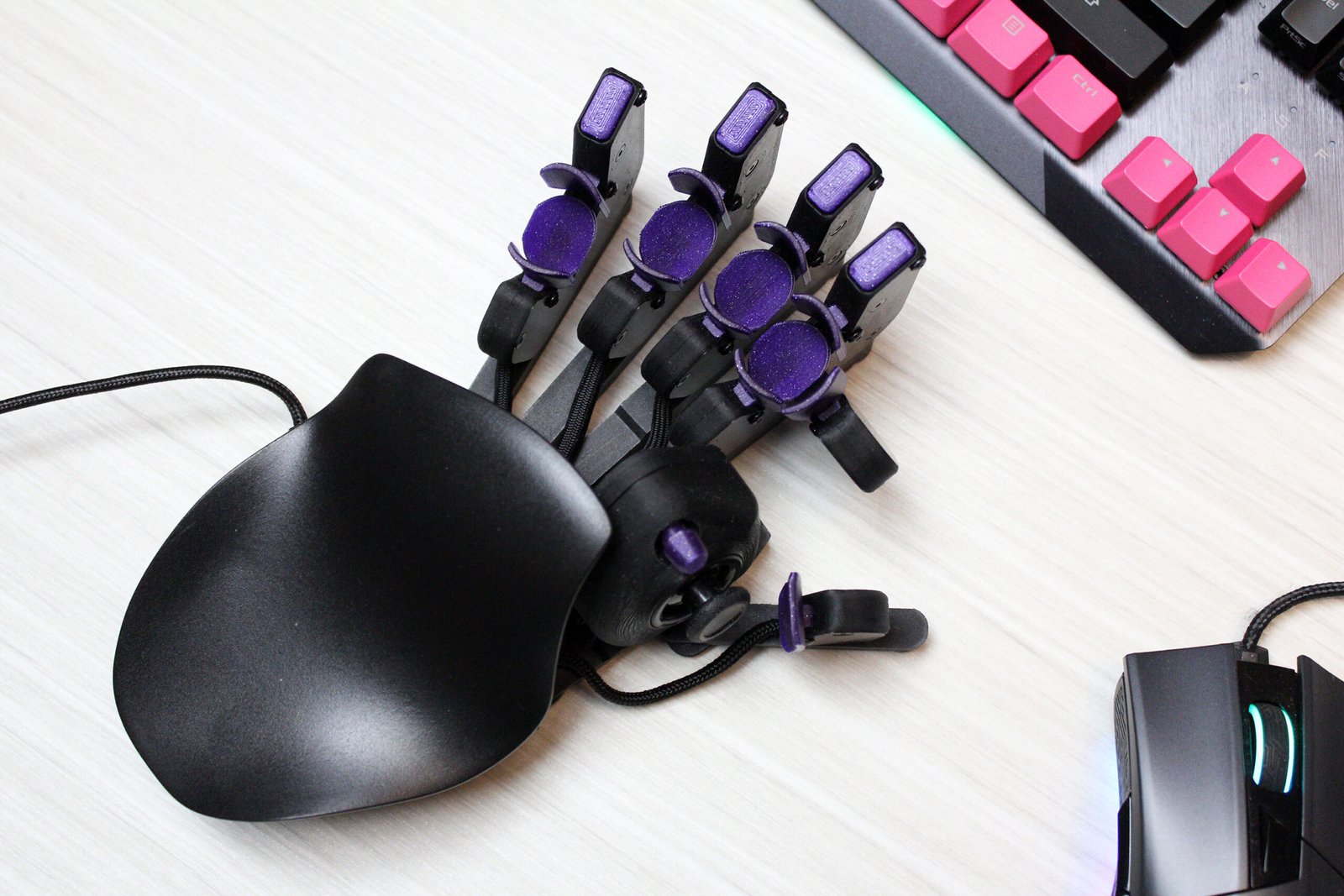
Enter the Azeron Cyborg gaming keypad
Alaina Yee / Foundry
My problem with mouse and keyboard is the keyboard. For whatever reason, using the WASD keys for navigation still has yet to click in my brain. Add in the surrounding keys for triggering abilities and the communication between my hand and my brain goes out a window.
Then back in April 2023, I stumbled upon this r/buildapc thread on Reddit. Among all the fantastic PC accessory recommendations was one for the Azeron Cyborg. It looked absolutely insane (and straight out of a Terminator movie), but what caught my attention was its actual thumbstick.
During the first few weeks of online slaughter (mine, not my opponents), I had wistfully thought how having a left thumbstick for navigation but a mouse for aiming would combine the best of both my worlds. But the Razer Tartarus and similar gaming keypads only had d-pads, not full 360 analog sticks.
I took this new discovery as as sign, especially when I looked on the Azeron site and saw a gently used model going for $140 USD. (A new one costs about $200 USD.) Impulse purchases are rare for me, but this seem fated. Desperation to not always be the weak link on my team may have added incentive to buy.
Twenty-five bucks in shipping and a handful of days later, my package safely completed the journey from Latvia and landed on the PCWorld office’s doorstep. And that’s when I learned some hard truths about myself.
A new problem emerges
Alaina Yee / Foundry
The Azeron Cyborg comes in two flavors: standard, which positions a set of buttons above your fingertips, and Compact, which places those buttons on shorter posts. You can also adjust the thumbstick positioning on the standard model—a feature I completely underestimated when I purchased my used Compact model in sparkly galactic purple.
This keypad is dizzyingly programmable and adjustable. You get 29 mappable keys overall, which includes the 5-way rocker switch and thumbstick. Key mapping is extremely simple—you just download Azeron’s software and start assigning keys—and you get two separate profiles that you can program. Key presses feel good too, with satisfying clicky feedback.
For the games I played (primarily Overwatch 2), I didn’t even use all 13 buttons within my immediate reach. Part of this had to do with fit. Even weeks later, my pinky can’t tap its nearby keys easily. This is despite me buying the smaller of the keypad’s two sizes, and also fussing with the positions of each key tower. You can change the distance and the spacing, but I never found the perfect sweet spot for my whole hand.
But I can’t blame fit entirely for my new struggle, which is overcoming my very fixed muscle memory on controller.
I am my own worst enemy, as usual
Alaina Yee / Foundry
During my formative years, I played platformers and action-adventure games almost to the exclusion of everything else—and it seems to show. A major issue of mine in PvP games is movement. I walk in straight lines, as the worst (best) noobs do. But platformers, my favorite genre, rewards that kind of steady tracking. That’s what I spent countless hours optimizing for, while also lacking exposure to genres (and game modes) that reward the opposite.
So first problem: I don’t think to strafe.
Second problem: The motion for strafing on an analog stick feels wrong to me.
Unfortunately, owning an Azeron gaming keypad does nothing to solve these first two issues, since it has a thumbstick. In fact, I didn’t even figure out the second one until I forced myself to try using WASD in a low-stakes Overwatch match. You should have seen my face when I realized how effortless strafing felt when tapping two distinctive keys, rather than wiggling a stick back and forth.
Third problem: I am not used to using fingers beyond my thumb and forefinger.
As a standard controller user, all I ever use are two fingers per hand. On occasion I might bring in my middle fingers if I have to press both the bumper and the trigger buttons at the same time, but it’s rare. (A fancier controller like the Xbox Elite has more buttons and thus can require more fingers, but I don’t use that type.)
Fourth problem: The controls are distributed differently than on controller.
The Azeron Cyborg doesn’t change the how many functions you perform with your left hand for a mouse and keyboard setup. It just offers them in a different form factor. And compared to controller, it’s about the opposite of what I’m used to. On a controller, I’m using my right hand for an analog stick (camera angle/melee), the four face buttons (which usually map to weapon choice, reload, jump, and crouch in a shooter), and a set of shoulder and trigger buttons (abilities). On mouse and keyboard, my right hand gets left click (primary ability), right click (secondary ability or zoom), and the scroll wheel (weapon choice/melee). At least, it does on a basic mouse, which is all I have currently.
Long story short, I have a lot of retraining to do and new muscle memory to build if I want to get anywhere in PvP.
How it shook out
Alaina Yee / Foundry
While the Azeron has not been able to cover for skills I never developed, I’m not disappointed. I knew it was probably going to be a long shot. (I’ve been through this before with photography gear.) I think it’s a great keypad, and I like how much you can customize it. That includes how it looks, too. If you buy new, you can pick color (so many fun shades!), palm rest style, thumbstick style, and which hand it’s designed for (right or left).
And the Cyborg has done more than providing insight into my long-standing inability to adapt to mouse and keyboard. My gameplay with hitscan characters in Overwatch is better—I don’t miss as many shots with Ana when playing support, for example. Don’t get me wrong, I still suck. But I can see glimpses of what life is like when you don’t completely suck. It’s a nice counter to getting older and stiffer, which have dulled my reflexes and made precision thumbstick movements harder. I once dreamed of getting even half as good as former colleagues on controller—they could go up against PC players, much to the surprise of developers during demos. But that’s beyond me now.
My only real complaint about the Cyborg is that I bought the wrong model. The Compact version’s thumbstick isn’t adjustable, and for my narrow hand it’s positioned a little too low to feel comfortable. Where the directional switch sits, that’s where I want the thumbstick to be. I get an ache in my hand after playing for about 90 minutes or more. If Azeron (or a community member) were to release a 3D printer file for a housing that reversed the positions of the thumbstick and rocker switch, I think I could game for longer stretches.
Regardless, the Cyborg has made mouse and keyboard feel less like a sink or swim proposition. Maybe one day I’ll get to basic WASD competency. But so far, that day has yet to come. In the meanwhile, I’ve now got floaties to keep me from drowning.
Update (September 2025): I originally documented this experience with the Azeron Cyborg Compact early in the journey, back in spring and summer of 2023. In the two years since, I can say that I still am happy with the investment—and it really has acted like floaties while learning to swim.
I outlined four problems I had while playing in games like Overwatch: just not strafing, disliking the sensation of strafing on an analog stick, use of more fingers than on an Xbox or PlayStation controller, and adjusting to a different layout of buttons relative to a console controller. The first two issues still remain, but I have since adjusted to the new mapping and my gameplay has improved a little. (I’m finally no longer ranked as Potato 5. Yay!)
I also mentioned that I regretted not purchasing the model with an adjustable position for thumbstick. I still feel that way, but after Azeron released a magnetic tenting stand for the controller, it helped ease much of the strain on my thumb.
Azeron
Overall, the improvements I’ve made in mechanical skill has gotten me more curious and willing to give WASD navigation another go. (I just picked up this Lemokey X0 gaming keypad at a deep discount, on the advice of my colleague and resident mechanical gaming keyboard guru Michael Crider.) I’ve also begun exploring the idea of trying a proper mouse mat and another gaming mouse to see if it improves my aim. As someone who has extremely deep console gaming roots, I always assumed my motor skills were solely to blame for my weak mechanical skills in PC games. I didn’t realize some of it is based on your gear and settings.
I feel less overwhelmed now about the idea of making the full switch to keyboard & mouse gaming. While I don’t know if I’ll make the leap successfully, the attempts will be pretty entertaining, I’m sure. To other people, at least.
Author: Alaina Yee, Senior Editor, PCWorld
A 14-year veteran of technology and video games journalism, Alaina Yee covers a variety of topics for PCWorld. Since joining the team in 2016, she’s written about CPUs, Windows, PC building, Chrome, Raspberry Pi, and much more—while also serving as PCWorld’s resident bargain hunter (#slickdeals). Currently her focus is on security, helping people understand how best to protect themselves online. Her work has previously appeared in PC Gamer, IGN, Maximum PC, and Official Xbox Magazine.
