Close Menu

    Subscribe to Updates

    Get the latest creative news from FooBar about art, design and business.

    What's Hot

    Pulsar X2 Crazylight Medium review: Light as air, strong on performance

    Raycast is finally on Windows, and it totally changed how I use my PC

    LG’s Gallery TV promises to transform your wall into an art museum

    Facebook X (Twitter) Instagram
    • Artificial Intelligence
    • Business Technology
    • Cryptocurrency
    • Gadgets
    • Gaming
    • Health
    • Software and Apps
    • Technology
    Facebook X (Twitter) Instagram Pinterest Vimeo
    Tech AI Verse
    • Home
    • Artificial Intelligence

      A new pope, political shake-ups and celebs in space: The 2025-in-review news quiz

      December 31, 2025

      AI has become the norm for students. Teachers are playing catch-up.

      December 23, 2025

      Trump signs executive order seeking to ban states from regulating AI companies

      December 13, 2025

      Apple’s AI chief abruptly steps down

      December 3, 2025

      The issue that’s scrambling both parties: From the Politics Desk

      December 3, 2025
    • Business

      Top 10 cloud computing stories of 2025

      December 22, 2025

      Saudia Arabia’s STC commits to five-year network upgrade programme with Ericsson

      December 18, 2025

      Zeroday Cloud hacking event awards $320,0000 for 11 zero days

      December 18, 2025

      Amazon: Ongoing cryptomining campaign uses hacked AWS accounts

      December 18, 2025

      Want to back up your iPhone securely without paying the Apple tax? There’s a hack for that, but it isn’t for everyone… yet

      December 16, 2025
    • Crypto

      US Jobless Claims Drop Sharply, Fed Rate Cuts Look Less Urgent

      December 31, 2025

      Ripple’s $1 Billion XRP Unlock Starts 2026, But Is It a Non-Event? | US Crypto News

      December 31, 2025

      An 80% Wipeout Hasn’t Stopped Korean Retail From Chasing Tom Lee’s BitMine

      December 31, 2025

      Zcash Price Eyes $672 Target After Clearing $500 Resistance

      December 31, 2025

      Trump Media to Launch New Token With Special Benefits

      December 31, 2025
    • Technology

      Pulsar X2 Crazylight Medium review: Light as air, strong on performance

      January 1, 2026

      Raycast is finally on Windows, and it totally changed how I use my PC

      January 1, 2026

      LG’s Gallery TV promises to transform your wall into an art museum

      January 1, 2026

      Guard against a corrupted Windows install with a system restore point

      January 1, 2026

      Murena taking pre-orders for the Hiroh smartphone powered by /e/OS, a privacy-focused version of Android 16

      January 1, 2026
    • Others
      • Gadgets
      • Gaming
      • Health
      • Software and Apps
    Check BMI
    Tech AI Verse
    You are at:Home»Technology»Lenovo’s Tab P12 Pro as a portable monitor
    Technology

    Lenovo’s Tab P12 Pro as a portable monitor

    TechAiVerseBy TechAiVerseSeptember 22, 2025No Comments5 Mins Read0 Views
    Facebook Twitter Pinterest Telegram LinkedIn Tumblr Email Reddit
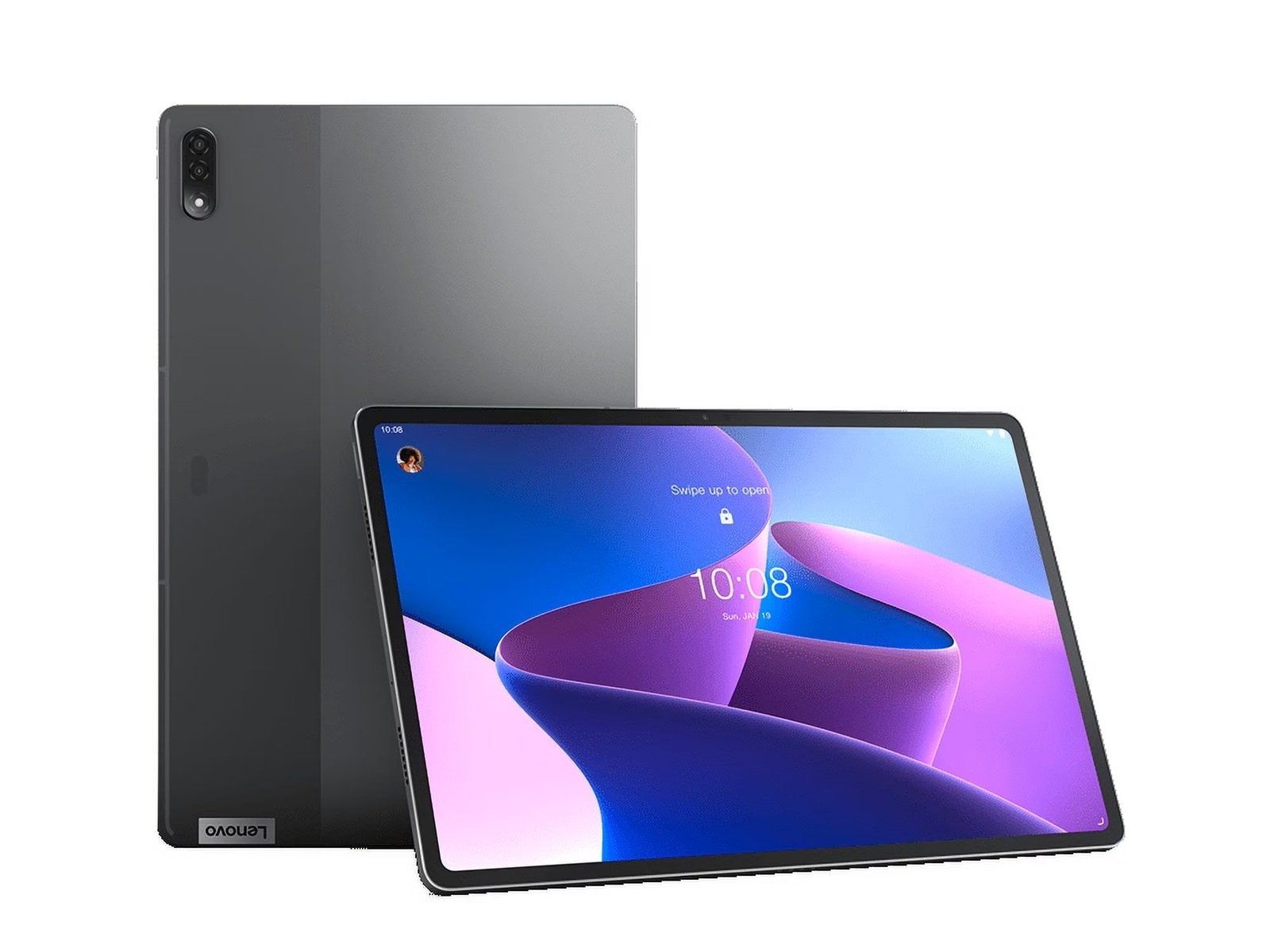
    Lenovo’s Tab P12 Pro as a portable monitor
    Share
    Facebook Twitter LinkedIn Pinterest WhatsApp Email

    Lenovo’s Tab P12 Pro as a portable monitor – NotebookCheck.net News

    With Smart Connect, the Tab P12 Pro can function as a wireless second screen for Windows PCs (Image source – Lenovo.com)

    Lenovo Tab P12 Pro with Precision Pen 3 doubles as a wireless second screen via Smart Connect. Setup, latency, and usability tested for students, pros, and creatives.

    The Lenovo Tab P12 Pro (2023) is marketed as a tablet built for both entertainment and productivity. Featuring a 12.7-inch LTPS LCD (2944 × 1840 resolution, HDR10+ support) and the bundled Precision Pen 3, the device now offers even greater versatility thanks to Lenovo Smart Connect.

    With Smart Connect, the The Lenovo Tab P12 Pro can function as a wireless second screen for Windows PCs, raising the question: Can this tablet actually replace a dedicated portable monitor… As well as double as the perfect Xbox Remote Play partner?

    Setup and connectivity

    Setting a Lenovo Tab P12 Pro up as a wireless second screen via Smart Connect is easy enough to do.

    • Install the Lenovo Smart Connect client on a Windows PC.
    • Ensure both devices are connected to the same Wi-Fi network.
    • Pair them using QR code scanning or device discovery.

    The process takes just a few minutes, and then, users can extend or mirror their desktop wirelessly. The biggest caveat is its dependence on Wi-Fi signal strength, which means performance varies in less stable environments.

    Lenovo Tab 12 Pro streaming on Windows 11 (Image source: Darryl Linington – Notebookcheck)

    Display quality and experience

    The 2560×1600 resolution makes the Lenovo Tab P12 Pro sharper than most budget portable monitors. With HDR10+ support and a 16:10 aspect ratio, visuals are bright, text is crisp, and media playback is immersive. Depending on system resources, connection type (Wi-Fi vs USB-C), and app scaling, the PC may downscale the output (e.g., 1920×1200, or even lower if over wireless) before sending it to the tablet.

    For multitasking… such as keeping Slack, Teams, Discord, PDFs, or reference material open — the experience is excellent. Streaming video also looks vibrant, though occasional compression artifacts appear when Wi-Fi performance dips.

    Latency and real-world performance

    In terms of productivity tasks like document reviews and web browsing, the latency is minimal and doesn’t disrupt workflow. However, for latency-sensitive tasks, much like gaming or video editing, input delay is noticeable. The Lenovo Tab P12 Pro is not positioned as a gaming-focused portable display, and wired monitors remain the better option for these scenarios.

    Precision Pen 3: Adding stylus input

    Unlike standard portable monitors, the Lenovo Tab P12 Pro offers active stylus support. The Precision Pen 3 works even when the device is in second-screen mode, enabling:

    • Annotation and highlighting in documents.
    • Note-taking during meetings or lectures.
    • Sketching and quick design work in creative apps.

    Although pen latency is slightly higher compared to native Android apps, the functionality is an advantage over traditional portable displays.

    Productivity and creative use cases

    In practical terms, the Lenovo Tab P12 Pro fits several workflows:

    • Students can run video calls on their laptops while keeping notes on the tablet.
    • Professionals gain portable dual-screen setups for presentations, spreadsheets, and reports.
    • Creatives can sketch concepts or annotate visuals with stylus support.

    Therefore, its ability to switch between an Android tablet to a second screen makes it more flexible than single-purpose monitors.

    Comparison with portable monitors

    Wired portable monitors such as the ASUS ZenScreen or Lenovo ThinkVision have advantages in low-latency reliability and lower pricing; however, the Lenovo Tab P12 Pro as a second screen offers:

    • Higher resolution (2560×1600 vs 1080p on many monitors)
    • HDR10+ support
    • Touch and stylus functionality
    • Full Android tablet use when not connected

    The trade-off is occasional wireless latency and a higher cost.

    With HDR10+ support and a 16:10 aspect ratio, visuals are bright, text is crisp, and media playback is immersive. (Image source: Darryl Linington – Notebookcheck)

    Verdict: Is the Lenovo Tab P12 a good second screen?

    The Lenovo Tab P12 Pro, when paired with its Precision Pen 3, makes it excel as a hybrid device, seamlessly blending the versatility of a premium tablet with the power of a second screen. Its dual-mode connectivity makes it fantastic for a wide-range of users, including: students and professionals who would benefit from the convenient, clutter-free wireless setup, while creatives and gamers can rely on the zero-latency wired connection, via USB-C for precision tasks.

    In conclusion, the Lenovo Tab P12 Pro proves that its a versatile tablet that can be more than an entertainment device… It stands as a powerful productivity tool, offering a combination of display quality and flexibility options that rival dedicated portable monitors.

    Hands-on testing
    Lenovo.com – official website
    Image sources – Lenovo/Darryl Linington

    Related Articles

    Darryl Linington – Tech Writer – 21 articles published on Notebookcheck since 2025

    I’m a tech editor and journalist with over 20 years of experience covering everything from cutting-edge smartphones and AI breakthroughs to gaming hardware and future-forward tech. I have a passion for making complex technology accessible, relatable, and genuinely interesting—especially when it’s something that impacts how we live, work, or play.

    Outside of journalism, I’m also an author with a deep love for psychological thrillers, horror, and emotionally honest storytelling. My books include Drowning: The Island Saga Book 1, 3:33 a.m.: The Island Saga Book 2, The Midnight Murderer, Keystrokes of Vengeance, and the no-filter self-help guide Life’s Too Short For This Sh!t! Whether I’m writing page-turning mysteries or personal insights, my goal is to connect, provoke thought, and leave an impact.

    Inspired daily by my daughters and shaped by years of media work and personal growth, I bring purpose, curiosity, and heart to everything I write—tech or fiction.

    Darryl Linington, 2025-09-22 (Update: 2025-09-22)

    Share. Facebook Twitter Pinterest LinkedIn Reddit WhatsApp Telegram Email
    Previous Article5 Warning Signs That Your Gut Is Unhealthy And What To Do About It
    Next Article Powerful Amazfit smartwatch in bold new colorway now available
    TechAiVerse
    • Website

    Jonathan is a tech enthusiast and the mind behind Tech AI Verse. With a passion for artificial intelligence, consumer tech, and emerging innovations, he deliver clear, insightful content to keep readers informed. From cutting-edge gadgets to AI advancements and cryptocurrency trends, Jonathan breaks down complex topics to make technology accessible to all.

    Related Posts

    Pulsar X2 Crazylight Medium review: Light as air, strong on performance

    January 1, 2026

    Raycast is finally on Windows, and it totally changed how I use my PC

    January 1, 2026

    LG’s Gallery TV promises to transform your wall into an art museum

    January 1, 2026
    Leave A Reply Cancel Reply

    Top Posts

    Ping, You’ve Got Whale: AI detection system alerts ships of whales in their path

    April 22, 2025565 Views

    Lumo vs. Duck AI: Which AI is Better for Your Privacy?

    July 31, 2025209 Views

    6.7 Cummins Lifter Failure: What Years Are Affected (And Possible Fixes)

    April 14, 2025114 Views

    6 Best MagSafe Phone Grips (2025), Tested and Reviewed

    April 6, 202597 Views
    Don't Miss
    Technology January 1, 2026

    Pulsar X2 Crazylight Medium review: Light as air, strong on performance

    Pulsar X2 Crazylight Medium review: Light as air, strong on performance Skip to content Image:…

    Raycast is finally on Windows, and it totally changed how I use my PC

    LG’s Gallery TV promises to transform your wall into an art museum

    Guard against a corrupted Windows install with a system restore point

    Stay In Touch
    • Facebook
    • Twitter
    • Pinterest
    • Instagram
    • YouTube
    • Vimeo

    Subscribe to Updates

    Get the latest creative news from SmartMag about art & design.

    About Us
    About Us

    Welcome to Tech AI Verse, your go-to destination for everything technology! We bring you the latest news, trends, and insights from the ever-evolving world of tech. Our coverage spans across global technology industry updates, artificial intelligence advancements, machine learning ethics, and automation innovations. Stay connected with us as we explore the limitless possibilities of technology!

    Facebook X (Twitter) Pinterest YouTube WhatsApp
    Our Picks

    Pulsar X2 Crazylight Medium review: Light as air, strong on performance

    January 1, 20263 Views

    Raycast is finally on Windows, and it totally changed how I use my PC

    January 1, 20263 Views

    LG’s Gallery TV promises to transform your wall into an art museum

    January 1, 20262 Views
    Most Popular

    What to Know and Where to Find Apple Intelligence Summaries on iPhone

    March 12, 20250 Views

    A Team of Female Founders Is Launching Cloud Security Tech That Could Overhaul AI Protection

    March 12, 20250 Views

    Senua’s Saga: Hellblade 2 leads BAFTA Game Awards 2025 nominations

    March 12, 20250 Views
    © 2026 TechAiVerse. Designed by Divya Tech.
    • Home
    • About Us
    • Contact Us
    • Privacy Policy
    • Terms & Conditions

    Type above and press Enter to search. Press Esc to cancel.