

Typst: A Possible LaTeX Replacement
September 17, 2025
This article was contributed by Lee Phillips
Typst is a program for document
typesetting. It is especially well-suited to technical material
incorporating elements such as mathematics, tables, and floating
figures. It produces high-quality results, comparable to the gold standard,
LaTeX, with a simpler markup
system and easier customization, all while compiling documents
more quickly. Typst is free software, Apache-2.0 licensed, and is written in Rust.
Desire for a LaTeX replacement
LaTeX is a document typesetting system built on the foundation of Donald
Knuth’s TeX. LaTeX has become the
standard tool for the preparation of scholarly papers and books in several
fields, such as mathematics and computer science, and widely adopted in
others, such as physics. TeX and LaTeX, which predate
Linux, are early free software success
stories. The quality of TeX’s (and therefore LaTeX’s) output rivals the
work of skilled hand typesetters for both text and mathematics.
$ sudo subscribe today
Subscribe today and elevate your LWN privileges. You’ll have
access to all of LWN’s high-quality articles as soon as they’re
published, and help support LWN in the process. Act now and you can start with a free trial subscription.
Despite the acclaim earned by LaTeX, its community of users has been
griping about it for years, and wondering aloud whether one day a
replacement might arrive. There are several reasons for this
dissatisfaction: the LaTeX installation is huge, compilation of large
documents is not fast, and its error messages are riddles delivered by an
infuriating oracle. In addition, any nontrivial customization or alteration to the
program’s behavior requires expertise in an arcane macro-expansion
language.
Along with the griping came resignation: after decades of talk about a
LaTeX replacement with nothing plausible on the horizon, and with the
recognition that LaTeX’s collection of specialized packages would take
years to replace, it seemed impossible to dislodge the behemoth from its
exalted position.
Introducing Typst
In 2019 two German developers, Laurenz
Mädje and Martin Haug, decided to try to write a LaTeX replacement “just for fun“. In 2022, Mädje wrote his
computer science master’s
thesis about Typst. In March 2023, its
first pre-release beta version was announced; a
month later, semantic versioning was adopted with the release of
v0.1.0. Typst is now at v.0.13.1 and shows
365 contributors on its GitHub repository.
I had been aware of this project for over a year but had not paid much
attention, assuming it to be yet another attempt to supplant LaTeX that was
doomed to fail. A rising chorus of enthusiasm among early
adopters, and the beginnings of acceptance of
Typst manuscripts by scholarly journals, made me curious enough
to take the young project for a spin.
Typst is available as Rust source and as a compiled binary. To install,
visit the releases
page and download the appropriate archive. There are options for Linux,
macOS and Windows; I used the
precompiled Linux version for my testing.
The “typst” command accepts several subcommands. Entering
“typst fonts” lists all of the usable fonts to be found in
standard locations on the machine; nonstandard font directories can be
added manually. In my case, Typst found all of my 476 fonts instantly;
the only ones omitted were some ancient PostScript Type 1 fonts used
by LaTeX. Users who have LaTeX installed will have a large collection of
OpenType and TrueType math and text fonts on their machines; Typst can
use all of these. But Typst will work fine without them, as the program has
a small collection of fonts built in (try “typst fonts
--ignore-system-fonts” to see them).
Two other subcommands to explore are
“compile“, which generates the output (PDF by default, with PDF/A,
SVG, and PNG available, along with HTML under development) from a source file, and
“watch” for interactive editing. The watch subcommand keeps a Typst process running that
incrementally and automatically compiles the document to PDF in response to
changes in the source. To use “typst watch” effectively, the
screen should be divided into three windows: a small terminal window to monitor
the typst output for error (or success) messages, the editing
window, and an area for any PDF reader that automatically reloads the
displayed document when it changes (many, such as my favorite, Sioyek, do this). The result is a
responsive live preview, even of large documents, due to Typst’s speed and
incremental compilation. For example, Frans Skarman described
his experience writing his doctoral thesis in Typst, and noted
that he was able to enjoy nearly instant previews of content changes to
the book-length document.
How Typst improves on LaTeX
Typst output is quite close to that of LaTeX. It uses the same line-breaking
algorithm developed by Donald Knuth and Michael Plass for TeX, so it
creates nicely balanced paragraphs of regular text. Its mathematical
typesetting algorithms are based closely on the
TeX algorithms, and indeed mathematical rendering is nearly
indistinguishable between the two systems.
Getting started with LaTeX can be confusing for newcomers, because it comes
with several alternative “engines” reflecting the long and complex history
of the project. These are the various binaries such as “pdflatex“,
“tex“, “xelatex“, “luatex“, “lualatex“,
and more, each with somewhat different capabilities. For Typst there is
only “typst“.
Markup in Typst is less verbose and easier to read than in LaTeX. It
dispenses with the plethora of curly brackets and backslashes littering
LaTeX documents by adopting, for prose, syntax in the style of Markdown, and, for
equations, a set of conventions designed for easy input. The
fact that curly brackets and backslashes are awkward to type on German
keyboards may have provided a little extra impetus for the developers to
create an alternative markup system that doesn’t require a forest of these
symbols.
When users make syntax errors in markup or programming, inevitable
even in Typst, the system presents them with another dramatic improvement
over LaTeX (and TeX): error messages using colored glyphs that
clearly point out exactly where the problem is. I’ve even discovered that
Typst will save me from trying to run a syntactically correct infinite
loop.
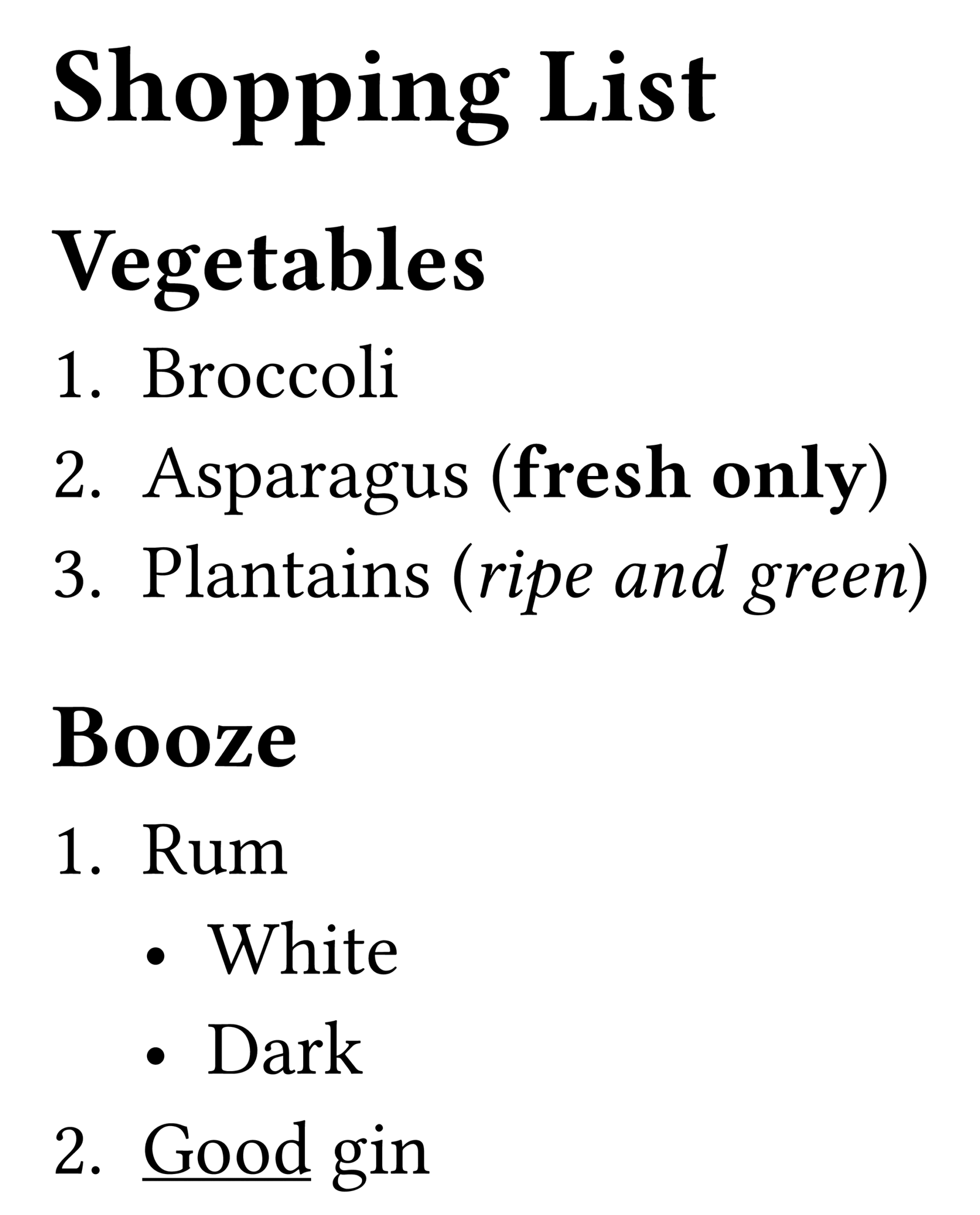
Here is a bit of Typst markup for a shopping list, with
the resulting rendering to the right:
   = Shopping List

   == Vegetables

   + Broccoli
   + Asparagus (*fresh only*)
   + Plantains (_ripe and green_)

   == Booze

   + Rum
     - White
     - Dark
   + #underline[Good] gin
The example gives a flavor of Typst’s terse markup syntax. Headings are
indicated with leading = signs. Automatically numbered lists are
created by prepending + signs to items, and bulleted lists with
- signs; lists can be nested. Delimiters are shown for bold text
and italics. These are shortcuts, or markup syntax sugar, for Typst
functions for transforming text. Not every function has a corresponding
shortcut; in those cases one needs to call the function explicitly, as in
the final item.
Typst input is always within one of three modes. Markup (text) mode is the
default. The # sign preceding the function call in the last line
of the example
places Typst in “code mode”. The “underline()” function accepts a number of keyword arguments that affect its behavior, and one trailing argument, in square brackets, containing the text that it modifies. In the example, we’ve stuck with the default behavior, but if we wanted, for example, a red underline, we could use “#underline(stroke: red)[Good] gin“. Following the square-bracketed text argument, Typst returns to interpreting input in text mode.
Other functions produce output directly, rather than modifying a text argument. This bit of Typst input:
    #let word = "Manhattan"
    There are #str.len(word) letters in #word.
produces the output (in typeset form) “There are 9 letters in Manhattan.”. The “len()” function is part of the
“str” module, so it needs the namespace.
Let’s take a look at the LaTeX equivalent for the first half of the
shopping list for comparison:
   documentclass[12pt]{article}
   begin{document}
   section*{Shopping List}

   subsection*{Vegetables}

   begin{enumerate}
   item Broccoli
   item Asparagus ({bfseries fresh only})
   item Plantains (emph{ripe and green})
   end{enumerate}
   end{document}
The first two and the last line are boilerplate that is not required in
Typst. The difference in verbosity level and ease of reading the source is
clear.
The third Typst mode, in addition to markup and code, is math mode,
delimited by dollar signs. This is also best illustrated by an example:
$ integral_0^1 (arcsin x)^2 (dif x)/(x^2 sqrt(1-x^2)) = π ln 2 $
When this is compiled by Typst, it produces the result shown below:
Those who’ve used LaTeX will begin to see from this example how math in
Typst source is less verbose and easier to read than in LaTeX. Greek
letters and other Unicode symbols can be used directly, as in modern LaTeX
engines such as lualatex, which we looked at back in 2017, but with no
imports required.
The advent of the LuaTeX and LuaLaTeX projects provided users who wanted to
incorporate programming into their documents a more pleasant alternative to
the TeX macro language. As powerful as the embedded Lua system is, however,
it betrays its bolted-on status, requiring users to negotiate the interface
between Lua data structures and LaTeX or TeX internals. In Typst,
programming is thoroughly integrated into the system, with no seams between
the language used for calculation and the constructs that place characters
in the final PDF. Typst programs are invariably simpler than their LuaLaTeX
equivalents. All authors using Typst will make at least some simple use of
its programming language, as such basic necessities as changing fonts, or
customizations such as changing the style of section headings, are
accomplished by calling Typst functions.
The Typst language is somewhat similar to Rust, perhaps
unsurprisingly. Most Typst functions are pure: they have no side effects and
always produce the same result given the same arguments (aside from certain
functions that mutate their arguments, such as array.push()). This
aspect reduces the probability of difficult-to-debug conflicts among
packages that plague LaTeX, and makes it easier to debug Typst documents.
Although Typst uses the same line-breaking algorithm as LaTeX, its internal
approach to overall page layout is distinct. Some
consequences are that Typst does a better job at handling movable elements
such as floating figures, and can, for example, easily split large tables
across page breaks, something that LaTeX struggles with even with
specialized packages.
Typst drawbacks
Typst’s page layout algorithm doesn’t always permit the refinements that
LaTeX is capable of.
For example, Typst is not as good
as LaTeX at avoiding widows
and orphans.
Another salient deficiency is Typst’s relative lack of specialized packages,
compared with the vast ecosystem produced by LaTeX’s decades of community
involvement. However, the relative ease of programming in Typst (and the
well-organized and extensively commented underlying Rust code) suggests
that this drawback may be remedied before a comparable number of decades
have elapsed. Indeed, there are already over 800 packages available. Typst still cannot do
everything that LaTeX can, but the breadth of its package collection is
encouraging.
Almost no journals that provide LaTeX templates for submissions offer a
Typst option, so physicists and mathematicians adopting Typst will need to
find a way to convert their manuscripts. This is made easier for those who
use Pandoc, as that conversion program
handles Typst.
Another drawback is the difficulty of learning Typst. The official documentation is confusingly
organized, with information scattered unpredictably among “Tutorial”,
“Reference”, and “Guides” sections. Concepts are not always clearly
explained, and sometimes not presented in a logical order. The manual is
not keeping up with the rapid development of the program, and contains some
out-of-date information and errors. None of this is surprising considering
how quickly the project is moving, its early stage, and its
small core team. A work-in-progress called the Typst
Examples Book has appeared, which may be a better starting point
than the official documentation.
There are other minor deficiencies compared with LaTeX, such as the
inability to include PDF documents. Typst provides no analogue to LaTeX’s
parshape command, which lets authors mold paragraphs to, for
example, wrap around complex illustrations. The situation is likely to
change, however, as something like parshape is being
considered for the future.
More serious is the possibility of breaking changes as the system evolves,
always a risk of early adoption. I suspect, however, that these will require
only minor edits to documents in most cases. Progress seems to be steady,
rational, and responsive to
user requests.
Conclusion
I’m using Typst in real work right now to write a physics paper. I will
need to submit my manuscript using the journal’s LaTeX template, but I’m
taking advantage of Typst to make the entry of the paper’s many equations
simpler, and I’ll transform the result to
LaTeX with Pandoc without needing any manual adjustment. The tooling is excellent, as my preferred editor, Neovim, has support
for the Tree-sitter
incremental parser
for Markdown and Typst, which provides syntax-aware highlighting
and navigation of the source files. I use Typst’s fast incremental
compilation to get live feedback as I fiddle with my math markup.
I was skeptical when I downloaded Typst to try it out, but became
enthusiastic within minutes, as I saw the first (of many) of its lovely
error messages, and remained sanguine as I saw the quality of its output. I
predict that Typst will eventually take the place of LaTeX. But even if
that never comes to pass, it is a useful tool right now.
| Index entries for this article | |
|---|---|
| GuestArticles | Phillips, Lee |
