

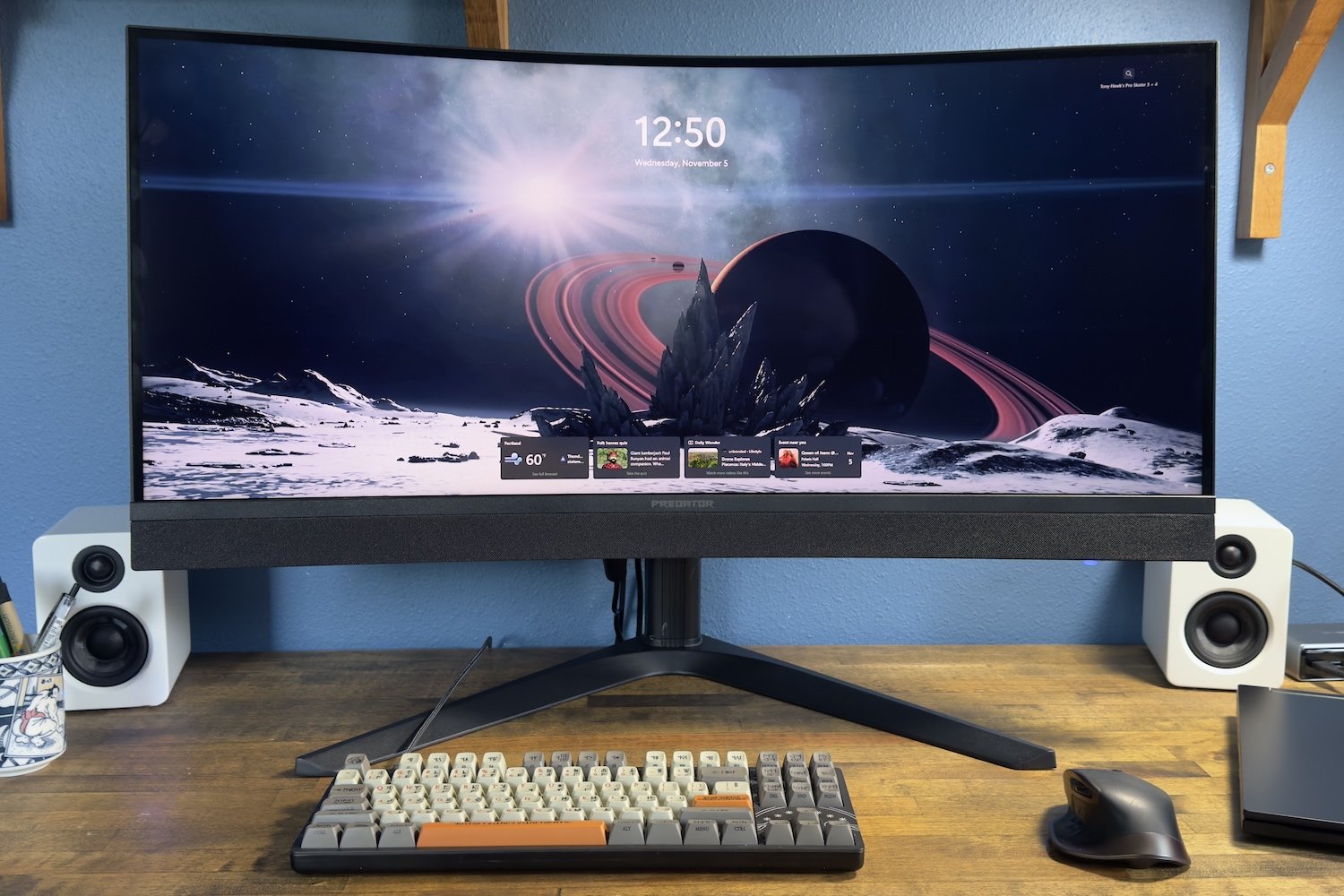
Acer Predator X34 X0 review: A Mini-LED ultrawide monitor for less than $500
Image: Matthew Smith / Foundry
At a glance
Expert’s Rating
Pros
- USB-C connectivity with 65 watts of power
- Attractive contrast, particularly at lower levels of brightness
- Very wide color gamut and accurate color performance
- Good HDR in bright scenes
Cons
- Stand is larger than it needs to be
- 200Hz refresh rate is not that impressive for the price
- HDMI ports only hit 100Hz
- “Blooming” effect is distracting in darker content
Our Verdict
The Acer Predator X34 X0 is an affordable Mini-LED monitor that delivers a bright and vivid image with good HDR and contrast, but distracting “blooming” will turn off some shoppers.
Price When Reviewed
This value will show the geolocated pricing text for product undefined
Best Pricing Today
Best Prices Today: Acer Predator X34 X0
Remember Mini-LED monitors? If not, I can hardly blame you. Though they seemed as if they might be a popular alternative to OLED several years ago, the rapid decrease in OLED monitor pricing pushed many of them aside.
Mini-LED still has its perks, though, and the Acer Predator X34 X0 is a new, affordable Mini-LED option for those who want very bright HDR and a low-glare display on a budget.
Read on to learn more, then see our roundup of the best gaming monitors for comparison.
Acer Predator X34 X0 (X34 X0bmiiphux) specs and features
The Acer Predator X34 X0’s size and resolution are precisely the same as hundreds of 34-inch ultrawide monitors sold over the past half-decade. It’s a 34-inch diagonal display with a 21:9 aspect ratio and a resolution of 3440×1440.
- Display size: 34-inch 21:9 aspect ratio
- Native resolution: 3440×1440
- Panel type: Mini-LED VA panel with 1,152 dimming zones
- Refresh rate: 200Hz
- Adaptive Sync: Yes, AMD FreeSync Premium
- HDR: VESA DisplayHDR 1000
- Ports: 2x HDMI 2.1, 1x DisplayPort 1.4, 1x USB Type-C with 65 watts of Power Delivery, 1x 3.5mm audio out
- Audio: 2x five-watt speakers
- Price: $599.99 MSRP, $479.99 current retail
What makes this Acer different from most monitors is the Mini-LED backlight with 1,152 independent dimming zones, which is paired with a Vertical Alignment (VA) LCD panel. The monitor also has built-in speakers and a USB-C port with up to 65 watts of Power Delivery, both of which are uncommon for a gaming monitor.
Acer released the Predator X34 X0 at a $599.99 MSRP, but it’s already on sale for $479.99 on Amazon. I expect sales to be frequent on this model, as Acer is often highly competitive on price.
Acer Predator X34 X0 design
The Acer Predator X34 X0 looks handsome, though basic. It uses a simple matte-black color scheme with a bit of flair, which includes a faux heatsink on the rear and an attractive fabric cover over the monitor’s speakers located on the lower lip.
Build quality is average but good enough. Aside from the stand, which includes some metal, the monitor’s exterior is plastic. That’s typical for a monitor at any price bracket, and the few monitors that buck that trend, like some Samsung Odyssey monitors, are more expensive.
This is a curved monitor with a 1500R curve (a lower number means a more noticeable curve). The curve is obvious but not so extreme that it makes the display’s image look extremely warped. I do tend to prefer an even less aggressive curve, though.
Matthew Smith / Foundry
Acer ships the monitor bundled with an ergonomic stand that provides height, tilt, and swivel adjustment. It does its job, but I have a beef with the stand base, which is both wide and deep. It’s so deep that I wasn’t able to position the monitor at my preferred viewing distance on my desk, which is about 26 inches deep. A smaller stand base would’ve been a better choice.
The monitor does provide a 100x100mm VESA mount, so third-party monitor arms and stands are an option.
Matthew Smith / Foundry
Acer Predator X34 X0 connectivity
You’ll find two HDMI ports, one DisplayPort, and one USB-C port on the rear of the Acer Predator X34 X0. That’s a total of four video inputs, which is one more than the average for a gaming monitor. It’s also great to see USB-C included, particularly at this price point. Some brands, like Alienware, are giving USB-C the cold shoulder.
There’s a problem, though: The HDMI ports only support a refresh rate of up to 100Hz. That’s a disappointment, as it means you won’t see ideal motion clarity from any HDMI source.
The monitor also has two USB-A downstream ports, which expand USB connectivity when using the USB-C port or, alternatively, when using a separate USB-B upstream port. Acer’s specifications didn’t list the version of USB that the USB-A ports offer, but the speeds seem in line with USB-A 3.2 Gen 1.
It’s great to see USB-C included, particularly at this price point.
A joystick on the Acer Predator X34 X0’s rear right flank offers quick, responsive access to the monitor’s on-screen menu system. The menu itself is well arranged and provides a good range of image quality options, which include correct gamma settings, as well as six-axis color customization. I do feel the text could be larger and easier to read, though.
Matthew Smith / Foundry
Acer offers a Windows utility called Acer Display Widget that can provide access to most monitor settings inside Windows. It works well enough but the user interface feels half-baked when compared to similar software from Asus and Dell.
There’s also a range of gaming options, such as a timer and on-screen crosshair. One feature to note is a mode that restricts the visible space of the monitor to a smaller, 16:9 aspect ratio with several size options. That’s handy if you want to play an older PC game that doesn’t work well with ultrawide resolutions.
Acer Predator X34 X0 audio
Acer packs a pair of five-watt speakers in the Predator X34 X0, and wants you to know it. The fabric covering the monitor’s lower lip, where the speakers are located, looks premium. Audio quality is decent though you’ll need to keep expectations in check.
The good news is that the pair of five-watt speakers are much louder than typical monitor speakers and provide a more precise, full sound. They’re enjoyable if you want to listen to ambient music while working, or if you’re playing a game where the audio experience isn’t front and center.
The Predator X34 X0 doesn’t have a built-in woofer, though, so there are still limits to what the speakers can offer. The soundstage is narrow and bass-heavy situations can make the audio sound muddy.
I also noticed a quiet but audible buzz from the speakers on my review unit, as if the wiring for the speakers wasn’t properly shielded. I didn’t pick up on it until over a week using the monitor, but it was there.
Gamers will want headphones for more immersive titles, but the speakers work well enough for the price, and most competitors don’t have speakers at all.
Acer Predator X34 X0 SDR image quality
The Acer Predator X34 X0 has a Vertical Alignment (VA) LCD display panel. This is a common type of panel found in hundreds of monitors and televisions.
What’s more unusual, though, is the Mini-LED backlight. It includes 1,152 individual dimming zones which can turn on and off independently for better control of contrast and brightness. Most LCD monitors have a lower number of LED backlights placed only along the edges of the display.
The Mini-LED backlight has advantages but also comes with downsides.
Matthew Smith / Foundry
First up is brightness, where the Acer Predator X34 X0 provides a maximum of 379 nits in SDR. That is bright, though not unusually bright for an LCD display. As the HDR results will show, the monitor could get brighter, but it appears Acer placed a limit on the brightness in SDR.
It’s also worth mention the display has a matte finish with modest glare, so reflections are rarely an issue. That means the monitor appears bright and readable in a wide variety of lighting situations.
Matthew Smith / Foundry
The monitor’s contrast is difficult to sum up in one graph.
As shown above, I measured a contrast ratio of 8,930:1 at 50 percent of maximum brightness. But contrast can vary greatly depending on the brightness of the display, which is not typical for most displays.
The contrast ratio is effectively infinite at lower levels of brightness, where the display’s minimum brightness registers a perfect result of zero nits. At 100 percent brightness, meanwhile, I measured a contrast ratio of 16,470:1, which is still a great result.
I suspect most gamers will use this display at lower levels of SDR brightness, in which case the contrast ratio is effectively infinite.
But the Mini-LED backlight further complicates the issue because, unlike OLED monitors such as the Alienware AW3425DW, it can’t dim or brighten individual pixels. The Predator X34 X0’s 1,152 dimming zones are a lot, but you’ll still see a splotchy “halo” or “blooming” effect around small bright objects—like your mouse cursor—when they’re on a dark background.
This is often not that noticeable in games, but it’s more obvious on the Windows desktop. Even something as simple as white text on a dark background can cause an obvious blooming effect. This will also be an issue if you turn on subtitles in movies or games.
Personally, I don’t mind this overly much, but your mileage will vary. Some people may hardly notice while others may find it completely unacceptable.
It’s worth mention, too, that the dynamic backlight can be turned off. I wouldn’t recommend that for games, as you’ll lose the contrast benefits of the Mini-LED backlight, but it’s a fine option if you dislike how blooming looks in Windows desktop apps.
Matthew Smith / Foundry
Next up is color gamut, and the Predator X34 X0 knocks this metric out of the park. It managed to cover 100 percent of sRGB, 98 precent of DCI-P3, and 95 precent of AdobeRGB.
Those figures are similar to OLED monitors and mean the Predator X34 X0 can deliver a vivid, colorful, highly saturated experience. The monitor also covers enough of the DCI-P3 and AdobeRGB color gamut to be useful for photo and video editing or digital art in those wider color spaces.
Matthew Smith / Foundry
Color accuracy is good, too. Though not the very best, the average color error was consistently low, which means the image looks realistic. The monitor also hit the preferred gamma target of 2.2. Color temperature was only slightly off at 6600K, slightly cooler than the target of 6500K. Overall, the monitor’s image feels balanced and true-to-life.
Sharpness is just okay. The monitor’s 3440×1440 resolution works out to roughly 110 pixels per inch across the 34-inch ultrawide panel. That’s fairly sharp, but a lot less so than the ultrawide equivalent to 4K resolution, which is 5120×2160 and delivers about 163 pixels per inch. However, 34-inch ultrawides with 5120×2160 are rare, so you’ll probably have to settle for 1440p if you want a 34-inch ultrawide monitor.
The Acer Predator X34 X0 puts in a solid SDR performance for the price. It has color performance similar to more expensive OLED competitors alongside higher brightness and somewhat competitive contrast. The question you need to ask yourself is whether you can put up with Mini-LED’s “blooming” effect, which I think most users will notice and can be distracting.
Personally, I find it most noticeable in games with a lot of menus, like Crusader Kings 3, and much less so in games where you’re typically immersed in the world, such as Cyberpunk 2077. The monitor’s competitive retail price of $479.99 may also help budget-conscious shoppers overlook the blooming effect.
Acer Predator X34 X0 HDR Image Quality
HDR used to be an advantage for Mini-LED, as OLED displays couldn’t reach brightness levels high enough for good HDR. OLED has improved, however, and the competition between Mini-LED and OLED is now mixed.
Matthew Smith / Foundry
As the graph shows, the way the Acer Predator X34 X0 performs in HDR is much different from how an OLED monitor will perform.
The Predator X34 X0 actually displayed a lower maximum brightness than some recent OLED monitors, which surprised me. However, the Predator X34 X0 still shows a significant advantage in HDR brightness when larger areas of the display are lit.
Subjectively, I think there’s a brilliance with Mini-LED that you don’t quite get from OLED. This was most obvious in the “Into the Storm” scene from Mad Max: Fury Road. Here, bursts of lighting weave their way through a dust storm. The best OLED monitors also perform well here, but the lighting seems to leap from the scene on the Predator X34 X0.
The flipside is that OLED will perform better in dark scenes, which can make Mini-LED’s “blooming” issue obvious. You can expect to see obvious orbs of light surrounding small, bright HDR details.
It’s worth keeping price in mind, too. At $600 MSRP, and sub-$500 current retail, the Acer Predator X34 X0’s HDR performance will be difficult to beat. OLED ultrawides are often $100 to $200 more expensive. The Predator X34 X0’s HDR performance has pros and cons, but it’s the best I’ve seen recently in a monitor sold under $500.
Acer Predator X34 X0 motion performance
The Acer Predator X34 X0 provides a refresh rate up to 200Hz.
That’s definitely a lot higher than 60Hz, and it means the Predator X34 X0 can feel rather smooth. But 240Hz monitors are now very common, so 200Hz doesn’t feel as special as it used to. You can buy 34-inch ultrawide monitors with a 240Hz refresh rate for less than $300.
Because of that, the Predator X34 X0’s motion clarity is merely okay for the price. It’s smooth and reasonably crisp in fast-paced content. I could use the monitor for many game genres and never have an issue with the clarity. But if you’ve ever used a 240Hz OLED, or even a 240Hz IPS monitor with a low pixel refresh time, you won’t be impressed.
Also, as mentioned earlier, the 200Hz refresh rate is only available over DisplayPort and USB-C. HDMI is stuck at 100Hz. That’s a bit weird. I even thought it might be a typo in the monitor specifications, but I tried it with HDMI and I can confirm 100Hz is the limit at 3440×1440 resolution.
The Predator X34 X0 supports adaptive sync with official AMD FreeSync Premium certification. Nvidia G-Sync support is not official, though it did work with an Nvidia-powered laptop I had on hand.
Should you buy the Acer Predator X34 X0?
The Acer Predator X34 X0 is an interesting addition to the sub-$500 monitor market. It delivers a Mini-LED panel with high brightness, solid contrast, a wide color gamut, and good HDR performance, though these traits come paired with a “blooming” effect that can be distracting.
The monitor also provides USB-C and decent speakers, both of which are an advantage at this price, though it also has a refresh rate of only 200Hz (and just 100Hz over HDMI), which isn’t all that impressive for close to $500.
That makes the Predator X34 X0 a confusing monitor to consider. I can’t recommend it to everyone, but the Predator X34 X0 is a solid pick if you want a vivid ultrawide monitor with decent HDR and USB-C connectivity in the sub-$500 price bracket.
Best Prices Today: Acer Predator X34 X0
Author: Matthew S. Smith, Contributor, PCWorld
Matthew S. Smith is a freelance technology journalist with 15 years of experience reviewing consumer electronics. In addition to PCWorld, his work can be found on Wired, Ars Technica, Digital Trends, Reviewed, IGN, and Lifewire. Matthew also covers AI and the metaverse for IEEE Spectrum and runs Computer Gaming Yesterday, a YouTube channel devoted to PC gaming history.
