

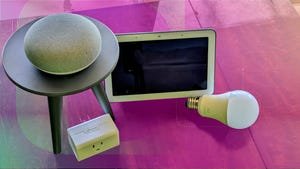
Best Google Smart-Home Devices in 2025
If you’re considering building and maintaining a smart home the right way, you don’t just need solid gadgets. You need a setup that makes managing and controlling all your gadgets convenient, which can only be possible with a strong ecosystem. There are quite a few out there, but one of the most reliable options is Google Home.
Google has gradually expanded its portfolio of smart home devices while opening up to more third-party devices.
Chris Wede/CNETGoogle’s lineup of smart speakers, displays, cameras and thermostats is designed to work in sync, and plenty of third-party devices play nice with Google, too. Whether you’re starting from scratch, upgrading your setup or looking for a smart home gift, there are plenty of great options.
We’ve spent hours testing and comparing the best Google Nest and Google Assistant-compatible devices so you don’t have to. From smart displays and speakers to lighting, locks and thermostats, this guide has everything you need to build a smarter, more connected home.
Pros
- More affordable
- Quick Gestures for hands-free control
- Edge-to-edge glass
- Bigger bass
Cons
- Sleep Sensing is only free for now
- Big bezel remains
- No camera means no video chat
The Google Nest Hub (formerly the Home Hub) is a great way to kick off a Google-centric smart home. It uses Google Assistant to respond to all of the same voice commands as a Google Home smart speaker. The touchscreen will show you extra info when you ask about the weather, search for restaurants and so on. Plus, you can use this smart home hub to watch videos or scroll through family pictures.
In fact, unique adaptive brightness sensors make the Nest Hub a great digital photo frame, as it adapts to both light levels and color temperature so it always looks like a physical photo in a frame. You can set it to play a scrolling slideshow of family pics as your screensaver. Google’s Soli is also onboard this second-gen model for Sleep Sensing and Quick Gestures like pausing media with an air tap in front of the display.
The Nest Hub is also a great kitchen helper, as it can walk you through recipes step by step and you can multitask while you cook. Set a timer, play music, add an ingredient to your shopping list — the Nest Hub will even keep your place in the recipe when you need to check it next. You can plug it in and set it up on your Wi-Fi network using the Google Home app and ask the Google Nest Hub any question you’d ask the original Google Home.
All of these voice control features make the Nest Hub useful in a lot of ways, but a simple control panel makes it the best choice for your central connected home device. Swipe down from the top for shortcuts that turn off the lights or let you check your smart home security cameras. You can then tap to see a room-by-room (living room, kitchen, etc.) overview of all of your devices. The control panel is well organized and helpful, particularly if you have family members who struggle to remember how to phrase voice commands. Now, they can just tap.
The Nest Hub is our favorite smart display overall and boasts a reasonable $100 price. It’s useful even if you don’t have a lot of smart home gadgets, but it’s indispensable if you want a smart home that works with Google Assistant.
If having an extra screen in your house would annoy you, the Google Nest Mini makes another good smart home starting point. Google’s small smart speaker is now in its second generation and offers all of the same Google Assistant-enabled voice commands as the rest, plus helpful extras like intercom functionality and stereo pairing with multiple Minis. Control compatible gadgets, search the web, play music and use its other features just by asking. The audio quality of the Nest Mini is surprisingly good, especially in this second-gen model.
The Nest Mini is also cute and comes in four colors (though Coral is currently out of stock). At $49, it’s the least expensive way to try smart home features without sacrificing voice control. The Nest Mini is also a good secondary device. If you put a Google Nest Hub in your kitchen, you can put a Nest Mini in a different room, and both will be able to control any compatible smart devices you set up. Even if they both hear you, only the closest one will respond.
Pros
- Room sensor included
- Smart schedule adjustments
- Beautiful design
- No C-wire required
The Nest smart thermostat has been a mainstay in the smart home world for years, and in 2024, we finally got a new Nest Learning Thermostat (4th Gen), which works exceptionally well. It is on the expensive side, but the thermostat’s overall design is stunning, with a large display that mimics weather conditions.
Sensors and intelligence also enable the thermostat to learn and adjust your climate preferences over time to keep you comfortable and save money. It integrates perfectly within the Google Home ecosystem with remote temperature sensors, one of which is included in the box, to help monitor climate and activity in the home.
Installation is a breeze, and it can be installed in nearly any home since it doesn’t require a C-wire, which is typically needed to work with some older homes or HVAC systems.
Pros
- Google’s great AI detection
- Free cloud video storage
- Magnetic base for easy charging
- Google Assistant and Alexa support
Cons
- Resolution could be higher for the price
Many smart cams work with Google Assistant and Google Home, the Nest Cam remains the best option if you want complete support. It’s reasonably affordable, easy to position and pop off the base for recharging, and it offers a couple of welcome bonuses.
First, the Nest Cam offers three free hours of cloud storage with no subscription required. Second, like many top cams, the Nest Cam has object detection for people, packages, vehicles and animals. Google’s version is accurate and completely free to use (recognizing faces will require a Nest Aware subscription starting at $8 per month).
Pros
- Great night vision and zoom
- 160-degree field of view
- Useful motion detection
- Built-in spotlight
Cons
- Expensive
- Needs a subscription for full benefits
- So many features may be overwhelming
The Arlo Pro 5s ranks high on several of our security camera lists, and for good reason. This 2K camera features a powerful zoom, bright spotlight, two-way audio, color night vision and a massive 160-degree field of view. Its IP65 weather resistance can handle a typical rain shower just fine.
We’re also fans of the Arlo app, which makes setup and control easy. Many features are locked behind an Arlo Secure subscription starting at $10 per month, so you’ll seriously want to consider a subscription plan with this camera. The good news is that higher-tier plans can unlock advanced custom object detection, which no other cameras are offering right now.
ADT’s integration with Google Nest is complete with the 2024 arrival of ADT Plus, a new version of ADT’s home security system that’s built from the ground up to work with Google Home, Nest devices and Google Assistant. You can control your Nest devices using Google Home or the ADT Plus app. ADT Plus can also use Nest’s familiar face technology for its Trusted Neighbor passes, which can unlock a smart lock when the Nest Doorbell recognizes a family member or pet sitter.
ADT’s kit has also received a minor revamp, making sensors more compact than ever. Displays like the Nest Hub Max also work well with the system. ADT’s required subscription starts at $25 a month, which includes one base, four door/window sensors, a motion sensor, and four stickers.
Pros
- Smaller design.
- Wi-Fi built in.
- Smoother mechanics.
- Works with Google, Alexa and Siri.
Cons
- Still expensive.
- Shorter battery life.
Speaking of locking down your home, the easy-to-install August Wi-Fi smart lock fits over your existing deadbolt. Built-in Wi-Fi lets you control it remotely and with voice recognition, so you can tell Google Assistant to lock your door.
The August Wi-Fi smart lock has lots of features, including open-close sensors so you can check to make sure you pulled the door shut when you were on your way out. August is responsive and reliable as well, making the Wi-Fi smart lock a good choice if you want to put Google Assistant in charge of your smart lock, door and entryway.
Wrapping this up with another one from Nest, the Nest Doorbell is a top-notch wireless device with excellent specs and unique perks. While its predecessor Nest Hello (now called the Nest Doorbell (wired)) is still available for purchase, the battery-powered option has a more impressive design and better performance, making it an upgrade on almost every level.
The Nest Doorbell with battery is an affordable $180 and offers a slew of neat features: two-way talk, high-def resolution, a 145-degree field of view with a 3:4 aspect ratio, smart alerts, facial recognition and a few other cool perks. And for icing on the cake, many of these best features come right out of the box — no monthly subscription to Nest Aware is necessary.
There are some video doorbells I like more (namely the Arlo Wire-Free), but the Nest Doorbell (battery) is a solid device. If you’re a Google loyalist or shopping for a wireless device with smart features without the monthly fees, then this video doorbell might be for you.
Pros
- Affordable
- Good range of tunable whites
- Matter compatible
- Can act as a motion sensor
Cons
- Motion setup can be tricky
- Matter is hit and miss
Wiz is a smart lighting brand that’s greatly improved its products and features over the past few years. The smooth and consistent connectivity, affordability and Spacesense motion sensor make these lights stand out from others.
Connecting these lights to your Google Home system is as easy as following a few prompts in the app. Once connected, you get all the expected features of smart lights, including remote control from anywhere with an internet connection, brightness controls, scheduling, automations and more. The most interesting feature is Spacesense.
This feature helps the bulb act as its motion sensor and allows it to turn on and off whenever movement is detected. Using the mobile app, you can link multiple Wiz bulbs and have them all react in sync when motion has been detected. For the features these bulbs offer, at only $9 for a three-pack, it’s hard to beat.
A smart plug is a great way to efficiently add connectivity to dumb devices. Plug in a lamp or fan, and you’ll be able to control it with an app. The TP-Link Kasa Smart Plug offers smartphone app controls and Google Assistant compatibility. Plus, the design is attractive and doesn’t block adjacent outlets.
It won’t monitor energy, but the smart plug lets you control an old-fashioned floor fan with your voice for a reasonable price. Like most smart plugs, it works with a 2.4GHz Wi-Fi network connection.
