

Our 8 Favorite Emergency Alert Apps
If you’re stuck in an emergency or would like to prepare for an impending disaster, below are the apps you need on your phone or tablet. Whether it be a flood, hurricane, fire, earthquake, tornado, etc., you need the right tools on hand to deal with what’s happening.
Emergencies are often entirely unexpected and life-threatening. Grab the apps listed here (they all work on Android and iOS) as soon as you can so you’ve got what you need to weather the storm. We also recommend keeping a portable phone charger ready to go in case you lose power.
Life360: Family Location Tracker
What We Like
-
Easy to use for most ages.
-
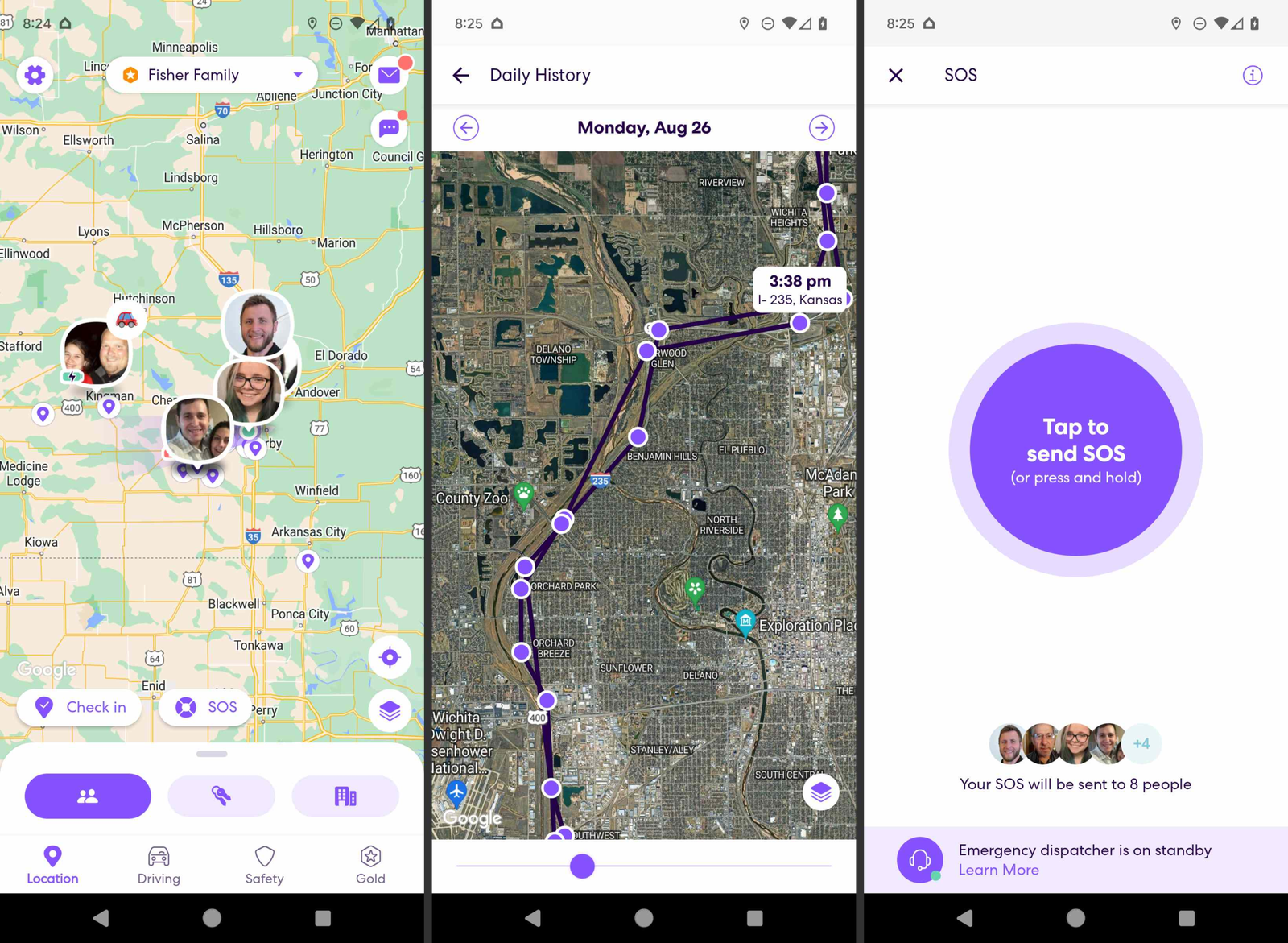
Trigger the SOS button to call family and emergency services.
-
Timely location-based alerts.
What We Don’t Like
-
Free version has limited place alerts.
-
No roadside assistance for free users.
Location tracking is essential during any emergency, and Life360 is the best way to do it. It’s one of our favorite phone tracking apps to monitor the whereabouts of friends and family. It lets you get alerts when they leave and arrive at the locations that you set up.
Constant location monitoring might seem excessive for some people, but you’ll be happy you installed it when an emergency strikes. For example, if you hear about a school emergency or a storm in the town where your daughter lives, anybody in the group can pull up the app to see where everybody else is located.
If there’s a storm brewing where a loved one lives or will be visiting, you can even make a new place alert right there so that you’ll know the second they cross that path.
Life360 has a free plan with basic features for Android and iOS users.
Download For:
CrimeRadar: AI-Summarized Public Safety Alerts
What We Like
-
Listen to official dispatch audio.
-
Set up alerts for any location.
-
Fast notifications.
-
Users can verify accurate incidents.
What We Don’t Like
-
Often shows duplicate entries.
-
Can be a little difficult to navigate.
-
Occasional inaccurate AI summaries.
If there’s an emergency, there are also usually sirens going off around you and various first-responder calls being made. CrimeRadar is indispensable for learning what’s happening in real time.
This app will keep you informed with location-based alerts and a handy map that lets you browse any supported area. Select any alert to hear the dispatch audio and read an AI summary of the call.
Incidents are labeled in categories like fire, theft, weapons, medical emergency, and more. You can filter the results by category and risk level to quickly narrow in on what’s going on. There’s also a date filter that can reveal incidents from just the last 24 hours or up to two weeks ago.
This app is ad-supported and runs on Android and iPhone.
Download For:
AccuWeather: Alerts for All Weather Types
What We Like
-
Tracks lots of threats.
-
Includes severe weather alerts.
-
Extremely detailed.
What We Don’t Like
-
Not all features are free.
-
Lots of options; can become overwhelming.
Most disasters are weather-related, and AccuWeather is one of the best all-purpose weather apps. It provides on-time emergency alerts for all sorts of events, making it a great hurricane tracker app and a general weather app for showing when it will snow, rain, flood, etc.
You can monitor multiple locations at once, see the weather as it stands right now, and view the hourly forecast or extended forecast for the week and month. The radar map is extremely detailed and supports lots of overlays, like for the past or future radar, temperature, dangerous thunderstorms, tropical storms, snowfall, and more.
Staying updated on the most recent weather news is also possible with the AccuWeather app.
Android and iOS users can install the app. It also works on iPad and smartwatches.
Download For:
FEMA: Homeland Security’s Disaster Alert App
What We Like
-
Extremely customizable alert types.
-
Supports English and Spanish.
-
Includes an emergency shelter finder.
-
Provides related news stories.
What We Don’t Like
-
Stale user interface.
FEMA, the Federal Emergency Management Agency, is an agency in the US that’s part of the Department of Homeland Security. The mobile app from FEMA lets you get real-time alerts concerning all sorts of disasters.
When you add a new location, you have full control (really) over what to monitor: flooding, coastal and lakeshore flooding, severe weather (thunderstorms and tornadoes), tropical weather (hurricanes and typhoons), winter weather (snow, ice, freezing rain), avalanches, fire, marine weather, public hazard alerts, and more. These are hyperspecific with subsections for you to choose from; e.g., pick just lake wind advisory alerts instead of general high wind warnings.
Unlike most similar apps, FEMA also delivers emergency alerts regarding evacuations, civil danger, child abductions, hazardous materials, nuclear power plants, radiological hazards, 911 phone outages, and more.
Numerous ‘planning ahead’ guides are also included so that you’re informed about what to do to protect your family from a disaster, how evacuations work, items to include in a pet emergency kit, etc.
Android and iOS tablets and phones can install this app.
Download For:
Nextdoor: Location-Based Social Network
What We Like
-
It’s easy to communicate with neighbors you might not know.
-
Anybody can post emergency alerts.
-
Great for user-driven, local news.
What We Don’t Like
-
Usefulness is limited in some areas due to lack of use and small populations.
-
Isn’t primarily an emergency alert or preparedness app.
-
Often overrun by job offers and requests.
Community is important during an emergency. Nextdoor is a social network for your community that can also serve as an emergency broadcast alert app. If someone in your area reports an emergency through the app, you’ll be the first to know about it.
Once you’ve connected with your neighborhood through the app, you can communicate with people to find shelter, organize the sharing of food and water, get updates on the emergency, etc. Just be sure to see our tips on staying safe while using Nextdoor.
It runs on iPhone, iPad, and Android devices.
Download For:
First Aid: Disaster Readiness App From American Red Cross
What We Like
-
Step-by-step guides for emergency situations like fractures, seizures, and heart attacks.
-
Works without internet.
-
Read in English or Spanish.
-
Free from clutter.
What We Don’t Like
-
Some information is extremely basic and obvious.
The Red Cross First Aid app is one of the best emergency apps for clear health-related instructions. It’s important for situations where you can’t necessarily access a hospital right away, although it includes a list of nearby hospitals if you need one. You can use the app to learn how to control bleeding, treat a broken bone, perform CPR, etc.
The app is primarily centered around learning what to do should one of those things occur, or something else like allergies, asthma attacks, burns, choking, distress, heat strokes, and more.
Quizzes are available to test your knowledge of these things so you can prepare ahead of time. The hospital list includes easy access to directions, the facility’s phone number, and its website.
First Aid runs on Android and iOS phones and tablets.
Download For:
Zello: Walkie-Talkie App for Quick Calls and Group Coordination
What We Like
-
Ideal for all ages.
-
Some channels are built specifically for disasters.
-
Car mode for safe use while driving.
What We Don’t Like
-
The service is sometimes offline and unreachable.
-
Too easy to drain your battery.
-
Hard to find public channels; must know the exact name.
Zello is a walkie-talkie app that makes staying in contact with individuals and groups of people really easy. It’s also helpful for facilitating communication between kids and the elderly who might know how to use a phone properly.
You can create private channels so that only certain people can access the messages, but there are also public channels anybody can join. When you’re actively connected to a Zello channel, you can lock your phone and still hear it when someone talks, making this especially helpful during emergencies.
iPhone and Android mobile devices can run Zello.
Download For:
GasBuddy: Gas Station Locator
What We Like
-
Several filtering options for finding stations.
-
Find locations that have a phone, food, and other amenities.
-
Get cheaper gas with rewards.
What We Don’t Like
-
Gas price updates aren’t live, but rely on the community.
-
The app includes advertisements.
Shopping for the cheapest gas station isn’t something you have time to do during an emergency, but you still need gas. GasBuddy is the easiest way to find the cheapest gas pumps around where you are or where you’re headed, and you can even save money when you fill up.
You can sort the gas stations by not only price and distance, but also filter by fuel type and locate stations that have amenities like a car wash, propane, air pump, service station, restroom, 24/7 access, ATM, payphone, restaurant, and more.
There’s an Android app and one for iPad and iPhone.
Download For:
Thanks for letting us know!
