

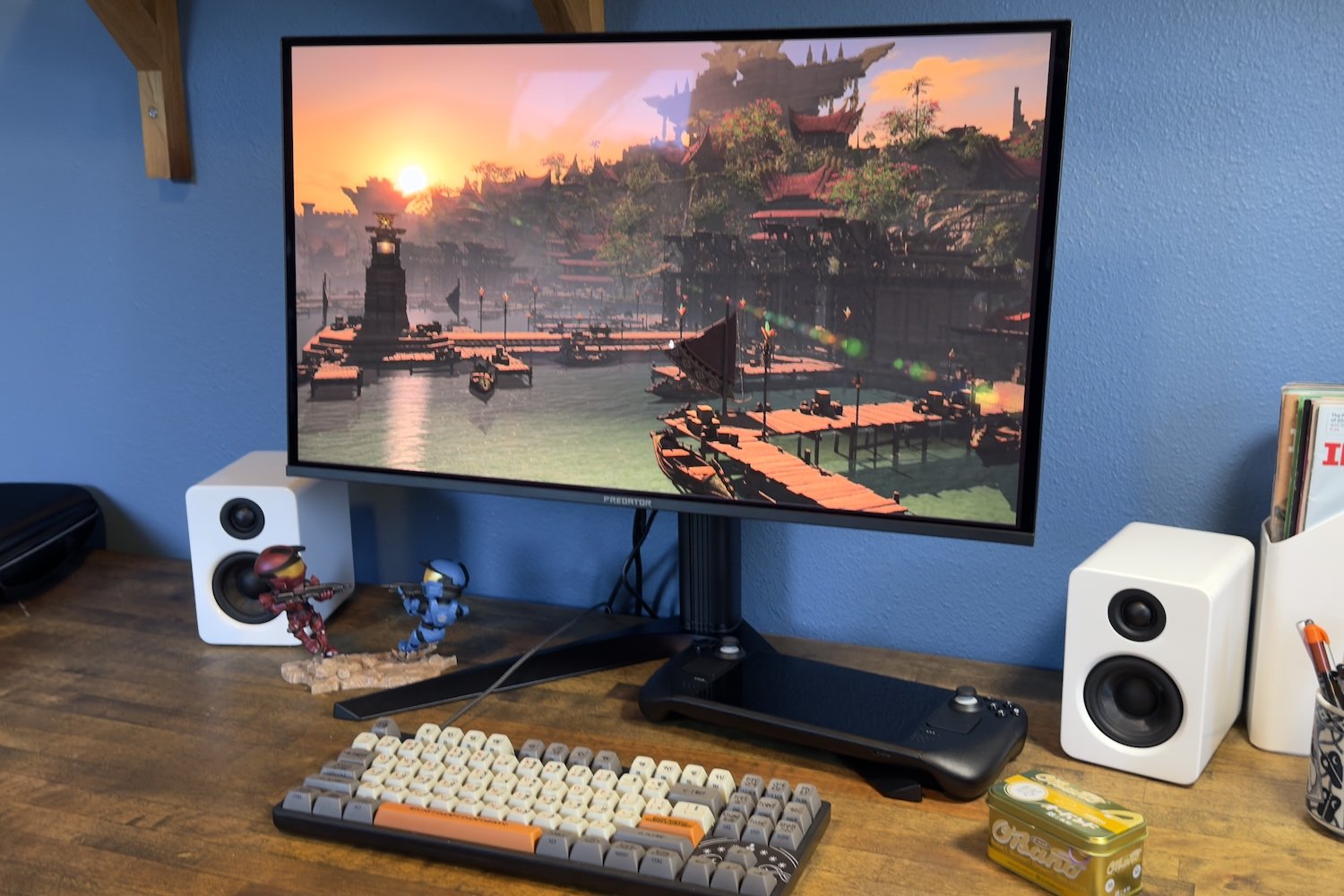
Acer Predator X27U F5 review: A more affordable 500Hz OLED monitor
Image: Matthew Smith / Foundry
At a glance
Expert’s Rating
Pros
- Excellent contrast and color performance
- More video connectivity than competitors, plus USB-C
- Stellar motion clarity at 500Hz refresh rate
- Low MSRP for a 1440p, 500Hz QD-OLED
Cons
- Design is basic, with no RGB-LED lighting
- Adjustable stand is larger than it needs to be
- Lacks some extras, like a proximity sensor
Our Verdict
The Acer Predator X27U F5 is yet another 1440p 500Hz OLED monitor that delivers great motion clarity, and it cuts some less essential features to lower the price.
Price When Reviewed
This value will show the geolocated pricing text for product undefined
Best Pricing Today
Best Prices Today: Acer Predator X27U F5
$799.99
The arrival of 1440p 500Hz QD-OLED monitors in the fall of 2025 has been fascinating to watch. A monitor with a refresh rate this high would’ve seemed exotic a couple years ago, but now you have roughly a half-dozen options to choose from. Acer’s entry into the crowd chooses to cut back some features to provide the 500Hz panel at a lower MSRP.
Read on to learn more, then see our roundup of the best monitors for comparison.
Acer Predator X27U F5 specs and features
The Acer Predator X27U F5’s basic specifications are familiar by now, as it’s part of a fleet of new 500Hz QD-OLED monitors arriving on store shelves. These monitors achieve an extraordinary refresh rate while sticking to a more modest resolution.
- Display size: 26.5-inch 16:9 aspect ratio
- Native resolution: 2560×1440
- Panel type: QD-OLED
- Refresh rate: 500Hz
- Adaptive sync: Yes, AMD FreeSync Premium Pro
- HDR: VESA DisplayHDR True Black 500
- Ports: 2x DisplayPort 2.1, 2x HDMI 2.1, 1x USB-C with DisplayPort and 65 watts of Power Delivery, 1x USB-B upstream, 2x USB-A downstream, 1x 3.5mm audio
- Audio: 2x 5-watt speakers
- Extra features: Headphone stand
- Price: $799.99 MSRP
One aspect of the Predator X27U F5 that stands out, though, is connectivity. It has two DisplayPort ports, two HDMI ports, plus USB-C with DisplayPort, for a total of five video inputs. Most competitors only have three, and many lack USB-C.
Acer’s Predator X27U F5 is shipping with an MSRP of $799.99. That’s lower than most alternatives: The Samsung Odyssey OLED G6 lists an MSRP of $999.99, the Asus ROG Strix XG27AQDPG is $899.99, and the MSI MPG 271QR is also $899.99. Sales are frequent, though, so keep an eye on current deals before you make a purchase—pricing can drop to several hundred dollars under MSRP.
Acer Predator X27U F5 design
The Acer Predator X27U F5’s design is nothing special even by the standards of computer monitors, which rarely make a bold design statement. From the front it’s a simple slab of glossy glass with thin black bezels and an almost unnoticeable Predator logo. It’s not much different from the rear, as the monitor is mostly built from basic, though sturdy, black plastics.
There’s nothing wrong with a simple approach. Personally, I tend to prefer subtle design, as I rarely see the rear of my monitor once it’s on my desk. Still, you should note the X27U lacks even basic RGB-LED lighting, a feature common at this price point. It does have a flip-out headphone stand on the stand neck, though its location makes hard to reach.
Matthew Smith / Foundry
I’m not a fan of the stand. It’s sturdy enough, but the stand has a deep neck and a wide base that takes up more desk space than necessary, particularly for a 27-inch monitor. The stand might be a problem if you have a narrow desk, as it places the display closer to the user than most stands that ship with 27-inch monitors.
The stand provides the usual range of height, tilt, and swivel adjustment. It can also pivot 90 degrees for use in portrait orientation. All of this is typical at this price point. The VESA mount differs slightly from the norm, as a 75x75mm VESA mount is used instead of the more common (among monitors, at least) 100x100mm VESA mount. Most monitor stands, arms, and wall mounts support both, though, so it’s not much disadvantage.
Acer Predator X27U F5 connectivity
Connectivity is an area where the Predator X27U F5 stands apart from competitors. It has two DisplayPort 2.1 ports, two HDMI 2.1 ports, plus a USB-C port with DisplayPort and 65 watts of Power Delivery. That’s a total of five video inputs; most direct competitors only provide three. The dual DisplayPort inputs are also unusual, as most monitors offer just one.
The wide range of video connectivity will stand out if you’re using the Predator X27U F5 like both a monitor and TV. With this many ports you can connect two game consoles, two desktop PCs, and a laptop.
The USB-C port connects to two downstream USB-A ports. These can also be driven by a USB-B port, and the monitor has a KVM switch. It would’ve been nice to see a USB-C downstream port as well, but most competitors also lack that feature.
The Acer Predator X27U F5 has a total of five video inputs; most direct competitors only provide three.
Acer Predator X27U F5 menus and features
The Acer Predator X27U F5’s on-screen menu system is controlled by a responsive joystick centered behind the lower bezel. The menu system is well organized and features are well-labeled. I can nitpick about the font size, which is a bit small, but it’s a good menu system.
There are quite a few options to tinker with. The monitor has a number of color modes, gamma, and color temperature presets. They’re not perfect (there’s no DCI-P3 or AdobeRGB color mode and the color temperature presets are vague values such as “Warm” instead of exact values like “6500K”), but they’re not bad. Further image calibration is available through six-axis color adjustment.
Matthew Smith / Foundry
Acer also provides a range of gaming features like on-screen crosshairs, a refresh rate counter, a dark stabilizer, and the option to decrease the screen’s viewable area if you want to simulate a smaller monitor (which can be useful in certain esports titles or some retro games).
One feature notably absent here, but found on competitors such as Asus ROG Strix XG27AQDPG, is a proximity sensor. A handful of OLED monitors now include this as a way to combat OLED burn-in, as the sensor will automatically dim or turn off the display when you’re away from your desk.
Acer Predator X27U F5 audio
Acer provides a pair of 5-watt speakers with the Acer Predator X27U F5. They’re not great, but they’re not the worst, and that alone is high praise in this category. Most monitors in this category do not provide speakers at all. I wouldn’t want to use the built-in speakers for most games and music, but they’re fine if I just want to listen to ambient tunes at low volume, or want to play a game where audio isn’t the focus.
Acer Predator X27U F5 SDR image quality
The Acer Predator X27U F5 has a Samsung QD-OLED panel with 1440p resolution and a 500Hz refresh rate. This panel first appeared in monitors this fall, and most major manufacturers now have a monitor with it. In short, it’s a known quantity, and the Predator X27U F5 performs as expected—which is to say, it’s excellent.
Matthew Smith / Foundry
First up we have brightness, where the Predator X27U F5 delivers a result in excess of 300 nits. That’s towards the high side for an OLED monitor, though also something the latest QD-OLED panels are beginning to achieve with consistency.
A brightness of 300 nits is usually more than adequate and, in a dark room, you may end up using the Predator X27U F5 at just 20 or 30 percent of its maximum. The panel has a glossy finish, though, so bright room performance can still feel strained.
Matthew Smith / Foundry
Contrast is always great on OLED monitors, and the Predator X27U F5 is no exception.
The fact is that SDR contrast performance is maxed out here. It literally can’t get better than this. Contrast is expressed as a ratio that defines the difference between a display’s minimum and maximum luminance. But OLED monitors achieve a perfect minimum luminance of zero nits, which breaks the ratio.
In practical terms, that means the Predator X27U F5 delivers a sense of depth, immersion, and shadow detail you won’t find on any IPS-LCD or VA-LCD display. Even Mini-LED monitors can’t match it.
Matthew Smith / Foundry
Color gamut is also a strength for QD-OLED monitors, as they use a technology called Quantum Dots to boost color coverage. The result is an incredibly wide color gamut. That’s useful if you want to create content in wide color gamuts and also provides a vivid, saturated image in all other content you’ll view.
Matthew Smith / Foundry
Next up is color accuracy. Technically, the Acer Predator X27U F5 lags the pack here, but the color accuracy of OLED displays is generally so excellent that you’ll be hard pressed to notice any difference. I personally can’t tell a difference in color performance or accuracy between modern QD-OLED panels, even with them side-by-side.
The Acer Predator X27U F5 hit a gamma curve of 2.3, slightly off the target of 2.2, and a color temperature of 6400K, slightly off the target of 6500K. These again are subtle differences, though I personally do find the gamma curve noticeable. It means content will look ever so slightly darker than on a monitor that hits gamma 2.2. Most OLED monitors have the same gamma and color temperature performance, though.
Sharpness is not a perk for the Acer Predator X27U F5. The monitor’s 1440p resolution works out to about 110 pixels per inch across the 26.5-inch panel. That’s adequate but certainly not impressive for a modern monitor, as 4K panels are widely available even at much lower price points. While this will of course mean games and movies are a bit softer than at 4K, I find the downgrade most obvious on the Windows desktop, where small fonts and interface details can look a bit jagged and blocky.
In summary, there’s no surprises with the Acer Predator X27U F5, and that’s a positive. The image looks vivid, saturated, deep and immersive. It all adds up to a fantastic experience when playing games or watching movies in SDR.
Acer Predator X27U F5 HDR image quality
The Acer Predator X27U F5 is VESA DisplayHDR True Black 500 certified and has an HDR 1000 mode to achieve a promised maximum brightness of 1,000 nits. Like most monitors I test, the X27U F5 doesn’t quite get there, but it gets close and is generally very bright for an HDR monitor.
Matthew Smith / Foundry
As the graph shows, the Predator X27U F5’s performance lands in the same range as most modern OLED displays. You can expect a peak brightness close to 1,000 nits in HDR, but only when a fraction of the display is brightly lit. HDR brightness drops significantly when larger areas of a display are lit. The good news is that bright, quick HDR highlights are often what contribute most to the sense of HDR pop, particularly in PC games, so the overall level of HDR performance is great.
One feature missing from the X27U F5’s HDR mode is brightness adjustment. HDR typically gives content control over brightness, but some modern monitors provide an override. That’s handy if you are playing in a very dark space, or you are playing a game with an uncomfortably bright HDR presentation. The lack of HDR brightness control on the X27U F5 isn’t a deal breaker, but I would’ve preferred to see it.
Acer Predator X27U F5 motion performance
The Acer Predator X27U F5 has a 500Hz refresh rate which, of course, is fantastic for motion clarity and responsiveness. A 500Hz refresh rate is way higher than the old 60Hz standard, of course, and also twice that of a 240Hz display.
It makes a noticeable difference, at least in games capable of hitting up to 500 FPS (which is necessary to enjoy the faster refresh rate’s benefits). Fast-moving objects are extremely crisp, with even details a few pixels in size visible, and quick camera pans in 3D games look hardly different from standing still. The improvement in motion clarity will be shocking if you are coming from a 60Hz display, and likely still noticeable even if upgrading from a 240Hz display.
One thing missing from the Predator X27U F5 is a backlight strobing mode, such as ELMB on the Asus ROG Strix XG27AQDPG or MPRT on the MSI MPG 271QR. Backlight strobing can improve motion clarity at lower refresh rates, and its absence may turn off some gamers.
Adaptive sync is supported through AMD FreeSync Premium Pro, though Nvidia G-Sync was detected when I connected the monitor to an RTX 5050 laptop. I would have preferred to see both FreeSync and G-Sync badges on the box, though.
Shoppers should keep in mind that the X27U F5’s motion clarity is not much different than other monitors with the same QD-OLED panel. This arguably works to the X27U F5’s favor, because it’s on the lower end of pricing.
Should you buy the Acer Predator X27U F5?
The Acer Predator X27U F5 is another great entry in the swelling ranks of QD-OLED monitors with 1440p resolution and a 500Hz refresh rate. It has outstanding contrast and color performance and superb motion clarity.
Compared to its peers, such as Samsung Odyssey G6 OLED and Asus ROG Strix XG27AQDPG, the X27U F5 is less eye-catching and has an inferior stand. However, the Acer Predator X27U F5 strikes back with a competitive MSRP of $799.99 (though the Samsung is currently less expensive on sale) and more connectivity including a total of five video inputs.
Best Prices Today: Acer Predator X27U F5
$799.99
Author: Matthew S. Smith, Contributor, PCWorld
Matthew S. Smith is a freelance technology journalist with 15 years of experience reviewing consumer electronics. In addition to PCWorld, his work can be found on Wired, Ars Technica, Digital Trends, Reviewed, IGN, and Lifewire. Matthew also covers AI and the metaverse for IEEE Spectrum and runs Computer Gaming Yesterday, a YouTube channel devoted to PC gaming history.
