Close Menu

    Subscribe to Updates

    Get the latest creative news from FooBar about art, design and business.

    What's Hot

    Manor Lords publisher Hooded Horse’s CEO argues game agreements violate contract principles

    Fable set for Autumn 2026 launch on Playstation as well as Xbox and PC

    Starbreeze reportedly makes another round of layoffs

    Facebook X (Twitter) Instagram
    • Artificial Intelligence
    • Business Technology
    • Cryptocurrency
    • Gadgets
    • Gaming
    • Health
    • Software and Apps
    • Technology
    Facebook X (Twitter) Instagram Pinterest Vimeo
    Tech AI Verse
    • Home
    • Artificial Intelligence

      ChatGPT can embrace authoritarian ideas after just one prompt, researchers say

      January 24, 2026

      Ashley St. Clair, the mother of one of Elon Musk’s children, sues xAI over Grok sexual images

      January 17, 2026

      Anthropic joins OpenAI’s push into health care with new Claude tools

      January 12, 2026

      The mother of one of Elon Musk’s children says his AI bot won’t stop creating sexualized images of her

      January 7, 2026

      A new pope, political shake-ups and celebs in space: The 2025-in-review news quiz

      December 31, 2025
    • Business

      New VoidLink malware framework targets Linux cloud servers

      January 14, 2026

      Nvidia Rubin’s rack-scale encryption signals a turning point for enterprise AI security

      January 13, 2026

      How KPMG is redefining the future of SAP consulting on a global scale

      January 10, 2026

      Top 10 cloud computing stories of 2025

      December 22, 2025

      Saudia Arabia’s STC commits to five-year network upgrade programme with Ericsson

      December 18, 2025
    • Crypto

      Bitcoin Flat at $89,000, but Charts Warn Buyers Are Losing Ground

      January 24, 2026

      Spacecoin Launches with a 65% Rally Post-Airdrop, But Will the Hype Hold?

      January 24, 2026

      Solana’s New $500 Smartphone Token Skyrocketed After Launch

      January 24, 2026

      Ex-Olympian Turns Himself In Over Accusations of Running a Crypto Drug Network

      January 24, 2026

      Jeff Bezos Denies Polymarket Claim, Rekindling Debate Over Fake News on Betting Platforms

      January 24, 2026
    • Technology

      Mini PC with AMD Ryzen 9: Is the Geekom A7 Max Edition 2026 worth it?

      January 24, 2026

      Cloud risk with BitLocker: Microsoft occasionally hands over BitLocker keys to the FBI

      January 24, 2026

      This one disadvantage really brings down the new Dynabook Tecra A65-M

      January 24, 2026

      Following cancelled Ubisoft games, employees reportedly set to mass quit before layoffs

      January 24, 2026

      How to use Google Photos’ new Me Meme feature

      January 24, 2026
    • Others
      • Gadgets
      • Gaming
      • Health
      • Software and Apps
    Check BMI
    Tech AI Verse
    You are at:Home»Technology»Tired of seeing Low Battery pop-up on iPhone? Here are 5 simple display settings to improve your battery life
    Technology

    Tired of seeing Low Battery pop-up on iPhone? Here are 5 simple display settings to improve your battery life

    TechAiVerseBy TechAiVerseJanuary 21, 2026No Comments5 Mins Read0 Views
    Facebook Twitter Pinterest Telegram LinkedIn Tumblr Email Reddit
    Tired of seeing Low Battery pop-up on iPhone? Here are 5 simple display settings to improve your battery life
    Share
    Facebook Twitter LinkedIn Pinterest WhatsApp Email

    Tired of seeing Low Battery pop-up on iPhone? Here are 5 simple display settings to improve your battery life

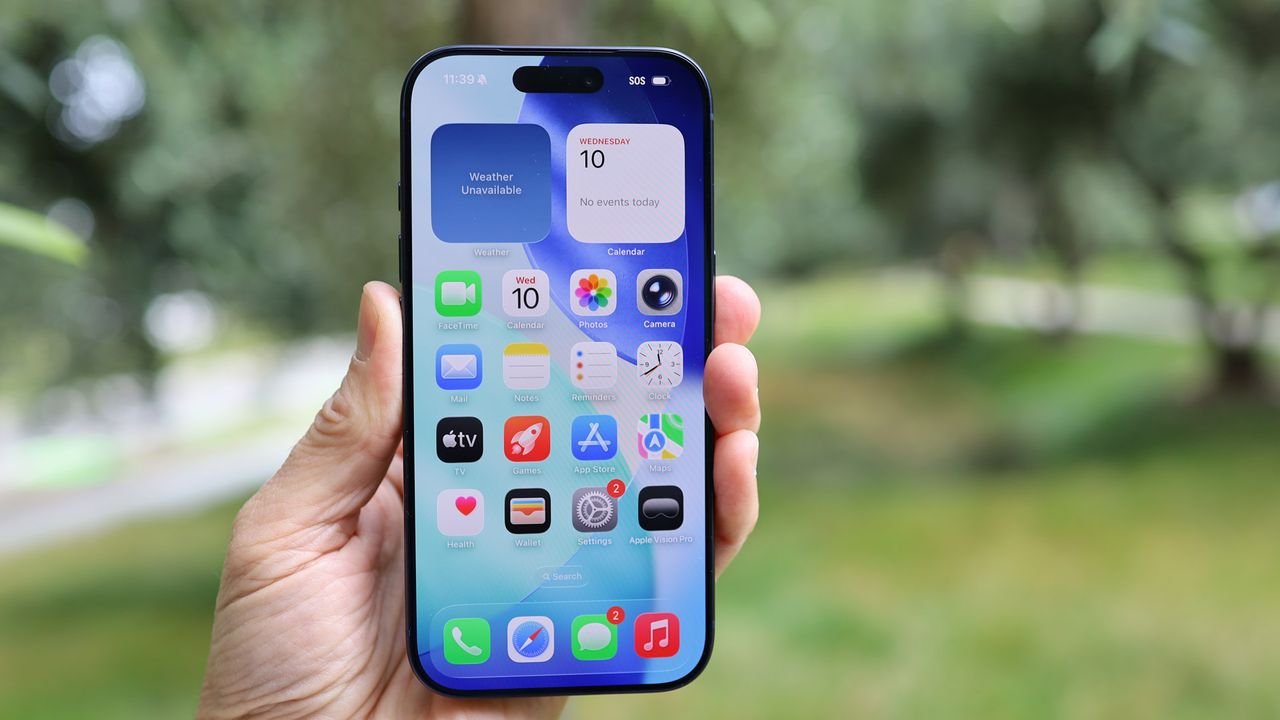
    (Image credit: Lance Ulanoff / Future)

    One of the best parts of using an iPhone is getting to use its display – Apple’s mobile screens are renowned for their sharpness, color accuracy, and, on ProMotion-enabled devices, smooth refresh rates.

    However, powering that display can drain a lot of battery life – especially if you’re outdoors or in another environment that requires high brightness.

    Keep scrolling for five simple and easy display settings you can change to extend your iPhone’s battery life.

    Turn down the brightness

    Modern iPhones have very bright screens that can really put pressure on the battery (Image credit: Jacob Krol/Future)

    Turning down your display brightness is a tried-and-tested way to conserve battery life on any phone, including iPhones. It might be a well-known tip, but it’s as true now as it ever was, especially since maximum brightness levels have steadily increased over the years.

    Luckily, it’s incredibly easy to turn down your brightness. Just head to the Control Center by swiping down on the top-right corner of the phone’s screen, and pull the slider with a sun icon down to a lower level.

    Your phone’s backlight is a major power draw, so keeping brightness low (but still visible enough that you aren’t straining your eyes) is a great way to conserve some battery.

    Sign up for breaking news, reviews, opinion, top tech deals, and more.

    Disable auto-brightness

    Taking an iPhone outside can cause the auto-brightness feature to kick in, drawing more power from the battery (Image credit: Lance Ulanoff / Future)

    Turning down your display brightness can get annoying after a while, as your iPhone will automatically adjust brightness based on ambient light.

    Luckily, you can head to Settings > Accessibility > Display & Text Size to find and disable the Auto-brightness switch, which stops your iPhone from automatically changing the brightness in response to ambient light levels.

    This allows you to have much greater control over your brightness level and means you won’t automatically use more battery power when using your phone in brighter rooms or outdoors.

    Low Power Mode

    Every iPhone user knows this pop-up, but Low Power Mode really can save battery by altering display behaviour and performance (Image credit: Shutterstock / boyhey)

    optionsNaturally, Low Power Mode reduces the amount of power your iPhone consumes – and part of the way it does so is by altering the way your display behaves. You’ll see pop-ups with the option to enable low-power mode at 20%, 10%, and 5% battery life, or you can enable it manually in the Control Center.

    As well as limiting your iPhone’s performance, Low Power Mode dims the screen, reduces the effect of auto-brightness, turns off the display after 30 seconds of inactivity, and, on ProMotion-enabled phones, limits the adaptive refresh rate to 1-60Hz rather than 1-120Hz.

    For ProMotion-enabled iPhones, you can manually lock the refresh rate to 60Hz by heading to Settings > Accessibility > Motion and selecting the Frame Rate option.

    Reduce the Auto Lock time

    Reducing the Auto Lock time can save battery life and keep your iPhone private (Image credit: Jacob Krol/Future)

    You can also manually adjust how long it takes for your iPhone to automatically go to sleep when left inactive, ensuring the screen doesn’t stay on and drain power if you set your phone down without pressing the lock button.

    You can find this option in Settings > Display & Brightness, under the Auto Lock menu. As with the brightness slider, this gives you more control over your iPhone’s behavior and allows for a quicker Auto Lock without using Low Power Mode (which also affects phone performance).

    Dark Mode

    Dark Mode makes compatible UI elements darker in iOS (Image credit: Apple)

    Dark Mode flips the iPhone’s usual bright color scheme, replacing white and lighter colors with black and darker colors in most menus and default UI elements.

    This especially reduces power consumption on iPhones with OLED displays, which every iPhone has had since the iPhone X, except the iPhone XR and the base-model iPhone 11. OLED displays don’t illuminate black pixels, which makes Dark Mode a useful way to conserve battery power.

    Those using older iPhones with LCD panels may not notice much difference in battery life with Dark Mode switched on, as LCDs illuminate all pixels regardless of color.

    To activate Dark Mode, you can either head to the Control Center, hold down the brightness slider, and tap the Dark Mode icon that appears, or head to Settings > Display & Brightness and tap Dark in the Appearance tab.

    Hopefully, these five tips can help you get more out of your iPhone’s battery life – and if you’re thinking of picking up a new Apple handset yourself, be sure to check out our guide to the best iPhones.


    Follow TechRadar on Google News and add us as a preferred source to get our expert news, reviews, and opinion in your feeds. Make sure to click the Follow button!

    And of course you can also follow TechRadar on TikTok for news, reviews, unboxings in video form, and get regular updates from us on WhatsApp too.

    Jamie is a Mobile Computing Staff Writer for TechRadar, responsible for covering phones and tablets. A lifelong tech-obsessive, Jamie began his writing career as a music blogger before studying journalism at Goldsmiths College, and joined TechRadar in 2024. He thinks the iPhone 5S is the greatest phone of all time, but is currently an Android user.

    As well as reporting on the latest in mobile hardware, software, and industry developments, Jamie specialises in features and long-form pieces that dive into the latest phone and tablet trends. He can also be found writing for the site’s Audio and Streaming sections from time to time, or behind the decks as a DJ at local venues around London.

    community guidelines.

    “>

    You must confirm your public display name before commenting

    Please logout and then login again, you will then be prompted to enter your display name.

    Share. Facebook Twitter Pinterest LinkedIn Reddit WhatsApp Telegram Email
    Previous ArticleYounger workers are more worried about AI taking their jobs
    Next Article “It is genuinely hard; we need to protect vulnerable users, while also making sure our guardrails still allow all of our users to benefit from our tools” — Sam Altman bemoans the difficulty of keeping ChatGPT safe in contentious debate with Elon Mus
    TechAiVerse
    • Website

    Jonathan is a tech enthusiast and the mind behind Tech AI Verse. With a passion for artificial intelligence, consumer tech, and emerging innovations, he deliver clear, insightful content to keep readers informed. From cutting-edge gadgets to AI advancements and cryptocurrency trends, Jonathan breaks down complex topics to make technology accessible to all.

    Related Posts

    Mini PC with AMD Ryzen 9: Is the Geekom A7 Max Edition 2026 worth it?

    January 24, 2026

    Cloud risk with BitLocker: Microsoft occasionally hands over BitLocker keys to the FBI

    January 24, 2026

    This one disadvantage really brings down the new Dynabook Tecra A65-M

    January 24, 2026
    Leave A Reply Cancel Reply

    Top Posts

    Ping, You’ve Got Whale: AI detection system alerts ships of whales in their path

    April 22, 2025636 Views

    Lumo vs. Duck AI: Which AI is Better for Your Privacy?

    July 31, 2025240 Views

    6.7 Cummins Lifter Failure: What Years Are Affected (And Possible Fixes)

    April 14, 2025140 Views

    6 Best MagSafe Phone Grips (2025), Tested and Reviewed

    April 6, 2025111 Views
    Don't Miss
    Gaming January 24, 2026

    Manor Lords publisher Hooded Horse’s CEO argues game agreements violate contract principles

    Manor Lords publisher Hooded Horse’s CEO argues game agreements violate contract principles “One of the…

    Fable set for Autumn 2026 launch on Playstation as well as Xbox and PC

    Starbreeze reportedly makes another round of layoffs

    US video game spend up 3% in December, fuelled in part by 24% increase in subscription services | US Monthly Charts

    Stay In Touch
    • Facebook
    • Twitter
    • Pinterest
    • Instagram
    • YouTube
    • Vimeo

    Subscribe to Updates

    Get the latest creative news from SmartMag about art & design.

    About Us
    About Us

    Welcome to Tech AI Verse, your go-to destination for everything technology! We bring you the latest news, trends, and insights from the ever-evolving world of tech. Our coverage spans across global technology industry updates, artificial intelligence advancements, machine learning ethics, and automation innovations. Stay connected with us as we explore the limitless possibilities of technology!

    Facebook X (Twitter) Pinterest YouTube WhatsApp
    Our Picks

    Manor Lords publisher Hooded Horse’s CEO argues game agreements violate contract principles

    January 24, 20260 Views

    Fable set for Autumn 2026 launch on Playstation as well as Xbox and PC

    January 24, 20260 Views

    Starbreeze reportedly makes another round of layoffs

    January 24, 20260 Views
    Most Popular

    A Team of Female Founders Is Launching Cloud Security Tech That Could Overhaul AI Protection

    March 12, 20250 Views

    7 Best Kids Bikes (2025): Mountain, Balance, Pedal, Coaster

    March 13, 20250 Views

    VTOMAN FlashSpeed 1500: Plenty Of Power For All Your Gear

    March 13, 20250 Views
    © 2026 TechAiVerse. Designed by Divya Tech.
    • Home
    • About Us
    • Contact Us
    • Privacy Policy
    • Terms & Conditions

    Type above and press Enter to search. Press Esc to cancel.