

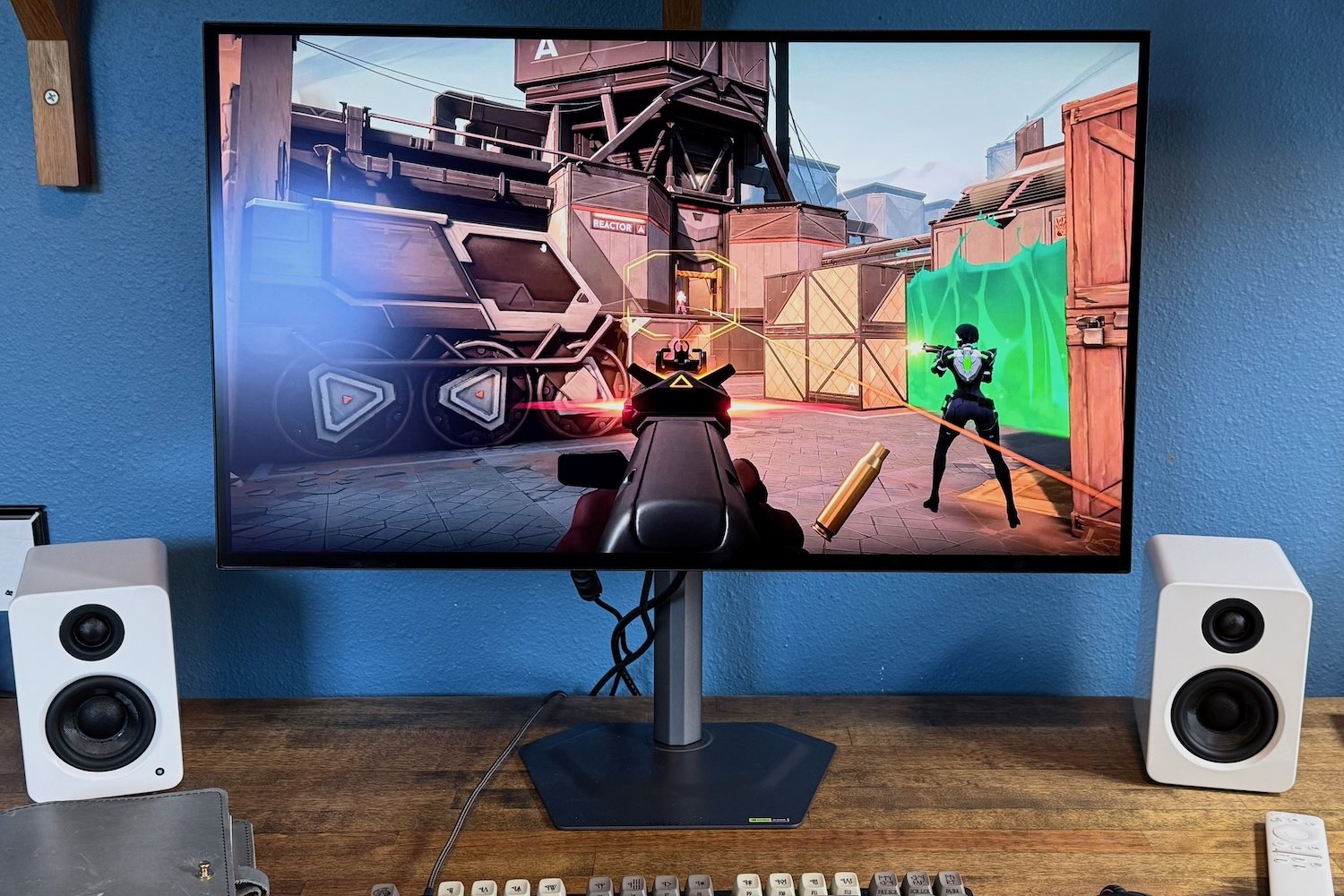
Gigabyte MO27Q28G review: A great entry-level OLED monitor
Image: Matthew Smith / Foundry
At a glance
Expert’s Rating
Pros
- Slim yet functional stand
- High SDR brightness for an OLED display
- Excellent contrast and wide color gamut
- Extremely competitive price
Cons
- Design is a bit too basic
- USB-C port only provides 18 watts of Power Delivery
- HDR performance is good, but not the best
Our Verdict
Sporting a 4th-generation LG tandem WOLED panel, the Gigabyte MO27Q28G is proof that more advanced display tech is now available for a more modest price.
Price When Reviewed
This value will show the geolocated pricing text for product undefined
Best Pricing Today
Best Prices Today: Gigabyte MO27Q28G
£499
While high-end OLED monitors are pushing refresh rates to new heights, more modest models have rapidly decreased in price. The Gigabyte MO27Q28G is a good example of that trend. It’s a 27-inch OLED monitor with 1440p resolution and a 280Hz refresh rate, and it carries a retail MSRP of $599.99. So far, so normal. But the MO27Q28G has a trick up its sleeve—a 4th-generation LG tandem WOLED panel.
Read on to learn more, then see our roundup of the best monitors for comparison.
Gigabyte MO27Q28G specs and features
The Gigabyte MO27Q28G’s basic specifications are identical to many OLED monitors sold over the past few years. It has a 27-inch OLED panel with 1440p resolution and a maximum refresh rate of 280Hz. That’s nothing to laugh at, but these basic specifications are shared by many monitors.
- Display size: 27-inch 16:9 aspect ratio
- Native resolution: 2560×1440
- Panel type: Tandem WOLED
- Refresh rate: 280Hz
- Adaptive Sync: AMD FreeSync Premium Pro, Nvidia G-Sync Compatible
- HDR: VESA DisplayHDR True Black 500 Certified
- Ports: 2x HDMI 2.1, 1x DisplayPort 1.4, 1x USB-C with DisplayPort Alternate Mode and 18 watts of Power Delivery, 2x USB-A 3.2 downstream, 1x USB-B 3.2 Upstream, 1x 3.5mm headphone jack
- Audio: 2x five-watt speakers
- Extra features: None
- Price: $599.99 MSRP
Yet one thing is unexpected. The MO27Q28G packs an LG tandem WOLED display. This is surprising given the monitor’s $599.99 MSRP, and it allows the monitor to claim VESA DisplayHDR True Black 500 certification (most OLED monitors only achieve True Black 400). The monitor also claims a peak HDR brightness of 1,500 nits, though I never saw that in my testing.
To achieve this, Gigabyte keeps the monitor’s additional features slim. A USB-C port is provided but only delivers 18 watts of Power Delivery. The refresh rate tops out at 280Hz, which is good, but the best modern OLEDs exceed 480Hz. However, the monitor’s low price easily excuses these omissions.
The Gigabyte MO27Q28G is marketed as a gaming monitor, but it’s not part of the Gigabyte Aorus sub-brand. As a result, the MO27Q28G delivers a tame design. There’s a subtle military-industrial look to some elements of the monitor, but there’s no RGB-LED lighting, headstand hook, or other flashy features found on more expensive gaming monitors.
Gigabyte ships the monitor with a compact stand. Many gaming monitors have moved towards this type of stand in 2026, but the MO27Q28G’s stand is compact even among its peers. The base is just two millimeters thick and not wide, so it doesn’t take up much space on a desk. Despite its small size, the stand is sturdy and provides adjustment for height, tilt, swivel, and can pivot 90 degrees for rotation into portrait orientation.
The monitor also has a 100x100mm VESA mount for use with third-party monitor stands and arms.
Matthew Smith / Foundry
Gigabyte MO27Q28G connectivity
Around back, the Gigabyte MO27Q28G has two HDMI 2.1 ports, one DisplayPort 1.4, and one USB-C port with DisplayPort Alternate Mode, for a total of four video inputs. All of these can handle the monitor’s maximum resolution and refresh rate.
The USB-C port also provides Power Delivery, but only up to 18 watts. A connected laptop can deliver video input to the monitor but will still require a second power connection in most situations. That’s a disappointment, though one partly forgiven by the monitor’s price.
A USB hub is included and provides two downstream USB-A 3.2 ports. These can be driven either by the USB-C port or a USB-B upstream port. A KVM switch function is included and works alongside these ports.
While there’s nothing exciting about the MO27Q28G’s connectivity, it’s competitive with some more expensive OLED monitors. Spending $1,000 for a premium 27-inch OLED display doesn’t guarantee you’ll receive more video or USB-C connectivity.
Gigabyte MO27Q28G menus and features
A joystick control is tucked behind the MO27Q28G’s bottom bezel. Unlike many monitors, however, it’s placed slightly to the right instead of centered. That’s great if you’re right-handed, but a bit annoying if you’re left-handed. Location aside, the joystick control functions much like other monitors and provides quick, responsive access to the on-screen menu.
Speaking of which, Gigabyte’s on-screen menu is much larger than most competitors. The added space allows for slightly larger fonts that are easier to read, though I think Gigabyte could do more to benefit from the added room (there’s a lot of blank space in the menu system).
Matthew Smith / Foundry
The menus are logically arranged and provide a good range of features for a gaming monitor including precise gamma settings, AdobeRGB and DisplayP3 presets, and six-axis color calibration.
There are also gaming-centric features like an on-screen crosshair and black equalizer, though here the range of features is basic. Some competitors, like Alienware, MSI MPG, and Asus ROG, provide a wider range of special image modes meant to enhance clarity in gaming—though whether those are useful is up for debate. Personally, I’ve never been keen on them.
Gigabyte also provides a Control Center utility that can be used to control monitor features. I don’t like it quite as much as competing software from Alienware and Asus, but it does the job. It will prove particularly compelling if you own other Gigabyte hardware, such as a video card or motherboard, as all Gigabyte hardware can be controlled by this single software utility.
Gigabyte MO27Q28G audio
A pair of 5-watt speakers are packed in the Gigabyte MO27Q28G. They deliver modest volume, a flat sound stage, and completely lack bass. Despite this, they’re better than usual for a gaming monitor—and in fact many competitors don’t have speakers at all. You’ll still want to use external headphones or speakers when playing games or listening to music but the built-in speakers are passable for podcasts and most YouTube content.
Gigabyte MO27Q28G SDR image quality
I’m surprised to see an LG Tandem WOLED panel design crop up in the Gigabyte MO27Q28G. This first appeared in monitors like the LG 27GX790B-B and Asus ROG Swift OLED PG27AQWP-W, both of which are priced at $1,000 or above. Gigabyte has managed to deliver the technology at a much more affordable price. So, is there a catch?
Matthew Smith / Foundry
The MO27Q28G is off to a strong start with an SDR brightness of 341 nits. As the graph shows, this is the highest result we’ve seen from any recent OLED gaming monitor. The Asus ProArt Display OLED PA32DC is the only OLED I’ve tested with a higher SDR brightness.
An SDR brightness of 341 nits puts the MO27Q28G in league with most IPS-LCD and VA-LCD displays, and makes the monitor easier to recommend if you want to use it in a bright room. The monitor’s finish isn’t as glossy as some competitors, either. It’s not what I’d call matte—like the Samsung Odyssey OLED G6—but reflections are more subdued than many OLED displays.
Matthew Smith / Foundry
There’s not a lot to say about contrast. OLED monitors have a minimum brightness of zero nits, and because contrast is measured as a ratio, this results in an effectively infinite contrast ratio.
In practice, this translates to an excellent sense of depth and immersion and better detail in dark scenes. A typical LCD display will deliver an image that looks flat and has a gray hue in darker scenes. The MO27Q28G, like every OLED monitor, solves these problems.
Matthew Smith / Foundry
The Gigabyte also does well in color gamut, as it managed to display 100 percent of sRGB, 99 percent of DCI-P3, and 93 percent of AdobeRGB. This makes for a wide, saturated, video color palette which looks great in games and movies, yet is also useful for creative work including photography, digital art, and video editing.
As the graph shows, the Gigabyte’s overall color gamut is similar to many other OLED monitors. However, this is still worth further comment. In 2024, and through most of 2025, LG’s WOLED panel (which the Gigabyte uses) was not as good as QD-OLED. But new monitors with a tandem WOLED panel, like the MO27Q28G and Asus ROG Swift OLED PG27AQWP-W, make up the difference. Modern tandem WOLED monitors are basically tied with modern QD-OLED monitors.
Matthew Smith / Foundry
Color accuracy rounds things off. This is not the most favorable result for the Gigabyte MO27Q28G, but it’s still good and in line with many similar monitors. The Gigabyte provides a realistic, lifelike image. The largest color errors are in grayscale results.
Speaking of which, the Gigabyte delivered a default gamma curve of 2.3. That’s a bit off the target of 2.2 and it indicates that content on the display often looks a bit darker than it should. It’s not a huge difference, however, and many OLED monitors share this trait.
Color temperature was also a tad off with a default color temperature of 6800K. That’s cooler than the target of 6500K. I find the difference is noticeable, but it’s not night-and-day. Most people will not find it a problem. The monitor does have some calibration options to tune color temperature, but it doesn’t have precise color temperature presets. Instead you’ll find vaguer color temperature presets like “Warm.”
Sharpness is the monitor’s most significant image quality downside. This is a 1440p monitor which, spread across the 27-inch display, works out to about 109 pixels per inch. Five years ago that wouldn’t have been a problem, but 4K displays are much more common today, and the gap in sharpness between 1440p and 4K is noticeable.
However, the Gigabyte’s low price also helps excuse the resolution. A mid-range monitor like the MO27Q28G is likely to be paired with a mid-range video card like an RTX 5060 Ti or 5070—in which case 1440p is often a more sensible resolution target.
Gigabyte MO27Q28G HDR image quality
The Gigabyte MO27Q28G supports HDR and is VESA DisplayHDR True Black 500 certified. Take note of that: Most OLED monitors are only VESA DisplayHDR True Black 400 certified. Put simply, the higher level of certification indicates that the Gigabyte should be able to get brighter without also elevating brightness in dark scenes.
Matthew Smith / Foundry
I was a bit underwhelmed by the test results, though only because the certification set high expectations. As you can see, the Gigabyte is a modest HDR performer among modern OLEDs with a maximum 3 percent window sustained brightness of 799 nits. The brightness was also a little lower than some recent monitors in a 100 percent and 50 percent window. And this, mind you, was in the monitor’s brightest HDR mode.
Still, I can’t say I’m bothered by the monitor’s HDR performance. It’s bright enough to pack a punch in dynamic HDR scenes. One of the games I played while testing the MO27Q28G was Diablo II Resurrected: Reign of the Warlock, and the warlock’s fire spells can really light up my room.
I’m also pleased to report the Gigabyte provides a total of five HDR preset modes and an HDR brightness adjustment. HDR does not allow brightness adjustment by default—a trait that is often at odds with real-world monitor use. I always prefer to see an HDR brightness adjustment, as it ensures you can tone down the brightness if you find HDR’s assault on your retinas to be a bit much.
Gigabyte MO27Q28G motion performance
The Gigabyte MO27Q28G has a maximum refresh rate of 280Hz. That would’ve been amazing a few years ago, but today’s best OLED monitors (as well as some LCD displays) can hit refresh rates up to 480Hz and beyond.
Still, 280Hz is a high refresh rate and provides great motion clarity and fluidity. Scrolling test images from DOTA 2 showed that many details were visible including character names and hitpoint bars. These details will be even easier to read on a 480Hz display, but they’re legible enough on the MO27Q28G. A quick camera pan in a 3D scene will show similar results, as most details remain visible.
The MO27Q28G supports both AMD FreeSync Premium Pro and Nvidia G-Sync. While that should be expected from a gaming monitor, it’s still good to see, as some competitors still only list official support for one of the two standards. I saw smooth frame pacing when playing games on my desktop, which has an AMD Radeon 7800 XT video card.
Of course, a 480Hz monitor like the Asus ROG Swift OLED PG27AQWP-W (which can achieve 540Hz) will provide even better motion clarity. But competitors that hit such extreme refresh rates are also more expensive. The MO27Q28G provides a balance of motion clarity and cost.
Should you buy the Gigabyte MO27Q28G?
Gigabyte’s MO27Q28G is a great new entry into the affordable OLED monitor arena. Bringing an LG tandem WOLED panel into the sub-$600 price bracket immediately makes the monitor appealing. The Gigabyte is particularly strong in SDR brightness and provides solid color performance alongside good-enough HDR and motion clarity. I would have liked a slightly more stylish design and a USB-C port with at least 65 watts of Power Delivery, but I can happily excuse those downsides at this price. Gamers looking to buy a less expensive OLED monitor should give this one a look.
Best Prices Today: Gigabyte MO27Q28G
£499
Author: Matthew S. Smith, Contributor, PCWorld
Matthew S. Smith is a freelance technology journalist with 15 years of experience reviewing consumer electronics. In addition to PCWorld, his work can be found on Wired, Ars Technica, Digital Trends, Reviewed, IGN, and Lifewire. Matthew also covers AI and the metaverse for IEEE Spectrum and runs Computer Gaming Yesterday, a YouTube channel devoted to PC gaming history.
