

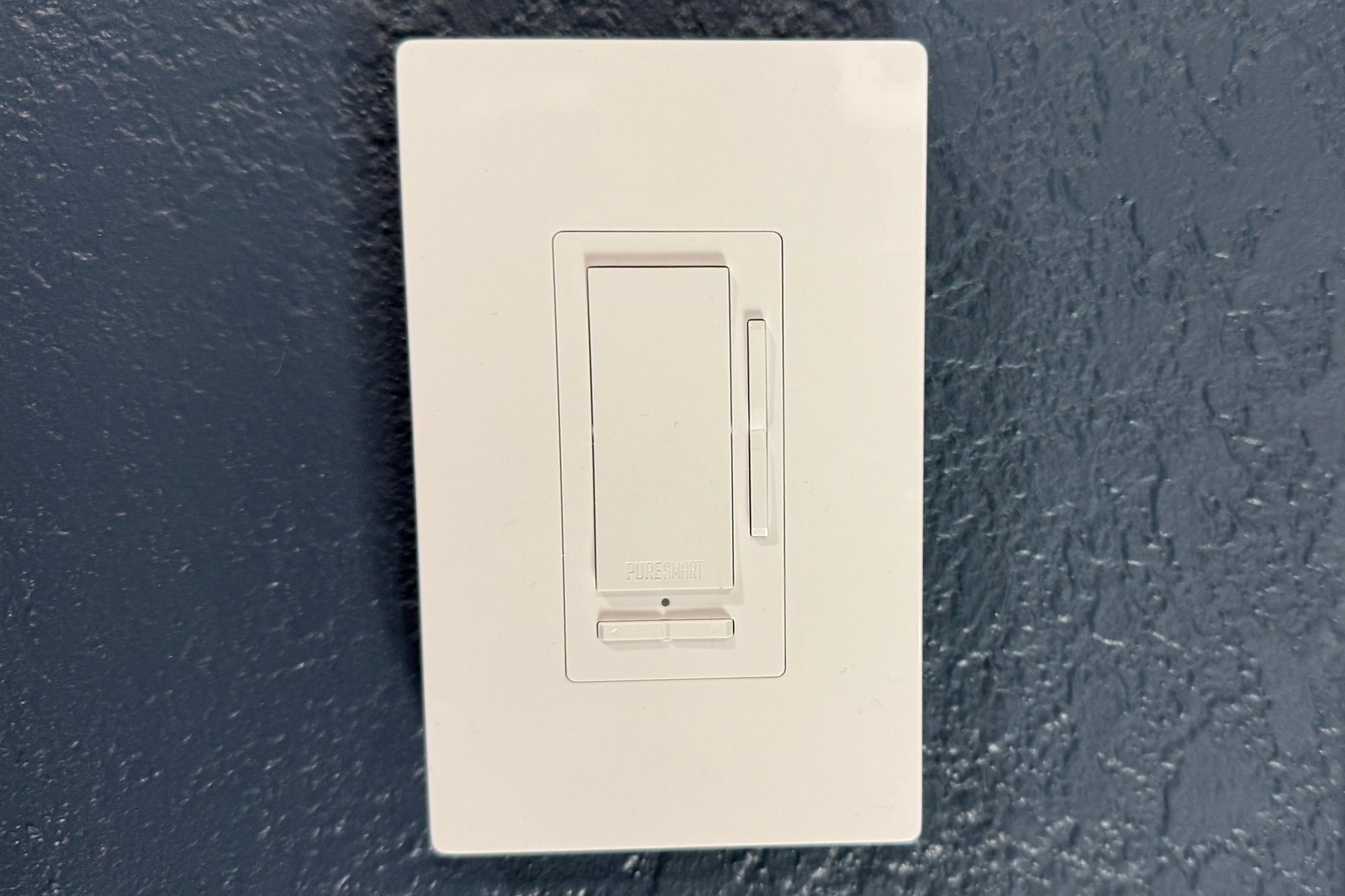
PureEdge Pure Smart Wi-Fi Smart Remote Room Controller review
Image: Christopher Null/Foundry
At a glance
Expert’s Rating
Pros
- Controls on/off, dimming, color, and white color temperature of WiZ-compatible lighting
- Runs on Wi-Fi, no hub required
- Virtually no delay in state changes
Cons
- On the chunky side for a remote control
- WiZ app can be a little convoluted to use
- Only works with WiZ-compatible smart bulbs and fixtures
Our Verdict
This battery-powered, wall-mountable remote control not only lets you dim connected WiZ-compatible smart lights and fixtures, it can also trigger custom lighting scenes and change both the color and white color temperature of connected lights.
Price When Reviewed
This value will show the geolocated pricing text for product undefined
Best Pricing Today
Before we get started with this PureEdge Pure Smart Wi-Fi Smart Remote Room Controller, allow me to give you a little background on the platform on which it runs: WiZ, also known as WiZ Pro and WiZ Connected. If you’re not familiar with WiZ, it’s a hardware brand owned by Signify, which also manufactures Philips Hue smart lighting products.
You’ll find all kinds of smart bulbs marketed directly under the WiZ name, but the WiZ brand and the underlying WiZ technology is also licensed to other manufacturers, so you’ll find many additional products on the market that work in the WiZ ecosystem.
That’s a long prologue to explain what PureEdge is doing with its Pure Smart products, including this remote lighting controller (the company also offers a 120-volt version that must be connected to your home’s wiring). PureEdge doesn’t have a smart app of its own: It relies on the WiZ app, and its Pure Smart products freely work with other WiZ devices, regardless of who makes them.
If your home’s lighting revolves around WiZ or PureEdge Pure Smart bulbs and lighting fixtures, the Pure Smart Wi-Fi Smart Remote Room Controller is hard to beat.
The primary difference between Hue and WiZ is the wireless standard behind each of them: Hue relies on Zigbee and requires a hub (though some devices can also work hub-free over a Bluetooth connection, with limitations), while WiZ devices connect directly to your 2.4GHz Wi-Fi network and don’t require a hub to connect to the internet and communicate with other WiZ gear.
Specifications
The PureEdge Pure Smart Wi-Fi Smart Remote Room Controller functions, illustrated.
PureEdge
The WiZ-compatible component we’re evaluating in this review looks deceptively simple on the surface, offering the appearance of a rather chunky in-wall light switch, one that’s designed to control WiZ lighting products. But here’s surprise number one: It’s not an in-wall switch at all. Rather, it’s fully battery-powered (again, there is a different SKU available if you want a wired, in-wall controller). Crack open this device by prying the plastic cover up and you’ll find space for four AAA batteries (not included) nestled in along the sides of the switch.
The controller is intended to be mounted on the wall, which can be accomplished by attaching it to an electrical box (sans wiring), using screws to attach it to drywall, or simply using adhesives to stick it to the wall. (All the relevant hardware is included in the box.) Frankly, you don’t even need to attach it to the wall at all if you want an unorthodox remote control.
Surprise number two is more visible, and it’s right on the face of the device. In addition to a standard (if undersized) rocker in the center of the device, you’ll see two additional rockers: a vertical one to the right of the main rocker, and a horizontal another beneath the main rocker. Each of these has a specific function, and it’s worth noting that they can’t be reassigned.
Here’s a rundown of what those functions do: The primary rocker, as expected, serves as both an on/off switch (a single tap on the top or bottom half) and as a dimmer (press and hold the top half to brighten, or do the same to the bottom half to dim). The slim vertical rocker on the right-hand changes color temperature when a white bulb is connected, letting you slide your way over the color temperature range supported by the bulb.
Day-to-day use
PureEdge
I tested the controller with PureEdge’s Pure Smart TruColor RGBTW A19 smart bulb, which has a range of 1500K to 6500K and was easily able to see the bulb’s color temperature change over the course of 10 intervals—about 500K at a time—while clicking the rocker up or down.
Lastly, the horizontal rocker at the bottom of the switch lets you change the scene applied to the room or device. Specifically, you can cycle through four “favorite modes” that you set in the WiZ app, whether these are default white light modes like daylight or color scenes you create yourself. Choosing these four lighting modes is the only part of the controller that is user configurable.
While setup is easy in the WiZ app—it discovers new devices with just a few taps and quickly bridges them to your Wi-Fi network—using the app to manage onboarded equipment isn’t always intuitive. It’s simple enough if you want to, say, simply change the color of a light bulb (although the interface is a bit basic), but configuring more advanced options for the controller is more complex because these features can be scattered or buried.
I had to go back to the manual and/or YouTube tutorials to figure out where to adjust things on more than one occasion, an issue exacerbated by the fact that the manual isn’t quite 100 percent correct, as it claims the battery-powered controller (impossibly) must be connected to household wiring in order to be set up.
the Pure Smart Wi-Fi Smart Remote Room Controller runs on 4 AAA batteries (a hardwired version is also available).
Christopher Null/Foundry
Another quirk is that the controller must be assigned to a room, but it can in fact control multiple devices simultaneously whether they are in that room or not. The documentation for this is a bit sketchy, so it can take a bit of trial and error to ensure everything is working properly, but I was able to get the controller set up with two PureEdge bulbs reasonably quickly.
The good news is that, in regular use, the controller is surprisingly responsive no matter what you’re doing with it. During my testing, all commands were carried out in a split-second, even with multiple devices, whether that was simple power toggling, changing color temperature, or switching scenes. The system is even smart enough to allow you to assign scenes to your four favorites that might not be compatible with every connected device.
For example, I set up a “green” color light favorite while having both a color and white-only bulb connected to the controller. When activated, the controller correctly set the color bulb to green while leaving the white bulb’s color temperature as is. Similarly, the color temperature toggle didn’t do anything when the color bulb was set to green, while the white bulb’s color temperature was correctly adjusted. In a nutshell: It works exactly like it should.
While the WiZ ecosystem at large supports additional smart home systems, including Alexa and Google Home, there’s nothing you can do with the Wall Controller outside of the WiZ app itself, since the controller can’t control non-WiZ devices.
PureEdge relies on the WiZ app to control its Pure Smart Wi-Fi Smart Remote Room Controller.
Christopher Null/Foundry
Should you buy the PureEdge Pure Smart Wi-Fi Smart Remote Room Controller?
At $79 (sold exclusively at Lightology.com), the PureEdge Pure Smart Wi-Fi Smart Remote Room Controller is a little pricy. A somewhat similar Lutron Caséta dimmer costs about $60, while the prettier Lutron Caséta Diva dimmer costs about $70. Both of those devices, however, require an $80 Caséta hub to unlock their entire feature set, and neither of them can control colors or white color temperatures.
Further reading: This review is part of TechHive’s in-depth coverage of the best smart dimmers and switches.
If your home’s lighting revolves around WiZ or PureEdge Pure Smart bulbs and/or PureEdge’s Pure Smart architectural and outdoor lighting products, on the other hand, the PureEdge Pure Smart Wi-Fi Smart Remote Room Controller is hard to beat.
We haven’t seen another product like it—apart from the company’s similar 120-volt offering, that is. Both offer a feature set we haven’t seen anywhere else.
Author: Christopher Null, Contributor, PCWorld
Christopher Null is an award-winning technology journalist with more than 25 years of experience writing about and reviewing consumer and business tech products. Previously, he served as Executive Editor for PC Computing magazine and was the founder and Editor in Chief of Mobile magazine, the first print publication focused exclusively on mobile tech. In addition to covering a wide range of smart home gear for TechHive, he is a frequent contributor to Wired, This Old House, and AAA’s Via Magazine.
