

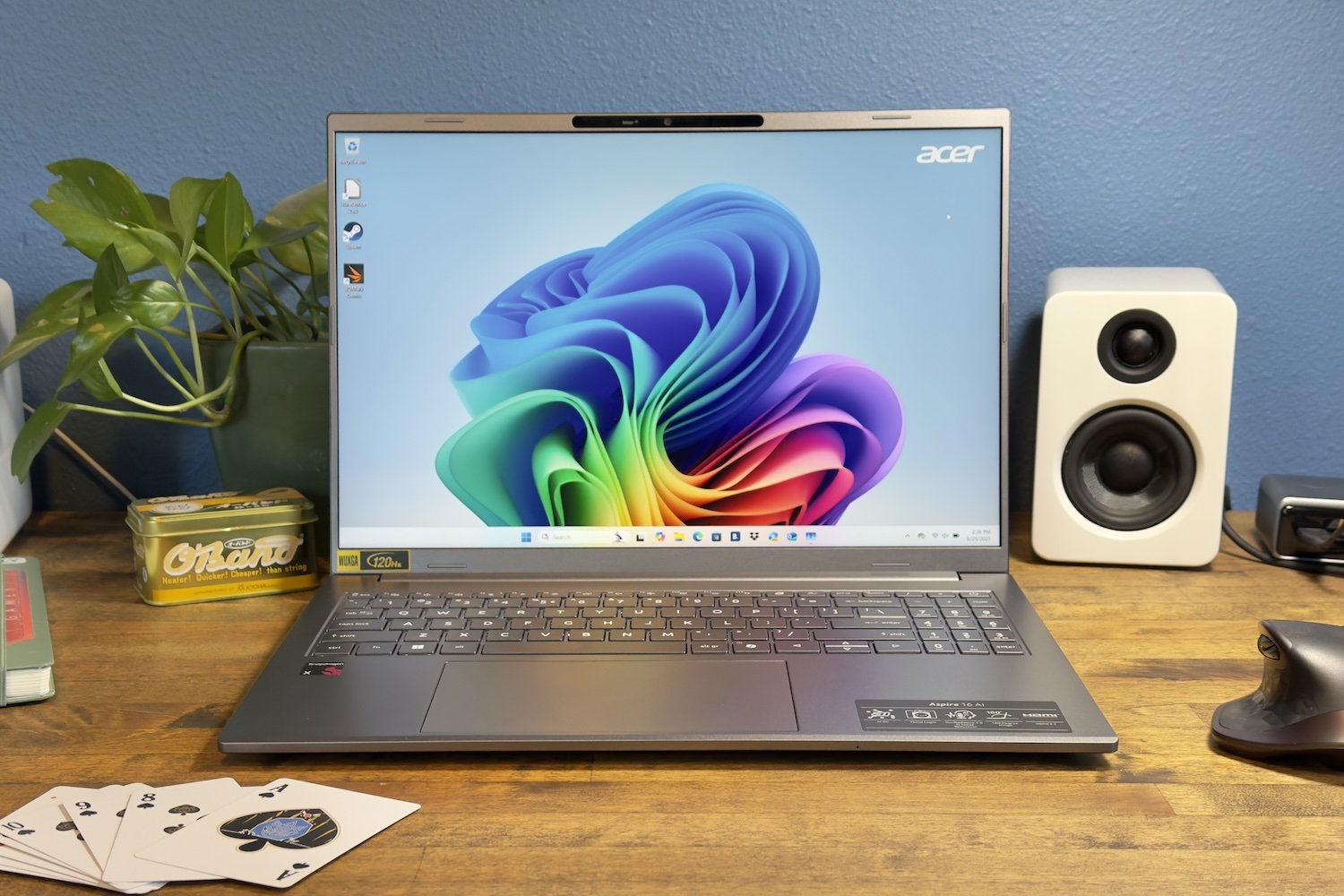
Acer Aspire 16 AI review: Big screen, small price
Image: IDG / Matthew Smith
At a glance
Expert’s Rating
Pros
- Big touchpad
- Large, clear 16-inch display with 120Hz refresh rate
- Lots of connectivity including USB4, Wi-Fi 7
- Good CPU performance for the price
Cons
- Keyboard with numpad can feel a bit cramped
- Modest integrated graphics performance
- Battery life is good, but some Snapdragon alternatives last longer
Our Verdict
The Acer Aspire 16 AI delivers solid CPU performance, a big screen, and a long list of features at a low price.
Price When Reviewed
This value will show the geolocated pricing text for product undefined
Best Pricing Today
Best Prices Today: Acer Aspire 16 AI
Qualcomm’s Snapdragon X chips are often a solid choice for a budget laptop, as they deliver good-enough performance and solid battery life at a low price. Most systems, though, have smaller displays. The Acer Aspire 16 AI adds an appealing big-screen option that is packed with features including USB4, Windows Hello facial recognition, and a plus-sized touchpad, among other things.
Acer Aspire 16 AI: Specs and features
The Acer Aspire 16 AI has Qualcomm’s entry-level Snapdragon X chip with eight cores and a maximum multi-core speed of 3GHz. It also ships with 16GB of memory and a 512GB solid-state drive. These are typical specifications for an entry-level Snapdragon X laptop.
- Model number: A16-11MT-X669
- CPU: Snapdragon X1P-26-100
- Memory: 16GB LPDDR5X-8448
- Graphics/GPU: Qualcomm Adreno
- NPU: Qualcomm NPU up to 45 TOPs
- Display: 16-inch 1920×1200 120Hz IPS-LCD
- Storage: 512GB M.2 PCIe 4.0 NVMe SSD
- Webcam: 1080p 30fps
- Connectivity: 2x USB-C 4 up to 40Gbps with Power Delivery and DisplayPort, two USB 3.2 Gen 1 (one with charging), 1x HDMI 2.1, 1x 3.5mm combo audio. MicroSD card reader
- Networking: Wi-Fi 7, Bluetooth 5.3
- Biometrics: Facial recognition
- Battery capacity: 65 watt-hours
- Dimensions: 14 x 9.85 x 0.63 inches
- Weight: 3.42 pounds
- Operating System: Windows 11 Home
- Price: $729.99 MSRP
The Acer Aspire 16 currently comes in just one configuration and is listed at an MSRP of $729.99. Some retailers actually list it higher at $799.99. The lack of configuration options makes shopping for the laptop simple—just buy from the retailer with the lowest price you can find.
The Acer Aspire 16 AI is a solid choice for shoppers looking to buy an inexpensive Windows laptop with a 16-inch display.
Acer Aspire 16 AI: Design and build quality
IDG / Matthew Smith
Acer’s Aspire is among the more affordable Windows laptops, and while that’s obvious in the laptop’s design, it’s less obvious in the build quality.
First up, design. There’s not much to remark on. The Aspire 16 AI is a simple silver-gray plastic slab with a low-key Acer badge. It’s thin at just 0.63 inches in profile (though note that number doesn’t appear to include the rubber feet on the bottom). It’s also light at 3.42 pounds, which isn’t much for a laptop with a 16-inch display.
What about build quality? The Aspire 16 AI isn’t luxurious, as the laptop uses plastic for both the interior and exterior. However, the materials offered look and feel fine for a budget machine. It’s rigid, too, as the display lid and lower chassis allow only a hint of flex in use.
I also noticed the display hinge can rotate up to 180 degrees, meaning it’s possible to open the laptop such that the screen lies entirely flat on a table. That provides some extra possibilities in your setup if you plan to use the laptop as a second screen with an external keyboard and mouse.
Acer Aspire 16 AI: Keyboard, trackpad, mouse
IDG / Matthew Smith
The Acer Aspire 16 AI squeezes in both a keyboard and numpad. That, of course. means you have a numpad, which even many 16-inch laptops lack. However, it also means the keyboard layout isn’t as spacious as most 16-inch laptops and shifted towards the left (to make room for the numpad). The touchpad also moves left to keep it centered under the spacebar, which makes the left palm rest area tight.
Key feel is fine. There’s fair key travel and each key activates with a defined bottoming action, but it’s not as crisp as I would like. This, however, is definitely a nitpick, and I had no problem typing several thousand words on the laptop.
The touchpad is large at roughly six inches wide and 3.5 inches deep. While there are some more expensive laptops with bigger touchpads, like the MacBook Pro 16 and Razer Blade 18, this is an above-average size for a laptop in this price bracket, and the extra space is appreciated. Multi-touch gestures felt responsive and more comfortable than on competitors with smaller touchpad surfaces.
Acer Aspire 16 AI: Display, audio
IDG / Matthew Smith
Acer ships the Aspire 16 AI with a 16-inch 1920×1200 IPS-LCD display. That’s standard for a budget laptop, but the Aspire goes the extra mile and delivers a 120Hz refresh rate. The Aspire isn’t a gaming laptop, so that’s of limited use in entertainment, but it does help Windows feel smoother and snappier than on the typical budget machine.
The display is bright and has a semi-gloss finish. Reflections are still noticeable in a very bright room, but the display remains usable. Outdoors use is dicey, though.
On the other hand, the display’s contrast and color performance are mediocre. It’s not terrible, but with OLED laptops now often available for well under $1,000, IPS-LCD displays are becoming less attractive even in budget machines.
Audio performance is decent. The dual-speaker system is downward firing, so audio presentation will vary depending on where the laptop is placed. Still, it provides respectable volume and decent clarity. I wouldn’t recommend the laptop for movies or for listening to your favorite album, but it’s fine if you want to throw on some chill beats while you study or work.
Acer Aspire 16 AI: Webcam, microphone, biometrics
IDG / Matthew Smith
The Acer Aspire 16 AI has a 1080p webcam that includes a physical privacy shutter. The camera’s sharpness and color reproduction are respectable. It’s a similar story for the dual-array microphone, which picked up my voice with decent volume and clarity. The webcam and microphone are average for the category, but they do the job.
Windows Hello facial recognition is supported for logging in to the laptop. It’s generally reliable and provides a quick, easy way to log into the laptop. While this feature has come down in price lately, most budget laptops still don’t include it—so it’s great to see it here.
Acer Aspire 16 AI: Connectivity
IDG / Matthew Smith
Connectivity is definitely a strength for the Acer Aspire 16 AI. It has two USB-C 4 ports, both of which support DisplayPort and Power Delivery, as well as two USB-A ports, a microSD card reader, a full-sized HDMI port, and a 3.5mm combo audio jack.
This is a wide range of connectivity for any Windows laptop sold in 2025, so it’s great to see all these ports included in a laptop that costs just $700. The USB-C 4 ports are a particular advantage as budget laptops sometimes stick to USB-C 3.2 Gen 2 speeds.
Acer also delivers on wireless connectivity as the Aspire 16 AI supports Wi-Fi 7, the latest version of the standard. It pairs that with Bluetooth 5.3, which is a step behind the latest 5.4 standard. While many Windows laptops now support Wi-Fi 7, it’s still not included with some budget machines (like the Lenovo IdeaPad Slim 3 and HP OmniBook 5 14), so this is another feature win for the Aspire 16 AI.
Acer Aspire 16 AI: Performance
The Snapdragon X X1P-26-100 is Qualcomm’s entry-level chip with eight cores and a maximum multi-core speed of 3GHz. It also has a stripped-down version of Qualcomm Adreno. The NPU is the same, however, as it quotes performance at 45 TOPS across all Snapdragon X chips.
IDG / Matthew Smith
Despite its entry-level Snapdragon X chip, the Acer Aspire 16 AI did well in Cinebench 2024, a heavily multi-threaded CPU test. The laptop did better than several other Qualcomm-powered systems and also beat the Intel-powered Dell 16 Plus.
It’s interesting to note, too, that the Snapdragon X doesn’t seem to give up much when compared to the Snapdragon X Plus, which sits a notch above in the product stack. While the latter has a higher maximum clock speed, they have the same core count. Because of that, the two chips trade blows depending on the laptop.
IDG / Matthew Smith
As mentioned, all Snapdragon X chips have Qualcomm Adreno graphics, but they’re not all created equal. The best Snapdragon X Elite chip quotes IGP performance up to 4.6 TFLOPS, but the version in the Acer Aspire 16 AI only quotes performance up to 1.7 TFLOPS. That leads to barebones performance in graphics tests.
With that said—and as the graph shows—this isn’t unexpected for a budget laptop. Most Intel and AMD chips in this price bracket also lack the best versions of each company’s integrated graphics and suffer similarly modest performance.
This is also an area where spending a little bit more can snag you a huge gain. The Dell 16 Plus, for example, can be purchased for as little as $750 when on sale. The Dell is a bit heavier and doesn’t last quite as long on a charge, but it’s a superior choice if you need passable 3D graphics performance.
Acer Aspire 16 AI: Battery life and portability
The Acer Aspire 16 AI ships with a 65 watt-hour battery. It powered the laptop to roughly 15 hours and 30 minutes of battery life in our standard battery test, which loops a 4K trailer of the short film Tears of Steel with the laptop’s display brightness set to roughly 200 nits.
IDG / Matthew Smith
This is a good result, or a mediocre result, depending on your perspective. Many laptops can achieve similar battery life, and the Snapdragon laptops with the longest battery life leave the Aspire 16 AI in the dust.
On the other hand, the Aspire 16 AI is a large laptop, and most large Windows laptops lag a bit in battery life. This is often because they pair the larger display with better performance, but the Aspire 16 AI’s miserly Snapdragon chip isn’t too demanding.
Personally, I think 15 hours is a good result for a laptop of this size, and it’s likely to be more than enough for most people who use it. Just be aware that you can have even better battery life if you opt for a smaller, optimized alternative like the HP OmniBook 5 14.
The Acer Aspire 16 AI ships with a USB-C charger that provides 65 watts of power. It’s towards the larger side for a 65-watt adapter. Aspire 16 AI owners may want to look into a 65-watt GaN charger to improve portability. The laptop doesn’t have a fast charging mode.
Acer Aspire 16 AI: Conclusion
The Acer Aspire 16 AI is a solid choice for shoppers looking to buy an inexpensive Windows laptop with a 16-inch display. While it lacks a headline feature that would make it stand out, it has an edge in several areas. It has USB4, Wi-Fi 7, a display with a 120Hz refresh rate, Windows Hello facial recognition, and a large touchpad. Many budget laptops can check off a few of these boxes, but the Aspire 16 AI checks them all.
Best Prices Today: Acer Aspire 16 AI
Author: Matthew S. Smith, Contributor, PCWorld
Matthew S. Smith is a freelance technology journalist with 15 years of experience reviewing consumer electronics. In addition to PCWorld, his work can be found on Wired, Ars Technica, Digital Trends, Reviewed, IGN, and Lifewire. Matthew also covers AI and the metaverse for IEEE Spectrum and runs Computer Gaming Yesterday, a YouTube channel devoted to PC gaming history.
