

AI-powered features begin creeping deeper into the bedrock of Windows 11
everything old is new again
Copilot expands with an emphasis on creating and editing files, voice input.
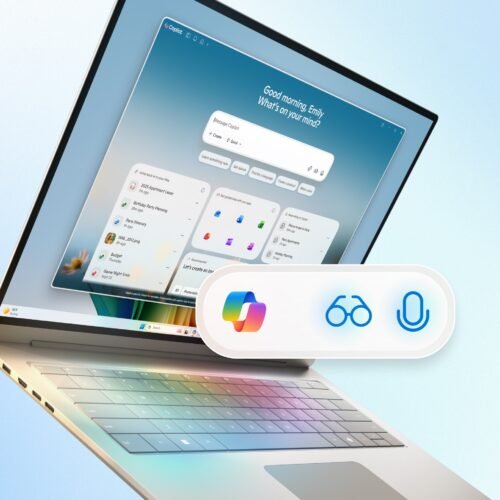
Microsoft is hoping that Copilot will succeed as a voice-driven assistant where Cortana failed.
Credit:
Microsoft
Microsoft is hoping that Copilot will succeed as a voice-driven assistant where Cortana failed.
Credit:
Microsoft
Like virtually every major Windows announcement in the last three years, the spate of features that Microsoft announced for the operating system today all revolve around generative AI. In particular, they’re concerned with the company’s more recent preoccupation with “agentic” AI, an industry buzzword for “telling AI-powered software to perform a task, which it then does in the background while you move on to other things.”
But the overarching impression I got, both from reading the announcement and sitting through a press briefing earlier this month, is that Microsoft is using language models and other generative AI technologies to try again with Cortana, Microsoft’s failed and discontinued entry in the voice assistant wars of the 2010s.
According to Microsoft’s Consumer Chief Marketing Officer Yusuf Mehdi, “AI PCs” should be able to recognize input “naturally, in text or voice,” to be able to guide users based on what’s on their screens at any given moment, and that AI assistants “should be able to take action on your behalf.”
The biggest of today’s announcements is the introduction of a new “Hey, Copilot” activation phrase for Windows 11 PCs, which once enabled allows users to summon the chatbot using only their voice rather than a mouse or keyboard (if you do want to use the keyboard, either the Copilot key or the same Windows + C keyboard shortcut that used to bring up Cortana will also summon Copilot). Saying “goodbye” will dismiss Copilot when you’re done working with it.
Macs and most smartphones have sported similar functionality for a while now, but Microsoft is obviously hoping that having Copilot answer those questions instead of Cortana will lead to success rather than another failure.
The key limitation of the original Cortana—plus Siri, Alexa, and the rest of their ilk—is that it could only really do a relatively limited and pre-determined list of actions. Complex queries, or anything the assistants don’t understand, often gets bounced to a general web search. The results of that search may or may not accomplish what you wanted, but it does ultimately shift the onus back on the user to find and follow those directions.
To make Copilot more useful, Microsoft has also announced that Copilot Vision is being rolled out worldwide “in all markets where Copilot is offered” (it’s been available in the US since mid-June). Copilot Vision will read the contents of a screen or an app window and can attempt to offer useful guidance or feedback, like walking you through an obscure task in Excel or making suggestions based on a group of photos or a list of items. (Microsoft additionally announced a beta for Gaming Copilot, a sort of offshoot of Copilot Vision intended specifically for walkthroughs and advice for whatever game you happen to be playing.)
Beyond these tweaks or wider rollouts for existing features, Microsoft is also testing a few new AI and Copilot-related additions that aim to fundamentally change how users interact with their Windows PCs by reading and editing files.
All of the features Microsoft is announcing today are intended for all Windows 11 PCs, not just those that meet the stricter hardware requirements of the Copilot+ PC label. That gives them a much wider potential reach than things like Recall or Click to Do, and it makes knowing what these features do and how they safeguard security and privacy that much more important.
AI features work their way into the heart of Windows
Microsoft wants general-purpose AI agents to be able to create and modify files for you, among other things, working in the background while you move on to other tasks.
Credit:
Microsoft
Whether you’re talking about the Copilot app, the generative AI features added to apps like Notepad and Paint, or the data-scraping Windows Recall feature, most of the AI additions to Windows in the last few years have been app-specific, or cordoned off in some way from core Windows features like the taskbar and File Explorer.
But AI features are increasingly working their way into bedrock Windows features like the taskbar and Start menu, and being given capabilities that allow them to analyze or edit files or even perform file management tasks.
The standard Search field that has been part of Windows 10 and Windows 11 for the last decade, for example, is being transformed into an “Ask Copilot” field; this feature will still be able to look through local files just like the current version of the Search box, but Microsoft also envisions it as a keyboard-driven interface for Copilot for the times when you can’t or don’t want to use your voice. (We don’t know whether the “old” search functionality lives on in the Start menu or as an optional fallback for people who disable Copilot, at least not yet.)
A feature called Copilot Actions will also expand the number of ways that Copilot can interact with local files on your PC. Microsoft cites “sorting through recent vacation photos” and extracting information from PDFs and other documents as two possible use cases, and that this early preview version will focus on “a narrow set of use cases.” But it’s meant to be “a general-purpose agent” capable of “interacting with desktop and web applications.” This gives it a lot of latitude to augment or replace basic keyboard-and-mouse input for some interactions.
Screenshots of a Windows 11 testing build showed Copilot taking over the area of the taskbar that is currently reserved for the Search field.
Credit:
Microsoft
Finally, Microsoft is taking another stab at allowing Copilot to change the settings on your PC, something that earlier versions were able to do but were removed in a subsequent iteration. Copilot will attempt to respond to plain-language questions about your PC settings with a link to the appropriate part of Windows’ large, labyrinthine Settings app.
These new features dovetail with others Microsoft has been testing for a few weeks or months now. Copilot Connectors, rolled out to Windows Insiders earlier this month, can give Copilot access to email and file-sharing services like Gmail and Dropbox. New document creation features allow Copilot to export the contents of a Copilot chat into a Word or PDF document, Excel spreadsheet, or PowerPoint deck for more refinement and editing. And AI actions in the File Explorer appear in Windows’ right-click menu and allow for the direct manipulation of files, including batch-editing images and summarizing documents. Together with the Copilot Vision features that enable Copilot to see the full contents of Office documents rather than just the on-screen portions, all of these features inject AI into more basic everyday tasks, rather than cordoning them off in individual apps.
Per usual, we don’t know exactly when any of these new features will roll out to the general public, and some may never be available outside of the Windows Insider program. None of them are currently baked into the Windows 11 25H2 update, at least not the version that the company is currently distributing through its Release Preview channel.
Learning the lessons of Recall
Microsoft at least seems to have learned lessons from the botched rollout of Windows Recall last year.
If you didn’t follow along: Microsoft’s initial plan had been to roll out Recall with the first wave of Copilot+ PCs, but without sending it through the Windows Insider Preview program first. This program normally gives power users, developers, security researchers, and others the opportunity to kick the tires on upcoming Windows features before they’re launched, giving Microsoft feedback on bugs, security holes, or other flaws before rolling them out to all Windows PCs.
But security researchers who did manage to get their hands on the early, nearly launched version of Recall discovered a deeply flawed feature that preserved too much personal information and was trivially easy to exploit—a plain-text file with OCR text from all of a user’s PC usage could be grabbed by pretty much anybody with access to the PC, either in-person or remote. It was also enabled by default on PCs that supported it, forcing users to manually opt out if they didn’t want to use it.
In the end, Microsoft pulled that version of Recall, took nearly a year to overhaul its security architecture, and spent months letting the feature make its way through the Windows Insider Preview channels before finally rolling it out to Copilot+ PCs. The resulting product still presents some risks to user privacy, as does any feature that promises to screenshot and store months of history about how you use your PC, but it’s substantially more refined, the most egregious security holes have been closed, and it’s off by default.
Copilot Actions are, at least for now, also disabled by default. And Microsoft Corporate Vice President of Windows Security Dana Huang put up a lengthy accompanying post explaining several of the steps Microsoft has taken to protect user privacy and security when using Copilot Actions. These include running AI agents with their own dedicated user accounts to reduce their access to data in your user folder; mandatory code-signing; and giving agents the fewest privileges they need to do their jobs. All of the agents’ activities will also be documented, so users can verify what actions have been taken and correct any errors.
Whether these security and privacy promises are good enough is an open question, but unlike the initial version of Recall, all of these new features will be sent out through the Windows Insider channels for testing first. If there are serious flaws, they’ll be out in public early on, rather than dropped on users unawares.
Andrew is a Senior Technology Reporter at Ars Technica, with a focus on consumer tech including computer hardware and in-depth reviews of operating systems like Windows and macOS. Andrew lives in Philadelphia and co-hosts a weekly book podcast called Overdue.
