

Apple’s $349 iPad 11 is missing a lot, but it’s still all the iPad most people need
apologies to the ipad pro
Other iPads are nicer and faster, but I end up using all of them the same way.
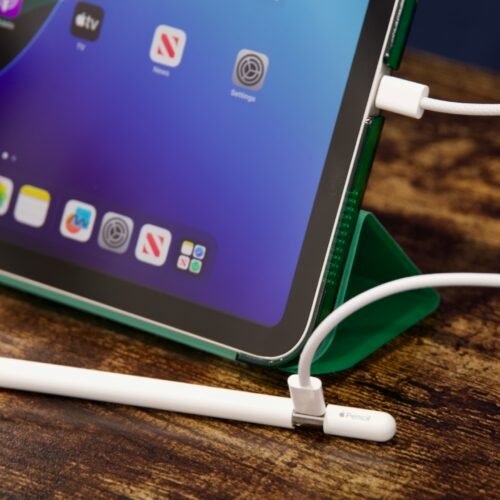
The basic iPad’s Apple Pencil situation is most charitably described as “sub-optimal.”
Credit:
Andrew Cunningham
The basic iPad’s Apple Pencil situation is most charitably described as “sub-optimal.”
Credit:
Andrew Cunningham
Apple released a new version of the basic $349 iPad this week, though you could be forgiven for not noticing. The new 11th-generation iPad (also known as the “iPad (A16)” or just plain-old “iPad”) looks identical to the previous version, it was introduced in a single paragraph buried in the middle of an iPad Air announcement, and the company didn’t offer to send any to reviewers. The one I have I bought myself for our 5-year-old, whose hand-me-down 2019 iPad Air 3 is slightly older than he is and a little worse for wear.
There’s nothing exciting or even particularly interesting about this tablet. The design is recycled from 2022’s 10th-generation iPad, which was itself a lower-rent version of the 2020 iPad Air design. It’s powered by a variant of the Apple A16, originally an iPhone chip from 2022. It still doesn’t support the regular Apple Pencil or Pencil Pro or the same keyboard accessories as other iPads. It still doesn’t have an anti-reflective screen coating, and the screen doesn’t feel as nice to use as an iPad Air’s or Pro’s.
But for all that, this is still probably the purest expression of what the iPad is: a cheap Internet-connected screen for reading and watching things. I say this as someone who has tried every new piece of hardware and software that Apple has introduced to try and make the iPad a powerful and versatile laptop replacement—it still feels like trying to make a square peg fit into a round hole. The more expensive iPads are nice, but I don’t end up using them much differently from how I use this bare-bones tablet.
Features and limitations
Apple’s 11th-generation iPad, with a USB-C Apple Pencil and a cheap case/cover.
Credit:
Andrew Cunningham
The A16 iPad is a typical post-Home-button iPad design, with a slim-ish symmetrical bezel running all the way around a 10.86-inch screen. Apple used to round this up to 10.9 inches, and now it rounds it up to 11 inches, but what has changed is the rounding and not the screen size.
A Touch ID fingerprint reader is embedded in the power button; the headphone jack is gone; the iPad branding has been removed from the back; and there’s a USB-C port on the bottom (one benefit of upgrading for me—the old iPad Air was the last Lightning device in the house, give or take a Magic Trackpad or Apple TV remote). The design hasn’t changed at all, which means any accessory made for the 10th-gen A14 iPad should fit this one without issue.
This screen ends up feeling like the biggest downgrade from an iPad Air, not because of its size or quality but because of the air gap between the front glass and the actual LCD panel. Other iPads have “laminated” screens, which means that the LCD panel and the glass are fused. This slightly improves color and contrast at the expense of repairability—with a laminated screen, cracked glass means you’re replacing the screen and the glass, not just the screen—but mainly, it makes the tablets feel more solid, and when you’re touching and drawing, it helps your fingers and Pencil feel closer to what you’re interacting with on screen. The air gap between the glass and the screen makes the iPad feel hollow. Along with the lack of anti-reflective coating, it’s the downgrade you’ll feel the most.
Apple’s reliance on older and slower internal hardware also means that the 11th-gen iPad is missing some of the features present on more expensive iPads, though I don’t currently view any of these features as essential. One is Stage Manager, the updated (and widely panned) multitasking experience introduced in iPadOS 16. One component of Stage Manager is actual multi-display support that can run iPad apps on an external screen; without Stage Manager, the iPad is limited to the traditional “video playback and display mirroring only” support.
A basic, flash-less, single-lens 12 megapixel camera and power button-mounted Touch ID sensor.
Credit:
Andrew Cunningham
Apple Intelligence is also missing here, even though it’s a feature Apple has gone out of its way to include on every device it has launched since last fall (including the iPhone 16e). Again, none of these features are especially great, and some of them are actually kind of bad, so I don’t feel their absence here. If anything, some people might consider it a plus not to have Apple Intelligence flipping itself back on every time you install a security update. If and when Apple ever releases its delayed Siri update, maybe you’ll be sorry your iPad doesn’t support Apple Intelligence, but for now, there’s not much to miss.
One thing that remains frustrating is the Apple Pencil situation. Apple offers two options: the $79 USB-C Apple Pencil, which attaches to the side of the iPad magnetically but doesn’t pair or charge magnetically and doesn’t offer pressure sensitivity, or the $99 first-generation Apple Pencil, which does support pressure sensitivity but is a decade-old design that is less comfortable to hold, doesn’t attach to the tablet at all, and can’t even pair or charge without an adapter. A USB-C Apple Pencil with pressure sensitivity would be an acceptable compromise here; using the deeply flawed first-gen Apple Pencil to fill that gap is just unacceptable at this point.
Apple has removed the “iPad” text and regulatory markings from the back of this iPad, making it a blank aluminum slab aside from the camera bump and Apple logo.
Credit:
Andrew Cunningham
Accessory pricing is another sore point. All of Apple’s cases and accessories run a bit expensive for my taste, but it’s particularly egregious for a budget tablet. The iPad does have a Smart Connector for Apple’s Magic Keyboard Folio, which at its normal retail price adds a staggering $249 to the price of your $349 iPad. Apple also has a regular Smart Folio case for the iPad, offering a foldable screen-cover-turned-stand and basic back protection for $79.
Luckily, third-party accessories can step in here and keep your total price close to or below $500, even if you’re trying to use the iPad as a computer. Logitech’s Combo Touch keyboard case adds a keyboard and trackpad for $160 and goes on sale with some regularity. Logitech also has separate Bluetooth keyboards like the $30-ish Pebble Keys 2 (formerly the K380s) or $50-ish Pop Icon Keys that can turn the iPad into a good writing machine for less money. MoKo’s iPad cases are decent and cheap and can add a touch of color or personalization. The best feature of the iPad is the price—don’t let expensive accessories mess that up.
Performance: A16 non-Bionic, plus more storage and RAM
Look at the “Chip” section on Apple’s spec pages for the iPhone 15 and the iPad 11, and you’ll note that the iPad’s A16 is missing the word “Bionic.”
Originally used to denote a chip with a mix of large high-performance CPU cores and small high-efficiency CPU cores, Apple has been dropping this label for new A-series processors for a while now (the A17 and A18 don’t use it at all). But in the new iPad’s case, it seems meant to denote that this is a slightly cut-down iteration of the A16, with five CPU cores instead of six and four GPU cores instead of three.
Benchmarks for the 10th-gen iPad have been pulled from publicly available numbers in each benchmark’s official results database.
Geekbench 6 doesn’t distinguish between the performance and efficiency cores, but it does say that the iPad has one cluster of two cores and one cluster of three cores. That means it’s likely one of the four efficiency cores that have been disabled, so the impact on the day-to-day user experience should be pretty minimal.
Performance in benchmarks is “faster, but not by much.” In our testing, the new iPad is still substantially slower than the M1 iPad Air from 2022. And using benchmarks pulled from public databases, it looks like a measurable but modest upgrade over the A14 Bionic in the 10th-generation iPad: a 20 percent-ish improvement in single- and multi-core CPU performance and between 15 and 30 percent faster graphics performance (depending on the benchmark). It’s good enough to be a kid’s Roblox machine, but it might struggle a bit with newer or more intensive games and apps.
The new iPad’s best spec upgrades are measured in gigabytes—the base model jumps from 64GB to 128GB of storage, and RAM increases from 4GB to 6GB. While still short of the unstated 8GB RAM requirement for Stage Manager or Apple Intelligence, that’s two extra gigabytes of memory the iPad can use for apps and Safari tabs before it has to start ejecting things from RAM to make more room. If you’re upgrading from something older, like 2021’s 9th-gen iPad or the iPad Air 3 we’ve been using, you’re doubling your memory from 3GB to 6GB. Not exciting, but not too shabby.
Still the default iPad
A cheap cover and Bluetooth keyboard can still turn the cheap iPad into a solid writing machine (not this keyboard, which is a Logitech MX Keys S I bought for something else, but an inexpensive Logitech Pebble Keys 2 or Pop Icon Keys are both good fits).
Credit:
Andrew Cunningham
The next time I buy an iPad for myself, I will still probably manage to talk myself into some kind of iPad Air. I occasionally need to test and write about the full range of iPad features, including Stage Manager and Apple Intelligence, and the laminated screen and anti-reflective coating are quality-of-life upgrades I’m pretty attached to. Sometimes, you spend a little more money on a nice thing because it is nice, even if it’s not strictly necessary.
But for just over half the price? For people who are just reading or doodling or watching TV, or for a kid who needs something basic but reliable for games and school and chatting? The basic iPad makes a strong case for itself. That was already kind of true of the 10th-generation iPad, which debuted at a who-is-this-for price of $449 before gradually falling to a more sensible $349 last year. This new iPad is just that one with a faster chip, 50 percent more memory, and 100 percent more storage.
It is a little frustrating that Apple couldn’t at least give people the option to use Apple Intelligence since the cheap iPad only sees an update once every couple of years—if there ever actually is a killer Apple Intelligence feature, this iPad won’t see it. But don’t let the tablet’s whisper-quiet, nothing-to-see-here launch or low price fool you—it still does pretty much all of the stuff that people actually enjoy doing on their iPads.
The good
- A reliable, functional multi-purpose computer for $349
- More RAM and double the storage of the previous-generation model
- Decent performance and a nice-looking screen for this price
- iPadOS has a solid library of games, productivity apps, and other software that Android and Windows tablets have never successfully replicated
- Compatible with the same ecosystem of accessories as the 10th-generation model
The bad
- You have two Apple Pencil options, and neither is ideal
- Still slower than a 3-year-old M1 iPad Air
- Apple’s accessories can drive the price way up
- No Apple Intelligence, I guess? You’re not missing anything now, but you might one day miss out on a feature you actually want
The ugly
- The gap between the glass and the screen gives it a hollow feeling and makes drawing less satisfying
Andrew is a Senior Technology Reporter at Ars Technica, with a focus on consumer tech including computer hardware and in-depth reviews of operating systems like Windows and macOS. Andrew lives in Philadelphia and co-hosts a weekly book podcast called Overdue.
