

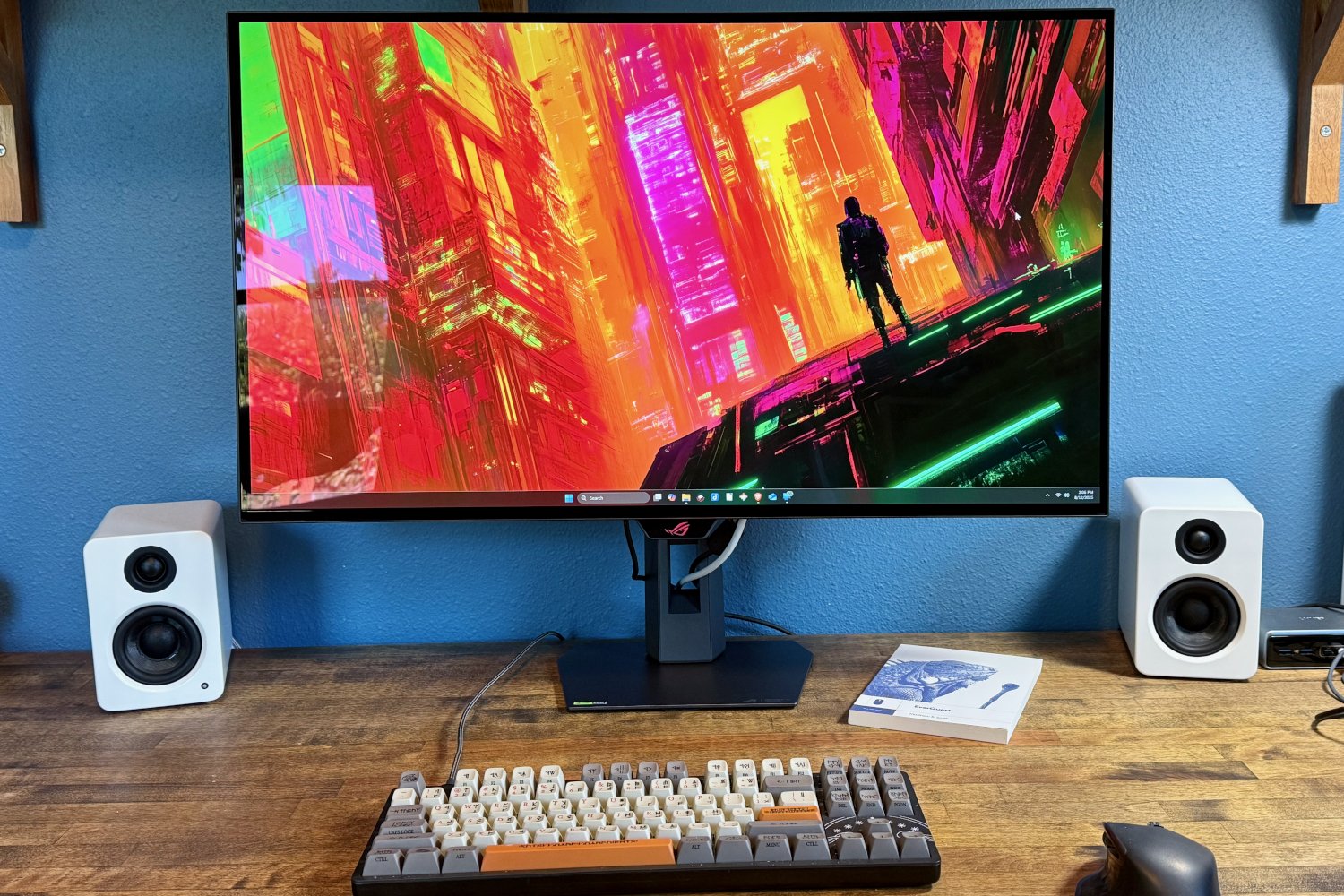
Asus ROG Strix OLED XG32UCWG review: A dual-mode monitor that shines
Image: Matthew Smith / Foundry
At a glance
Expert’s Rating
Pros
- Attractive design with compact stand
- Good range of video, USB-C, USB-A connectivity
- High SDR and HDR brightness
- Outstanding motion clarity at 1080p/330Hz
Cons
- USB-C only supports 15 watts of power delivery
- Extremely glossy display finish
- Only 165Hz refresh rate at 4K
Our Verdict
The Asus ROG Strix OLED XG32UCWG provides great motion clarity with solid brightness for an OLED panel, and the price is right.
Price When Reviewed
This value will show the geolocated pricing text for product undefined
Best Pricing Today
Best Prices Today: Asus ROG Strix OLED XG32UCWG
Want a monitor with great motion clarity, OLED image quality, and a contrast-rich finish that can also double as a mirror when the monitor is turned off? The Asus ROG Strix OLED XG32UCWG might be for you.
It goes all-in on gaming with a dual-mode display that can refresh at up to 330Hz and a TrueBlack Glossy finish that enhances immersion. Those benefits come with downsides but, for many, the pros and cons will net out to be positive.
Read on to learn more, then see our roundup of the best gaming monitors for comparison.
Asus ROG Strix OLED XG32UCWG specs and features
At its core, the Asus ROG Strix OLED XG32UCWG is another 32-inch 4K monitor, but there are a few interesting details on the spec sheet. It uses LG’s WOLED panel, which is a bit less common than Samsung’s QD-OLED. On top of that, it’s a dual-mode display, meaning it offers both 4K and 1080p native resolution modes. In 4K, the refresh rate goes up to 165Hz, but in 1080p it can reach 330Hz.
The monitor also has what Asus calls a TrueBlack Glossy display coat, which allegedly improves perceived contrast. More on that later in the review.
- Display size: 31.5-inch 16:9 aspect ratio
- Native resolution: 3840×2160 / 1920×1080
- Panel type: WOLED
- Refresh rate: 165Hz / 330Hz (in 1080p mode)
- Adaptive sync: Yes, AMD FreeSync Premium Pro & G-Sync Compatible
- HDR: Yes, HDR10, VESA DisplayHDR 400 True Black
- Ports: 2x HDMI 2.1, 1x DisplayPort 1.4, 1x USB-C upstream with DisplayPort Alternate Mode and 15 watts of power delivery, 1x 3.5mm headphone jack, 1x USB-B 3.2 Gen 1 upstream, 3x USB-A 3.2 Gen 1 downstream
- Audio: None
- Additional features: Proximity sensor, dual-mode display
- Price: $999 MSRP / $899 initial retail
The monitor also provides a fair bit of connectivity, including USB-C with DisplayPort and three downstream USB-A ports. That means it works well as a USB hub. There’s also a proximity sensor—a new feature starting to appear in some OLED monitors—meant to reduce image retention by automatically turning off the display when you move away.
Asus ROG Strix OLED XG32UCWG design
The design of the Asus ROG Strix OLED XG32UCWG is quite reserved from the front, with slim black bezels on all sides. The only notable distinction is the glowing red ROG logo on the bottom bezel, which also houses the proximity sensor.
Flip it around and the monitor looks a bit more distinctive, with a large RGB-lit Asus ROG logo and the visually interesting two-tone black look common to many ROG monitors. It’s clearly a gaming monitor, but it leans toward the more subtle end of typical gaming monitor design.
Matthew Smith / Foundry
Looks aside, the design is practical. The monitor ships with an ergonomic stand that has an extremely small base. Asus highlights this as a feature, and for good reason, as the small base makes it easier to position the monitor on your desk and minimize its footprint.
The stand supports tilt, swivel, and height adjustment, though its range is a bit limited in some areas. For example, it adjusts only 80mm for height, while some competitors offer 110mm or, in the best case, 130mm. Still, 80mm is fine for most setups. The stand doesn’t support pivoting into portrait orientation and instead can pivot just a few degrees for minor adjustments, though that’s not too unusual for a 32-inch OLED monitor.
Of course, the monitor also provides a 100x100mm VESA mount, so you can attach it to third-party monitor arms or stands to increase its range of adjustment.
Like most OLED monitors, the XG32UCWG uses an external power brick, so you’ll need to place that under your desk. It’s a small brick as these things go, though, and rated at 240 watts.
Asus ROG Strix OLED XG32UCWG connectivity
Past Asus ROG monitors haven’t always stood out for connectivity, but the ROG Strix OLED XG32UCWG offers a good range of options. The video inputs include two HDMI 2.1 ports, one DisplayPort 1.4, and a USB-C port with DisplayPort Alternate Mode, for a total of four inputs. That’s a bit more than the typical three video inputs.
The USB-C port isn’t a complete win, as it only provides power delivery up to 15 watts, which won’t be enough to handle a connected laptop (unless it’s a MacBook Air, maybe, if you’re not running at full load). However, the USB-C port does provide upstream access to three downstream USB-A ports, which is useful. Those USB-A ports can also be accessed through an upstream USB-B connection if you’re using a desktop, in which case you likely won’t be using USB-C.
A few competitors provide better overall connectivity, such as the HP Omen Transcend 32. On the other hand, some rivals like Alienware have recently offered fewer ports, and the Asus is less expensive than the HP. The XG32UCWG’s connectivity is a middle ground for people who want decent connectivity without paying too much for it.
Asus ROG Strix OLED XG32UCWG menus, features, and audio
The Asus ROG Strix OLED XG32UCWG’s menu system is controlled by a joystick hidden behind the ROG logo on the bottom bezel. The menu is easy to navigate thanks to clearly labeled options and decently sized text. Alternatively, you can use Asus’ DisplayWidget Center to control monitor settings directly in Windows or macOS. It’s a great option for making quick adjustments and mostly makes the joystick unnecessary—unless you simply prefer to use it.
Asus also provides a few interesting features that might sway some shoppers. The monitor offers significant aspect ratio controls, letting the 32-inch panel behave like a 24.5-inch or 27-inch display. Most people will stick with the default settings—a 32-inch display area, 4K resolution, and 165Hz refresh rate—but you could also run it as a 24-inch, 330Hz display for certain esports titles. There’s an OLED anti-flicker mode that can reduce flickering, which OLEDs sometimes exhibit, especially when displaying certain grayscale tones.
Matthew Smith / Foundry
Of course, you also get the usual gaming extras like FPS counters and crosshairs. Asus has added some AI branding here, calling it an AI assistant, which means certain features are dynamic. For example, Dynamic Shadow Boost can automatically brighten dark areas of a scene to make enemies easier to spot, without affecting brighter areas. Personally, I rarely use these features, but I can see how they might be helpful if you often rely on crosshairs or shadow boosting for a competitive edge.
Asus is also all-in on screen protection features to prevent OLED burn-in. The monitor has a proximity sensor to automatically turn off the screen when you move away from the monitor, then turn it back on when you return. There’s also a wide range of features that automatically detect scenarios that might cause burn-in, like a bright logo on a dark image (or vice versa), and attempt to compensate. I can’t comment on how effective these features will be long-term, since I only had the monitor for a couple of weeks, but I expect the proximity sensor, at the least, will be helpful.
On top of all this, the monitor provides a good range of image quality adjustment. It includes gamma and color temperature modes that target precise values, not vague presets, plus color calibration. Though not sold as a monitor for creative professionals, it could work in a creative capacity for many people.
Speakers, on the other hand, are absent. That’s a tad disappointing, but it’s common among OLED gaming monitors, as monitor makers typically assume gamers will want to use a headset.
Asus is also all-in on screen protection features to prevent OLED burn-in.
Asus’ ROG Strix OLED XG32UCWG SDR image quality
The Asus ROG Strix OLED XG32UCWG has an LG WOLED panel. This contrasts to the more common Samsung QD-OLED panel. WOLED panels tend to have slightly inferior color performance to QD-OLED, and the XG32UCWG is no exception. However, its overall SDR performance is extremely good, and WOLED’s color gamut coverage is getting closer to QD-OLED.
Matthew Smith / Foundry
First up is brightness. The Asus ROG Strix OLED XG32UCWG does well here with a maximum sustained SDR brightness of 286 nits. That’s the second-best result from an OLED, behind only the much more expensive Asus ProArt PA32UCDM.
You may need that brightness, however, due to the True Glossy Black panel finish. This finish is meant to enhance perceived contrast, but it’s already extremely reflective. Indeed, it’s virtually a mirror, as highly distinct full-color reflections are easy to make out even in moderately lit rooms. Because of that, I can only recommend the XG32UCWG in a room with very good light control.
Matthew Smith / Foundry
The True Glossy Black finish enhances perceived contrast but not necessarily measured contrast. That’s because OLED panels all hit an effectively infinite contrast ratio anyway due to their success providing a perfect black level of zero nits.
So, what does better perceived contrast mean in practice? It means that dark areas of the image have an incredibly inky, deep look. This is not because the pixels themselves are dimmer but, rather, because of how light scatters across the display.
I happened to review the Samsung Smart Monitor M9, an OLED panel with a matte finish, just before the XG32UCWG. The difference is stark. The XG32UCWG looks dramatically more contrast-rich and vivid, particularly when viewing high-contrast content. A dark alley in Cyberpunk 2077 is a good example.
However, as just mentioned, the XG32UCWG is highly reflective. The Smart Monitor M9 is not. Personally, I would rather have the Smart Monitor M9’s matte coat than the XG32UCWG’s glossy coat. This, however, is a matter of personal preference. Glossy OLED fans will love the XG32UCWG.
Matthew Smith / Foundry
The XG32UCWG’s color gamut results are interesting. It covered 100 percent of sRGB, 96 percent of DCI-P3, and 88 percent of AdobeRGB.
As the graph shows, this puts the XG32UCWG slightly behind the curve for an OLED monitor—as all of the recent 32-inch displays PCWorld has tested were QD-OLED panels. On the other hand, this color gamut is objectively solid, defeating most monitors that lack quantum dots.
I think the XG32UCWG’s color gamut is more than adequate for most situations, but if you really want the best color gamut possible, QD-OLED still has the edge.
Matthew Smith / Foundry
It’s a similar story in color accuracy. The measured average color error of 0.97 is technically towards the bottom of this heap of OLED monitors. However, a color error this low is excellent by any standard, and certainly more than good enough for gaming. It’s also worth mention, again, that the XG32UCWG has an unusually wide range of image quality adjustments for a gaming monitor, which means you can do more to calibrate and tune the monitor to your needs than with some competitors.
The monitor’s color temperature and gamma performance was average. I measured a default color temperature of 6600K which, though slightly above the target of 6500K, isn’t going to be noticeable in most cases. The gamma curve was a bit high too, at 2.3 when set to 2.2 (other gamma presets were also high). That means the image looks a bit darker than it should. I do find this to be slightly noticeable compared to a spot-on IPS-LCD display, but most OLED monitors have the same quirk.
Sharpness is a perk, of course, as the monitor’s maximum resolution of 3840×2160 works out to about 140 pixels per inch across the 31.5-inch display. That is identical to other OLED monitors, so there’s no major advantage here. The high resolution, along with improvements to OLED panel technology, largely banish the sharpness issues of earlier panels. It looks tack-sharp though, of course, no more so than the competition.
The Asus ROG Strix OLED XG32UCWG’s overall SDR image quality is solid, though not exceptional for an OLED monitor. It scores better than most in brightness, though also gives up some ground in color gamut. Contrast is exceptional and perceived contrast is enhanced by the highly glossy display coat, though at the cost of annoying reflections in even moderately lit rooms. Gamers who can get over the highly glossy finish, or prefer it, will find the monitor’s SDR image quality is top-notch.
Asus ROG Strix OLED XG32UCWG HDR image quality
Asus backs up the ROG Strix OLED XG32UCWG’s healthy SDR performance with HDR performance that, while not class-leading, is certainly strong and among the better reasons to buy the monitor.
Matthew Smith / Foundry
As the graph shows, the XG32UCWG delivered great HDR brightness across the board. Its HDR brightness maximum was about 807 nits in a 3 percent window, meaning 3 percent of the screen was displaying a bright white HDR image. That’s a solid result.
Subjectively, HDR content looked excellent. The monitor has the brightness, contrast, and color performance required to deliver superb results. Highlights, like explosions in games, were remarkably bright and vivid.
Asus also benefits from providing a good range of HDR adjustments. You can adjust the brightness or turn on the dynamic brightness mode to boost maximum brightness (this mode was used for testing). While these will technically reduce the accuracy of the image, I find they’re almost essential for PC monitors. Most HDR content is mastered on the assumption it will be viewed on a large display with the viewer many feet away, which is not the typical use case for a monitor.
Asus ROG Strix OLED XG32UCWG motion performance
The Asus ROG Strix OLED XG32UCWG is a dual-mode monitor. That means it’s designed to display 4K resolution at up to 165Hz, or 1080p at up to 330Hz. Whether that matters will depend on your priorities.
Personally, I would not play at 1080p to enjoy 330Hz, even though I can notice the improved motion clarity at 330Hz. The reduced sharpness of 1080p on a 32-inch display is just too much. However, highly competitive gamers will likely appreciate the added smoothness and motion clarity of the 1080p/330Hz mode.
The real key is the versatility this can provide. Traditionally, competitive gamers had to opt for lower resolutions to gain high refresh rates. That’s fine in Counter-Strike 2 but less so if a competitive gamer wants to boot up Cyberpunk 2077 in their down-time. The XG32UCWG offers the best of both worlds.
It’s not without sacrifice, however. At this price, you could buy a 4K/240Hz monitor instead. So, you must decide: 4K at 240Hz all the time, or the option to flip between 4K/165Hz and 1080p/330Hz? I would always opt for the first option, but I can see why some would prefer the latter.
Whichever you’d prefer, the XG32UCWG’s motion clarity is excellent. OLED monitors have low pixel response times, which reduces blur and makes the most of their high refresh rates. The XG32UCWG also provides official support for AMD FreeSync Premium Pro and Nvidia G-Sync for smooth frame pacing alongside AMD and Nvidia video cards.
The XG32UCWG also supports Extreme Low Motion Blur. This is Asus’ name for a backlight strobing feature that inserts black frames between standard frames. Due to quirks of human persistence of vision, this has the effect of reducing perceived motion blur. ELMB reduces brightness, is only in certain image modes (including a refresh rate up to 165Hz), and can cause a “double image” effect. But, on the plus side, it’s successful in noticeably increasing motion clarity. The XG32UCWG also mitigates some ELMB downsides. It has a bright panel for an OLED, so reduced brightness with ELMB on is less of a concern, and ELMB’s double image effect is less apparent than some other backlight strobing schemes I’ve witnessed.
Overall, the XG32UCWG represents the leading edge of motion clarity and responsiveness in a 32-inch gaming display. The 1080p/330Hz mode is extremely crisp, and the 4K/165Hz isn’t bad, either. I think that, for many, the buying decision will come down to motion clarity. If 1080p/330Hz and ELMB sound rad, the XG32UCWG is a solid choice. If not, a 4K/240Hz QD-OLED is probably the way to go.
Should you buy the Asus ROG Strix OLED XG32UCWG?
The Asus ROG Strix OLED XG32UCWG is a strong contender in the highly competitive battle between 32-inch 4K OLED monitors. Its perks include solid connectivity, a contrast-rich panel, good SDR and HDR performance, and support for dual-mode functionality at 4K/165Hz or 1080p/330Hz.
On the downside, the panel’s extremely glossy surface will prove divisive, its color performance doesn’t quite match QD-OLED, and the monitor is priced to compete with monitors that can provide 4K/240Hz. That last point stings most, in my opinion. If it were my money, I’d opt for the MSI MPG 32URXW. Or, at least, I would if it was in stock at MSRP (it’s currently not).
Speaking of MSRP, it’s worth mention that the XG32UCWG is not too expensive. It carries an MSRP of $999, but Asus says it will be $899 for an “initial period” at launch. That’s very competitive, and the monitor is worth a spot on any 32-inch 4K OLED short list for as long as it stays at or near that price.
The Asus ROG Strix OLED XG32UCWG will appeal most to hardcore gamers who really care about motion clarity, as they’ll see the benefit of the 1080p/330Hz mode. At the same time, competitive gamers can still choose 4K resolution when playing more graphically demanding and immersive titles.
Best Prices Today: Asus ROG Strix OLED XG32UCWG
Author: Matthew S. Smith, Contributor, PCWorld
Matthew S. Smith is a freelance technology journalist with 15 years of experience reviewing consumer electronics. In addition to PCWorld, his work can be found on Wired, Ars Technica, Digital Trends, Reviewed, IGN, and Lifewire. Matthew also covers AI and the metaverse for IEEE Spectrum and runs Computer Gaming Yesterday, a YouTube channel devoted to PC gaming history.
