

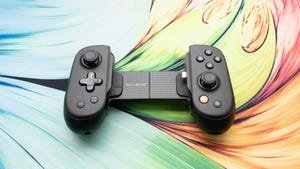
Backbone Pro Review: A Smart Mobile Game Controller That’ll Cost You
Backbone Pro
Pros
- Bluetooth plus some in-controller processing means you don’t have to play with your phone inserted
- Software now provides access to emulators for retro games
- Much better, ergonomic grip than Backbone One and other “flat” controllers
- Rear buttons
Cons
- Expensive
- Can still only use USB for charging (now both controller and phone), not audio
- Some features, including the emulator support, livestreaming, clip recording and more require a $40 annual subscription
A controller that wants to be wherever you’re gaming? The Backbone Pro sets out on that path and covers a fair bit of ground — for a nontrivial $170 price tag (thank you, tariffs).
I tested the iPhone version of the app; it also supports Android.
The original — and still available — Backbone One is designed to run only with a phone snapped into it, which obviates the need for built-in wireless or batteries; the Pro has its own Bluetooth radio and batteries, so it can operate independently like a typical Bluetooth controller. For the Pro, Backbone retronyms the original function as “handheld mode,” differentiating the Bluetooth as “wireless mode.”
That’s the functional difference between the two controllers. The Pro was also significantly redesigned from the original, both to accommodate the new capabilities and to make it feel more upscale; sorry, old iPhone owners, it will only come with USB-C, not Lightning connectors (so iPhone 15 or later).
Along with the launch of the Pro, Backbone changed the features available in the app versus those only available via its Backbone Plus subscription service, making the controller itself a better value.
The Backbone Pro on an iPhone 16 Pro Max.
Lori Grunin/CNETDuring my pre-announcement briefing, Backbone’s CEO, Maneet Khaira, explained his philosophy about where his corner of gaming was heading. “Our view is that in the future […] all you have to do is buy just one device and you can play games on any screen. And maybe you could be a kid who doesn’t own a console, and you could […] play Fortnite on a TV, because that’s just the TV you can buy at Best Buy, right, and you can play games on it. So our goal is to make one device that works [on] every single screen, so you can move from screen to screen. That way, we can bring gaming to a lot more people and expand […] the addressable market of gaming.”
But it’s the software that enables what he’s describing — the hardware is nice, but there are a lot of competing controllers — and the most difficult part to pull off, thanks to all the game launchers and service fragmentation.
A more traditional, organic design
One problem with the initial generation of on-phone controllers, including the Backbone One, was that they were designed to be as small as possible. That meant feel and features were frequently sacrificed. With the Pro, Backbone tried to keep it small, but reinstated a lot of the design characteristics that players want, such as grips that you can actually grip, full-size thumbsticks, rear buttons and Hall Effect triggers.
Backbone also changed the switches on the ABXY buttons to carbon pill-type to make them quieter, rather than the crisp clickiness of those on the older controller. They’ve got deeper travel, which to me registers as slightly less responsive, but I’m a button masher, so after a while, I got used to them. I didn’t feel a lot of latency in local games — actioners like Carrion and Hades on the phone — but over wireless, I do think I experienced occasional lag (in Lies of P on a Mac, Dead Cells on an iPad and more). Bluetooth has gotten a lot better, but it’s still not perfect. You can still connect via wire if it becomes an issue.
The Backbone Pro’s grips have a subtle ergonomic curve, and their larger size makes the controller a lot more comfortable to hold.
Lori Grunin/CNETThe grips offer a solid handhold. They have a little more texture than the Backbone One but less than the Xbox Wireless controller, and they feel a little softer than the other parts of the controller. Overall, they’re pretty comfy for long hours of gameplay.
Because they’re thin and the controller is a little shorter than I’m used to, I find the left and right buttons difficult to hit quickly in games where they’re actively used for gameplay (as opposed to just navigating menus and the like).
Lori Grunin/CNETI’m not crazy about the left and right buttons. Because of the controller and button sizing, I have trouble using them without having to think about it — which makes the rear buttons so useful for me. Those are a little bit harder to press to prevent accidental activation, but not so hard that I can’t operate them with weaker fingers (my ring fingers), so I remapped them as default in the software.
The rear buttons are essential if, like me, you find the left and right buttons awkward to operate quickly.
Lori Grunin/CNETThat said, they’re still a little bigger than those on the Backbone One, as are the triggers, and still relatively clicky. I have mixed feelings about the triggers, though. They’ve got a relatively deep pull, which can be great for aiming but not as responsive as I like for shooting. The software lets you set virtual trigger stops and deadzones (as well as joystick deadzones), but without the physical stop, it’s only partially effective for me. But you’ve got the control if you want to try it.
While the backbone of the Backbone doesn’t seem to rub the lenses on the iPhone Pro Max, it does cover one of them (I believe it’s the telephoto).
Lori Grunin/CNETThere’s a dedicated Bluetooth pairing button and analog jack for audio on the left grip and USB-C charging on the right. In addition to charging the batteries in the controller, it can charge your phone, and when it’s doing that, it still trickle charges the controller battery. (Backbone rates the battery at 40 hours, but I somehow drained it a lot faster on the first charge. Now it’s draining more slowly.) But as with the Backbone One, you can’t use the USB-C port for audio, video or data.
On the left grip are a Bluetooth pairing button and analog jack for audio.
Lori Grunin/CNETWhen you pair the controller with another device, but the phone is connected, it gives you a choice as to which device you want to control. But once you’ve set the profile via the phone — I wish it were possible to cycle through profiles in hardware so the phone wasn’t necessary — you probably want to remove it. I found that it disconnected Bluetooth when I went to the Backbone app using the touchscreen, for example. If you want to keep the phone in, you’re better off connecting to the second screen via USB.
Like the One, the Pro comes bundled with adapters to accommodate a variety of phone sizes.
Lori Grunin/CNETSoftware and $oftware
The free Backbone software delivers the best capabilities I’ve seen for a mobile controller. In addition to the typical button mappings (for the iPhone, it refers you to system settings, anyway). The subscription service still adds support for streaming, clip recording and chat, plus perks and discounts. In addition, Backbone’s added retro games and emulators to the hub to its subscription plan.
Now, the ability to connect to other screens via USB-C doesn’t require Backbone Plus, and specific to the Pro within the basic app, it supports game profiles with button remappings and deadzone/trigger stop settings on a per-game basis.
The Backbone app now integrates ROMs and retro games.
Lori Grunin/CNETIt also lets you save different device connections in the app for easy switching (which Backbone calls “FlowState”), which is one of the slickest aspects of the software specific to the Pro. For instance, once I’d paired to my iPad, I simply had to go to the list of paired devices and select it to connect and control. You can also select the profile you want to use. After that, remove the phone from the controller.
It’s as seamless as I’ve ever seen, and when it’s not, it’s because of the Byzantine ways you have to set up things on Apple devices or how the services work — web app shortcuts to play Xbox Cloud gaming and GeForce Now’s painful login process spring to mind.
I generally like the software, and yesterday I wished there was an option to turn off the audio while scrolling through the game thumbnails, which autoplay. But sometimes you do get what you wish for: The company has already updated the app to be able to turn off autoplay.
The Backbone app lets you test your sticks and triggers to find the deadzone as well as virtually adjust them.
Lori Grunin/CNETCompatibility claims can get confusing as well. For instance, Backbone claims it can work as an Xbox controller, but there’s no Bluetooth support in the console: You have to use Remote Play or cloud gaming, which aren’t always feasible. In my case, Remote Play isn’t supported by my network configuration — a double NAT setup — and cloud is hit or miss (even an Xbox Cloud Gaming lightweight game like Blue Prince ran fine for a while and then started to degrade, while Expedition 33 barely ran). Neither of those is within Backbone’s control, but can nonetheless affect the Backbone Pro experience.
The hardware is compelling if you like the on-phone controller concept or want something a little smaller to tote for your Bluetooth gaming, but it’s certainly not for the budget-minded, given you can find tons of alternatives for a fraction of the price. If you play on a lot of different Bluetooth-equipped devices, though, the Backbone Pro’s probably the slickest option out there.
