

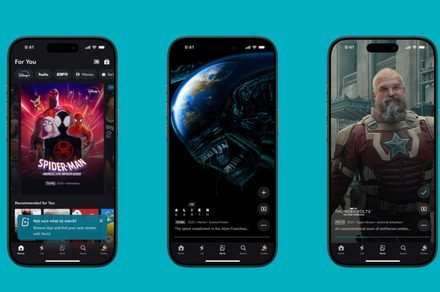
Disney+ app gets its own doomscrolling fix with a dedicated vertical video feed
New Verts feed lets you scroll through clips from Disney+ movies and shows
Disney+
If you have ever found yourself doomscrolling through TikTok or Instagram Reels, Disney+ now wants to offer a similar experience inside its own app. The company has introduced Verts, a vertical video feed in its app to help you discover movies and shows by swiping through short clips.
With Verts, you can swipe through short vertical videos that showcase scenes, highlights, and moments from Disney+ movies and TV shows. Instead of browsing menus or searching for something to watch, you can simply scroll through a stream of short videos until something catches your attention.
So how does Disney+’s new Verts feed work?
Verts appears as a new icon in the navigation bar of the Disney+ mobile app. It opens up a vertically scrolling feed filled with clips from movies and TV shows available on the platform.
The feed is personalized using recommendations based on your viewing activity. That means the clips you see will gradually reflect the types of movies and series you already enjoy.
Disney says that Verts will make discovering something new as effortless as scrolling through social media. If a clip grabs your attention, you can instantly start watching the full title on Disney+.
The clip can also be saved to your Watchlist so you can return to it later. Verts is now rolling out to Disney+ users on Android and iOS.
More streaming platforms are embracing vertical videos
Disney is not alone in experimenting with vertical videos to keep viewers engaged on mobile devices. Rival streaming platform Netflix already has a TikTok-like video feed showing clips from its shows.
For now, the feature mainly highlights scenes from existing Disney+ content. However, Disney says the format could expand over time to include new storytelling formats, creator content tied to fan communities, and more personalized experiences, turning Verts into a larger part of everyday discovery on Disney+.
Manisha likes to cover technology that is a part of everyday life, from smartphones & apps to gaming & streaming…
Stewie from Family Guy is getting his own two-season spinoff series
Stewie’s new series will center on his preschool misadventures and escapades through time and space.
Fox is expanding the Family Guy universe with a new spinoff centered on one of its most iconic characters. The network has officially ordered ‘Stewie’, a standalone animated series focused on Stewie Griffin, the mischievous baby genius from the long-running comedy show.
Seth MacFarlane, the creator of Family Guy, will return as the voice of Stewie and will also serve as an executive producer on the project. Longtime Family Guy writer and producer Kirker Butler will take on the role of showrunner, helping shape the direction of the new series.
YouTube Premium vs YouTube Premium Lite: Is the affordable plan better for you?
Want ad-free YouTube but not sure which plan to pick? We break it down for you.
YouTube offers two main subscription options for viewers who want an ad-free experience: the full YouTube Premium plan and the more affordable Premium Lite. While both plans remove the interruptions that come with watching YouTube for free, they differ in features, pricing, and who they’re best suited for.
If you’re thinking about subscribing but aren’t sure which plan to choose, here’s a breakdown of the key differences, including costs, features, and limitations, to help you decide whether Premium or Premium Lite is the right fit.
What is YouTube Premium Lite? All you need to know about YouTube’s cheaper plan
What’s included, what’s not, and if it’s right for you.
YouTube introduced a more affordable subscription tier in the US last year called YouTube Premium Lite, offering viewers a cheaper way to watch most videos without ads. The plan is designed for people who mainly use YouTube to watch videos and want a less interrupted viewing experience without paying for the full YouTube Premium bundle.
At launch, Premium Lite focused on one core benefit: removing ads from most videos. Since then, YouTube has updated the plan with additional features that were previously exclusive to the full Premium subscription.
