

GE Cync Keypad Dimmer Smart Switch review: For Cync-heads only
Image: Christopher Null/Foundry
At a glance
Expert’s Rating
Pros
- Delivers lots of flexibility that other switches can’t
- Broad ecosystem support, starting with Matter (and GE Lighting’s Cync line)
Cons
- Its most interesting features only work with Cync bulbs and fixtures
- Bulky dimensions make for a tough fit in an electrical box
- Fairly expensive
Our Verdict
The busy collection of buttons on this otherwise fine smart dimmer can control lighting scenes and colors without depending on the app on your smartphone, but those advanced features only work with other GE Lighting Cync products.
Price When Reviewed
This value will show the geolocated pricing text for product undefined
Best Pricing Today
Best Prices Today: GE Cync Keypad Dimmer Smart Switch
Give me an in-wall smart switch but make it really complicated, said no one ever.
Well never mind that, because the GE Cync Keypad Dimmer Smart Switch is every bit as complicated as its mouthful of a name. That said, if you’re heavily invested in GE Lighting’s Cync ecosystem, this multi-button dimmer is worth a look.
Specifications
The switch supports a maximum load of 450 watts of incandescent bulbs or 150 watts of LEDs, with a maximum draw of 3.75 amps. The switch is quite versatile and can support single-pole, 3-way, and 4-way installations. You’ll need a neutral wire in the box where you install it.
The dimmer is limited to connecting to 2.4GHz Wi-Fi networks, but it doesn’t require a hub and it’s Matter-certified, with explicit support for Amazon Alexa, Apple HomeKit, Google Assistant, and Samsung SmartThings smart home ecosystems. The switch also supports GE Lighting’s high-end Savant smart home system and app, although that’s designed for professional installations.
Installation and setup
The GE Cync Keypad Dimmer can be used in either single-pole or 3-way/4-way situations.
Christopher Null/Foundry
The GE Cync Keypad Dimmer Smart Switch is an all-pigtail design, with five wires jutting out the back. You’ll only need to connect four of these in a single-pole setup; the fifth wire is a traveler wire for multi-way connections. A large broadsheet installation guide provides wiring schematics for a number of scenarios. If you’re setting up anything beyond a single-pole connection, you’ll want to study it carefully. Numerous wire nuts of different sizes are included in the box; I still had to use some larger ones that I provided myself to complete all the connections, however, because the included nuts were too small.
You can just tap one of these buttons to set the appropriate mood without fishing your phone out of your pocket or relying on a voice assistant.
With five wire nuts (you will need one to cover the bare traveler wire if you’re not using it), things get very tight in the electrical box. It took some doing to get the switch in place and reasonably flush against the wall, and even after multiple tries I still wasn’t 100 percent satisfied with its placement. Plan to spend quite a bit of time and a large amount of elbow grease to get the switch positioned just right. Once installed, a frame attaches to the switch with two tiny screws. A cover plate with a small GE logo then snaps on top of that.
While this switch supports Matter, you’ll need to use the Cync app to configure the bulk of this switch’s features. Onboarding is a straightforward process, but I found it to be rather slow and plodding, often requiring a refresh to complete a step, such as locating available Wi-Fi networks. Eventually, after nearly five minutes of fits and starts, I made it through the initial setup process, including a firmware update. I had no issues connecting it to a Matter network, either.
Using the GE Cync Keypad Dimmer Smart Switch
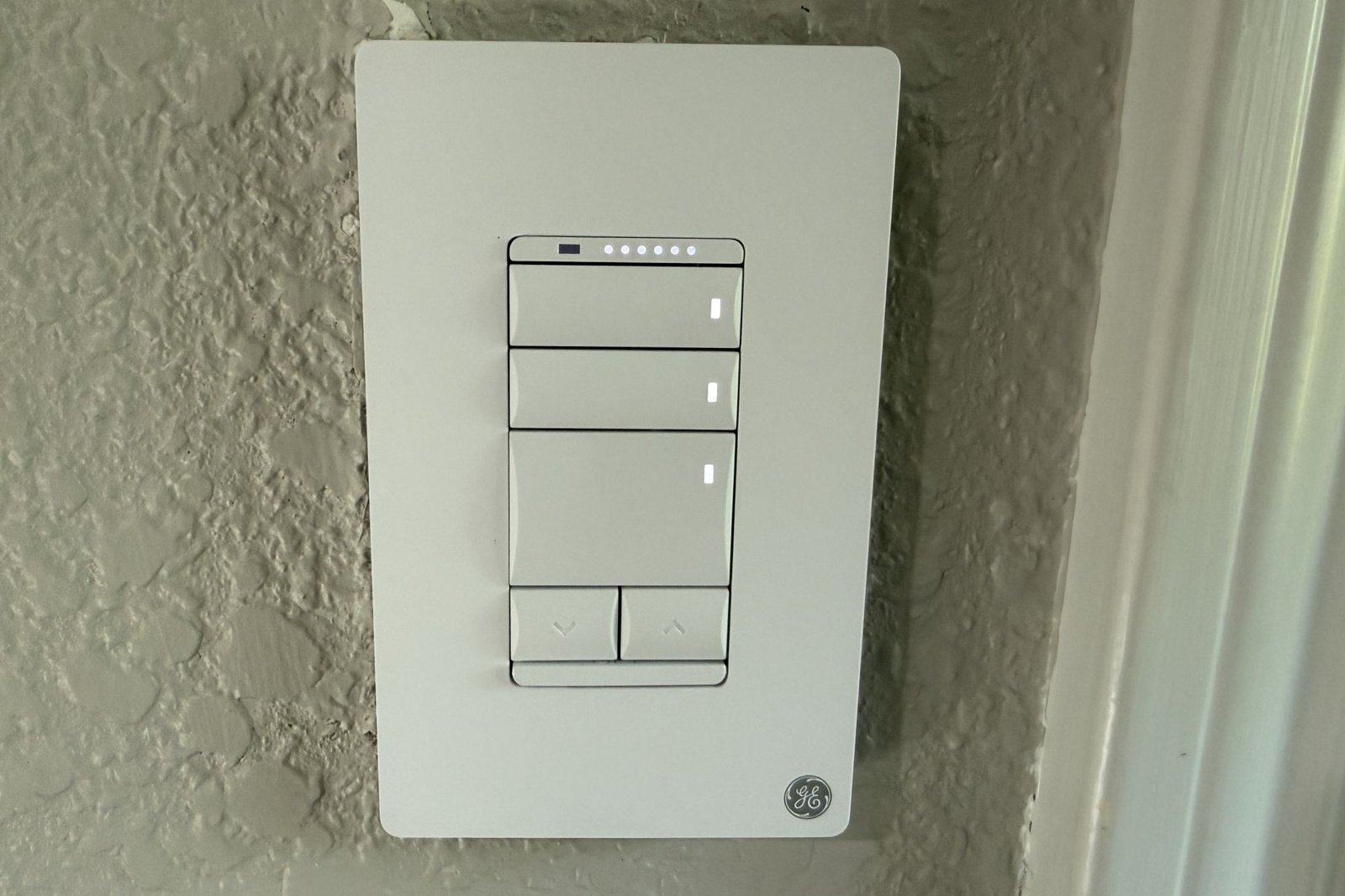
Let’s start with the hardware. The large button in the center of the device is a simple power toggle. A pair of up and down buttons below that control brightness on demand, stepping through 10 levels each time you tap. A row of white LEDs across the top of the switch provides a visual indicator of where you stand in the brightness range. You can also hold down these two buttons to gradually dim or brighten the lights; but as with most dimmers, this method is slow going.
With all those wires and wire nuts, it can be challenging to stuff the GE Cync Keypad Dimmer back into the electrical box.
Christopher Null/Foundry
The Cync Keypad Dimmer features two additional buttons, which you can’t miss if you’ve looked at any of the photos in this review. These are smaller buttons stacked on top of the primary power button. These two buttons are configurable by the user—although just how configurable they are depends on what other gear you have installed in your home.
The most basic options for these two buttons will work for anything connected to the switch: Using the Cync app, you can set them to turn the connected load on (only) or off (only) or toggle the on/off state. But the real value comes from configuring these buttons to control either the color of the light or cycle through scenes configured in the Cync app.
In other words, you can just tap one of these buttons to set the appropriate mood without needing to fish your phone out of your pocket or rely on a voice assistant. It’s a handy feature if you commonly switch themes within a room, but there’s a big catch for using it: Color and scene controls only work with GE Cync smart lights—they don’t even need to be wired to this switch for those buttons to work.
The GE Cync app lets you program the dimmer’s plethora of buttons for changing lighting colors and scenes, but this feature works best with GE Lighting’s own Cync lighting products.
Christopher Null/Foundry
Unfortunately, GE Lighting didn’t send me any Cync bulbs, so I had limited opportunities to test those features. The more generic functions of these buttons (and the switch as a whole) worked fine, although half the time the Cync app seems to be intentionally convoluted and confusing, making configuration less than intuitive.
TrueImage is another curious feature of the Cync app that’s worth mentioning. This isn’t well documented, so I didn’t know exactly what to expect from it before I tried it. Setting it up invites you to snap a photo of your connected light fixture when it’s off, and a separate shot when it’s on at full brightness. TrueImage then melds these two images together to create a sort of dynamic icon in the Cync app.
Touching that icon dims and brightens in time with the dimmer’s brightness setting, giving you a more nuanced sense of how the room’s lighting will look. It’s kind of a superfluous function, but it is at least a neat trick, and it works far better than I expected.
Should you buy the GE Cync Keypad Dimmer Smart Switch?
Regardless of how well it works, the biggest reason to buy this dimmer over something from the competition—whether that be a cheaper device like the Tapo or even more expensive alternative—is if you also have GE Lighting’s Cync bulbs in the room where you intend to install it. Even then, you’ll need to be prepared to live with a busy industrial design that’s better suited to an office building than the typical home.
All that aside, for households frequently jumping between lighting scenes and colors, this kind of solution might be convenient. The $38 street price might be steep, but it’s a lot less expensive than a Lutron Diva smart dimmer (which does require a hub). And if you’re not installing a switch in every room, it might not be as big a deal.
This review is part of TechHive’s in-depth coverage of the best smart lighting controls.
Best Prices Today: GE Cync Keypad Dimmer Smart Switch
Author: Christopher Null, Contributor, PCWorld
Christopher Null is an award-winning technology journalist with more than 25 years of experience writing about and reviewing consumer and business tech products. Previously, he served as Executive Editor for PC Computing magazine and was the founder and Editor in Chief of Mobile magazine, the first print publication focused exclusively on mobile tech. In addition to covering a wide range of smart home gear for TechHive, he is a frequent contributor to Wired, This Old House, and AAA’s Via Magazine.
