Close Menu

    Subscribe to Updates

    Get the latest creative news from FooBar about art, design and business.

    What's Hot

    Emergency Chrome 146 update patches 2 zero-day vulnerabilities

    Exclusive deal: Ryzen 7 mini PC with 32GB RAM + 1TB SSD for $290 off

    How I turned a dusty old radio into a 24/7 music station

    Facebook X (Twitter) Instagram
    • Artificial Intelligence
    • Business Technology
    • Cryptocurrency
    • Gadgets
    • Gaming
    • Health
    • Software and Apps
    • Technology
    Facebook X (Twitter) Instagram Pinterest Vimeo
    Tech AI Verse
    • Home
    • Artificial Intelligence

      What the polls say about how Americans are using AI

      February 27, 2026

      Tensions between the Pentagon and AI giant Anthropic reach a boiling point

      February 21, 2026

      Read the extended transcript: President Donald Trump interviewed by ‘NBC Nightly News’ anchor Tom Llamas

      February 6, 2026

      Stocks and bitcoin sink as investors dump software company shares

      February 4, 2026

      AI, crypto and Trump super PACs stash millions to spend on the midterms

      February 2, 2026
    • Business

      The team behind continuous batching says your idle GPUs should be running inference, not sitting dark

      March 13, 2026

      Met Office ‘supercomputing as a service’ one year old

      March 12, 2026

      Tech hiring evolves as candidates ask for AI compute alongside pay and perks

      March 11, 2026

      Oracle is spending billions on AI data centers as cash flow turns negative

      March 11, 2026

      Google: Cloud attacks exploit flaws more than weak credentials

      March 10, 2026
    • Crypto

      Banks Respond to Kraken’s Federal Reserve Access as Trump Sides with Crypto

      March 4, 2026

      Hyperliquid and DEXs Break the Top 10 — Is the CEX Era Ending?

      March 4, 2026

      Consensus Hong Kong 2026: The Institutional Turn 

      March 4, 2026

      New Crypto Mutuum Finance (MUTM) Reports V1 Protocol Progress as Roadmap Enters Phase 3

      March 4, 2026

      Bitcoin Short Sellers Caught Off Guard in New White House Move

      March 4, 2026
    • Technology

      Emergency Chrome 146 update patches 2 zero-day vulnerabilities

      March 13, 2026

      Exclusive deal: Ryzen 7 mini PC with 32GB RAM + 1TB SSD for $290 off

      March 13, 2026

      How I turned a dusty old radio into a 24/7 music station

      March 13, 2026

      Will Apple’s MacBook Neo kill budget PC laptops—or save them?

      March 13, 2026

      Track global weather and climate data in real time with this site

      March 13, 2026
    • Others
      • Gadgets
      • Gaming
      • Health
      • Software and Apps
    Check BMI
    Tech AI Verse
    You are at:Home»Technology»How I turned a dusty old radio into a 24/7 music station
    Technology

    How I turned a dusty old radio into a 24/7 music station

    TechAiVerseBy TechAiVerseMarch 13, 2026No Comments6 Mins Read3 Views
    Facebook Twitter Pinterest Telegram LinkedIn Tumblr Email Reddit
    How I turned a dusty old radio into a 24/7 music station
    Share
    Facebook Twitter LinkedIn Pinterest WhatsApp Email

    How I turned a dusty old radio into a 24/7 music station

    Skip to content

    Image: Jared Newman / Foundry

    Summary created by Smart Answers AI

    In summary:

    • PCWorld explores transforming a vintage 1976 GE Monogram radio into a continuous music station using modern technology and creative repurposing.
    • The project combines an old smartphone, a $15 aux-to-FM transmitter, and music streaming services to create “Newmy Radio” broadcasting on 87.6 FM.
    • This setup demonstrates how simple, dedicated audio devices can provide an uncluttered listening experience while blending vintage hardware with digital music collections.

    The mission was supposed to be simple: Drive to my father-in-law’s house, head into the garage, and grab one of his spare garden hoses to replace the one I accidentally chopped in half with the lawnmower. But in the process, something boxed up on a high shelf caught my eye.

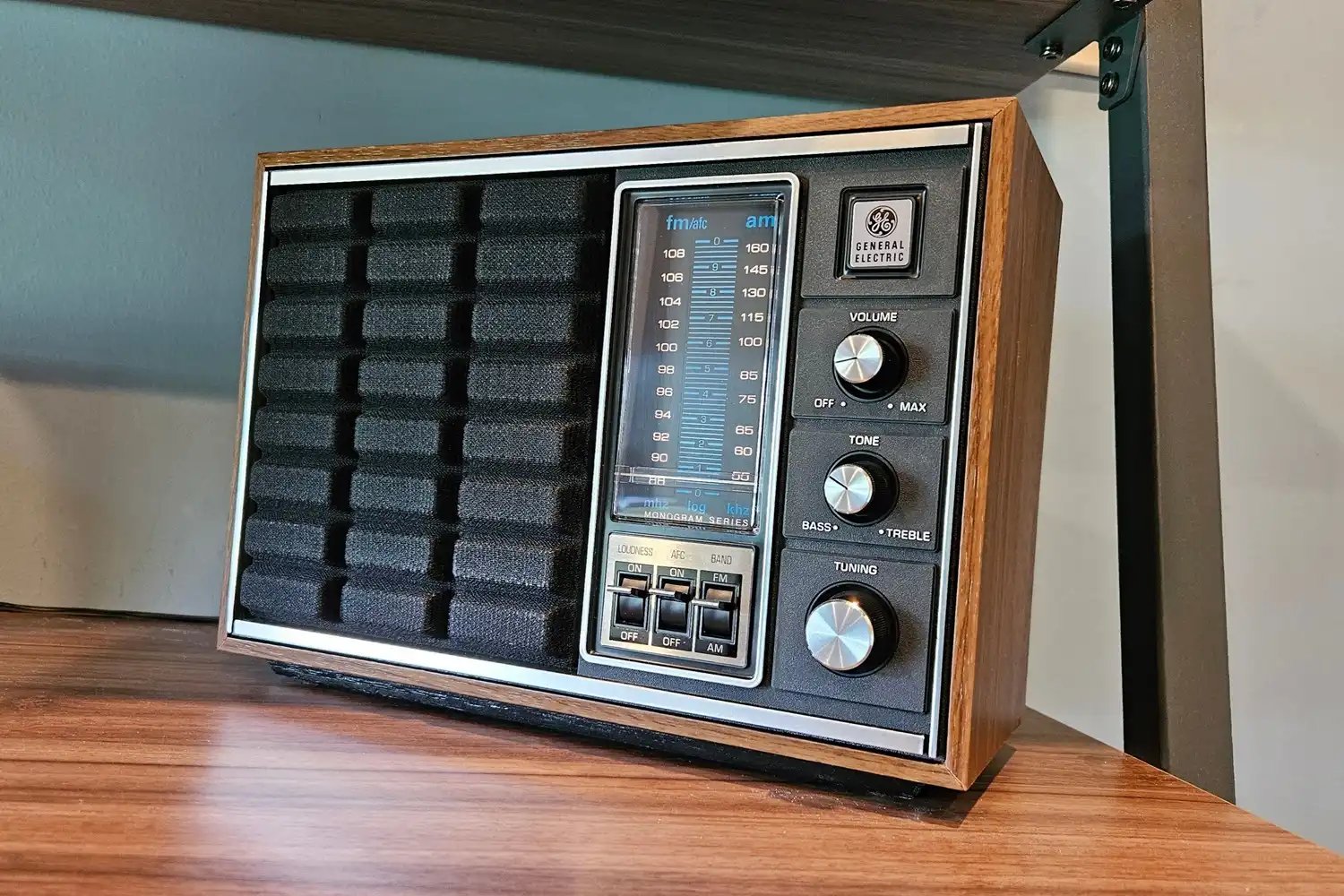
    Still unopened in its original packaging was a GE Monogram 7-4150A radio, which dates to around 1976 according to RadioMuseum. I don’t like seeing old tech go to waste, so instinctively I wondered if it might still have some life in it. I brought it home with my father-in-law’s permission—along with the garden hose—though if we’re being honest, the radio was already in my car by the time I’d texted him about it.

    To my delight, it works. Moreover, it just works. Unlike every other modern music playback source, this piece of vintage tech required no account creation, no pairing process, and no setup. You simply plug it in and it starts playing the radio. I quickly made space for it in my office, if only to celebrate its beauty and simplicity.

    Of course, I couldn’t resist complicating things from there. What sits in my office now isn’t just a vintage radio but a round-the-clock Newmy Radio station, broadcasting on 87.6 FM with an old smartphone and a $15 aux-to-FM transmitter. The Monogram 7-4150A still functions as a radio—with the same “it just works” immediacy of turning it on and hearing music—but most of the time it’s tuned to a station that shuffles through my personal FLAC collection, one album at a time.

    It’s one of the most joyful tech things I’ve ever set up—and you can create something similar in your own home with the right parts.

    This column first appeared in Advisorator, Jared’s weekly tech advice newsletter. Sign up to get tech advice like this every Tuesday.

    First step, go find a radio

    What makes this all work is the simplicity of playing music with the flip of a power switch. If you don’t have an old radio on hand, consider a new radio with no other options or menu systems that get in the way.

    That isn’t the easiest thing to find today, of course, but Best Buy does sell portable standalone radios by Panasonic and Victrola. (The latter also includes Bluetooth, but with a dial that can keep it on radio mode.) Otherwise, you could always venture onto eBay or Facebook Marketplace in search of actual vintage radios instead.

    Next, grab an old (or spare) phone

    Before you can set up your own radio station, you’ll need a spare phone, tablet, or PC that you don’t mind keeping powered on and playing music at all times. It should have a headphone jack—otherwise you’ll need an adapter with both a power connector and 3.5mm output—and it should be plugged into a charger as close to the radio as possible.

    Having recently written about turning an old phone into a portable MP3 player, I already had some old phones sitting around, waiting to be repurposed. If you aren’t like me and don’t keep spare devices, Swappa and eBay have plenty of cheap ones.

    Roll your own radio station

    This piece of the puzzle brought me back to my college years, when iPods were everywhere but most cars didn’t have 3.5mm inputs. As a workaround, I’d use an aux-to-FM transmitter to play the iPod’s audio on a short-range station, which my car radio could then pick up. Such products still exist today, but most are designed for car power outlets (also known as the cigarette lighter).

    Jared Newman / Foundry

    Fortunately, I found this $15 transmitter on Amazon that draws power over Micro-USB and lets me do just that. I plugged the transmitter into my phone’s headphone port and connected the Micro-USB cable to a charger—and it worked exactly as expected, playing to radio whatever audio was coming from my spare phone.

    Lastly, just play some music

    The most important criteria when playing audio like this is that it needs to play non-stop without any intervention or maintenance. How do you do that? Here are some possibilities:

    • The simplest option is to use a free internet radio app like Pandora, Amazon Music (free radio stations have no ads with Prime), or perhaps SomaFM if your tastes veer toward the alternative.
    • Subscription music streaming services like Apple Music and Spotify can also work, but they’re really only worth it if you’re paying for a family plan with an extra stream to spare.
    • With apps like Dark Noise (iOS) or Atmosphere (Android), you could also use your radio to play ambient sound instead of music.

    As for me, I’m using Plexamp, which streams from my personal music collection stored on a nearby Mac Mini. Setting up your own music server is a whole other project, but Plexamp’s “Random Album Radio” feature is perfect for this scenario. When I turn on the radio, I’ll often hear part of an album that I’d never have thought to play on my own.

    It feels a lot like turning on the TV and catching a beloved movie at the midway point. It’s hard to resist stopping to appreciate it.

    This column first appeared in Advisorator, Jared’s weekly tech advice newsletter. Sign up to get tech advice like this every Tuesday.


    Author: Jared Newman
    , Contributor

    Jared has been a freelance technology journalist for more than 15 years and is a regular contributor to PCWorld, Fast Company, and TechHive, where he’s written a weekly cord-cutting column since 2014. His Cord Cutter Weekly newsletter has more than 30,000 subscribers, and his Advisorator tech advice newsletter is read by nearly 10,000 people each week. Jared has a master’s degree in journalism from NYU and specializes in making complex tech topics easy to understand, from streaming and cord-cutting to neat apps and useful tech tricks. He is based in Cincinnati, OH.

    Share. Facebook Twitter Pinterest LinkedIn Reddit WhatsApp Telegram Email
    Previous ArticleWill Apple’s MacBook Neo kill budget PC laptops—or save them?
    Next Article Exclusive deal: Ryzen 7 mini PC with 32GB RAM + 1TB SSD for $290 off
    TechAiVerse
    • Website

    Jonathan is a tech enthusiast and the mind behind Tech AI Verse. With a passion for artificial intelligence, consumer tech, and emerging innovations, he deliver clear, insightful content to keep readers informed. From cutting-edge gadgets to AI advancements and cryptocurrency trends, Jonathan breaks down complex topics to make technology accessible to all.

    Related Posts

    Emergency Chrome 146 update patches 2 zero-day vulnerabilities

    March 13, 2026

    Exclusive deal: Ryzen 7 mini PC with 32GB RAM + 1TB SSD for $290 off

    March 13, 2026

    Will Apple’s MacBook Neo kill budget PC laptops—or save them?

    March 13, 2026
    Leave A Reply Cancel Reply

    Top Posts

    Ping, You’ve Got Whale: AI detection system alerts ships of whales in their path

    April 22, 2025716 Views

    Lumo vs. Duck AI: Which AI is Better for Your Privacy?

    July 31, 2025303 Views

    Wired Headphones Are Making A Comeback, And We Have Gen Z To Thank

    July 22, 2025210 Views

    6.7 Cummins Lifter Failure: What Years Are Affected (And Possible Fixes)

    April 14, 2025172 Views
    Don't Miss
    Technology March 13, 2026

    Emergency Chrome 146 update patches 2 zero-day vulnerabilities

    Emergency Chrome 146 update patches 2 zero-day vulnerabilities Image: Chrome Summary created by Smart Answers…

    Exclusive deal: Ryzen 7 mini PC with 32GB RAM + 1TB SSD for $290 off

    How I turned a dusty old radio into a 24/7 music station

    Will Apple’s MacBook Neo kill budget PC laptops—or save them?

    Stay In Touch
    • Facebook
    • Twitter
    • Pinterest
    • Instagram
    • YouTube
    • Vimeo

    Subscribe to Updates

    Get the latest creative news from SmartMag about art & design.

    About Us
    About Us

    Welcome to Tech AI Verse, your go-to destination for everything technology! We bring you the latest news, trends, and insights from the ever-evolving world of tech. Our coverage spans across global technology industry updates, artificial intelligence advancements, machine learning ethics, and automation innovations. Stay connected with us as we explore the limitless possibilities of technology!

    Facebook X (Twitter) Pinterest YouTube WhatsApp
    Our Picks

    Emergency Chrome 146 update patches 2 zero-day vulnerabilities

    March 13, 20263 Views

    Exclusive deal: Ryzen 7 mini PC with 32GB RAM + 1TB SSD for $290 off

    March 13, 20263 Views

    How I turned a dusty old radio into a 24/7 music station

    March 13, 20263 Views
    Most Popular

    Outbreak turns 30

    March 14, 20250 Views

    New SuperBlack ransomware exploits Fortinet auth bypass flaws

    March 14, 20250 Views

    CDs Offer Guaranteed Returns in an Uncertain Market. Today’s CD Rates, March 14, 2025

    March 14, 20250 Views
    © 2026 TechAiVerse. Designed by Divya Tech.
    • Home
    • About Us
    • Contact Us
    • Privacy Policy
    • Terms & Conditions

    Type above and press Enter to search. Press Esc to cancel.