Close Menu

    Subscribe to Updates

    Get the latest creative news from FooBar about art, design and business.

    What's Hot

    Gartner: Why neoclouds are the future of GPU-as-a-Service

    Runlayer is now offering secure OpenClaw agentic capabilities for large enterprises

    Microsoft Copilot ignored sensitivity labels twice in eight months — and no DLP stack caught either one

    Facebook X (Twitter) Instagram
    • Artificial Intelligence
    • Business Technology
    • Cryptocurrency
    • Gadgets
    • Gaming
    • Health
    • Software and Apps
    • Technology
    Facebook X (Twitter) Instagram Pinterest Vimeo
    Tech AI Verse
    • Home
    • Artificial Intelligence

      Read the extended transcript: President Donald Trump interviewed by ‘NBC Nightly News’ anchor Tom Llamas

      February 6, 2026

      Stocks and bitcoin sink as investors dump software company shares

      February 4, 2026

      AI, crypto and Trump super PACs stash millions to spend on the midterms

      February 2, 2026

      To avoid accusations of AI cheating, college students are turning to AI

      January 29, 2026

      ChatGPT can embrace authoritarian ideas after just one prompt, researchers say

      January 24, 2026
    • Business

      Gartner: Why neoclouds are the future of GPU-as-a-Service

      February 21, 2026

      The HDD brand that brought you the 1.8-inch, 2.5-inch, and 3.5-inch hard drives is now back with a $19 pocket-sized personal cloud for your smartphones

      February 12, 2026

      New VoidLink malware framework targets Linux cloud servers

      January 14, 2026

      Nvidia Rubin’s rack-scale encryption signals a turning point for enterprise AI security

      January 13, 2026

      How KPMG is redefining the future of SAP consulting on a global scale

      January 10, 2026
    • Crypto

      Another European Country Bans Polymarket, Threatens Massive Fine

      February 20, 2026

      Why Is The US Stock Market Up Today?

      February 20, 2026

      Is XRP Price Preparing To Breach Its 2026 Downtrend? Here’s What History Says

      February 20, 2026

      “Disgrace” or “Win for American Wallets”? Supreme Court Tariff Bombshell Sparks Political Meltdown in Washington

      February 20, 2026

      Perle Labs CEO Ahmed Rashad on Why AI Needs Verifiable Data Infrastructure

      February 20, 2026
    • Technology

      Runlayer is now offering secure OpenClaw agentic capabilities for large enterprises

      February 21, 2026

      Microsoft Copilot ignored sensitivity labels twice in eight months — and no DLP stack caught either one

      February 21, 2026

      Be Wary of Bluesky

      February 21, 2026

      CERN rebuilt the original browser from 1989

      February 21, 2026

      Across the US, people are dismantling and destroying Flock surveillance cameras

      February 21, 2026
    • Others
      • Gadgets
      • Gaming
      • Health
      • Software and Apps
    Check BMI
    Tech AI Verse
    You are at:Home»Technology»How to check if your Apple Silicon Mac is booting securely
    Technology

    How to check if your Apple Silicon Mac is booting securely

    TechAiVerseBy TechAiVerseAugust 25, 2025No Comments5 Mins Read2 Views
    Facebook Twitter Pinterest Telegram LinkedIn Tumblr Email Reddit
    How to check if your Apple Silicon Mac is booting securely
    Share
    Facebook Twitter LinkedIn Pinterest WhatsApp Email

    How to check if your Apple Silicon Mac is booting securely

    There are so many controls in macOS that sometimes you can’t see the wood for the trees. This can leave uncertainty over essentials, such as whether your Apple silicon Mac really is properly secure, or maybe there’s something sinister going on with it? This is a question I’m asked not infrequently, usually when someone has been spreading disinformation or FUD (fear, uncertainty, doubt). So how can you check that your Mac is properly locked down and boots securely?

    Quick checks

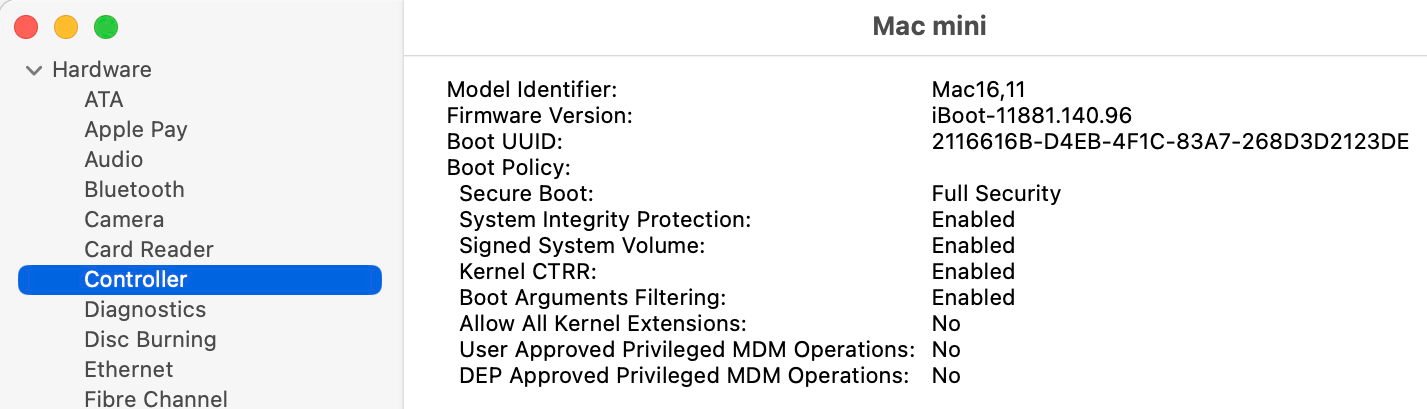
    There are two quick checks that cover the essentials. First, open System Information and select the Controller section in Hardware.

    This provides a brief summary of your Mac’s boot security, which should read as shown above. If you still need to use a kernel extension or similar, your Mac might show Reduced Security with Allow All Kernel Extensions enabled, but you should do everything you can to avoid that.

    Secure Boot is controlled using Startup Security Utility in Recovery mode, and if you care to start up in that mode, you can confirm or correct its settings there.

    Back in normal user mode, open Privacy & Security settings and ensure you have FileVault enabled there.

    SilentKnight also checks that XProtect/Gatekeeper checks are enabled, and that security data are up to date, giving you complete confidence.

    Details

    Although those should be sufficient for most, some want to go further and verify that their Mac’s boot process and security systems are also working correctly. To do that, shut your Mac down, wait ten seconds or so, and start up normally with the startup chime sounding at a known time. Enter your password, wait a few seconds for the Finder to get set up and running, and open LogUI. Set its time to that of the startup chime, and get the first 10 seconds or 10,000 log entries. You may need to adjust the seconds to capture the full boot sequence. When you have, look through the log and identify the following waypoints.

    In each of these log entries, I have emboldened a word or two that you can copy from here and paste into LogUI’s Search box, then press Return. That will display the log entry, and sometimes others you might find relevant. Times are given here in seconds, with the startup chime occurring at about 37 seconds. Version numbers shown are those for macOS 15.6.

    The start of boot is recorded as
    37.562774 === system boot: [UUID]
    and a little while after that, the kernel declares its version details
    42.759300 Darwin Kernel Version 24.6.0: Mon Jul 14 11:30:40 PDT 2025; root:xnu-11417.140.69~1/RELEASE_ARM64_T6041
    for macOS 15.6.

    Further down you’ll come across more information about key security components, including the Trusted Execution Monitor
    43.060422 [Log]: Code Signing Monitor Image4 Module Version 7.0.0: Fri Jul 11 16:51:29 PDT 2025; root:AppleImage4_txm-320.100.22~1090
    43.060447 [Log]: build variant: txm.macosx.release.TrustedExecutionMonitor_Guarded-135.100.37

    Then the iBoot firmware version
    43.061758 iBoot version: iBoot-11881.140.96
    43.061760 iBoot Stage 2 version: iBoot-11881.140.96

    CoreCrypto support is vital, and another Image4 extension
    43.137635 FIPSPOST_KEXT [133796636] fipspost_post:154: [FIPSPOST][Module-ID] Apple corecrypto Module v18.3 [Apple silicon, Kernel, Software, SL1]
    43.242334 Darwin Image4 Extension Version 7.0.0: Mon Jul 14 11:23:46 PDT 2025; root:AppleImage4-320.100.22~2585/AppleImage4/RELEASE_ARM64E

    You should see entries reporting the loading of security policy components
    43.242343 Security policy loaded: AppleImage4 hooks (AppleImage4)
    43.242961 Security policy loaded: Apple Mobile File Integrity (AMFI)
    43.243092 Security policy loaded: Seatbelt sandbox policy (Sandbox)

    The Secure Enclave Processor or SEP is another key component that has to be started up
    43.264594 "AppleSEPKeyStore":326:0: starting (BUILT: Jul 14 2025 23:34:10) ("normal" variant 🌽 , 1827.120.2)
    43.264639 "AppleSEPKeyStore":471:0: _sep_enabled = 1

    Apple System Policy should follow a bit later
    43.760156 Security policy loaded: Apple System Policy (ASP)
    43.760188 AppleSystemPolicy has been successfully started

    The root of the file system is then identified in two entries whose origins go right back to the start of Mac OS X
    43.940643 BSD root: disk3s1
    43.940644 , major 1, minor 13

    And APFS mounts the root file system, using the SSV snapshot
    43.941048 apfs_vfsop_mountroot:2984: apfs: mountroot called!
    44.034685 apfs_vfsop_mount:2763: disk3s1 Rooting from snapshot with xid 1724240.

    One of the most important entries comes shortly after that, where successful validation of the SSV’s root hash is reported
    44.038830 authenticate_root_hash:642: disk3s1 successfully validated on-disk root hash

    It’s now time to start user space processes, and for that launchd must be loaded so it can launch everything else
    44.103761 load_init_program: attempting to load /sbin/launchd

    How Secure Boot works

    Apple silicon Macs have a small ROM to support DFU mode in case a full Restore is required, and to check and load the first stage of the ‘firmware’, the Low-Level Bootloader or LLB. Only if that matches its signature will the ROM firmware hand over to it and proceed with the boot process. The LLB in turn performs the same checks on the second stage ‘firmware’, iBoot proper. That goes on to check the kernel, before loading that and handing over for kernel boot to take over.

    iBoot ‘firmware’ doesn’t write anything in the log, but once the kernel takes over its log entries provide a detailed account of its progress. The great majority of its log entries are unintelligible to anyone outside Apple, but the waypoints I have given above identify some of the most important steps it takes. When it’s ready, the kernel validates the root hash for the SSV snapshot, as noted above, enabling the boot process to proceed to load and run other parts of macOS. The remaining hash checking of the SSV, to confirm that it’s exactly as Apple intends, proceeds in a ‘lazy’ fashion, as access is needed to its contents.

    This chain of validation before loading the next stage ensures that nothing in the boot process can be tampered with or changed, and the boot is secure throughout. Apple provides further details in its Platform Security Guide.

    Share. Facebook Twitter Pinterest LinkedIn Reddit WhatsApp Telegram Email
    Previous ArticleShow HN: Sping – An HTTP/TCP Latency Tool That’s Easy on the Eye
    Next Article I’m fighting for my freedom using outdated technology
    TechAiVerse
    • Website

    Jonathan is a tech enthusiast and the mind behind Tech AI Verse. With a passion for artificial intelligence, consumer tech, and emerging innovations, he deliver clear, insightful content to keep readers informed. From cutting-edge gadgets to AI advancements and cryptocurrency trends, Jonathan breaks down complex topics to make technology accessible to all.

    Related Posts

    Runlayer is now offering secure OpenClaw agentic capabilities for large enterprises

    February 21, 2026

    Microsoft Copilot ignored sensitivity labels twice in eight months — and no DLP stack caught either one

    February 21, 2026

    Be Wary of Bluesky

    February 21, 2026
    Leave A Reply Cancel Reply

    Top Posts

    Ping, You’ve Got Whale: AI detection system alerts ships of whales in their path

    April 22, 2025684 Views

    Lumo vs. Duck AI: Which AI is Better for Your Privacy?

    July 31, 2025274 Views

    6.7 Cummins Lifter Failure: What Years Are Affected (And Possible Fixes)

    April 14, 2025158 Views

    6 Best MagSafe Phone Grips (2025), Tested and Reviewed

    April 6, 2025118 Views
    Don't Miss
    Business Technology February 21, 2026

    Gartner: Why neoclouds are the future of GPU-as-a-Service

    Gartner: Why neoclouds are the future of GPU-as-a-Service Neoclouds are set to change the economcs…

    Runlayer is now offering secure OpenClaw agentic capabilities for large enterprises

    Microsoft Copilot ignored sensitivity labels twice in eight months — and no DLP stack caught either one

    Be Wary of Bluesky

    Stay In Touch
    • Facebook
    • Twitter
    • Pinterest
    • Instagram
    • YouTube
    • Vimeo

    Subscribe to Updates

    Get the latest creative news from SmartMag about art & design.

    About Us
    About Us

    Welcome to Tech AI Verse, your go-to destination for everything technology! We bring you the latest news, trends, and insights from the ever-evolving world of tech. Our coverage spans across global technology industry updates, artificial intelligence advancements, machine learning ethics, and automation innovations. Stay connected with us as we explore the limitless possibilities of technology!

    Facebook X (Twitter) Pinterest YouTube WhatsApp
    Our Picks

    Gartner: Why neoclouds are the future of GPU-as-a-Service

    February 21, 20262 Views

    Runlayer is now offering secure OpenClaw agentic capabilities for large enterprises

    February 21, 20260 Views

    Microsoft Copilot ignored sensitivity labels twice in eight months — and no DLP stack caught either one

    February 21, 20260 Views
    Most Popular

    7 Best Kids Bikes (2025): Mountain, Balance, Pedal, Coaster

    March 13, 20250 Views

    VTOMAN FlashSpeed 1500: Plenty Of Power For All Your Gear

    March 13, 20250 Views

    This new Roomba finally solves the big problem I have with robot vacuums

    March 13, 20250 Views
    © 2026 TechAiVerse. Designed by Divya Tech.
    • Home
    • About Us
    • Contact Us
    • Privacy Policy
    • Terms & Conditions

    Type above and press Enter to search. Press Esc to cancel.