Close Menu

    Subscribe to Updates

    Get the latest creative news from FooBar about art, design and business.

    What's Hot

    Major iPhone update: iOS 26.3 makes switching to Android and third-party smartwatches easier

    “The world is in peril”: Anthropic’s head of AI safety resigns, unable to reconcile his work with his values

    Xiaomi 17 Ultra falls behind Apple iPhone 17 Pro in camera test

    Facebook X (Twitter) Instagram
    • Artificial Intelligence
    • Business Technology
    • Cryptocurrency
    • Gadgets
    • Gaming
    • Health
    • Software and Apps
    • Technology
    Facebook X (Twitter) Instagram Pinterest Vimeo
    Tech AI Verse
    • Home
    • Artificial Intelligence

      Read the extended transcript: President Donald Trump interviewed by ‘NBC Nightly News’ anchor Tom Llamas

      February 6, 2026

      Stocks and bitcoin sink as investors dump software company shares

      February 4, 2026

      AI, crypto and Trump super PACs stash millions to spend on the midterms

      February 2, 2026

      To avoid accusations of AI cheating, college students are turning to AI

      January 29, 2026

      ChatGPT can embrace authoritarian ideas after just one prompt, researchers say

      January 24, 2026
    • Business

      The HDD brand that brought you the 1.8-inch, 2.5-inch, and 3.5-inch hard drives is now back with a $19 pocket-sized personal cloud for your smartphones

      February 12, 2026

      New VoidLink malware framework targets Linux cloud servers

      January 14, 2026

      Nvidia Rubin’s rack-scale encryption signals a turning point for enterprise AI security

      January 13, 2026

      How KPMG is redefining the future of SAP consulting on a global scale

      January 10, 2026

      Top 10 cloud computing stories of 2025

      December 22, 2025
    • Crypto

      How Polymarket Is Turning Bitcoin Volatility Into a Five-Minute Betting Market

      February 13, 2026

      Israel Indicts Two Over Secret Bets on Military Operations via Polymarket

      February 13, 2026

      Binance’s October 10 Defense at Consensus Hong Kong Falls Flat

      February 13, 2026

      Argentina Congress Strips Workers’ Right to Choose Digital Wallet Deposits

      February 13, 2026

      Monero Price Breakdown Begins? Dip Buyers Now Fight XMR’s Drop to $135

      February 13, 2026
    • Technology

      Major iPhone update: iOS 26.3 makes switching to Android and third-party smartwatches easier

      February 13, 2026

      “The world is in peril”: Anthropic’s head of AI safety resigns, unable to reconcile his work with his values

      February 13, 2026

      Xiaomi 17 Ultra falls behind Apple iPhone 17 Pro in camera test

      February 13, 2026

      Haru Mini retro camera takes on Kodak Charmera with a 20MP sensor in tiny retro SLR body

      February 13, 2026

      Under $8: Fantasy-themed strategy RPG reaches new all-time low on Steam

      February 13, 2026
    • Others
      • Gadgets
      • Gaming
      • Health
      • Software and Apps
    Check BMI
    Tech AI Verse
    You are at:Home»Technology»How To Get The Best Astrophotography Photos Out Of Your iPhone
    Technology

    How To Get The Best Astrophotography Photos Out Of Your iPhone

    TechAiVerseBy TechAiVerseSeptember 20, 2025No Comments6 Mins Read3 Views
    Facebook Twitter Pinterest Telegram LinkedIn Tumblr Email Reddit
    How To Get The Best Astrophotography Photos Out Of Your iPhone
    Share
    Facebook Twitter LinkedIn Pinterest WhatsApp Email

    How To Get The Best Astrophotography Photos Out Of Your iPhone

    Nadeem Sarwar/SlashGear

    Capturing shots of the night sky and celestial events, an art known as astrophotography, may sound intimidating at first. After all, the fantastic stills you often see making rounds on social media are captured with uber expensive cameras, stands, and computing gear to go with post-edits. But the humble iPhone in your pocket is a fairly powerful snapper that can click some beautiful shots of the night sky. And you don’t necessarily need a whole lot of supporting gear for it. A decent support to keep the still and a proper framing can get the job done, as you can see in the sample below:

    Iphones have come a long way for astrophotography. This is a photo I took out in the desert a few nights ago on my Iphone 15 Max Pro! #iphone @Apple pic.twitter.com/Bwry0UF2LW

    — Sean Parker (@seanparkerphoto) May 9, 2025

    The execution is easy, but as NASA puts it in the agency’s astrophotography guide, “don’t expect Hubble-level images to start.”The first step to clicking decent night sky or planetary object shots is getting ready for the frame. You must first ask yourself questions such as “when does the eclipse begin?” “What hour will produce the least light pollution?” “What phase of the night will provide the easiest view of the constellation from the spot you are going?” Some of these questions can be answered — and prepared for — using mobile apps.

    Coming back from Osaka, on our way to Taipei.
    Not the best quality but not a bad job considering it was shot with an iphone.

    Milky Way, Venus and Comet Tsuchinshan-Atlas (c/2023 a3)#Astrophotography #comet #milkyway #venus pic.twitter.com/hWCMjAzXxn

    — Andre Quiros (@flyingheavy747) October 22, 2024

    SkySafari is one of the best stargazing apps out there, and a close second would be Star Walk. If you want to prep for location scouting and readying the camera kit (such as calculating the best exposure and depth settings), Photopills is a lovely option. Night Sky is a hot favorite in the Apple community, thanks to its beginner-friendly approach and intuitive AR (augmented reality) experiences. Stellarium Mobile is another highly rated app loved for its night sky simulation view and massive knowledge bank.

    Preparing for night capture

    Nadeem Sarwar/SlashGear

    Once you are done with the prep work, have finalized the spot, and are ready to put your phone’s camera through the paces, decide what kind of shot you want to click. On some occasions, you just want to point and shoot in handheld mode, and it’s totally fine. The sensor-shift stabilization system on iPhones does a fairly good job of negating hand movements, while the algorithm further helps reduce blurry artifacts and deliver crisp pictures. But if you want to capture long-exposure shots or seek to push the night mode and get the absolute best, even a small (and cheap) tripod can work wonders. Take a look: 

    Just shot the Milky Way with my iPhone, and honestly, I’m speechless

    sc ig/amsyarnaaif pic.twitter.com/lXSdcvz5qw

    — Mutia (@Mutiyaagustin2) September 11, 2025

    The folks over at The New York Times’ WireCutter suggest the Joby GorillaPod 1K Kit and Ulanzi ST-27 combo, Joby Podzilla, Moment Tripod Mount for MagSafe, MOFT Snap Phone Tripod Stand MOVAS, Benro MeVIDEO Sidekick Pocket, and the Apexel Gorillas Tripod. Benro KoalaPod and KraftGeek are also highly recommended by the experts at DigitalCameraWorld, so they’re worth checking out, as well.

    Double moon halo, Ireland, Monday night. iPhone 14 📱#Astrophotography ⁦@321MoonHourGirl⁩ ⁦@NASAMoon⁩ ⁦@MoonHourSocial⁩ ⁦@ThePhotoHour⁩ ⁦@StormHour⁩ pic.twitter.com/amHEZLSjDw

    — SkyWatcherDave (@SkyWatch07) January 24, 2024

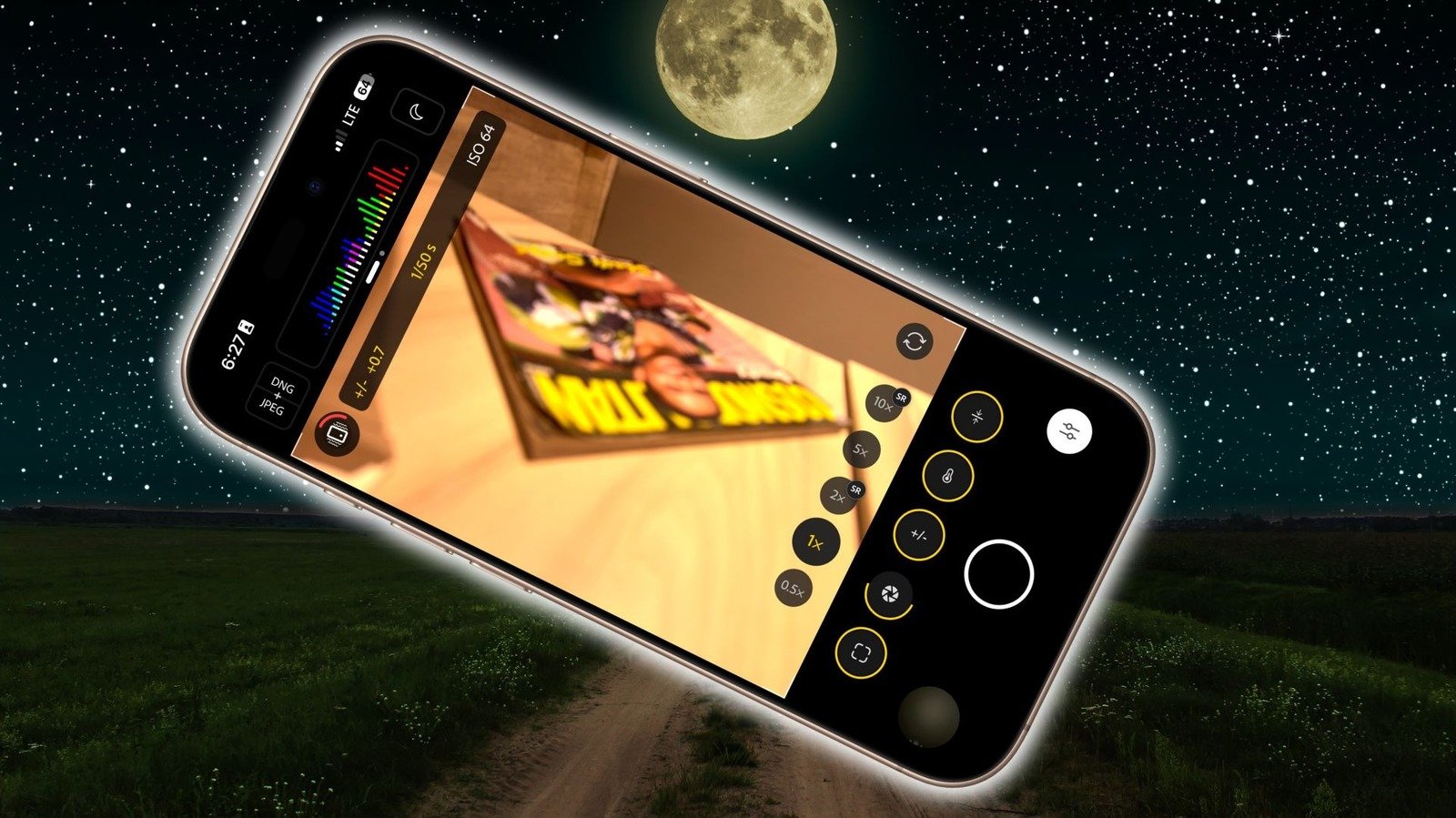
    Now, support and mounting gear are important for a couple of reasons. First, the iPhone’s Night Mode is only triggered when the phone is resting still. Second, a mount + tripod combo offers the flexibility to point the phone’s camera at the best angle and view. In fact, you can use the Apple Watch as a remote shutter button if you absolutely don’t want to touch the iPhone after putting it in the perfect spot and angle. This is the stage where you decide between the auto mode or go full manual for deeper controls. They may look intimidating at first, but as you experiment, it’s easy to get a grasp.

    Working with the iPhone’s camera sensor

    Nadeem Sarwar/SlashGear

    Usually, I would suggest sticking with the primary camera, since it’s the most advanced imaging sensor available, but if you want to get closer to an object, stick within the optical zoom range when you switch to the telephoto lens. This ensures visual minimal quality loss and doesn’t force digital cropping in your pictures. But if you have a “Pro” model (iPhone 16 and 17 series) or the iPhone 17, switch to the ultrawide mode (0.5x button). These phones feature a 48-megapixel sensor, so you don’t have to worry about the quality, and capture a much wider view of the sky. Have a look:

    You guys, I shot this last night on an iPhone 14 Pro 🤯 the level of dust detail is insane! And this is only a quick edit using the in built tools of the phone! Who said you need a DSLR to capture the Milky Way?!? Will be trying for more tonight! pic.twitter.com/Qhe4tDIfi4

    — Dr. Jenifer Millard 🇪🇺🏴󠁧󠁢󠁷󠁬󠁳󠁿🇺🇦 (@DrJeniMillard) June 15, 2023

    Next, make sure Night Mode is active (yellow moon crescent icon in the top-right corner). At the bottom of the screen, tap on “Photo” to open the tools panel, and tap a few times on “Night Mode” until you see a small “Night Mode Max” message appear at the top of the screen. In this state, the sensor waits up to 30 seconds to collect all the optical data, and then performs the algorithmic processing to produce the most detailed astrophotography shot.

    ‼️✨ I captured the Southern Cross constellation using my iPhone 16 Pro ! Modern smartphone cameras perform remarkably well in low-light conditions, and astrophotography is the ultimate test of their capabilities 👍 I took this image in Chile’s Atacama Desert, renowned for its… pic.twitter.com/We8rhvwe72

    — Yuri Beletsky (@YBeletsky) July 23, 2025

    If you seek more creative control over your shots and want to perform post-capture edits, switch to the highest possible resolution (48-megapixel) and set the photo format to RAW. The real magic happens with long exposure and fine-tuned adjustments. For that, you will need apps such as ProCamera and Halide Mark II for the most extensive suite of manual controls. ProcessZero is a mode in the Halide app that removes all algorithmic processing and produces pristine shots with natural noise retention. The Indigo app by Adobe is another fantastic choice.

    Share. Facebook Twitter Pinterest LinkedIn Reddit WhatsApp Telegram Email
    Previous Article8 Of The Most Reliable Ford Mustang Years, And 5 To Avoid (According To Owners)
    Next Article 5 Of The Best Toyota 4Runner Rock Sliders, According To Users
    TechAiVerse
    • Website

    Jonathan is a tech enthusiast and the mind behind Tech AI Verse. With a passion for artificial intelligence, consumer tech, and emerging innovations, he deliver clear, insightful content to keep readers informed. From cutting-edge gadgets to AI advancements and cryptocurrency trends, Jonathan breaks down complex topics to make technology accessible to all.

    Related Posts

    Major iPhone update: iOS 26.3 makes switching to Android and third-party smartwatches easier

    February 13, 2026

    “The world is in peril”: Anthropic’s head of AI safety resigns, unable to reconcile his work with his values

    February 13, 2026

    Xiaomi 17 Ultra falls behind Apple iPhone 17 Pro in camera test

    February 13, 2026
    Leave A Reply Cancel Reply

    Top Posts

    Ping, You’ve Got Whale: AI detection system alerts ships of whales in their path

    April 22, 2025670 Views

    Lumo vs. Duck AI: Which AI is Better for Your Privacy?

    July 31, 2025259 Views

    6.7 Cummins Lifter Failure: What Years Are Affected (And Possible Fixes)

    April 14, 2025153 Views

    6 Best MagSafe Phone Grips (2025), Tested and Reviewed

    April 6, 2025112 Views
    Don't Miss
    Technology February 13, 2026

    Major iPhone update: iOS 26.3 makes switching to Android and third-party smartwatches easier

    Major iPhone update: iOS 26.3 makes switching to Android and third-party smartwatches easier – NotebookCheck.net…

    “The world is in peril”: Anthropic’s head of AI safety resigns, unable to reconcile his work with his values

    Xiaomi 17 Ultra falls behind Apple iPhone 17 Pro in camera test

    Haru Mini retro camera takes on Kodak Charmera with a 20MP sensor in tiny retro SLR body

    Stay In Touch
    • Facebook
    • Twitter
    • Pinterest
    • Instagram
    • YouTube
    • Vimeo

    Subscribe to Updates

    Get the latest creative news from SmartMag about art & design.

    About Us
    About Us

    Welcome to Tech AI Verse, your go-to destination for everything technology! We bring you the latest news, trends, and insights from the ever-evolving world of tech. Our coverage spans across global technology industry updates, artificial intelligence advancements, machine learning ethics, and automation innovations. Stay connected with us as we explore the limitless possibilities of technology!

    Facebook X (Twitter) Pinterest YouTube WhatsApp
    Our Picks

    Major iPhone update: iOS 26.3 makes switching to Android and third-party smartwatches easier

    February 13, 20263 Views

    “The world is in peril”: Anthropic’s head of AI safety resigns, unable to reconcile his work with his values

    February 13, 20263 Views

    Xiaomi 17 Ultra falls behind Apple iPhone 17 Pro in camera test

    February 13, 20262 Views
    Most Popular

    7 Best Kids Bikes (2025): Mountain, Balance, Pedal, Coaster

    March 13, 20250 Views

    VTOMAN FlashSpeed 1500: Plenty Of Power For All Your Gear

    March 13, 20250 Views

    This new Roomba finally solves the big problem I have with robot vacuums

    March 13, 20250 Views
    © 2026 TechAiVerse. Designed by Divya Tech.
    • Home
    • About Us
    • Contact Us
    • Privacy Policy
    • Terms & Conditions

    Type above and press Enter to search. Press Esc to cancel.