Close Menu

    Subscribe to Updates

    Get the latest creative news from FooBar about art, design and business.

    What's Hot

    Madden NFL 26 Rushes to Xbox Game Pass in February

    YouTube TV Launches a Raft of New Streaming Packages From $55 a Month

    Work Up a Sweat at Home With These 7 Expert-Approved Workout Apps

    Facebook X (Twitter) Instagram
    • Artificial Intelligence
    • Business Technology
    • Cryptocurrency
    • Gadgets
    • Gaming
    • Health
    • Software and Apps
    • Technology
    Facebook X (Twitter) Instagram Pinterest Vimeo
    Tech AI Verse
    • Home
    • Artificial Intelligence

      Read the extended transcript: President Donald Trump interviewed by ‘NBC Nightly News’ anchor Tom Llamas

      February 6, 2026

      Stocks and bitcoin sink as investors dump software company shares

      February 4, 2026

      AI, crypto and Trump super PACs stash millions to spend on the midterms

      February 2, 2026

      To avoid accusations of AI cheating, college students are turning to AI

      January 29, 2026

      ChatGPT can embrace authoritarian ideas after just one prompt, researchers say

      January 24, 2026
    • Business

      New VoidLink malware framework targets Linux cloud servers

      January 14, 2026

      Nvidia Rubin’s rack-scale encryption signals a turning point for enterprise AI security

      January 13, 2026

      How KPMG is redefining the future of SAP consulting on a global scale

      January 10, 2026

      Top 10 cloud computing stories of 2025

      December 22, 2025

      Saudia Arabia’s STC commits to five-year network upgrade programme with Ericsson

      December 18, 2025
    • Crypto

      Bernstein Discusses Bitcoin’s Weakest Bear Market Yet – “Nothing Broke”

      February 9, 2026

      Ethereum Price Hits Breakdown Target — But Is a Bigger Drop to $1,000 Coming?

      February 9, 2026

      Damex Secures MiCA CASP Licence, Establishing Its Position as a Tier-1 Digital Asset Institution in Europe

      February 9, 2026

      Bitget and BlockSec Introduce the UEX Security Standard, Setting a New Benchmark for Universal Exchanges

      February 9, 2026

      3 Meme Coins To Watch In The Second Week Of February 2026

      February 9, 2026
    • Technology

      Madden NFL 26 Rushes to Xbox Game Pass in February

      February 9, 2026

      YouTube TV Launches a Raft of New Streaming Packages From $55 a Month

      February 9, 2026

      Work Up a Sweat at Home With These 7 Expert-Approved Workout Apps

      February 9, 2026

      Don’t Throw Away Your Laptop: How to Install Windows 11 On Unsupported Hardware

      February 9, 2026

      Your Recap of Super Bowl 2026 Ads Is Here: Baby Yoda, Pokemon and Much More

      February 9, 2026
    • Others
      • Gadgets
      • Gaming
      • Health
      • Software and Apps
    Check BMI
    Tech AI Verse
    You are at:Home»Technology»How to use (or turn off) your Instagram Map
    Technology

    How to use (or turn off) your Instagram Map

    TechAiVerseBy TechAiVerseAugust 18, 2025No Comments4 Mins Read2 Views
    Facebook Twitter Pinterest Telegram LinkedIn Tumblr Email Reddit
    How to use (or turn off) your Instagram Map
    Share
    Facebook Twitter LinkedIn Pinterest WhatsApp Email

    How to use (or turn off) your Instagram Map

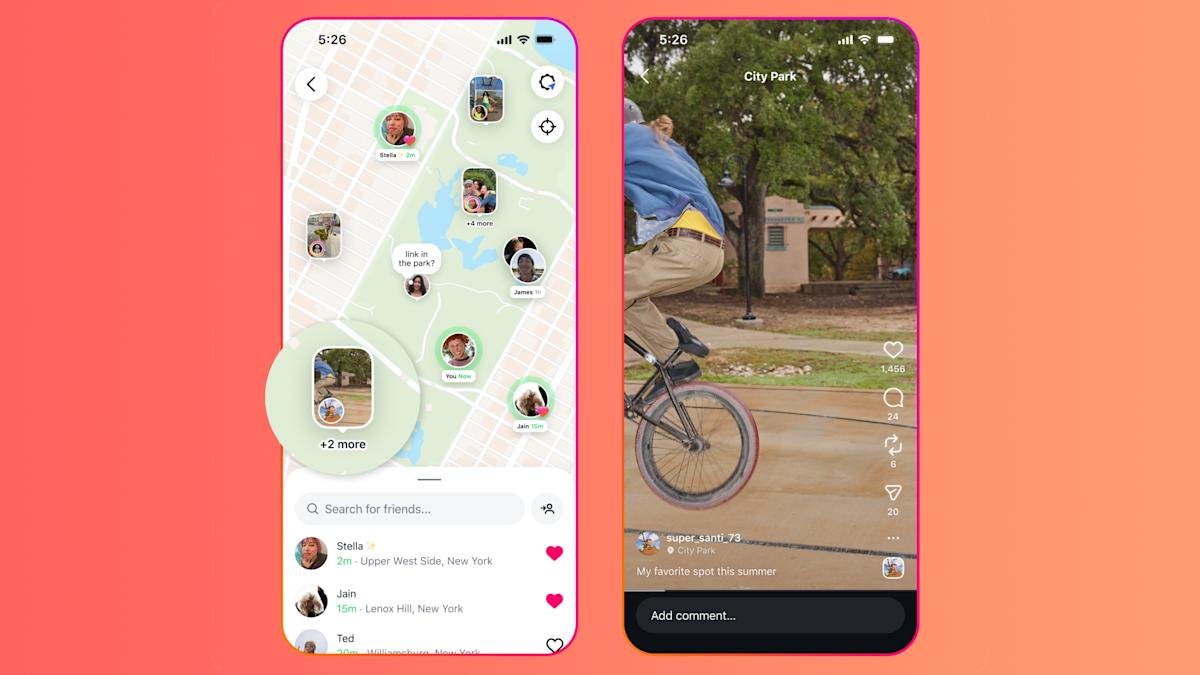
    Instagram Map, the new Instagram feature copying Snapchat’s Snap Map, makes it simple to share your location with friends. So simple you might not understand who you’re sharing it without digging into your settings. That’s naturally led to confusion from some Instagram users as to how the feature works.

    If you already spend a lot of time on Instagram and are looking for a way to see where your friends have been, it’s worth familiarizing yourself with how Instagram Map works. And if you’re worried about what information Instagram is broadcasting without your knowledge, you might as well get comfortable with the feature’s settings. Here’s how to do both in the Instagram app.

    How to use Instagram Map

    Screenshots of the Instagram Map, the location settings, and the DMs menu with a link to the Map.

    (Ian Carlos Campbell for Engadget)

    To access Instagram Map, you’ll have to head to the DMs section of Instagram, and then tap on the Map icon in the top row of status icons. The first time you tap on the map, Instagram will walk you through how Instagram Map shares your location, and why Location Services needs to be enabled for it will work. Then, if you’re not already sharing your location with Instagram, you’ll receive a pop-up from your phone asking if you want to share your location. Tapping through that will take you to the map itself.

    The majority of the Instagram Map is taken up by a map displaying your current location, with a search bar at the bottom for looking up the location of your friends. Scroll around for a bit and your might see a profile picture marking a friend’s current location, or miniature posts tagged with a specific location. There’s a few basic things you can do with Instagram Map:

    • Swipe around and see friends’ posts displayed geographically

    • Use the search bar to find a friend’s current location or recent tagged posts

    • Tap on a friend to be taken to their profile, or a post to see it in full

    Instagram Map is primarily informational. It can tell your where your friends are or where they’ve recently been, and let you view content based on where it was posted. It’s really not much more complicated then that. Unless you’re picky about who can see your location.

    How to stop sharing your location with Instagram Map

    A screenshot of the various location settings available in Instagram Map.

    (Ian Carlos Campbell for Engadget)

    Sharing your location on Instagram Map is opt-in. Your current location won’t be shared on Instagram unless you actively choose to share it. What will be there are any posts that have a location tagged in them, something that’s an option every time you add photos and videos to your Stories or your grid.

    Instagram gives you four different sharing options for the Map. You can share with:

    • Friends: Followers that you follow back

    • Close Friends: Followers already in your Close Friends list

    • Only these friends: Specific people you choose

    • No one: Don’t share your location (except for posts with tagged locations)

    So to disable location sharing entirely in Instagram Map, or change who can see your location:

    1. Open the Instagram app.

    2. Tap on the DMs icon in the top-right corner.

    3. Tap on the Map icon.

    4. Tap on the Location Settings menu (shaped like a gear) in the top-right corner.

    5. And then tap on “No one”, to disable location sharing.

    To change who you share your location with, follow the same steps except instead of choosing “No one,” choose one of the other options Instagram offers.

    Three screenshots showing the location settings, the Hidden Places introduction text and the menu for adding a new Hidden Place.

    (Ian Carlos Campbell for Engadget)

    For even more granular control over location sharing, you can also add specific locations to a list of “Hidden Places” that will never appear on Instagram Map while you’re visiting. If you want to modify that list, open the Map feature, then:

    1. Tap on Location Settings (the gear icon) in the top-right corner.

    2. Tap on the three-dot menu in the corner of the settings menu.

    3. Tap on Hide Places.

    4. Tap and drag a pin on the map to mark a hidden place, and then set a radius around it with the slider.

    5. Type in the name of the place and then tap Done.

    Share. Facebook Twitter Pinterest LinkedIn Reddit WhatsApp Telegram Email
    Previous ArticleGoogle admits anti-competitive conduct involving Google Search in Australia
    Next Article Ready to try Apple’s iOS 26? Here are all the compatible iPhones that can run public beta 2 today
    TechAiVerse
    • Website

    Jonathan is a tech enthusiast and the mind behind Tech AI Verse. With a passion for artificial intelligence, consumer tech, and emerging innovations, he deliver clear, insightful content to keep readers informed. From cutting-edge gadgets to AI advancements and cryptocurrency trends, Jonathan breaks down complex topics to make technology accessible to all.

    Related Posts

    Madden NFL 26 Rushes to Xbox Game Pass in February

    February 9, 2026

    YouTube TV Launches a Raft of New Streaming Packages From $55 a Month

    February 9, 2026

    Work Up a Sweat at Home With These 7 Expert-Approved Workout Apps

    February 9, 2026
    Leave A Reply Cancel Reply

    Top Posts

    Ping, You’ve Got Whale: AI detection system alerts ships of whales in their path

    April 22, 2025660 Views

    Lumo vs. Duck AI: Which AI is Better for Your Privacy?

    July 31, 2025248 Views

    6.7 Cummins Lifter Failure: What Years Are Affected (And Possible Fixes)

    April 14, 2025148 Views

    6 Best MagSafe Phone Grips (2025), Tested and Reviewed

    April 6, 2025111 Views
    Don't Miss
    Technology February 9, 2026

    Madden NFL 26 Rushes to Xbox Game Pass in February

    Madden NFL 26 Rushes to Xbox Game Pass in February Why You Can Trust CNET…

    YouTube TV Launches a Raft of New Streaming Packages From $55 a Month

    Work Up a Sweat at Home With These 7 Expert-Approved Workout Apps

    Don’t Throw Away Your Laptop: How to Install Windows 11 On Unsupported Hardware

    Stay In Touch
    • Facebook
    • Twitter
    • Pinterest
    • Instagram
    • YouTube
    • Vimeo

    Subscribe to Updates

    Get the latest creative news from SmartMag about art & design.

    About Us
    About Us

    Welcome to Tech AI Verse, your go-to destination for everything technology! We bring you the latest news, trends, and insights from the ever-evolving world of tech. Our coverage spans across global technology industry updates, artificial intelligence advancements, machine learning ethics, and automation innovations. Stay connected with us as we explore the limitless possibilities of technology!

    Facebook X (Twitter) Pinterest YouTube WhatsApp
    Our Picks

    Madden NFL 26 Rushes to Xbox Game Pass in February

    February 9, 20260 Views

    YouTube TV Launches a Raft of New Streaming Packages From $55 a Month

    February 9, 20261 Views

    Work Up a Sweat at Home With These 7 Expert-Approved Workout Apps

    February 9, 20260 Views
    Most Popular

    7 Best Kids Bikes (2025): Mountain, Balance, Pedal, Coaster

    March 13, 20250 Views

    VTOMAN FlashSpeed 1500: Plenty Of Power For All Your Gear

    March 13, 20250 Views

    This new Roomba finally solves the big problem I have with robot vacuums

    March 13, 20250 Views
    © 2026 TechAiVerse. Designed by Divya Tech.
    • Home
    • About Us
    • Contact Us
    • Privacy Policy
    • Terms & Conditions

    Type above and press Enter to search. Press Esc to cancel.