Close Menu

    Subscribe to Updates

    Get the latest creative news from FooBar about art, design and business.

    What's Hot

    How to Watch Netflix’s ‘America’s Next Top Model’ Docuseries

    Today’s Wordle Hints, Answer and Help for Feb. 16, #1703

    Today’s NYT Connections Hints, Answers and Help for Feb. 16, #981

    Facebook X (Twitter) Instagram
    • Artificial Intelligence
    • Business Technology
    • Cryptocurrency
    • Gadgets
    • Gaming
    • Health
    • Software and Apps
    • Technology
    Facebook X (Twitter) Instagram Pinterest Vimeo
    Tech AI Verse
    • Home
    • Artificial Intelligence

      Read the extended transcript: President Donald Trump interviewed by ‘NBC Nightly News’ anchor Tom Llamas

      February 6, 2026

      Stocks and bitcoin sink as investors dump software company shares

      February 4, 2026

      AI, crypto and Trump super PACs stash millions to spend on the midterms

      February 2, 2026

      To avoid accusations of AI cheating, college students are turning to AI

      January 29, 2026

      ChatGPT can embrace authoritarian ideas after just one prompt, researchers say

      January 24, 2026
    • Business

      The HDD brand that brought you the 1.8-inch, 2.5-inch, and 3.5-inch hard drives is now back with a $19 pocket-sized personal cloud for your smartphones

      February 12, 2026

      New VoidLink malware framework targets Linux cloud servers

      January 14, 2026

      Nvidia Rubin’s rack-scale encryption signals a turning point for enterprise AI security

      January 13, 2026

      How KPMG is redefining the future of SAP consulting on a global scale

      January 10, 2026

      Top 10 cloud computing stories of 2025

      December 22, 2025
    • Crypto

      Binance Denies Sanctions Breach Claims After $1 Billion Iran-Linked USDT Transactions Reported

      February 16, 2026

      Ray Dalio Says the World Order Has Broken Down: What Does It Mean for Crypto?

      February 16, 2026

      Cardano Whales are Trying to Rescue ADA Price

      February 16, 2026

      MYX Finance Lost 70% In a Week: What Triggered the Sharp Sell-Off?

      February 16, 2026

      What Really Happened Between Binance and FTX? CZ Finally Tells His Side

      February 16, 2026
    • Technology

      How to Watch Netflix’s ‘America’s Next Top Model’ Docuseries

      February 16, 2026

      Today’s Wordle Hints, Answer and Help for Feb. 16, #1703

      February 16, 2026

      Today’s NYT Connections Hints, Answers and Help for Feb. 16, #981

      February 16, 2026

      Today’s NYT Strands Hints, Answers and Help for Feb. 16 #715

      February 16, 2026

      Astronauts Are Now Allowed to Use the Latest Smartphones in Space

      February 16, 2026
    • Others
      • Gadgets
      • Gaming
      • Health
      • Software and Apps
    Check BMI
    Tech AI Verse
    You are at:Home»Technology»I finally found the perfect mechanical keyboard to go with my Mac, and it’s a lot cheaper
    Technology

    I finally found the perfect mechanical keyboard to go with my Mac, and it’s a lot cheaper

    TechAiVerseBy TechAiVerseApril 28, 2025No Comments7 Mins Read1 Views
    Facebook Twitter Pinterest Telegram LinkedIn Tumblr Email Reddit
    I finally found the perfect mechanical keyboard to go with my Mac, and it’s a lot cheaper
    Share
    Facebook Twitter LinkedIn Pinterest WhatsApp Email

    I finally found the perfect mechanical keyboard to go with my Mac, and it’s a lot cheaper

    My experience with Apple’s Magic Keyboard for the Mac has been a love-hate situation, at best. It is slim, sleek, offers a fantastic scissor-switch, and serves the Touch ID convenience. What’s not to love? 

    Well, for starters, the asking price is a steep $200, which is too much for a non-mechanical keyboard. There is no backlight. It is not ergonomic. The looks, though understated, are bland.  

    Merely months into splurging on it, I replaced it with a mechanical keyboard for my Mac setup. But typing on a mechanical keyboard that was destined for gaming wasn’t exactly kind to my fingers.

    That is, until I came across the Satechi SM3 Slim, a low-profile mechanical keyboard that is almost tailor-made for Mac productivity. It gave me everything Apple couldn’t, for nearly half the price.

    Oodles of charm, and substance to go with it

    Nadeem Sarwar / Digital Trends

    Satechi has been making fantastic accessories targeted at Apple gear for a while now. Their Mac Studio base is a beautiful piece of functional add-on, and I particularly love their trio wireless charging kit. The keyboard, however, is an altogether different ball game. 

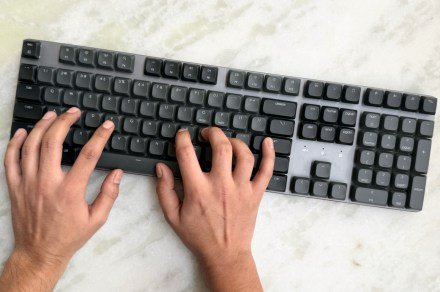
    With the SM3 Slim, Satechi didn’t chase the signature matching Apple aesthetics. Instead, the brand created its own two-tone design language while fixing some of the biggest flaws of Apple’s pricey keyboard. 

    To begin with, the build is solid, thanks to an aluminum frame. The whole kit, however, isn’t too bulky, thanks to the polycarbonate base. The resting height profile is over twice that of the Magic Keyboard for Macs. 

    It’s not much of an issue, but there’s a kickstand underneath to achieve the elevation you need for a comfortable wrist position. And oh, it is backlit, something Apple’s keyboard sorely misses out on.

    Nadeem Sarwar / Digital Trends

    The feet are not step-locked, which means you can’t adjust the incline height. What you get is a sole elevated profile, or a flat platform. It wasn’t a problem for me, but you should check it out in person, if possible, before splurging on it.

    You can adjust the brightness levels and pick from over a dozen backlight patterns. I typically work in a dark room for maximum immersion, and it was quite a sigh of relief to see that the Satechi keycaps were backlit. 

    The optical passthrough through the keycaps is sufficiently bright, even at mid-settings. In case you’re wondering, yes, there are dedicated keys integrated with the functional row for backlight adjustment. 

    It fills a lot of gaps

    This is a full 108-key layout we are talking about, and thankfully, the deck is spacious enough for clearly demarcated key islands. The direction, page control, and the number pad are well spaced. 

    You also get dedicated shortcut keys for connection switching, playback controls, and mode change, among others. Talking about connectivity, the suite is pretty decked out on the Satechi SM3 Slim keyboard. 

    Nadeem Sarwar / Digital Trends

    It can be paired with up to four devices at once, and switching between them is nearly seamless. I often keep my iPad close to my computing desk, and didn’t face any troubles switching the input across. 

    Though I did notice a few occasional input lags during device switching. For wireless connections, you can either pick between the dual Bluetooth 5.0 lane or the 2.4 GHz channel. I appreciate this flexibility, and so will any other person who prefers a clean desktop view devoid of a wired mess. 

    I prefer wired input, so the bundled USB-C cable was my preferred connection route to the Mac. However, I also used it for a while with my Windows PC, and for that setup, the 2.4 GHz receiver came in handy.

    Types like a smooth charm

    Nadeem Sarwar / Digital Trends

    Let’s talk about the typing experience, which is the real differentiator here. Satechi has equipped the SM3 Slim with in-house brown switches. Now, there are both good and bad sides to this approach.

    These are proprietary switches, which means if you run into mechanical issues, your only option is to contact Satechi customer support for replacement units. Second, these are not hot-swappable, though it shouldn’t matter much to the target audience that is predominantly buying it for productivity.

    On the positive side, the switches offer a delightful typing experience, despite being low-profile. It’s not quite as fluid as linear switches, but even after working all day, you won’t feel the tardiness that usually comes with working on mechanical keyboards. 

    Nadeem Sarwar / Digital Trends

    The keys offer an acceptable 2.6mm of vertical travel, and the actuation force worth 50gf also sits in the comfort territory. The keycaps have a beautiful inward curve that offers ample resting place for the fingertips.

    On a comparative note, the actuation point is registered at a vertical depth of 1.4mm, which is slightly above the key travel you get on the MacBook keyboard and a bunch of other laptops out there. So, if you are starting your journey with a mechanical keyboard, the Satechi SM3 Slim is the most subtle and rewarding transition route. 

    Nadeem Sarwar / Digital Trends

    Feedback from the switches is satisfyingly springy, and the inward press is also fairly reassuring. You can almost feel the actuation point, which goes a long way at ensuring that the keystroke has been registered and you didn’t run into the proverbial case of a ghost press. 

    Another benefit of using the brown switches is that they are relatively quiet. And thanks to the low-profile layout and the open undersides, the sound dissipation is also fairly subtle and not as annoyingly clicky as gaming keyboards with blue or green switches.

    Satechi offers additional keycaps in the bundle for switching the Command and Option keys with those corresponding to a Windows layout. Thankfully, you don’t need a tool to remove the keycaps. 

    Nadeem Sarwar / Digital Trends

    Just pull around the keycap edges and gently press the new ones in place. With a simple keyboard shortcut, you can switch the input mode between the two platforms. Now, this bit is pretty controversial, but I like that there’s no extra app involved here. 

    It’s a simple plug-and-play approach, and only a few keyboard shortcuts to ease you into your workflow. On the flip side, you can’t create custom shortcuts. Personally, I don’t mind, since this is an unabashedly all-work, no-play keyboard.

    It’s an easy pick

    Nadeem Sarwar / Digital Trends

    Priced at $119.99, the Satechi SM3 Slim is a fantastic option for any desktop setup. For getting work done, it’s far more versatile and inherently superior to the Magic Keyboard. There are plenty of connectivity options to pick from, and the keyboard is backlit with a brightness control perk. 

    The build quality is sturdy, the switches offer a lovely level-up in the typing experience, and the multi-device connectivity is an underrated convenience. The only miss is Touch ID, but I can trade that out for a password input if the rest of the package is appealing. 

    My only advice when you go shopping for this one? Pick the Light color option, which offers a stunning two-tone white-grey color combo. The black shade I got for myself is quite a looker, too, but it doesn’t match my desktop styling. 


    Share. Facebook Twitter Pinterest LinkedIn Reddit WhatsApp Telegram Email
    Previous ArticleI tested Galaxy S25 Ultra and Find X8 Ultra cameras, this one wins
    Next Article SpaceX marks 250th Starlink mission with spectacular photo
    TechAiVerse
    • Website

    Jonathan is a tech enthusiast and the mind behind Tech AI Verse. With a passion for artificial intelligence, consumer tech, and emerging innovations, he deliver clear, insightful content to keep readers informed. From cutting-edge gadgets to AI advancements and cryptocurrency trends, Jonathan breaks down complex topics to make technology accessible to all.

    Related Posts

    How to Watch Netflix’s ‘America’s Next Top Model’ Docuseries

    February 16, 2026

    Today’s Wordle Hints, Answer and Help for Feb. 16, #1703

    February 16, 2026

    Today’s NYT Connections Hints, Answers and Help for Feb. 16, #981

    February 16, 2026
    Leave A Reply Cancel Reply

    Top Posts

    Ping, You’ve Got Whale: AI detection system alerts ships of whales in their path

    April 22, 2025678 Views

    Lumo vs. Duck AI: Which AI is Better for Your Privacy?

    July 31, 2025260 Views

    6.7 Cummins Lifter Failure: What Years Are Affected (And Possible Fixes)

    April 14, 2025154 Views

    6 Best MagSafe Phone Grips (2025), Tested and Reviewed

    April 6, 2025112 Views
    Don't Miss
    Technology February 16, 2026

    How to Watch Netflix’s ‘America’s Next Top Model’ Docuseries

    How to Watch Netflix’s ‘America’s Next Top Model’ Docuseries Why You Can Trust CNET Our…

    Today’s Wordle Hints, Answer and Help for Feb. 16, #1703

    Today’s NYT Connections Hints, Answers and Help for Feb. 16, #981

    Today’s NYT Strands Hints, Answers and Help for Feb. 16 #715

    Stay In Touch
    • Facebook
    • Twitter
    • Pinterest
    • Instagram
    • YouTube
    • Vimeo

    Subscribe to Updates

    Get the latest creative news from SmartMag about art & design.

    About Us
    About Us

    Welcome to Tech AI Verse, your go-to destination for everything technology! We bring you the latest news, trends, and insights from the ever-evolving world of tech. Our coverage spans across global technology industry updates, artificial intelligence advancements, machine learning ethics, and automation innovations. Stay connected with us as we explore the limitless possibilities of technology!

    Facebook X (Twitter) Pinterest YouTube WhatsApp
    Our Picks

    How to Watch Netflix’s ‘America’s Next Top Model’ Docuseries

    February 16, 20263 Views

    Today’s Wordle Hints, Answer and Help for Feb. 16, #1703

    February 16, 20263 Views

    Today’s NYT Connections Hints, Answers and Help for Feb. 16, #981

    February 16, 20262 Views
    Most Popular

    7 Best Kids Bikes (2025): Mountain, Balance, Pedal, Coaster

    March 13, 20250 Views

    VTOMAN FlashSpeed 1500: Plenty Of Power For All Your Gear

    March 13, 20250 Views

    This new Roomba finally solves the big problem I have with robot vacuums

    March 13, 20250 Views
    © 2026 TechAiVerse. Designed by Divya Tech.
    • Home
    • About Us
    • Contact Us
    • Privacy Policy
    • Terms & Conditions

    Type above and press Enter to search. Press Esc to cancel.