

I thought the iPad is untouchable, but the $399 OnePlus Pad Go 2 shook my belief
The vanilla iPad is a ruthlessly efficient tablet, and what it has to offer for $349 is nearly unbeatable. It gets almost everything right, from solid build and smooth performance to reliably feature-loaded software and update longevity. It’s perfect for kids, schools, and entertainment.
For years, it has remained the North Star for players in the Android segment, but none has quite managed to eclipse it. Enter OnePlus with the Pad Go 2, a budget Android offering that goes in a slightly different direction to upend the iPad and almost gets it done.
It can’t quite decisively beat the iPad, but it still offers plenty of goodies at $399 that make it one of the most well-rounded Android slates out there. I’d even go as far as crowning it as the best pound-for-pound Android tablet in the market. After pushing it as a companion device for a couple of weeks.
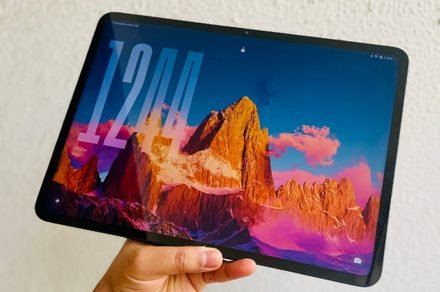
A screen cut out for work and play
It’s hard to find a decent screen on a budget. The budget constraints either take a toll on the pixel density, size, brightness, or fluidity. The OnePlus Pad Go 2 strikes a fine balance — perhaps the best balance — between all these crucial metrics.
Compared to the vanilla iPad, it offers a bigger (12.1-inch vs 11-inch) display with a resolution of 2800 x 1980 pixels. In terms of sharpness, the pixel density on the OnePlus slate is even higher (284 vs 264 PPI) and it also offers a higher brightness output at 600 nits (900 nits in high brightness mode), while the iPad maxes out at 500 nits.
It’s not a day and night difference, but you will notice better legibility outdoors. Another underrated perk is the aspect ratio. The 7:5 format is better suited for split-screen multitasking compared to the square-ish approach of the iPad. Of course, the screen real estate is more generous, too.
If you’re buying this tablet primarily for content streaming, it won’t disappoint. It supports Dolby Vision content, and the aspect ratio also makes it an apt choice compared to the 16:9 format on a bunch of Android tablets and Apple’s 4:3-ish approach.
If you plan to play a lot of games or even stream titles from the cloud, this panel is better suited for it. You will run into fewer pillarboxing situations, or odd vertical cropping on the OnePlus Pad Go 2 compared to the iPad.
The screen is fairly well saturated, and viewing angles are fine, as well. But what really sets this tablet apart is the 120Hz refresh rate. A majority of tablets in this price bracket— including the iPad — stick with a regular panel, but the OnePlus Pad Go 2 raises the bar with a 120Hz screen.
The added dash of fluidity is immediately apparent. Whether it’s your usual Oxygen OS 16 interactions, note-taking with the stylus, or watching games, the 120Hz panel feels noticeably smoother. It can drop to as low as 30Hz in auto mode, but I’d stick with the peak value, even if it takes a toll on the battery.
You can’t quite experience the fun of 60FPS+ gaming due to the constrained system resources, but in the odd few titles where it can be achieved with a bit of graphics optimization, the experience is pretty charming. In my experience, 60fps mode in games is the Goldilocks situation for the 120Hz LCD panel on the OnePlus Pad Go 2, and it’s still quite fun.
The software sets it apart
OnePlus has really shifted gears into the future of an AI-native software experience atop OxygenOS 16, but didn’t go overboard with it. On the contrary, the Android 16-based software on the tablet still maintains its own charm with plenty of unique features.
The sidebar is one of my favorites. With an inward swipe, you get quick access to the most frequently used apps and utilities without any distracting cross-app back-and-forth. It also harbors the file dock, which acts more like a synced universal file container, aka a glorified clipboard.
For items that you frequently access, you can quickly park them here and access them without having to rummage through the local storage. Moreover, if you have a OnePlus phone handy, you can sync the file deck across both devices. On a similar note, you get a neat screen mirroring system that works just like the iPhone-Mac bridge.
OnePlay has even built an app relay system that lets you cast the phone content on the tablet’s screen. I love the off-screen note-taking mode, which lets you directly start scribbling on the lock screen, without having to go through the unlock and app launch process.
There are a handful of AI-powered features, as well, which can handle chores such as translation, summarization, image editing, and more. They could use some polish, though. For example, the AI writer feature didn’t work in the pre-installed notes app, and I couldn’t run it on webpages in Chrome, either.
OnePlus’ implementation of app window management is pretty intuitive, especially the gestures. And yeah, it does a better job than what you get with iPadOS 26 on the iPad. The drag-and-drop gestures, window swapping, and transparency controls in OxygenOS 16 are standout elements of the user experience.
The only big miss is the Open Canvas, which lets you run three apps side by side. I loved it on the OnePlus Open foldable phone, but for some reason, it’s missing from the OnePlus Pad Go 2. Apparently, it’s due to the resource constraints. Another feature that is sorely missed is the OnePlus Mind Space.
Another small, but notable perk, is the scalable icons. Essentially, you can stretch out the app icon and add quick action shortcuts within the same bubble. For example, the Perplexity app’s icon can be stretched to directly launch voice mode or camera view.
The highs and hiccups
For its asking price, the OnePlus Pad Go 2 offers a lot. OnePlus has armed it with MediaTek Dimensity 7300-Ultra SoC, ticking alongside 8 GB of RAM and up to 256 GB of onboard storage. That’s a pretty potent combination for basic tasks, video streaming, casual gaming, and light video editing.
It handled Devil May Cry at 60fps pretty fine, and Call of Duty: Mobile was also an enjoyable experience at the “high” frame preset with respectable graphics settings. Just don’t expect it to handle Zenless Zone Zero with the same kind of visual oomph and fluidity.
For comparison, the Geekbench benchmark puts the A16 silicon inside the iPad roughly 50% faster on multi-core and a whopping 150% speedier at single-core test runs. That gulf doesn’t translate to the day-to-day experience. The OnePlus Pad Go 2 can handle media and gaming duties just fine.
The speaker array can get pretty loud, and they sound pleasing within the 50-50% volume range. But as you crank the levels up, you will hear some distortion and tearing, while the bass also takes a backseat. The iPad doesn’t fare dramatically better, but it does sound more refined in a subdued fashion.
Battery life is a winner here. The 10,050mAh power pack fitted inside the OnePlus Pad Go 2 can easily handle over 12 hours of streaming content. If you’re not on a binge-watching spree, this tablet can last well over a day, and even stretches into the second with ease. The idle power draw, thankfully, is not ravenous.
The tablet supports 33W wired charging, which is extremely slow by OnePlus standards, but still a healthy few miles ahead of the iPad. However, topping it up is a test of patience. With the supplied 33W adapter, the tablet takes nearly two hours to fully top up.
You can pick this one up in a 5G cellular variant, as well, which is pretty neat. The build, on the other hand, is minimalist and rock solid. However, the black version I had for review gets smudged, and pretty fast, mind you.
Overall, the OnePlus Pad Go 2 is a fantastic option if you’re dipping your toes into the world of tablets, but don’t want the locked iPad experience. In the Android segment, it’s unbeatable at the current ask. And there are enough standout elements on the table here that will even make iPad shoppers rethink what the $50 premium can get them.
