

Lockly Secure Pro 2025 Version review: Once more, with Wi-Fi
Image: Christopher Null/Foundry
At a glance
Expert’s Rating
Pros
- Vastly improved installation procedure
- Integrated Wi-Fi frees you from the external bridge
- Lockly Home app is significantly improved, with lots of new features
Cons
- Integrated Wi-Fi significantly reduces battery life (by about half)
- We experienced some app-disconnect issues
- Still quite bulky on the exterior
Our Verdict
Integrated Wi-Fi is the major upgrade in this revamp of Lockly’s well-aged Secure Pro lock, making it a winner on all fronts.
Price When Reviewed
This value will show the geolocated pricing text for product undefined
Best Pricing Today
The Lockly Secure Pro isn’t a new lock, but rather an upgrade to an old one: The original Lockly Secure Pro came out way back in 2019, hence this release’s full (and rather awkward) name: Lockly Secure Pro 2025 Version.
The two locks have roughly the same industrial appearance (though the new lock is reportedly 25 percent smaller), so you’ll need to pay close attention when shopping to ensure you’re getting the current version. While Lockly’s website includes the 2025 indicator in the name, many vendors, including Amazon, do not. Look for Lockly model number PGD728WMBE1 to be sure.
Specifications
The biggest difference between the two locks is indeed a biggie: The 2025 Version has a built-in 2.4GHz Wi-Fi adapter and no longer requires an external hub to bridge to your internal Wi-Fi network. (Lockly says the fingerprint scanner on the lock has also improved, but this isn’t nearly as important: Lockly has long had some of the best fingerprint scanning tech on the market, so any improvements are minuscule).
Lockly’s PIN Genie makes it impossible to guess a PIN by observing someone or by dusting the touchscreen for fingerprints.
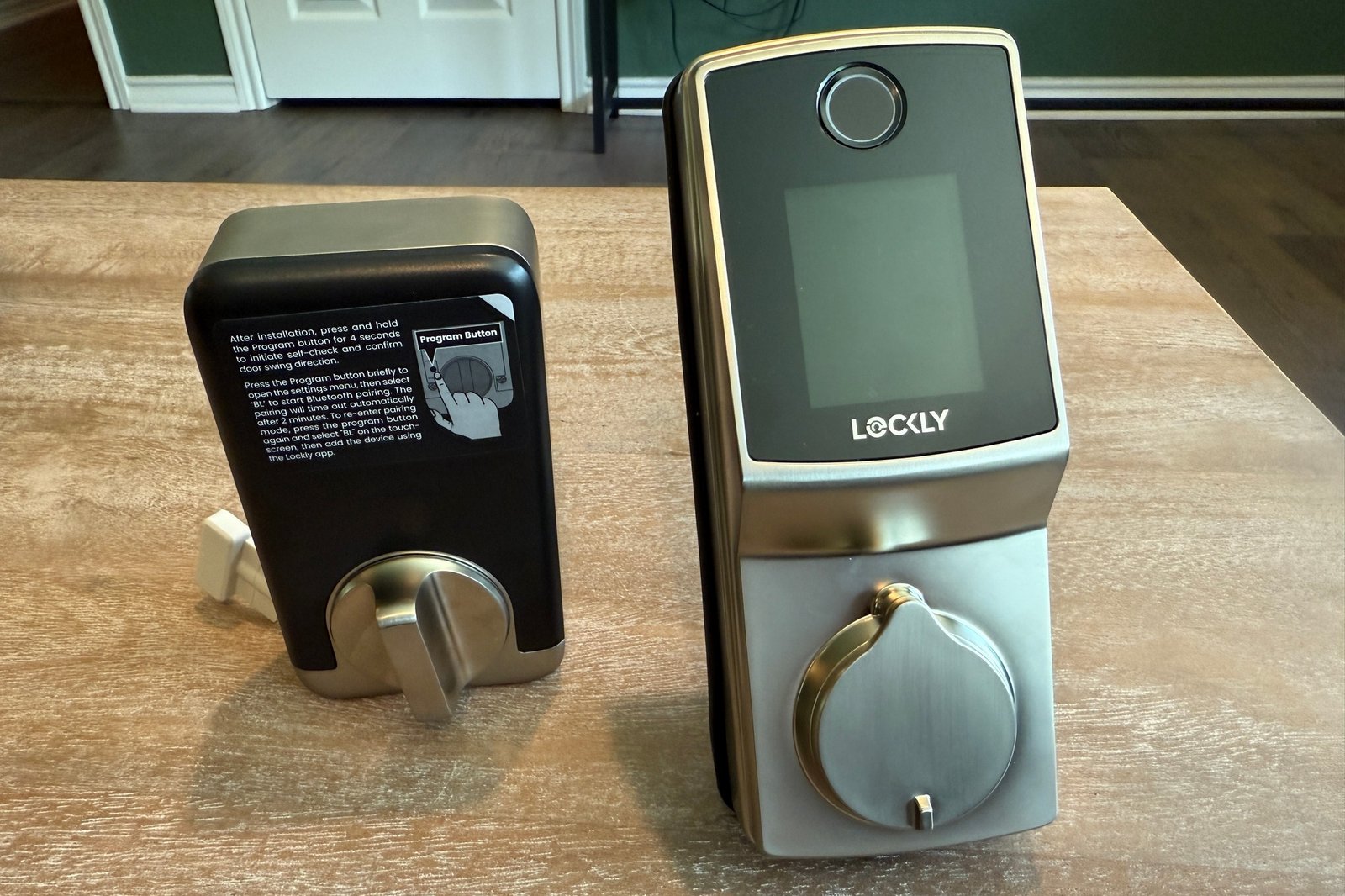
Other changes are incremental, and many are part of wider industry shifts, such as the move from a 9-volt battery terminal at the bottom of the exterior escutcheon to a USB-C port that can provide emergency power from a power bank if needed. The interior escutcheon and thumbturn have been redesigned to be more appealing and easier to grasp, and the fingerprint reader has been moved from the side of the device to the front, just above the touchscreen and set at a slight angle.
Lockly’s PIN Genie randomizes the arrangement of numbers on its PIN pad, so no one will be able to observe the code you tap out or discover your code by looking at the locations of your fingerprints.
Lockly
Lockly’s PIN Genie keypad is still in effect, and if you’ve never seen it, it does take some getting used to. Instead of being organized in numerical order, digits are grouped into four sets of three, which are shuffled each time the lock is used. This makes it functionally impossible to guess a PIN by observing someone or by dusting the touchscreen for fingerprints, since the numbers move around every time it’s used. The lock is also built to ANSI Grade 2 standards, according to Lockly, but it is not certified as such.
Installation and setup
I’m happy to report that Lockly has made great strides in improving its hardware and installation process in the last six years. The disconnected crossbar that connects the exterior and interior escutcheons is now built into the exterior escutcheon, making setup far easier than in previous incarnations of Lockly hardware. The whole kit comes together with two long bolts that connect a standard interior mounting frame to the exterior escutcheon, plus three more screws attaching the interior escutcheon to that frame.
It’s by and large a process that’s fairly standard in the smart lock industry, and while I didn’t have any major issues getting things connected, I will offer a pro tip: Make sure the deadbolt is extended when you attach the interior escutcheon, or the system will not be able to calibrate, an important step for setting whether the door is left-handed or right-handed. (This calibration is done by pressing the red button located under the cover of the interior escutcheon, after which the lock opens and closes a few times before finalizing setup.)
All told, installation was smooth—and even Lockly’s manual has been greatly improved since the original Secure Pro launched, should you need extra help.
The built-in wired door sensor informs you if the door is open or closed.
Christopher Null/Foundry
The lock is still powered by four AA batteries, and after they’re installed, you’re directed to the newish Lockly Home app, which replaced the old Lockly app earlier this year, for onboarding. The new app a big upgrade, too: It’s straightforward and painless to initially configure the app, and once everything is configured, it’s equally easy to use.
The primary screen offers a standard, front-and-center button for lock/unlock operations; the button doubles as an icon to show whether the door is locked, unlocked, open, and/or closed. (A built-in wired door sensor that sticks out from the bottom of the interior escutcheon is still standard, though its use is optional.)
In addition to support for using a physical key or the app to open the lock, the lock (still) supports PIN and fingerprint-based access. The lock supports a maximum of 52 users, with support for a total of 99 fingerprints and 49 access codes. I don’t get the math on those numbers either, except that users are not required to have both fingerprint and PIN, so it sort of makes sense.
Lockly has made significant improvements to its app.
Christopher Null/Foundry
Users can be configured with full-time access, as “sub-admins” who can also create new accounts, with time-limited access that either expires at a set time or recurs each week, or one-time access (which can also be set to expire). Up to three one-time or limited-time access codes can also be configured, though note that there are specific instructions that must be followed (involving certain button presses and entering the code twice) for these codes to work.
All told, I didn’t encounter any issues with user setup or management—or using PINs or prints to open the lock. As with previous Lockly products, all access methods were wholly reliable.
Logging is robust, though Lockly includes a second, slightly confusing “notification center” that duplicates some but not all of the information in the logs about lock openings, closings, and failed access attempts. These notifications (not the log entries) are what are pushed to your phone—reliably so, in my testing.
You can open the Lockly Secure Pro 2025 with a physical key in addition to using the app, the PIN pad, or your fingerprint.
Christopher Null/Foundry
A bevy of settings options are available for those who wish to dig deeper, including three power modes designed to extended battery life (5 months is specified by Lockly, about half what the old lock offers), automatic locking (customizable by time, or settable to lock whenever the door is closed), and Lockly’s somewhat maddening “random mode” which shuffles the digits on the PIN Genie keypad each time a button is pressed instead of just once per use. Support for Alexa and Google Assistant are also included (though not Siri).
This review is part of TechHive’s in-depth coverage of the best smart locks.
Should you buy the Lockly Secure Pro 2025 Version?
The few non-trivial issues I encountered with the lock were connectivity related. The app would sometimes take a few seconds to connect to the lock, and on more than one occasion it didn’t connect at all, forcing me to quit the app and try again. The open/closed door status condition also didn’t update reliably in my testing, though it was accurate more often than not. In general, the unit was plenty reliable and its few connection hiccups were easily resolved with a little patience.
At $310, the lock isn’t significantly more expensive than the 2019 model, which is still available for $260. Still, both are on the high side for Wi-Fi-capable smart locks, though not egregiously so. If you’re sold on Lockly, especially its unique touchpad interface and slightly dystopian design, the 2025 Lockly Pro sees the outfit performing at its best.
Author: Christopher Null, Contributor, PCWorld
Christopher Null is an award-winning technology journalist with more than 25 years of experience writing about and reviewing consumer and business tech products. Previously, he served as Executive Editor for PC Computing magazine and was the founder and Editor in Chief of Mobile magazine, the first print publication focused exclusively on mobile tech. In addition to covering a wide range of smart home gear for TechHive, he is a frequent contributor to Wired, This Old House, and AAA’s Via Magazine.
