

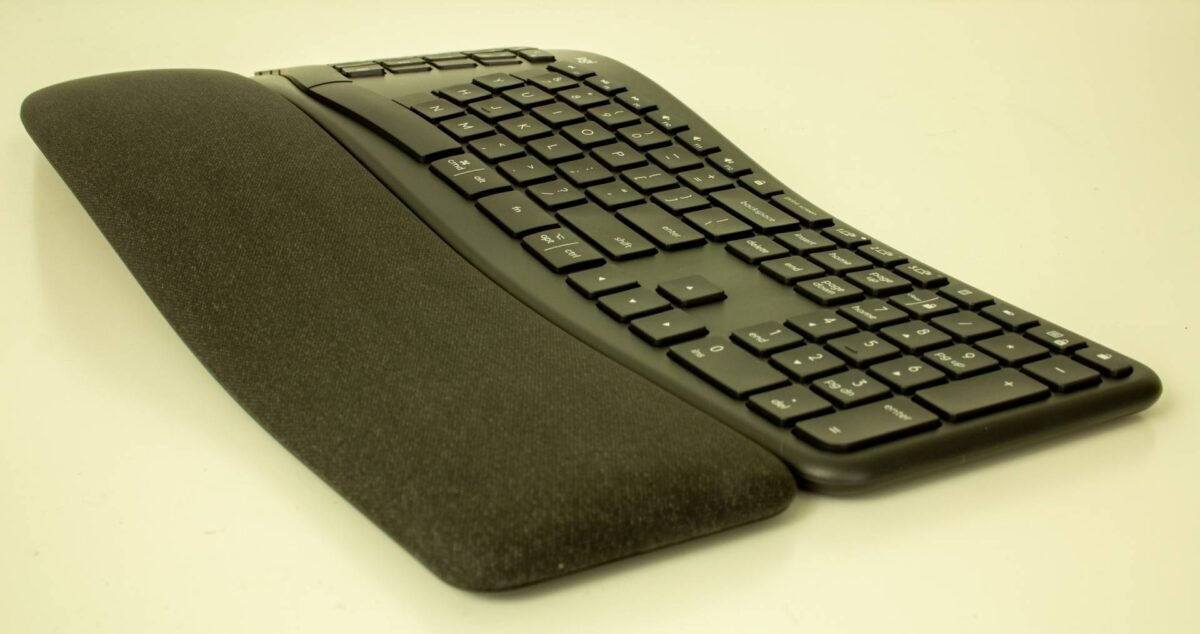
Logitech K860 Wireless Ergonomic Keyboard Review
Editor’s Note: This is a legacy article, originally published in March 2020. While pricing and availability details may be outdated, the test results and analysis remain accurate and relevant.
I sit at my desk a lot. No, that’s not correct. I sit at my desk too much. I stand sometimes, too, but I’m always using my keyboard.
As much as I hate to say it, I type more than I game. It’s more important than ever that I find the right tool for that. As much as I enjoy the feel of typing on a good mechanical keyboard, though, my wrists don’t agree.
That led me to the Logitech K860 ergonomic keyboard. This is the first ergonomic keyboard from Logitech, I think, ever. It has some really good points going for it a couple of frustrating ones, all of which are worth considering if you’re going to pay the $130 retail price tag for it.
Build
For years and years, I used Microsoft’s Ergonomic 4000 keyboard before switching to mechanical keyboards. I hammered through 8 or so Ergonomic 4000s between work and play, only spilling soda on one of them before I got hooked on mechanical keyboards.
The 4000 is a sturdy, inexpensive offering, but the plasticky membrane keyboard has never felt particularly premium. This is a problem with many ergonomic devices. Evoluent’s vertical mouse is arguably more flexible than Logitech’s MX Vertical, but the Vertical feels much better in the hand.
The same goes for the Logitech K860 Ergonomic keyboard. While it is still plastic and has a bit of creak to it, it feels solid and sturdy without the need for an undercarriage attachment to steady it. The whole device feels slickly engineered with lots of great little touches throughout.
Wrist Rest and Ergonomics
The built-in wrist rest is one of my favorites. It has a surface layer of treated fabric that keeps it feeling relatively cool to the touch without being rough the same way some fabric wrist rests can. The layers of foam just below that are just enough to feel like a cushion without getting in the way.
Because the rest is a part of the keyboard, I’m admittedly a little worried about how it’ll stand up to abuse over time. In the time I’ve spent with it, the K860 wrist rest has held up without a problem, but what will it look like a year from now, or two years when I’m replacing the batteries for the first time (more on that later)?
Adjustability
Underneath the keyboard, there are five rubberized feet and two adjustable legs at the front of the keyboard that can raise the front up to -4° or -7° from its 0° position. I’ve ended up using the 0° position when I’m sitting at my desk and -7° when I’m standing.
The premium, fully-engineered feel with good built-in customization options is what I expect from a Logitech product, and I’m pretty happy with what they’re offering here.
The Keys
The keys on the Logitech K860 Ergonomic keyboard are where Logitech might lose a few typists. Logitech went with the same low-profile PerfectStroke keys that it uses on the Logitech Craft keyboard.
These keys are technically mechanical in that each key uses a separate scissor-style mechanism to accept key presses. But this thing is not going to do double-duty as a mechanical keyboard, and I’ve been looking at pairing it with one of Razer’s mechanical gamepads as an alternative to keeping two keyboards in reach of my desktop.
The keys are, compared to most mechanical keys, pretty stiff and take a fair amount of actuation force. That means that I’m not accidentally pressing keys, but I’m also a little surprised that a keyboard built to be ergonomic would ask the user to use as much force as the keys take to press.
They’re perfectly comfortable to type on, but the pressure alone took me a few days to get used to, even if the ergonomic split wasn’t an issue for me personally. For my use, they have good travel and a satisfying feel. I know when I’ve depressed a key and when I haven’t. The bounceback feels just about right.
Key Placement
Speaking of key placement, this is mostly good, but I take issue with a few choices Logitech made.
The first is the absence of any kind of media keys. This is a productivity keyboard, I understand, but for me, music is a crucial part of my workflow.
I’m listening to the Beach Boys in an attempt to make summer come a little sooner as I write this; I find myself consistently frustrated even after dozens of hours with this keyboard at using the Function-style media keys the keyboard does offer. F7 through F12 double as playback and volume keys, and you can lock them to either Function or Media keys using the Options software or the Fn Lock key.
I don’t like giving up my Function keys, but the placement of the Fn key means I’m doing a weird spider hand on my keyboard to manipulate the media keys since both the Fn key and the media keys are on the same side of the keyboard.
Next is the Print Screen key. The K860 does away with the Pause and Scroll lock keys entirely but keeps the Print Screen key.
The print screen key lives right above the Backspace key. I use this keyboard with both a Mac and a PC–more on that later–and I can’t tell you how many screenshots I’ve deleted from my Mac desktop from accidentally punching the Print Screen key.
Custom Keys
It’s worth noting that the print screen key can be reassigned, but I generally avoid reassigning keys with printed names/icons.
On that note: the Logitech K860 Ergonomic keyboard also has a custom calculator, app menu, and battery life keys.
These, along with the F1-F12 functions can all be reassigned in Logitech’s Options application away from their default functions if you like, but I dislike these over more generic custom keys. The pre-printed symbols mean that I have to remember that Macro 1 is the brightness key, Macro 2 is the other brightness key, and so forth.
There are keys that I like, though. Logitech split the spacebar into two halves, which makes that key much easier to depress.
Cross-Platform Support
Logitech also designed the keyboard to double as a Mac and PC keyboard, and it offers assignments for both of those. With something like Logitech G915, I had to memorize which PC keys performed which Mac functions. Here, you have dedicated keys.
It’s taken a lot of muscle-memory reprogramming to get the proper key assignments down again, but it’s nice to have the correct keys in their expected spots rather than using some remapped keys.
Features
Ergonomics is all what this keyboard is about — but not all it has to offer. Logitech K860 does have a few standout features in terms of connectivity and software support.
Bluetooth
One of the best features is, again, that this keyboard can double-duty.
My setup has the keyboard connecting to my PC via my Logitech Unifying Receiver, which it shares with the MX Vertical mouse and only takes up a single USB port. The keyboard then connects to my Macbook via Bluetooth.
There’s a set of three keys on the keyboard to switch between up to three systems. It would be easy to connect the third to a tablet. Switching between the three has been generally flawless.
The Bluetooth connectivity did fail once, but I’ve had the same issue with every other Bluetooth keyboard, so I’m not going to ding the K860 for that. I think that’s more Bluetooth’s fault. Otherwise, the connection is strong and switching happens instantly.
I’ve also had the keyboard lose connection to any devices a few times and fixed that by flipping the power switch off and back on again. It’s a minor inconvenience, but I’m concerned that it’s happened more than once.
Then again, I’m also switching between devices dozens of times per day, so if you’re not switching between devices this might not factor in for you.
Battery
One nice aspect of the K860 is that it switches back from a built-in Lithium-Ion battery to a pair of AAA batteries. And because this keyboard doesn’t have any LED lighting or backlighting, Logitech doesn’t estimate its life in hours, but years. Plural.
Logitech says that a pair of AAA batteries will last two years in this keyboard. Even after using it full-time for over a month, it still reads as ‘Full’ in Logitech’s Options application.
Logitech Flow
As part of Logitech’s productivity line, you can also use it with Logitech Flow, which lets you shift between two computers without having to even press they connection buttons. This feature doesn’t work for my needs personally, so I didn’t use it, but it’s there if you want it.
Logitech K860 Review: My Verdict
Despite some serious complaints with the K860, I actually really like it.
The build quality goes a long way. Despite the fact that this keyboard arches up off of my desk, it never feels like that. It feels sturdy and solid. There’s no hollowness, no echo.
After the adjustment period, I’ve adapted to the actuation force. I wouldn’t say I prefer it over my previous mechanical keyboard necessarily. I wish this keyboard was properly mechanical, but I’m not sure if there’s a way to do that with an ergonomic keyboard.
Regardless, Logitech K860 is massively more comfortable to type on for long periods, which is exactly what it was designed for.
As a nice bonus, the keyboard helps me correct my posture more frequently because I know which positions feel “wrong” on the board. I’m used to typing in all sorts of poor postures on a regular layout. And even better, my wrists stay straight and basically stay still while I type. This keyboard is definitely better for my hands than any mechanical keyboard.
The big sticking point for those who can get past the scissor keys is going to be the price. At $130, you’re going to pay a lot more than you would with many other ergonomic keyboards.
Microsoft, Kinesis, Kensington, Perixx, and more offer ergonomic keyboards with significantly lower price tags. If you’re connecting your keyboard to just one system, those are worth a look before you settle on this one.
For my needs, Logitech’s K860 Ergonomic Keyboard gets about as close to serving every master that I need it to serve. It works with my Mac and my PC almost flawlessly day in and day out, has incredible battery life, and feels good to use.
I’ll take a few questionable key choices for all of that. But I might need to find some aftermarket media keys. I can firmly recommend this keyboard.
Disclaimer: We received the K860 from Logitech and spent over a month with it as our daily driver for 8+ hours each day before writing this review.
The Tech Report editorial policy is centered on providing helpful, accurate content that offers real value to our readers. We only work with experienced writers who have specific knowledge in the topics they cover, including latest developments in technology, online privacy, cryptocurrencies, software, and more. Our editorial policy ensures that each topic is researched and curated by our in-house editors. We maintain rigorous journalistic standards, and every article is 100% written by real authors.
