

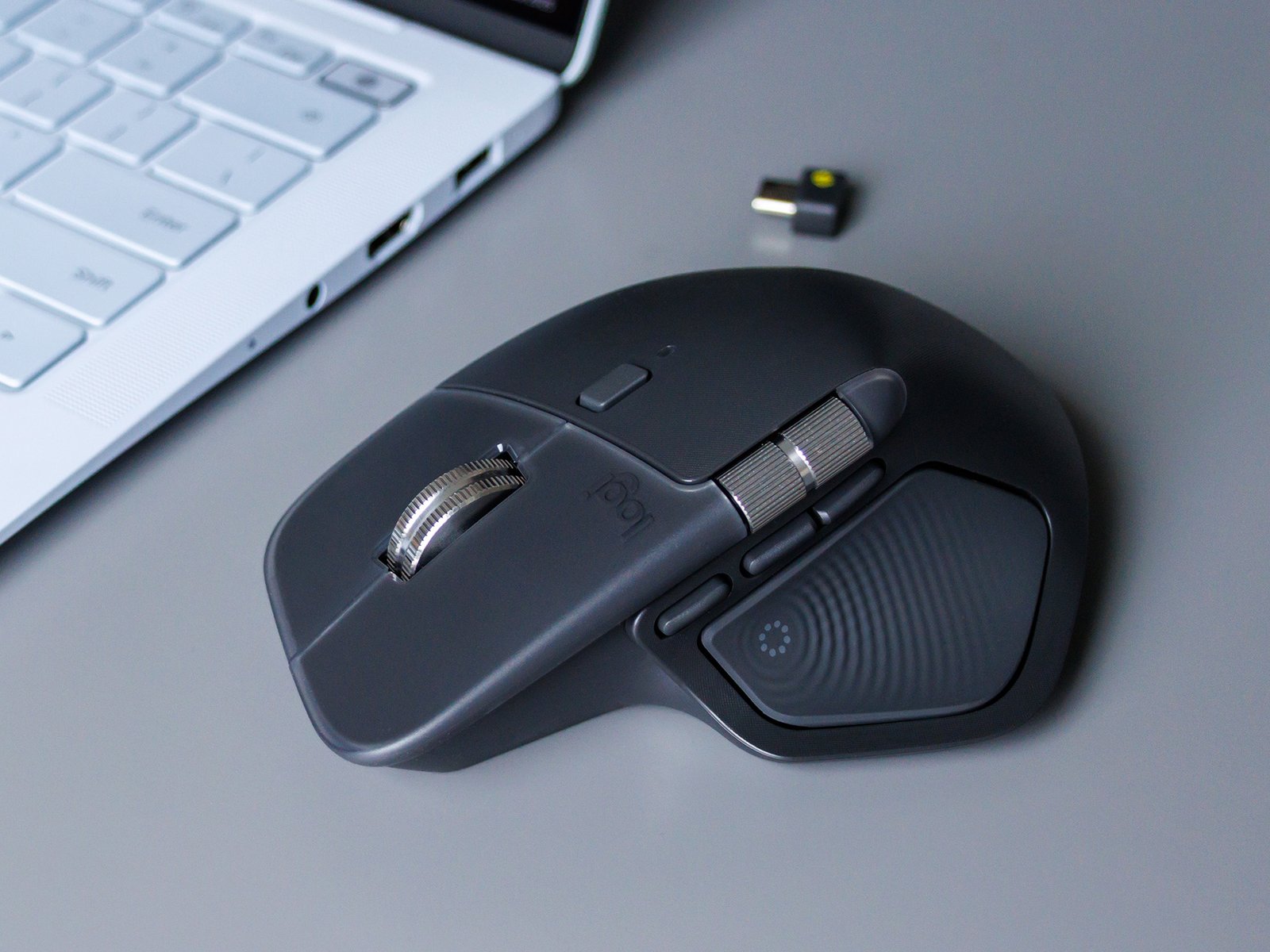
Logitech MX Master 4 review – Premium mouse with haptic feedback – NotebookCheck.net Reviews
The Logitech MX Master 4 is a well-designed, ergonomic office mouse with innovative features that can make everyday work much easier for professional users. Its quick setup, long battery life, and high-quality construction make it a durable product.
Minor issues such as the lack of a charging cable and the unfinished software are minor weaknesses, but they hardly detract from the overall picture. With a price tag of around $120, the MX Master 4 is primarily aimed at users who value comfort, precision, and productivity and are willing to invest a little more to achieve this.
A clear recommendation for power users who spend a lot of time at the computer and want to optimize their workflows.
Pros
+ excellent ergonomics
+ innovative haptic feedback
+ long battery life
+ high precision
Cons
– haptic feedback only works with certain programs and is limited to the thumb area
– quite heavy
Logitech MX Master 4, Ergonomic Wireless Mouse with Advanced Performance Haptic Feedback, Ultra-Fast Scrolling, USB-C Charging, Bluetooth, Windows, MacOS – Graphite
The Logitech MX Master 4 is one of the most sought-after productivity mice on the market and is set to continue the success of its predecessors. It promises maximum ergonomics, precise control, and innovative features such as haptic feedback and the Action Ring, which are designed to significantly optimize workflow. The MX Master 4 is designed especially for professionals who spend long hours working at the computer. We reviewed it.
| Scanning sensor | Darkfield laser, 200–8,000 DPI (adjustable in 50 DPI increments) |
| Vibration motor | Haptic feedback is used for important Options+ functions such as Actions Ring, Smart Actions, and gestures |
| Buttons | 8, MagSpeed scroll wheel, thumb wheel for horizontal scrolling, gesture switch |
| Connectivity | Bluetooth 5.1 LE |
| Battery | 650 mAh, rechargeable |
| Dimensions | 128.15 x 88.35 x 50.8 mm (height x width x depth) |
| Weight | 150 g |
| Included | Mouse, Bolt receiver (USB-C) |
The Logitech MX Master 4 features high-quality materials: the housing is largely made of recycled plastic, while the thumb wheel and main scroll wheel are crafted from robust aluminum.
The non-slip surface has been significantly improved compared to the previous generation, as Logitech has dispensed with the previously much-criticized rubber coating and now uses a more durable coating that is easier to clean. At around 150 grams, the mouse is comparatively heavy, which increases precision when controlling it, but can be annoying for mobile gamers.
The sensor operates at up to 8,000 DPI and can be used reliably even on glass surfaces. Screws for disassembly and possible repair are easily accessible, and Logitech plans to offer replacement batteries, which supports the sustainable use concept.
Setting up the MX Master 4 is quick and easy. The mouse can be connected either via Bluetooth or the included Logi Bolt USB-C receiver, which provides a stable, secure wireless connection with a range of several meters. Users can pair up to three devices and switch between them effortlessly using a button on the bottom of the mouse.
The basic connection is established within seconds, so the mouse is ready to use immediately. To enjoy the full range of features, we recommend installing the free Logi Options+ software, which can be used to configure the Action Ring in particular. The circular menu on this ring allows quick access to up to eight programmable shortcuts, which make navigating and working in complex applications such as Adobe Photoshop, Zoom, or Office noticeably easier. The software design is currently still in the beta phase, but has already proven to be very reliable during the review.
The Logitech MX Master 4 is compatible with all common operating systems such as Windows, macOS, Linux, Android, iOS, iPadOS, and ChromeOS.
With its haptic feedback, the Logitech MX Master 4 offers a feature that has previously been seen mainly in smartphones and high-end trackpads. A vibration motor beneath the thumb rest provides noticeable feedback during certain actions, such as navigating to the edge of the screen, switching between applications, or activating the new Action Ring. The intensity of the vibration can be individually adjusted in four levels or completely deactivated.
In practical testing, the haptic feedback proves to be pleasant and valuable: it makes workflows tangible, signals when limits are reached when moving elements, and facilitates orientation when multitasking. Especially in combination with the Action Ring, the circular shortcut overlay, the feature gains even more value, which should significantly reduce repetitive movements. However, the feedback is limited to the thumb area and only works optimally with supported applications such as Adobe Photoshop or Premiere Pro.
All in all, the haptic feedback of the MX Master 4 is a well-thought-out innovation that can increase not only comfort but also productivity in the office and represents a unique selling point in the previously conservative market for office mice.
Logitech advertises the MX Master 4 with a battery life of up to 70 days with average use, a claim that may well be realistic in practice if haptic feedback is disabled. But even with intensive use, a month should easily be possible with one battery charge.
Fast charging via USB-C provides up to three hours of additional use after just one minute of charging, which meets professional requirements on stressful workdays. Another positive feature is the ability to continue using the mouse while it is charging, so there are no interruptions in your workflow.
The Logitech mouse is charged via a USB-C port on the front. If the battery does eventually die, it should be replaceable by the user.
Transparency
The selection of devices to be reviewed is made by our editorial team. The test sample was given to the author by the manufacturer free of charge for the purposes of review. There was no third-party influence on this review, nor did the manufacturer receive a copy of this review before publication. There was no obligation to publish this review. As an independent media company, Notebookcheck is not subjected to the authority of manufacturers, retailers or publishers.
Related Articles
Editor of the original article: Daniel Schmidt – Managing Editor Mobile – 741 articles published on Notebookcheck since 2013
As a child I was fascinated by my Commodore 16, and this sparked my enthusiasm for computers. Using my first modem, I surfed the BTX videotext system and later the World Wide Web. I have always been captivated by the latest technologies, and this is especially true for mobile devices such as smartphones and tablets. I’ve been part of the Notebookcheck team since 2013 and have also on occasion written for Notebookinfo.de, and I’m looking forward to testing new innovations for our readers. I like to spend my spare time indulging in photography and barbecues and being with my family.
Daniel Schmidt, 2025-10-31 (Update: 2025-10-31)
