Close Menu

    Subscribe to Updates

    Get the latest creative news from FooBar about art, design and business.

    What's Hot

    Older Windows 11 PCs need a Secure Boot fix ASAP

    Why Ring’s Super Bowl ad hits so sinister

    This dual-CPU PC from 1995 was so cool, Microsoft had to kill it

    Facebook X (Twitter) Instagram
    • Artificial Intelligence
    • Business Technology
    • Cryptocurrency
    • Gadgets
    • Gaming
    • Health
    • Software and Apps
    • Technology
    Facebook X (Twitter) Instagram Pinterest Vimeo
    Tech AI Verse
    • Home
    • Artificial Intelligence

      Read the extended transcript: President Donald Trump interviewed by ‘NBC Nightly News’ anchor Tom Llamas

      February 6, 2026

      Stocks and bitcoin sink as investors dump software company shares

      February 4, 2026

      AI, crypto and Trump super PACs stash millions to spend on the midterms

      February 2, 2026

      To avoid accusations of AI cheating, college students are turning to AI

      January 29, 2026

      ChatGPT can embrace authoritarian ideas after just one prompt, researchers say

      January 24, 2026
    • Business

      New VoidLink malware framework targets Linux cloud servers

      January 14, 2026

      Nvidia Rubin’s rack-scale encryption signals a turning point for enterprise AI security

      January 13, 2026

      How KPMG is redefining the future of SAP consulting on a global scale

      January 10, 2026

      Top 10 cloud computing stories of 2025

      December 22, 2025

      Saudia Arabia’s STC commits to five-year network upgrade programme with Ericsson

      December 18, 2025
    • Crypto

      HBAR Shorts Face $5 Million Risk if Price Breaks Key Level

      February 10, 2026

      Ethereum Holds $2,000 Support — Accumulation Keeps Recovery Hopes Alive

      February 10, 2026

      Miami Mansion Listed for 700 BTC as California Billionaire Tax Sparks Relocations

      February 10, 2026

      Solana Drops to 2-Year Lows — History Suggests a Bounce Toward $100 is Incoming

      February 10, 2026

      Bitget Cuts Stock Perps Fees to Zero for Makers Ahead of Earnings Season, Expanding Access Across Markets

      February 10, 2026
    • Technology

      Older Windows 11 PCs need a Secure Boot fix ASAP

      February 11, 2026

      Why Ring’s Super Bowl ad hits so sinister

      February 11, 2026

      This dual-CPU PC from 1995 was so cool, Microsoft had to kill it

      February 11, 2026

      1,300 games for $10: ‘No ICE in Minnesota’ bundle launched

      February 11, 2026

      Gemini gave my Plex server a checkup. Its diagnosis surprised me

      February 11, 2026
    • Others
      • Gadgets
      • Gaming
      • Health
      • Software and Apps
    Check BMI
    Tech AI Verse
    You are at:Home»Technology»Ready to download iOS 26? See if your iPhone is eligible for the free update first
    Technology

    Ready to download iOS 26? See if your iPhone is eligible for the free update first

    TechAiVerseBy TechAiVerseSeptember 19, 2025No Comments6 Mins Read2 Views
    Facebook Twitter Pinterest Telegram LinkedIn Tumblr Email Reddit
    Ready to download iOS 26? See if your iPhone is eligible for the free update first
    Share
    Facebook Twitter LinkedIn Pinterest WhatsApp Email

    Ready to download iOS 26? See if your iPhone is eligible for the free update first

    Now that iOS 26 is available to download for many iPhone users — here’s how to install it — it’s time to check your phone to see if you’re eligible for the update. The new OS became available on Monday this week, along with iPadOS 26 and Apple’s other operating system updates.

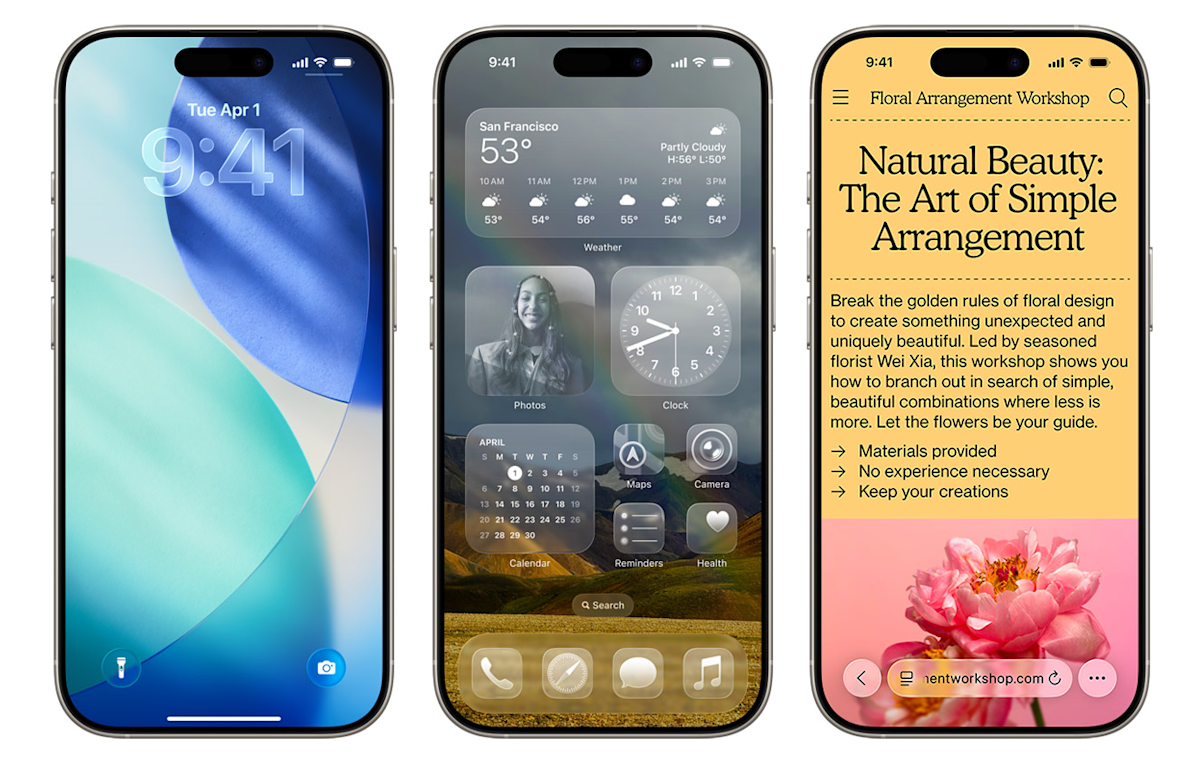
    If your phone is compatible with the latest OS, you’ll notice substantial changes when you install the new update. You may have already heard about “Liquid Glass,” which (intentional or not) is sort of like Apple’s take on the old Windows Vista design language. That’s the most notable change, but we spent two weeks test-driving many of the other features included in the update — you can check out our hands-on iOS 26 preview for more impressions.

    Not sure if you have an eligible smartphone or tablet but also don’t want to upgrade? No worries, we’ll help you find out if your devices will be able to run iOS 26.

    While Apple didn’t nix any iPhones from its eligibility list last year, that’s not the case for 2025, as a few models are getting the axe this time around. All iPhone 8 models and the iPhone X were the last to receive the boot in 2023, and this year, iPhones released in 2018 will be left behind.

    You can find a full list of iPhones and iPads that support iOS 26 and iPadOS 26 below. To see everything you get with the latest OS updates, you can check out our big rundown of what to expect from iOS 26. Additionally, here’s everything Apple revealed at the iPhone 17 launch event, including the all-new iPhone Air. (Check out Engadget’s liveblog of the event for full details.)

    These three iOS 18 iPhones aren’t compatible with iOS 26

    Unlike last year, a trio of iPhones won’t be eligible to download the newest iOS. These three models that were first released in 2018 won’t be coming to the iOS 26 party:

    • iPhone XR

    • iPhone XS

    • iPhone XS Max

    iPhones compatible with iOS 26

    Per Apple’s site, the devices listed below will be compatible with iOS 26. In short, if you have an iPhone that was announced in 2019 or later, you’re in the clear:

    • iPhone SE (second generation or later)

    • iPhone 11

    • iPhone 11 Pro

    • iPhone 11 Pro Max

    • iPhone 12

    • iPhone 12 mini

    • iPhone 12 Pro

    • iPhone 12 Pro Max

    • iPhone 13

    • iPhone 13 mini

    • iPhone 13 Pro

    • iPhone 13 Pro Max

    • iPhone 14

    • iPhone 14 Plus

    • iPhone 14 Pro

    • iPhone 14 Pro Max

    • iPhone 15

    • iPhone 15 Plus

    • iPhone 15 Pro

    • iPhone 15 Pro Max

    • iPhone 16

    • iPhone 16 Plus

    • iPhone 16 Pro

    • iPhone 16 Pro Max

    • iPhone 16e

    • iPhone 17

    • iPhone 17 Pro

    • iPhone 17 Pro Max

    • iPhone Air

    iPads compatible with iPadOS 26

    Meanwhile, the iPads listed below are eligible to download iPadOS 26:

    • iPad Pro (M4)

    • iPad Pro 12.9‑inch (3rd generation and later)

    • iPad Pro 11‑inch (1st generation and later)

    • iPad Air (3rd generation and later, including M2 and M3)

    • iPad (8th generation and later, including A16)

    • iPad mini (5th generation and later, including A17 Pro)

    What if I don’t want to buy a new iPhone?

    If you want to continue using your older iPhone that isn’t supported by iOS 26, that’s fine. However, you’ll eventually miss out on security updates which could potentially put your phone at risk for malware and other threats. Additionally, some apps may stop working if they require a certain version of iOS or later. And, of course, you won’t be able to access the latest features iOS 26 offers.

    Should I upgrade to iOS 18.7 or iOS 26?

    When you first open Software Update in Settings, you’ll notice two different upgrade options: iOS 18.7 and iOS 26. Apple released the former to address security issues, so you can at least download that one if you’re unsure about all the big changes on iOS 26. It also gives you more time to wait for Apple to take care of any bugs on the new OS.

    However, if you’re excited to finally have the Liquid Glass aesthetic on your phone and use all the new features iOS 26 has to offer, go ahead and install that one. After all, Apple had all summer to weed through the most problematic bugs during its beta phase and usually releases a new update shortly after the initial launch.

    iOS 26 features to try out first

    Liquid Glass design: Your home screen is getting revamped with new app icons, including dark mode and all-clear options. You’ll also notice buttons with a new floating design. Liquid Glass, in Apple’s terms, was designed to make all of the company’s operating systems more visually cohesive.

    Phone app redesign: You can finally scroll through contacts, recent calls and voicemail messages all on one screen. It also comes with a new feature called Hold Assist that’ll notify you when an agent comes to the phone so you can avoid the elevator music.

    Live Translate: iOS 26 brings the ability to have a conversation via phone call or text message with someone who speaks another language. Live Translate will translate your conversation in real time.

    Polls feature: Coming to group messages in the Messages app, chat members can now create polls. This can help prevent the unwanted 30+ messages when it comes to deciding which restaurant you’re meeting at this weekend.

    New lock screen options: More customizable iPhone lock screen options are available with iOS 26, including a cooler clock, 3D wallpaper effects, more widgets and better focus mode options.

    Snooze longer (or shorter): Say goodbye to the 9-minute snooze setting in your alarms (if you want). You now have the option to change your snooze time from one to 15 minutes.

    Fresh Camera app design: You’ll find the Camera app is simpler to navigate in iOS 26, with all the buttons and menus located in convenient spots. That means less swiping, more photo taking. Plus, there’s a new feature that tells you if your lens is too dirty.

    Screenshot revamps: When you take a screenshot, you now have the option to search for the image on Google (maybe you’re looking for a sweater you saw on a celeb) and you can ask ChatGPT questions about the photo — all from the edit screen. It’s like a reverse image search but without all the hard work.

    If you buy something through a link in this article, we may earn commission.

    Share. Facebook Twitter Pinterest LinkedIn Reddit WhatsApp Telegram Email
    Previous ArticleiOS 26 is ready to download: Everything to know about the free iPhone software update
    Next Article Meta Ray-Ban Display hands-on: Discreet and intuitive
    TechAiVerse
    • Website

    Jonathan is a tech enthusiast and the mind behind Tech AI Verse. With a passion for artificial intelligence, consumer tech, and emerging innovations, he deliver clear, insightful content to keep readers informed. From cutting-edge gadgets to AI advancements and cryptocurrency trends, Jonathan breaks down complex topics to make technology accessible to all.

    Related Posts

    Older Windows 11 PCs need a Secure Boot fix ASAP

    February 11, 2026

    Why Ring’s Super Bowl ad hits so sinister

    February 11, 2026

    This dual-CPU PC from 1995 was so cool, Microsoft had to kill it

    February 11, 2026
    Leave A Reply Cancel Reply

    Top Posts

    Ping, You’ve Got Whale: AI detection system alerts ships of whales in their path

    April 22, 2025664 Views

    Lumo vs. Duck AI: Which AI is Better for Your Privacy?

    July 31, 2025250 Views

    6.7 Cummins Lifter Failure: What Years Are Affected (And Possible Fixes)

    April 14, 2025151 Views

    6 Best MagSafe Phone Grips (2025), Tested and Reviewed

    April 6, 2025111 Views
    Don't Miss
    Technology February 11, 2026

    Older Windows 11 PCs need a Secure Boot fix ASAP

    Older Windows 11 PCs need a Secure Boot fix ASAP Image: Microsoft Summary created by…

    Why Ring’s Super Bowl ad hits so sinister

    This dual-CPU PC from 1995 was so cool, Microsoft had to kill it

    1,300 games for $10: ‘No ICE in Minnesota’ bundle launched

    Stay In Touch
    • Facebook
    • Twitter
    • Pinterest
    • Instagram
    • YouTube
    • Vimeo

    Subscribe to Updates

    Get the latest creative news from SmartMag about art & design.

    About Us
    About Us

    Welcome to Tech AI Verse, your go-to destination for everything technology! We bring you the latest news, trends, and insights from the ever-evolving world of tech. Our coverage spans across global technology industry updates, artificial intelligence advancements, machine learning ethics, and automation innovations. Stay connected with us as we explore the limitless possibilities of technology!

    Facebook X (Twitter) Pinterest YouTube WhatsApp
    Our Picks

    Older Windows 11 PCs need a Secure Boot fix ASAP

    February 11, 20262 Views

    Why Ring’s Super Bowl ad hits so sinister

    February 11, 20263 Views

    This dual-CPU PC from 1995 was so cool, Microsoft had to kill it

    February 11, 20263 Views
    Most Popular

    7 Best Kids Bikes (2025): Mountain, Balance, Pedal, Coaster

    March 13, 20250 Views

    VTOMAN FlashSpeed 1500: Plenty Of Power For All Your Gear

    March 13, 20250 Views

    This new Roomba finally solves the big problem I have with robot vacuums

    March 13, 20250 Views
    © 2026 TechAiVerse. Designed by Divya Tech.
    • Home
    • About Us
    • Contact Us
    • Privacy Policy
    • Terms & Conditions

    Type above and press Enter to search. Press Esc to cancel.