Close Menu

    Subscribe to Updates

    Get the latest creative news from FooBar about art, design and business.

    What's Hot

    This AI prompt builder is like a translator between you and bots

    Get a lifetime family license to this AI video editor and enhancer for just $36

    Wyze Lock Bolt v2 review: Now with Wi-Fi

    Facebook X (Twitter) Instagram
    • Artificial Intelligence
    • Business Technology
    • Cryptocurrency
    • Gadgets
    • Gaming
    • Health
    • Software and Apps
    • Technology
    Facebook X (Twitter) Instagram Pinterest Vimeo
    Tech AI Verse
    • Home
    • Artificial Intelligence

      Trump signs executive order seeking to ban states from regulating AI companies

      December 13, 2025

      Apple’s AI chief abruptly steps down

      December 3, 2025

      The issue that’s scrambling both parties: From the Politics Desk

      December 3, 2025

      More of Silicon Valley is building on free Chinese AI

      December 1, 2025

      From Steve Bannon to Elizabeth Warren, backlash erupts over push to block states from regulating AI

      November 23, 2025
    • Business

      Top 10 cloud computing stories of 2025

      December 22, 2025

      Saudia Arabia’s STC commits to five-year network upgrade programme with Ericsson

      December 18, 2025

      Zeroday Cloud hacking event awards $320,0000 for 11 zero days

      December 18, 2025

      Amazon: Ongoing cryptomining campaign uses hacked AWS accounts

      December 18, 2025

      Want to back up your iPhone securely without paying the Apple tax? There’s a hack for that, but it isn’t for everyone… yet

      December 16, 2025
    • Crypto

      10x Research Targets 8% Up for Gold: Today’s ATH Is the Cheapest You’ll See

      December 23, 2025

      Bitcoin Fintech Enters Russell 2000 While Strategy Risks MSCI Exclusion

      December 23, 2025

      3 Meme Coins To Watch In The Week of Christmas 2025

      December 23, 2025

      3 Altcoins To Watch In The Christmas 2025 Week

      December 23, 2025

      5 Charts Suggest Bitcoin Could Enter a Bear Market in Early 2026

      December 23, 2025
    • Technology

      This AI prompt builder is like a translator between you and bots

      December 23, 2025

      Get a lifetime family license to this AI video editor and enhancer for just $36

      December 23, 2025

      Wyze Lock Bolt v2 review: Now with Wi-Fi

      December 23, 2025

      Displace Wireless Pro 2 TVs will feature local AI to enhance privacy

      December 23, 2025

      Despite the hype, agentic AI isn’t ready to take the brand controls just yet

      December 23, 2025
    • Others
      • Gadgets
      • Gaming
      • Health
      • Software and Apps
    Check BMI
    Tech AI Verse
    You are at:Home»Technology»Stop Wasting Money On Cloud Storage: Try This Instead
    Technology

    Stop Wasting Money On Cloud Storage: Try This Instead

    TechAiVerseBy TechAiVerseDecember 23, 2025No Comments5 Mins Read0 Views
    Facebook Twitter Pinterest Telegram LinkedIn Tumblr Email Reddit
    Stop Wasting Money On Cloud Storage: Try This Instead
    Share
    Facebook Twitter LinkedIn Pinterest WhatsApp Email

    Stop Wasting Money On Cloud Storage: Try This Instead

    We may receive a commission on purchases made from links.

    Most of us create and store a lot of data these days. Even if you’re not hoarding movies and music on a custom-built home media streaming server, you still probably have a bunch of files — photos, videos, work documents, and so on — that you want to preserve and access on multiple computers.

    The easiest way is to rely on one of the best cloud storage options available, but the costs can quickly add up. Google One’s 2 TB Premium tier, for example, costs $9.99 per month, or $100 annually, and you’ll have to keep paying that much for as long as you use the service. Yes, it’s incredibly convenient, but you’re looking at thousands of dollars in total for the rest of your life — quite a chunk of change. A NAS may work out cheaper than cloud storage in the long run, but it has high start-up costs and doesn’t offer much in the way of data portability.

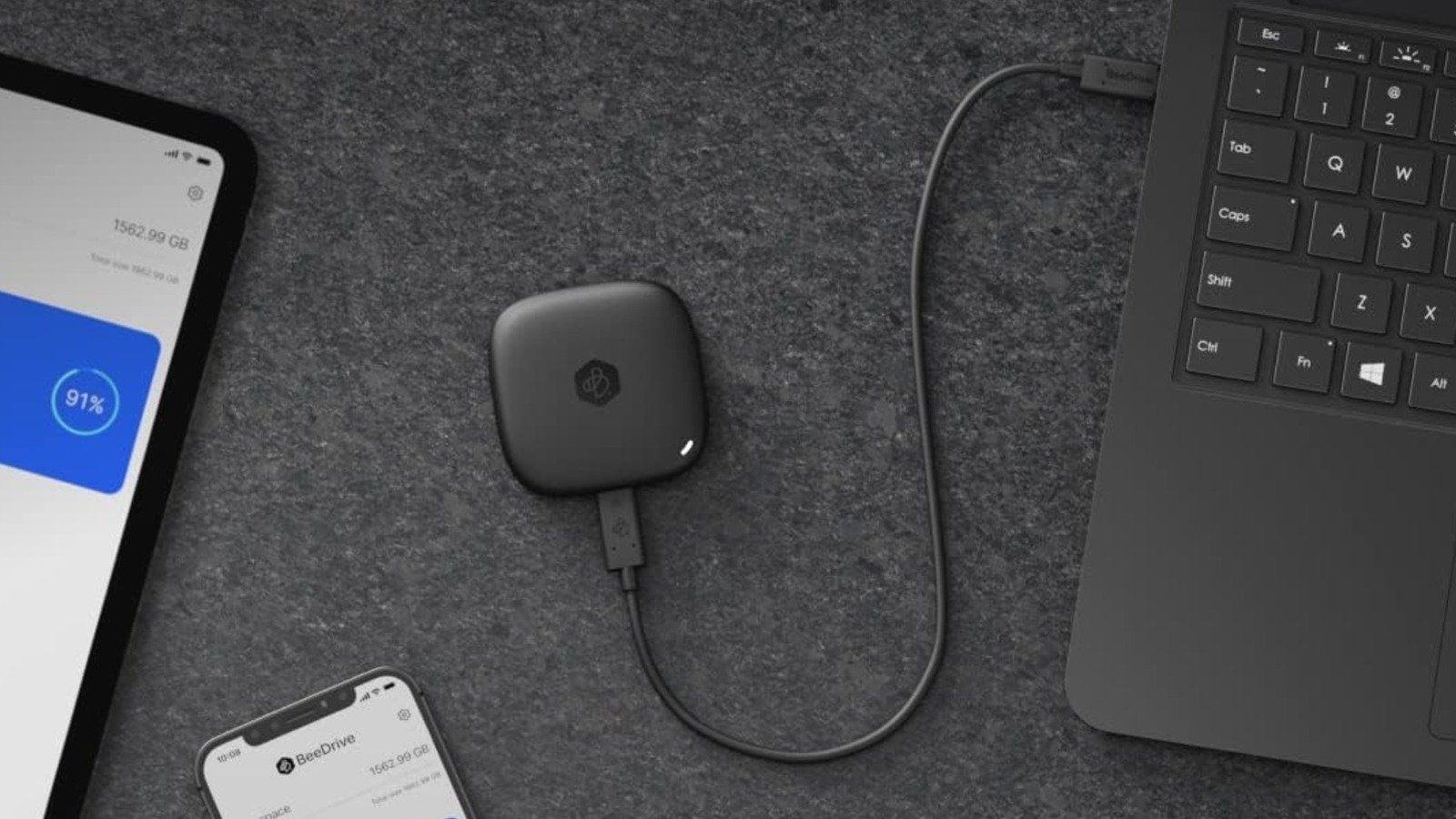
    If you primarily use cloud storage to back up and keep files in sync across computers (home and work computers, for example), there’s a better alternative: Synology BeeDrive. It’s a portable SSD — available in 1, 2, and 4 TB capacities — with AI-powered file search and automatic backup and sync functionality that echoes the convenience of an always-running cloud storage desktop app, just offline — but with a one-time purchase cost.

    What is the Synology BeeDrive?

    Hardware-wise, the BeeDrive is nothing out of the ordinary. It’s a compact external SSD available in several capacities, with MSRPs ranging from $134.99 for the 1 TB version to $329.99 for the largest 4 TB variant. It has a wired USB-C 3.2 Gen 2 connection, which, according to TechRadar’s testing, can deliver 1,050 MB/s and 730 MB/s read and write speeds, respectively. Not the fastest you’ll see, but fine for simple backups and syncing.

    The software side of the equation is where the BeeDrive stands out, though. Synology’s BeeDrive software, available on Windows and Mac, provides a range of features not commonly found on external SSDs. Synology’s software allows you to set up automatic backups of selected folders every time you connect the BeeDrive to a PC (with up to five versions of each file available at any given time), wirelessly back up photos and videos from your mobile devices (provided the BeeDrive is connected to a running PC), and automatically sync files between computers via its File Sync feature.

    File Sync offers a choice between one- or two-way operation, and also lets you specify the file types you want to sync. There’s also a BeeDrop feature that enables you to send files from a smartphone directly to the BeeDrive, which can be useful depending on your workflow. Data hoarders will also appreciate BeeDrive’s local AI agent, which lets you search for files, text, and images with natural language prompts. Overall, the Synology BeeDrive’s software looks to offer a similar experience to the Google Drive or Dropbox apps, though the data is stored on an external SSD rather than a server.

    The Synology BeeDrive works well, but it’s not perfect

    Reviews indicate that Synology nailed the BeeDrive’s core functionality, with the automated backup, file syncing, and wireless file transfer all working without hitches. If you primarily want to sync files between computers effortlessly (while having multiple copies for safety), then it should, by all accounts, be a great product. That said, we wouldn’t call it an outright replacement for cloud storage.

    For one, the Synology BeeDrive doesn’t work exactly like cloud storage, nor does it offer the same level of flexibility. After all, your data is only stored on the drive itself. That will be a boon for those who want total control over their data, but you lose the convenience of pulling files from a cloud server on any internet-connected device anytime. If you forget to sync files and then leave the BeeDrive at home, for example, then you’re out of luck. Think of it, then, as a backup device that handles file transfers and syncing automatically; undoubtedly perfectly fine for some, but not the solution for everyone.

    Security-conscious users may also be somewhat turned off by the BeeDrive’s lack of built-in encryption. Windows users can use BitLocker, admittedly, but that leaves Mac users out in the cold. The BeeDrive’s transfer speeds aren’t particularly fast either. It’s adequate for photos or documents, but if you need to move (or back up) uncompressed video or audio, for instance, you’ll likely want to buy one of the fastest portable SSDs and manage the data yourself.

    How we judged the Synology BeeDrive

    A company’s marketing may not always reflect the product’s reality; thus, we had to ensure that Synology BeeDrive is genuinely worth considering. To do so, we combined our familiarity with (and experience of) cloud storage providers and other forms of data storage — including manual copying to external hard drives and NAS systems — with trusted third-party reviews of the BeeDrive.

    Share. Facebook Twitter Pinterest LinkedIn Reddit WhatsApp Telegram Email
    Previous ArticleThese Robot Dogs With Human Faces Might Be The Worst Thing You See All Week
    Next Article US Air Force’s F-35 Fleet Is Getting A $240M Firepower Upgrade
    TechAiVerse
    • Website

    Jonathan is a tech enthusiast and the mind behind Tech AI Verse. With a passion for artificial intelligence, consumer tech, and emerging innovations, he deliver clear, insightful content to keep readers informed. From cutting-edge gadgets to AI advancements and cryptocurrency trends, Jonathan breaks down complex topics to make technology accessible to all.

    Related Posts

    This AI prompt builder is like a translator between you and bots

    December 23, 2025

    Get a lifetime family license to this AI video editor and enhancer for just $36

    December 23, 2025

    Wyze Lock Bolt v2 review: Now with Wi-Fi

    December 23, 2025
    Leave A Reply Cancel Reply

    Top Posts

    Ping, You’ve Got Whale: AI detection system alerts ships of whales in their path

    April 22, 2025533 Views

    Lumo vs. Duck AI: Which AI is Better for Your Privacy?

    July 31, 2025191 Views

    6.7 Cummins Lifter Failure: What Years Are Affected (And Possible Fixes)

    April 14, 202593 Views

    6 Best MagSafe Phone Grips (2025), Tested and Reviewed

    April 6, 202579 Views
    Don't Miss
    Technology December 23, 2025

    This AI prompt builder is like a translator between you and bots

    This AI prompt builder is like a translator between you and bots Image: StackCommerce TL;DR: Get…

    Get a lifetime family license to this AI video editor and enhancer for just $36

    Wyze Lock Bolt v2 review: Now with Wi-Fi

    Displace Wireless Pro 2 TVs will feature local AI to enhance privacy

    Stay In Touch
    • Facebook
    • Twitter
    • Pinterest
    • Instagram
    • YouTube
    • Vimeo

    Subscribe to Updates

    Get the latest creative news from SmartMag about art & design.

    About Us
    About Us

    Welcome to Tech AI Verse, your go-to destination for everything technology! We bring you the latest news, trends, and insights from the ever-evolving world of tech. Our coverage spans across global technology industry updates, artificial intelligence advancements, machine learning ethics, and automation innovations. Stay connected with us as we explore the limitless possibilities of technology!

    Facebook X (Twitter) Pinterest YouTube WhatsApp
    Our Picks

    This AI prompt builder is like a translator between you and bots

    December 23, 20250 Views

    Get a lifetime family license to this AI video editor and enhancer for just $36

    December 23, 20250 Views

    Wyze Lock Bolt v2 review: Now with Wi-Fi

    December 23, 20250 Views
    Most Popular

    What to Know and Where to Find Apple Intelligence Summaries on iPhone

    March 12, 20250 Views

    A Team of Female Founders Is Launching Cloud Security Tech That Could Overhaul AI Protection

    March 12, 20250 Views

    Senua’s Saga: Hellblade 2 leads BAFTA Game Awards 2025 nominations

    March 12, 20250 Views
    © 2025 TechAiVerse. Designed by Divya Tech.
    • Home
    • About Us
    • Contact Us
    • Privacy Policy
    • Terms & Conditions

    Type above and press Enter to search. Press Esc to cancel.