

Surprisingly good for entry-level: Soundcore Nebula P1 with screen review – NotebookCheck.net Reviews
Small projector, big sound.
The Soundcore Nebula P1 is a compact projector that surprised us in the test with its image and, thanks to two detachable speakers, also its sound. We tested it with a foldable 100-inch screen.
Marcus Schwarten (translated by DeepL / Marcus Schwarten) Published 🇩🇪
Home Theater Audio
Our expectations of the Nebula P1 from Anker Soundcore were not particularly high before the test. However, we were pleasantly surprised in practice.
There are certainly some compromises to be made. Anything else would be surprising in the price range up to $1,000. But the picture quality and the sound with the two detachable stereo speakers are absolutely solid. The Nebula P1 also scored points in the test with its simple setup, the benefits of Google TV including Netflix and low power consumption, even if it unfortunately lacks a battery.
For a good 900 euros MSRP in combination with the compact, stowable 100-inch screen (and therefore relatively manageable costs), the Nebula P1 provides a surprisingly good home cinema experience for spontaneous movie nights. It may cost a little more than many other entry-level projectors, but according to our test impressions it also delivers.
Pros
+ surprisingly good picture
+ simple setup
+ freely positionable stereo sound
+ Google TV
+ low operating noise
The recommended retail price for the Nebula P1 is $799.99. The projector is available from the manufacturer and Amazon, among others. The 100-inch screen with tripod, which we also tested, costs $169 according to the MSRP.
soundcore Nebula P1 Portable GTV Projector with Detachable Speakers, 650 ANSI Lumens, 1080P, 20W Truly 2.0 Surround Sound, Dolby Audio, Built-In Gimbal, Auto Adjustment, 180″ Big Screen, Carry Handle
Most recently, Anker’s projector brand Nebula, which is now classified under Soundcore, has been particularly successful with high-quality 4K models such as the great Nebula X1 (approx. $2,500 on Amazon) or the gigantic Nebula X1 Pro (approx. $5,000 on Amazon). The Nebula P1, a much more compact, but also much cheaper model, has recently came onto the market.
In principle, however, the manufacturer has remained true to its approach and has ported the concept of the detachable sound system to the entry-level class. Our test report reveals what the Nebula P1 has to offer and how well it performed in practice.
| Resolution | Full HD / 1080p (1,920 x 1,080 pixels) |
| Projection ratio | 1.2:1 |
| max. image size | 180 inch |
| Light source (lifetime) | LED |
| Brightness | 650 ANSI lumens |
| Sound system | 2.0 channels, 20 W, Dolby Audio |
| Operating system | Google TV |
| Connectivity | HDMI 2.1 (eARC), USB-A/C, Aux out, Wi-Fi 5, Bluetooth |
| MSRP | $799.99 |
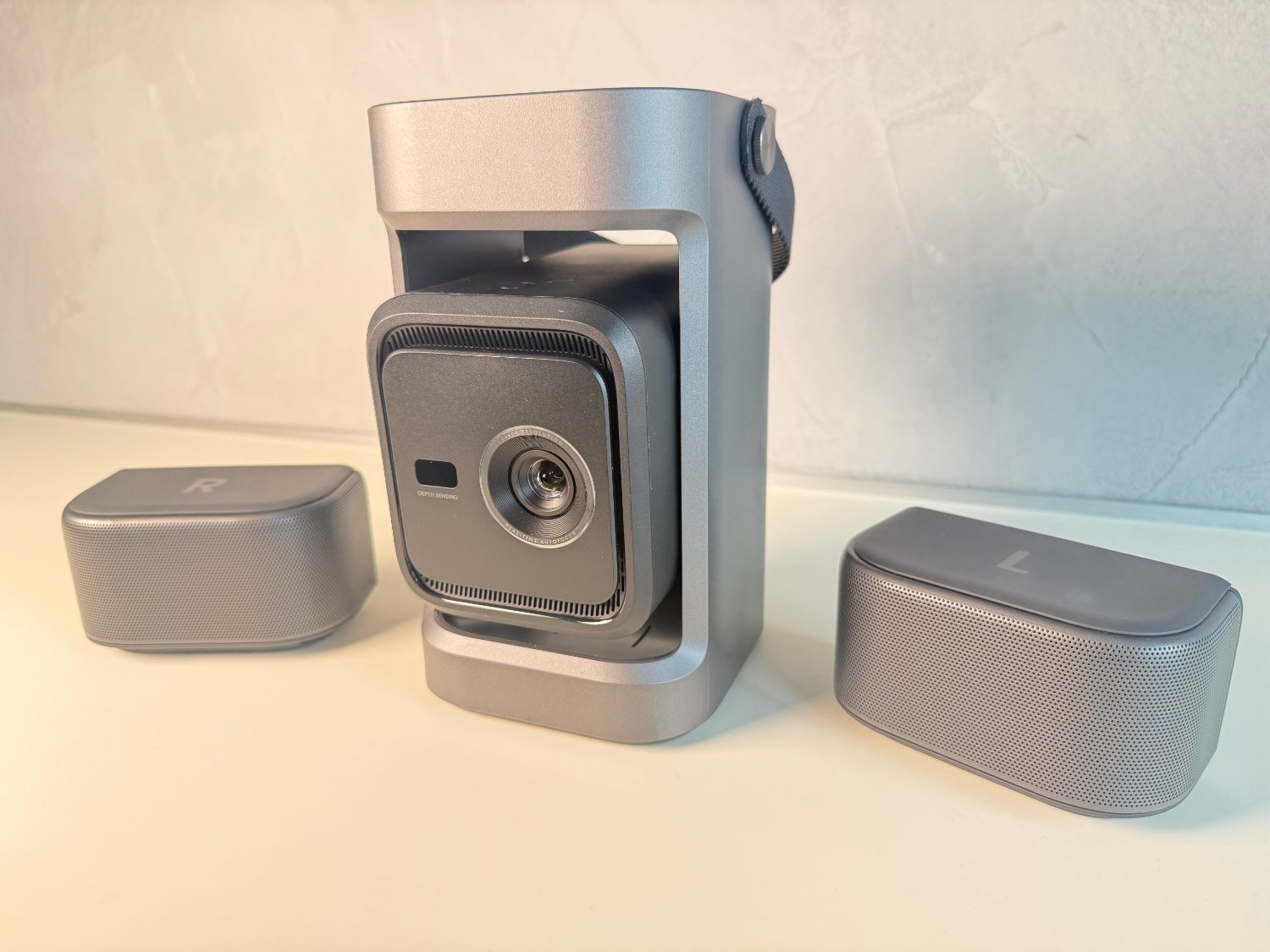
The Nebula P1 is supplied in a compact cardboard box. In addition to the IP33-protected FHD projector with its two detachable speakers, the box also contains a USB-C cable and USB power adapter for the power supply as well as a partially illuminated remote control in the familiar design with shortcut buttons for important streaming services and two AAA batteries.
The projection unit is rotated in transport mode and therefore protected. Before use, it is rotated out of the device, which also serves as a 130-degree gimbal and enables flexible alignment. The image is reproduced via a small DLP sensor with LED light source, which, according to the manufacturer, results in a 650 ANSI lumen bright Full HD image (1,920 x 1,080 pixels).
On the top are two wirelessly connected, detachable speakers, which are the hallmark of the Soundcore Nebula P1 and provide stereo sound with Dolby Audio. As we also describe in the course of our Nebula P1 review, this is an exciting approach and offers more than many other projectors in the entry-level price range.
But before we get to our practical impressions, let’s first take a look at the connections. The USB-C port for the power supply is always accessible at the rear. When ready for use, HDMI 2.1 with eARC, an aux-out audio port and a USB-A port are also visible. In addition to Wi-Fi and Bluetooth, wireless transmissions are possible with Google Cast and Nebula Cast.
As with its other projectors, Soundcore Nebula also relies on Google TV for the P1. After switching on, the familiar logo greets you before the set-up process begins. The displayed QR code enables a practical detour via the smartphone so that the Wi-Fi password and other details do not have to be laboriously typed in using the virtual keyboard on the screen. We are already familiar with this from many other Google TV devices and appreciate it every time.
Setting up the Nebula P1 took us around three quarters of an hour in our test. However, this was largely due to an update that still had to be installed. Without this, it is much faster. Wi-Fi connection, logging into the Google account and selecting a few initial settings regarding apps and co. to be installed on the smartphone or with the projector remote control – then the projector is ready for use in under 30 minutes.
One of the major advantages of Google TV is the well-stocked app store. Apps from all popular streaming providers can be installed, including native support for Netflix. This is by no means a matter of course for all projectors in the entry-level class up to 1,000 euros.
Google TV and the manufacturer’s own Nebula Connect app open up various options for customizing. These include picture and sound adjustments, inputs and energy settings. If desired, the Nebula app can help with picture setup and be used as an alternative remote control.
The Nebula P1 is equipped with a fixed projection ratio. From a distance of just under 2.7 m, for example, this results in an image measuring around 100 inches. However, this also means that, apart from the distance to the projection surface, no influence can be exerted on the up to 180 inch projection if the digital zoom (which reduces the image quality) is not to be used. This means that only the position remains for alignment, whereby the 130-degree rotating gimbal helps. Autofocus and automatic keystone correction also make it easier to set up the image so that you always get a sharp and aligned image without having to do anything yourself.
With 650 ANSI lumens according to the manufacturer’s specifications, the affordable P1 naturally cannot keep up with the models in the X1 series. Even if not all of this reaches the screen in practice, even at the highest brightness level, it still produces an amazingly bright picture. On a cloudy day, an acceptable result can even be achieved during the day with the light switched off. Of course, you shouldn’t have too high expectations in this price range.
The Nebula P1 is much more impressive in an (almost) darkened room. Here, the brightness is sufficient for an astonishingly impressive result. In addition to the smooth display of moving images, the contrast and color reproduction in NebulaMaster mode (other modes: Standard, Vivid, Sport, Movie, Game, Conference) are also at a more than solid level and can be adjusted to personal taste via the settings.
For example, in combination with the Nebula screen presented in more detail below, you can spontaneously enjoy an entertaining evening at the movies without having to invest thousands of euros beforehand. It also made a more than solid impression in gaming thanks to its low input lag.
The feature that Soundcore focuses on the most when advertising the Nebula P1 is the two detachable speakers with a total of 20 W. They are wirelessly connected and can be positioned anywhere in the room. Placed to the left and right of the screen, this creates a wide sound stage that is impressive for a projector in the under 1,000 euro class.
Of course, no bass and sound fireworks should be expected from the approx. 13 x 7 x 7 cm compact speakers, such as the X1 Pro, which costs almost $5,000. However, they provide an absolutely solid and balanced stereo sound, which is definitely better than most speakers integrated into budget projectors. Especially as the sound can now come from the area of the screen thanks to the free positioning of the two speakers and is not thrown at the head by the projector, which is usually close to the seating position.
Optionally, the two IP54 splash-proof speakers can also be used separately from the projector as Bluetooth speakers. The battery life is almost a whole day. They can be charged within around three hours when docked via the USB-C port on the projector or the USB-C port on the speakers themselves. It was a little annoying in the test that the P1 emits various sounds when it boots up. However, this can be deactivated in the settings.
As with the more expensive models X1 and X1 Pro anker Soundcore has also dispensed with the integration of a battery in the P1. This is a pity for such a mobile concept, but would ultimately have led to larger dimensions, a higher weight and a more expensive price. The Nebula P1 weighs less than 2.4 kg including the speakers and measures approx. 28 x 13 x 13 cm (including speakers), making it easier to transport, which is also helped by the flexible carrying handle.
However, without battery, the FHD projector is always connected to an external power source. As the power is supplied via USB-C (cable and power supply unit are included), a large power bank or small power station is theoretically also sufficient. Especially as the P1 is very economical at around 60 W from the power supply, even at maximum brightness. Directly via USB-C it is even only a good 50 W.
Another positive aspect: at less than 35 dB (measured from a distance of 50 cm), the projector is pleasantly quiet in operation, meaning that the external speakers don’t have to be turned up too high to drown out the projector, which is (usually) positioned closer to the seating position.
Of course, a projector achieves the best results in combination with a screen, even if it also works with a smooth white wall with some compromises. Soundcore offers the perfect sparring partner for the Nebula P1.
The manufacturer is offering a 100-inch screen with a collapsible tripod for $169.99 MSRP. This comes in a bag measuring only around 50 x 15 x 12 cm. It can be set up quickly by plugging together the poles, which are connected by elastic bands. Clamping the screen also went smoothly in the test, but is easier with two people than alone.
The result is a smoothly stretched screen of 100 inches (dimensions when set up: approx. 230 x 182 x 55 cm), which is quick to set up and just as quick to stow away again to save space. Thanks to accessories in the form of pegs, straps for tensioning and weights for the two feet that can be filled with water, it can also be used outdoors. In the living room, it is reasonably stable on its two feet even without fastening, even if it is a somewhat wobbly affair overall. How durable the product is cannot yet be finally assessed in our short test period.
Transparency
The selection of devices to be reviewed is made by our editorial team. The test sample was provided to the author as a loan by the manufacturer or retailer for the purpose of this review. The lender had no influence on this review, nor did the manufacturer receive a copy of this review before publication. There was no obligation to publish this review. As an independent media company, Notebookcheck is not subjected to the authority of manufacturers, retailers or publishers.
I have been fascinated by technology for around 25 years – especially technology that makes life easier rather than more complicated. Mobile devices such as laptops, smartphones, tablets, and smartwatches are particularly close to my heart as is the booming subject of smart homes. I have been working in these areas for several years now as a news and reviews editor. I have been active with various websites, including the smart home blogs homee, Nuki, and siio, as well as tech portals such as Giga and TechRadar. I have been writing news and laptop reviews for Notebookcheck since 2020.


