

Tapo Smart Wi-Fi Wall Outlet Extender review: Flaw ahead!
Image: Michael Brown/Foundry
At a glance
Expert’s Rating
Pros
- 3 individually controlled smart outlets (+3 dumb outlets)
- 3 fast-charging USB outlets
- Compatible with Amazon Alexa, Apple Home, Google Home, and IFTTT
Cons
- Gives no warning when it can no longer provide surge protection
- Surge protection limited to 205 joules
Our Verdict
Don’t buy this multi-outlet for its surge protection feature, as it won’t warn you when it can no longer deliver it.
Price When Reviewed
This value will show the geolocated pricing text for product undefined
Best Pricing Today
TP-Link’s Tapo Smart Wi-Fi Wall Outlet Extender has some great features, as well as one critical shortcoming that prevents us from recommending it.
Tapo doesn’t make big promises for this product in terms of its surge protection, but it does list a key feature on the box: the ability to warn you when it can no longer provide surge protection.
If you’re considering buying Smart Wi-Fi Wall Outlet Extender for that feature, don’t. Here’s why.
The Tapo Smart Wi-Fi Wall Outlet Extender isn’t all bad news—provided you’re not buying it for surge protection.
Most surge protectors use sacrificial MOVs (metal oxide varistors) to absorb excess voltage from power surges, and this one is no exception. The thing is, MOVs wear out over time, losing some of their ability to absorb that excess voltage with each power surge until they can no longer offer any protection at all.
Since the number and severity of power surges will vary based on a wide range of factors, starting with the quality of power coming from your utility, it’s impossible to predict when a given surge protector’s MOV (or MOVs, as the case may be) will wear out.
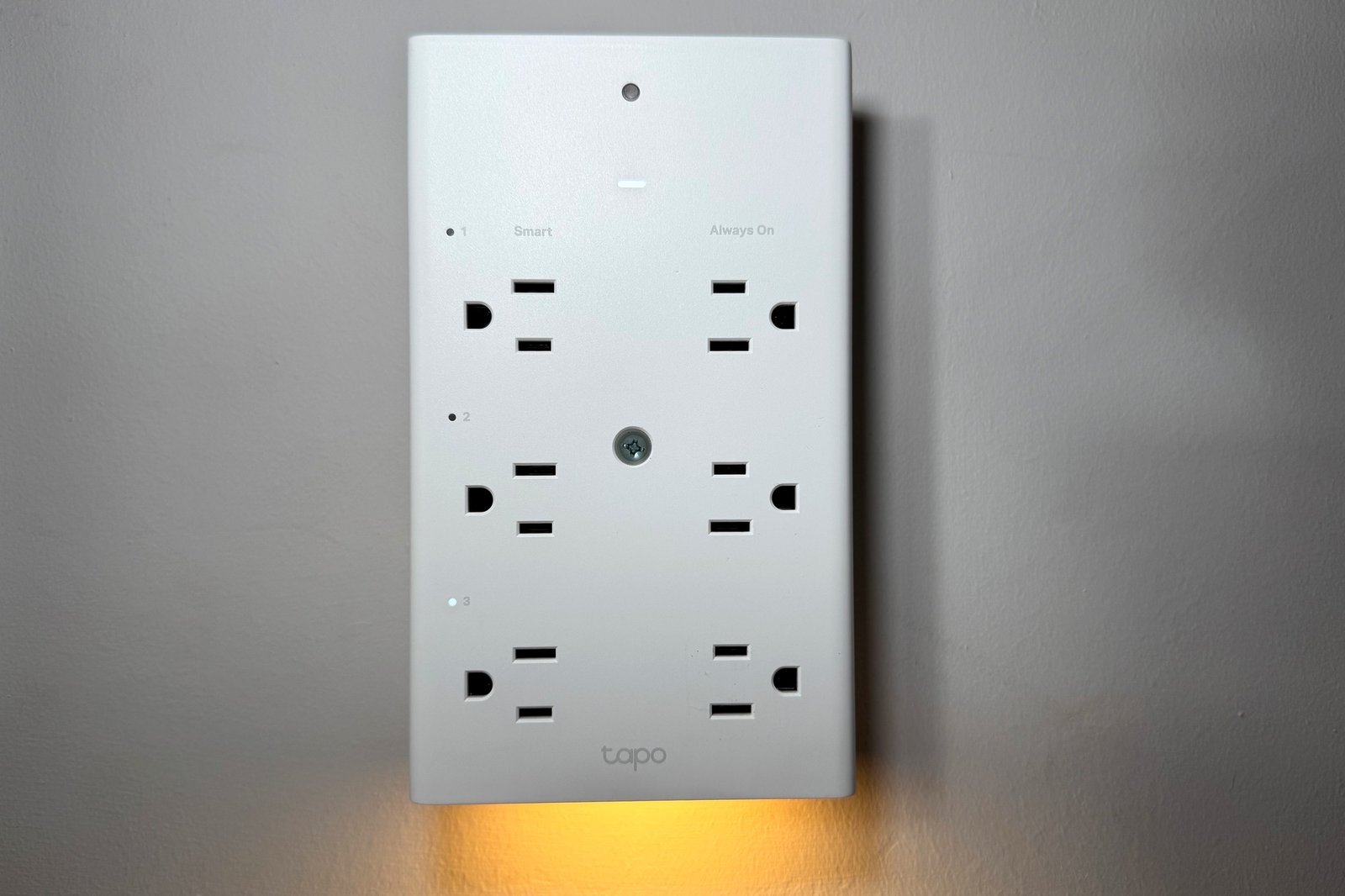
The outlets on the Tapo Smart Wi-Fi Wall Outlet Extender are spaced 1.56 inches apart, so wall warts and oversized plugs don’t block adjacent outlets.
Michael Brown/Foundry
Some surge protectors will simply stop sending power to their outlets when this happens, and that’s the best approach in my opinion. Others will trigger a red or green “protection” indicator—typically an LED—to stop glowing when they can no longer offer protection.
The latter approach is far more common, and you should periodically check yours to make sure it’s still lit. The problem with the Tapo Smart Wi-Fi Wall Outlet Extender is that it doesn’t do either of these things. Its MOV will eventually wear out and cease offering surge protection, but you’ll have no way of knowing when that has happened.
I verified this fact with TP-Link, and the manufacturer replied that the absence of a protection indicator is due to the product’s “structural limitations,” but that it recognizes this “as a potential area for improvement in future product iterations.”
I’d say that’s an understatement. It would have been better to not include surge protection at all than to have users gamble as to when this one will stop offering protection without any warning.
Specifications
The Tapo Smart Wi-Fi Wall Outlet Extender isn’t all bad news—provided you’re not buying it for surge protection. But before we leave that topic, allow me to report a few details you find won’t find on TP-Link’s website.
Three USB charging ports–1 USB-C and 2 USB-A–deliver up to 18 watts of power.
Michael Brown/Foundry
This product’s surge protector element can handle only a maximum of 205 joules, but it offers 1,200 volts of clamping voltage, based on a 6,000-volt surge on the line-to-neutral leg of the circuit it’s connected to. Thumbs up for that: Protection for the line-to-neutral leg is what’s needed most in a properly grounded home.
Compare that to the Philips 6-Outlet Surge Protector Power Strip, a “dumb” surge protector that offers up to 720 joules of protection, but only 500V of protection across the line-to-neutral leg of the circuit. The Philips product also lacks USB-charging ports, but it costs less than half as much as the Tapo product.
I should also note, however, that the Philips product doesn’t have any LED indicators either. The key difference is that the Philips product will cease to provide power to its outlets when its MOV wears out and can no longer provide surge protection. An LED would be superfluous in that product.
OK, let’s turn our attention to the rest of the Tapo Smart Wi-Fi Wall Outlet Extender’s considerable specifications and features. It occupies the top half of a duplex outlet, but necessarily also covers the bottom half. If you have an old-school outlet with a middle screw hole for the cover plate, you can remove the cover, insert a provided screw into the center of the Outlet Extender, and fasten it to that hole. You can also screw a provided post into the back of the extender and plug that into the second outlet’s ground hole for added stability when plugging and unplugging devices.
Each of the three smart outlets can also be controlled with a button on the side. The post below the electrical prongs plugs into the second grounded outlet to provide additional stability.
Michael Brown/Foundry
The Outlet Extender can handle up to a maximum of 1,875 watts, and each of its six outlets puts out a maximum of 15 amps. It’s equipped with one USB-C charging port and two USB-A charging ports on its right-hand side. These deliver a maximum output of 5 volts and 3 amps, providing up to 18 watts of fast charging. More specifically, single-port outputs are 5V/3A, 9V/2A, or 12V/1.5A.
You can rest your smartphone on top of the outlet extender while it’s charging, and a lip on its front edge will prevent the device from sliding forward and off.
There are six grounded AC outlets in front, three on each side and spaced 1.57-inches apart to accommodate at least smaller wall warts or oversized plugs without blocking adjacent outlets. Only the three outlets on the left-hand side are smart plugs, and each one has an on/off switch and an LED indicator that glows when it’s on. The three outlets on the right-hand side are always-on “dumb” plugs and don’t have buttons or LEDs.
An ambient light sensor at the top of the extender’s face triggers a dimmable white, down-facing LED nightlight to glow. This feature is highly customizable in the Tapo app, based on the level of ambient light that will activate it, a time-and-date schedule, or even a countdown timer. An LED beneath the ambient light sensors reports the overall status of the device (solid white when connected to the cloud, blinking orange when disconnected from Wi-Fi, and so on).
Smart features
The Tapo Smart Wi-Fi Wall Outlet Extender connects to your 2.4GHz Wi-Fi network, with up to WPA3 security. Although it’s not Matter certified, it is compatible with all three major smart home ecosystems: Amazon Alexa, Google Home, and Apple Home. It’s also compatible with Samsung SmartThings, Siri Shortcuts, and IFTTT.
You’ll use the Tapo smart home app to program and control the device. This software is also used to control everything from security cameras to smart plugs, smart bulbs, robot vacuums, and other smart home products carrying TP-Link’s Tapo or Kasa Smart brands. But you can organize the app by assigning everything to “rooms” and designating “favorites” to make it easier to manage everything.
You can control every Tapo smart home device with the Tapo app, which can also control any of TP-Link’s Kasa Smart products.
Michael Brown/Foundry
Widgets are provided for each of the Outlet Extender’s three smart plugs, but there’s just one widget for all three of its USB ports. The widgets have power buttons for toggling them on and off, or you can tap anywhere else on the widget to open a new full-screen window for more granular information and control, including scheduling.
You can set “away modes” that will randomly turn the assigned smart outlets on and off between defined days and times. Plug a lamp into one, two, or all three smart outlets, and it will make your home look occupied while you’re away from home. Separate countdown timers will turn any or all the assigned smart outlet on or off after a given number of hours and minutes has elapsed.
The smart plugs don’t track energy consumption, but they will report the number of hours they’ve been energized for the current day, the past seven days, and the past 30 days.
If you have other TP-Link or Tapo products, you can create routines that will cause those devices to trigger each other—and without needing a smart home hub. For example, you can have a TP-Link or Tapo security camera trigger a light plugged into the Outlet Extender when it detects motion after sunset, and then automatically turn off after a programmed amount of time. Or you can create a shortcut button that dims your Tapo or TP-Link smart bulb when you’re ready for bed and turns off any of the company’s smart plugs, including this Outlet Extender.
The more compatible gadgets you have, the more you can do with this feature. If you’re an IFTTT subscriber, of course, you don’t necessarily need Tapo or TP-Link products to accomplish similar goals.
TP-Link’s Tapo and Kasa Smart devices can operate together in the same smart home environment.
Michael Brown/Foundry
Further reading: This review is part of TechHive’s in-depth coverage of the best smart plugs.
Should you buy a Tapo Smart Wi-Fi Wall Outlet Extender?
In terms of a multi-plug, the Tapo Smart Wi-Fi Wall Outlet Extender is a fine product. It expands any duplex outlet into three smart outlets and provides three more “dumb” outlets. You also get three fast-charging smart USB plugs. So far, so good.
As a surge protector, on the other hand, it almost utterly fails. Not knowing when a surge protector can no longer protect attached devices from power surges is worse than not having surge protection in the first place. Whether smart or dumb, if Tapo’s Outlet Extender didn’t offer surge protection, you could at least plug a single-outlet surge protector into one of its outlets to power a sensitive device—a computer, for example—that you want to protect.
That said, you should never daisy-chain surge protectors–i.e., plug one surge protector into another surge protector–as that has the potential to overload the electrical circuit to which they’re connected. An overloaded electrical circuit is a fire risk.
Author: Michael Brown, Executive Editor, TechHive
Michael is TechHive’s lead editor, with 30+ years of experience covering smart homes, home networking, and home audio/home theater. He holds a BA in Multimedia Journalism, authored the book Desktop Video Production, and was awarded Best Online Review by the Computer Press Association. Michael built a smart home in 2007 and used it as a real-world product-testing lab. Now living in the Pacific Northwest, he is converting his 1890 Victorian bungalow into a modern smart home. Michael has worked at CNET, PCWorld, Electronic Musician, and Maximum PC. As a freelancer, he contributed to New Media, Camcorder, MacWeek, and more.
