

The iPhone’s Shortcuts app is smarter than you think, you’re just using it wrong
One of the most common compliments – or complaints – that I often come across in the phone community is that the “iPhone just works.” It’s plenty fast, fluid, and user-friendly. For those who seek the power-user nirvana, Android is where you can tinker with custom ROMs and revel in the joys of customizability.
That, however, doesn’t mean the iPhone can’t pull off its own tricks. On the contrary, it can pull off some seriously impressive multi-step automation wizardry. The best example? Shortcuts. The pre-installed app is pretty impressive, especially with its newfound AI chops.
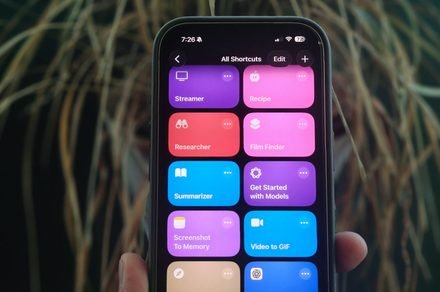
I recently created a “memory” shortcut for storing important nuggets of information. But instead of the laborious work that involves saving pages as bookmarks, copy-pasting text and links, or taking screenshots, I combined it all. With a single button press, the shortcut takes a screenshot, an AI summarizes the on-screen content, gives it a headline, search-friendly hashtags, and saves it all in a designated app.
The Shortcuts app can actually do a lot more thanks to AI. You can either designate ChatGPT for the task, use an on-device AI model, or even designate more demanding tasks to Apple’s private cloud compute for more secure processing. I have created a few AI-driven shortcuts to give you an idea of how utterly convenient they can prove to be on a daily basis.
Finding film or TV show details from random clips
Let’s get straight to business. This is how a custom shortcut took me from a random clip to its streaming destinations:
TikTok and Instagram are brimming with channels that post clips from TV shows and films. These clips often go viral, but in a lot of cases, there is no mention of the film’s name as an overlay, or in the descriptions. It’s an extremely frustrating situation, especially if you’ve made up your mind to watch the whole thing after watching a 30 or 60-second snippet.
Thankfully, with a single press of the Action Button, you can execute a multi-stage action that will give you the name of a film or TV show, alongside a few other details, such as where to stream it. I just created a shortcut that gets the job done in roughly six to seven seconds.
The simplest route is to use Apple’s cloud-based AI model. You trigger the shortcut, a screenshot is captured, and it’s fed to the AI. Within a few seconds, the AI tells you about the scene, the actor(s) name, the film or TV show, and a few more details in a pop-up window. It’s not 100% accurate, but with big entertainment franchises, it gets the job done.
The most accurate approach involves using Google Lens. This is broadly how it works. Let’s say you are watching a film clip on Instagram. As soon as you trigger the shortcut, the phone takes a screenshot and automatically feeds it to Google Lens. The image is scanned, and you get the name of the film or TV show pop up on the screen.
You can stop the shortcut there. But I went a step ahead and customized it further. After the Google Lens step, I created a delay of five seconds, after which a pop-up appears at the top of the screen. Here, you just enter the name of the movie or TV series and hit enter.
The name is fed to the AI, which then tells you where that particular film or TV show is available to watch, rent, or stream. Think of it like Shazam, but for videos you see on the internet. I also experimented with using Perplexity in the same shortcut, which also gave me extra nuggets of information, such as plot summary, rating, cast, and more.
This is what the interface looks like when I integrate Perplexity in the shortcut:
A recipe wizard: From clicks to counter-ready
I cook. A lot. Naturally, my social media feed is aware of that, as well. However, not all pictures and videos of delicacies I see on Instagram Reels come with a full recipe attached. In a healthy few cases, I don’t even know what I am looking at. This is where AI comes to the rescue again.
Normally, I would take a screenshot and perform a reverse Google image search. Once the identification is done, I would go perform another round of search to find the recipe, understand its origins, and get details about its nutritional value. Of course, some manual note-taking is also involved.
Instead, I do it all with a single tap by activating the “Recipe” shortcut. Let’s say I am looking at a friend’s story on Instagram where they shared pictures of food items. As soon as the shortcut is activated, a screenshot is captured and the image is fed to ChatGPT.
The AI identifies the dish, pulls up the whole recipe, lists all the ingredients, cooking instructions, alongside a brief overview of the delicacy, and its nutritional value for a single serving. All these details, alongside a picture of the screenshot, are then neatly saved to my Apple Notes.
Once again, you can substitute ChatGPT with Google Lens for identification, but then, it would take an extra step where you need to type, or copy-paste the name of the dish. It’s not much of a hassle to do so, but it depends more on your personal preference.
Custom file summarization in a single tap
Apple has already built a summarizer feature within the Apple Intelligence stack. You can activate it using the Writing Tools system, and even access it within Safari’s reading mode. However, it doesn’t work with files locally stored on your phone.
Thanks to Shortcuts, you can have any file analyzed by ChatGPT. Aside from images, OpenAI’s chatbot can handle XLSX, CSV, JSON, and PDF files, as well. Just make sure that the ChatGPT extension is enabled within the Apple Intelligence & Siri dashboard in the settings app.
Now, you might ask why go through all this trouble, instead of using the ChatGPT app? Well, that’s because it’s a multi-step process. Plus, you will have to give the prompt instruction each time you upload a file for analysis in the ChatGPT app. With a custom shortcut, you merely need to share the file from within the share sheet.
More importantly, the shortcut allows you to follow a specific routine each time. For example, I configured it to pick a title, show a brief summary, and then pick up all the key takeaways as bullet points. For more flexibility, you can automatically copy the AI’s full response and save it as a dedicated note. Simply put, you set the rules for file analysis.
Now, there are two ways of using this shortcut. You dig into the Files app, hit the share button, and then select the Shortcut to get it done. Or, you can treat the shortcut as a standalone and put its icon on the home screen. With the latter approach, you just have to tap on the icon, and it will automatically open the file picker page.
There’s a lot more you can do by pushing the AI in creative ways within the Shortcuts app. All you need to do is find a task that can benefit from using AI, and you can speed it up by simply creating a shortcut for it. And the best part is that you simply have to describe the task at hand, and the AI will handle the rest.
