Close Menu

    Subscribe to Updates

    Get the latest creative news from FooBar about art, design and business.

    What's Hot

    Google’s still struggling to crack PC gaming

    Xbox unveils first tech details of its next generation console, codenamed Project Helix

    Developer sues publisher after leaving Kickstarter backers waiting over two years for promised physical editions

    Facebook X (Twitter) Instagram
    • Artificial Intelligence
    • Business Technology
    • Cryptocurrency
    • Gadgets
    • Gaming
    • Health
    • Software and Apps
    • Technology
    Facebook X (Twitter) Instagram Pinterest Vimeo
    Tech AI Verse
    • Home
    • Artificial Intelligence

      What the polls say about how Americans are using AI

      February 27, 2026

      Tensions between the Pentagon and AI giant Anthropic reach a boiling point

      February 21, 2026

      Read the extended transcript: President Donald Trump interviewed by ‘NBC Nightly News’ anchor Tom Llamas

      February 6, 2026

      Stocks and bitcoin sink as investors dump software company shares

      February 4, 2026

      AI, crypto and Trump super PACs stash millions to spend on the midterms

      February 2, 2026
    • Business

      Met Office ‘supercomputing as a service’ one year old

      March 12, 2026

      Tech hiring evolves as candidates ask for AI compute alongside pay and perks

      March 11, 2026

      Oracle is spending billions on AI data centers as cash flow turns negative

      March 11, 2026

      Google: Cloud attacks exploit flaws more than weak credentials

      March 10, 2026

      Could this be the key to eternal storage? Experts claim new DNA HDD can be ‘erased and overwritten repeatedly’

      March 9, 2026
    • Crypto

      Banks Respond to Kraken’s Federal Reserve Access as Trump Sides with Crypto

      March 4, 2026

      Hyperliquid and DEXs Break the Top 10 — Is the CEX Era Ending?

      March 4, 2026

      Consensus Hong Kong 2026: The Institutional Turn 

      March 4, 2026

      New Crypto Mutuum Finance (MUTM) Reports V1 Protocol Progress as Roadmap Enters Phase 3

      March 4, 2026

      Bitcoin Short Sellers Caught Off Guard in New White House Move

      March 4, 2026
    • Technology

      Google’s still struggling to crack PC gaming

      March 12, 2026

      Media Briefing: In the AI era, subscribers are the real prize — and the Telegraph proves it

      March 12, 2026

      Furniture.com was built for SEO. Now it’s trying to crack AI search

      March 12, 2026

      How medical creator Nick Norwitz grew his Substack paid subscribers from 900 to 5,200 within 8 months

      March 12, 2026

      Inside Amazon’s effort to shape the AI narrative on sustainability and ethics

      March 12, 2026
    • Others
      • Gadgets
      • Gaming
      • Health
      • Software and Apps
    Check BMI
    Tech AI Verse
    You are at:Home»Technology»You Don’t Need A Dock To Stream Your Steam Deck To Your TV
    Technology

    You Don’t Need A Dock To Stream Your Steam Deck To Your TV

    TechAiVerseBy TechAiVerseNovember 15, 2025No Comments3 Mins Read4 Views
    Facebook Twitter Pinterest Telegram LinkedIn Tumblr Email Reddit
    You Don’t Need A Dock To Stream Your Steam Deck To Your TV
    Share
    Facebook Twitter LinkedIn Pinterest WhatsApp Email

    You Don’t Need A Dock To Stream Your Steam Deck To Your TV

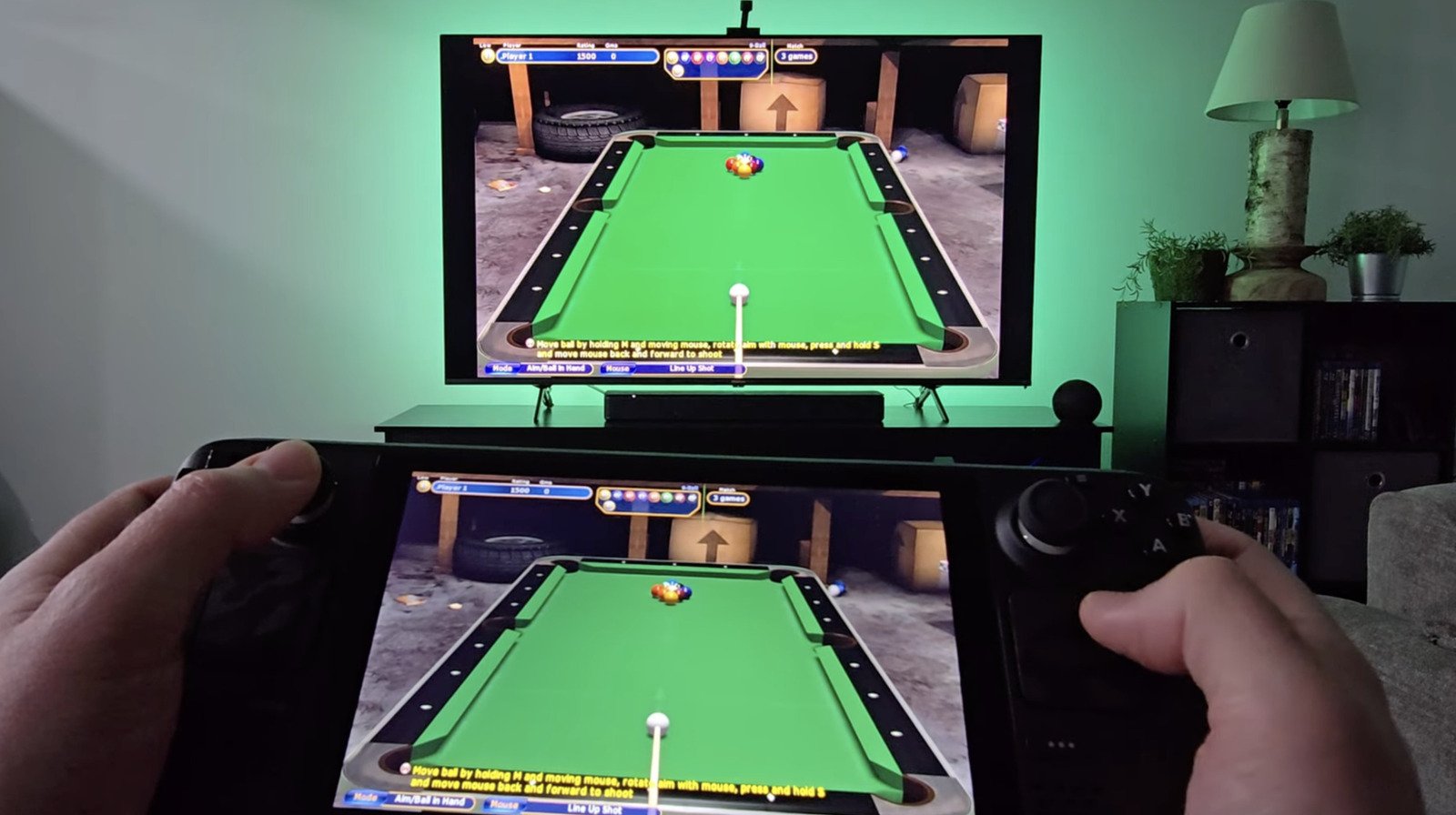
    The Steam Deck’s miniature build is perfect for travel, but it may not match the console-level experience players look for at home. That’s why you’d be tempted to stream your games over to the big screen. The usual method for this is using a dock, though that requires wires. But there’s a hack that lets you ditch those entirely. It involves a wireless streaming host called Sunshine and a client app called Moonlight. Here’s how you can get started:

    1. First, you’ll need your Deck’s local IP. Boot into desktop mode, click the Wi-Fi icon, and dig into the details menu until you spot the “IPv4 Address.” Keep that number handy.
    2. Head to the Discover app.
    3. Use the search bar (on the top-left) to find “Sunshine” and install the app.
    4. Find Sunshine in your “Multimedia” applications and run it. Your browser will pop up with a setup page asking you to lock it down with a new username and password.
    5. Move over to your big screen. Open its app store and grab the client app called “Moonlight”. It’s easily available on TVs running Google TV/Android TV and on the Apple TV box.
    6. Fire up Moonlight. The most direct way to connect is to tap the plus symbol for a manual connection and punch in the Deck’s IP address from step one. Do keep in mind that your router might assign your Deck a new IP address every few days.
    7. You should see your Deck’s display pop up on the TV.

    If the stream is choppy, don’t be afraid to poke around in the Sunshine settings back on your Deck. It’s also worth double-checking a few common mistakes Steam Deck users make that can hurt performance.

    Other ways to go big screen

    Enthusiasts swear by the Sunshine/Moonlight setup. The common alternative, Steam Link, is easier to use, but it’s known to be laggy. Meanwhile, Sunshine/Moonlight is praised for its low latency. It can even achieve 4K 120 FPS streaming, and that too, with HDR. On top of that, it lets you stream your entire desktop, not just games. That said, all those steps to be followed for setup and customization features mean that this is more of an enthusiast’s setup. So it’s okay if you don’t dig it. As an alternative, you could try to find a pair of wireless HDMI dongles to just beam the video signal directly.

    But Steam Link does offer one huge advantage: ease of setup. Getting started is far less convoluted. You just launch the app on your TV, connect it to your Wi-Fi, and sign in to your Steam account. Then make sure your Deck is powered on and on the same Wi-Fi network. The app will show you a PIN, which you have to enter on your Steam Deck. This will pair the devices.

    Still, while ditching wires is neat, you’ll always face some latency without them. If you want to get rid of that completely, you’ll have to use an adapter to connect to a TV. This will have to be the USB-C to HDMI kind, since the Steam Deck lacks a built-in HDMI port. Once you start playing, you will quickly notice that the gameplay is almost completely latency-free. Just one drawback: an adapter won’t let you charge the Deck while you play. That’s why you’ll want to use a good powered USB-C dock with it.

    Share. Facebook Twitter Pinterest LinkedIn Reddit WhatsApp Telegram Email
    Previous Article5 Open-Source Chrome Extensions To Install ASAP
    Next Article If A Dealership Wants To Charge You Hundreds To Program A Key Fob, You Might Want To Try This Instead
    TechAiVerse
    • Website

    Jonathan is a tech enthusiast and the mind behind Tech AI Verse. With a passion for artificial intelligence, consumer tech, and emerging innovations, he deliver clear, insightful content to keep readers informed. From cutting-edge gadgets to AI advancements and cryptocurrency trends, Jonathan breaks down complex topics to make technology accessible to all.

    Related Posts

    Google’s still struggling to crack PC gaming

    March 12, 2026

    Media Briefing: In the AI era, subscribers are the real prize — and the Telegraph proves it

    March 12, 2026

    Furniture.com was built for SEO. Now it’s trying to crack AI search

    March 12, 2026
    Leave A Reply Cancel Reply

    Top Posts

    Ping, You’ve Got Whale: AI detection system alerts ships of whales in their path

    April 22, 2025714 Views

    Lumo vs. Duck AI: Which AI is Better for Your Privacy?

    July 31, 2025299 Views

    Wired Headphones Are Making A Comeback, And We Have Gen Z To Thank

    July 22, 2025210 Views

    6.7 Cummins Lifter Failure: What Years Are Affected (And Possible Fixes)

    April 14, 2025169 Views
    Don't Miss
    Technology March 12, 2026

    Google’s still struggling to crack PC gaming

    Google’s still struggling to crack PC gaming Image: Razer Summary created by Smart Answers AIIn…

    Xbox unveils first tech details of its next generation console, codenamed Project Helix

    Developer sues publisher after leaving Kickstarter backers waiting over two years for promised physical editions

    Valve responds to NY Attorney General lawsuit: “We have serious concerns with the alterations the NYAG claims are necessary to make to our games”

    Stay In Touch
    • Facebook
    • Twitter
    • Pinterest
    • Instagram
    • YouTube
    • Vimeo

    Subscribe to Updates

    Get the latest creative news from SmartMag about art & design.

    About Us
    About Us

    Welcome to Tech AI Verse, your go-to destination for everything technology! We bring you the latest news, trends, and insights from the ever-evolving world of tech. Our coverage spans across global technology industry updates, artificial intelligence advancements, machine learning ethics, and automation innovations. Stay connected with us as we explore the limitless possibilities of technology!

    Facebook X (Twitter) Pinterest YouTube WhatsApp
    Our Picks

    Google’s still struggling to crack PC gaming

    March 12, 20263 Views

    Xbox unveils first tech details of its next generation console, codenamed Project Helix

    March 12, 20262 Views

    Developer sues publisher after leaving Kickstarter backers waiting over two years for promised physical editions

    March 12, 20261 Views
    Most Popular

    The Players Championship 2025: TV Schedule Today, How to Watch, Stream All the PGA Tour Golf From Anywhere

    March 13, 20250 Views

    Over half of American adults have used an AI chatbot, survey finds

    March 14, 20250 Views

    UMass disbands its entering biomed graduate class over Trump funding chaos

    March 14, 20250 Views
    © 2026 TechAiVerse. Designed by Divya Tech.
    • Home
    • About Us
    • Contact Us
    • Privacy Policy
    • Terms & Conditions

    Type above and press Enter to search. Press Esc to cancel.