Close Menu

    Subscribe to Updates

    Get the latest creative news from FooBar about art, design and business.

    What's Hot

    Google is sunsetting the weather app on Android

    Nvidia could launch its first laptops with its own processors later this year

    AMD reportedly pauses Ryzen Z1 drivers for gaming handhelds

    Facebook X (Twitter) Instagram
    • Artificial Intelligence
    • Business Technology
    • Cryptocurrency
    • Gadgets
    • Gaming
    • Health
    • Software and Apps
    • Technology
    Facebook X (Twitter) Instagram Pinterest Vimeo
    Tech AI Verse
    • Home
    • Artificial Intelligence

      Tensions between the Pentagon and AI giant Anthropic reach a boiling point

      February 21, 2026

      Read the extended transcript: President Donald Trump interviewed by ‘NBC Nightly News’ anchor Tom Llamas

      February 6, 2026

      Stocks and bitcoin sink as investors dump software company shares

      February 4, 2026

      AI, crypto and Trump super PACs stash millions to spend on the midterms

      February 2, 2026

      To avoid accusations of AI cheating, college students are turning to AI

      January 29, 2026
    • Business

      Gartner: Why neoclouds are the future of GPU-as-a-Service

      February 21, 2026

      The HDD brand that brought you the 1.8-inch, 2.5-inch, and 3.5-inch hard drives is now back with a $19 pocket-sized personal cloud for your smartphones

      February 12, 2026

      New VoidLink malware framework targets Linux cloud servers

      January 14, 2026

      Nvidia Rubin’s rack-scale encryption signals a turning point for enterprise AI security

      January 13, 2026

      How KPMG is redefining the future of SAP consulting on a global scale

      January 10, 2026
    • Crypto

      XRP Struggles as On-Chain Stress Mounts: Is a Bottom Forming?

      February 23, 2026

      Vitalik Buterin Sold Over 8,800 ETH in February: Did It Impact the Price?

      February 23, 2026

      Vitalik Buterin Explains How Crypto Can Protect Users When Perfect Security Remains Impossible

      February 23, 2026

      Ethereum, Solana Defy L1 Myth — Bitwise CIO Sees Prediction Markets Changing Everything

      February 23, 2026

      5 Critical Factors That Could End Gold’s 7-Month Green Streak

      February 23, 2026
    • Technology

      Google is sunsetting the weather app on Android

      February 23, 2026

      Nvidia could launch its first laptops with its own processors later this year

      February 23, 2026

      AMD reportedly pauses Ryzen Z1 drivers for gaming handhelds

      February 23, 2026

      Here’s your chance to grab a cheaper Cybertruck but you have to hurry

      February 23, 2026

      Rocket reentries are leaving measurable lithium pollution in the upper atmosphere

      February 23, 2026
    • Others
      • Gadgets
      • Gaming
      • Health
      • Software and Apps
    Check BMI
    Tech AI Verse
    You are at:Home»Technology»4 Things You Didn’t Know HDMI Ports Can Do
    Technology

    4 Things You Didn’t Know HDMI Ports Can Do

    TechAiVerseBy TechAiVerseFebruary 23, 2026No Comments6 Mins Read2 Views
    Facebook Twitter Pinterest Telegram LinkedIn Tumblr Email Reddit
    4 Things You Didn’t Know HDMI Ports Can Do
    Share
    Facebook Twitter LinkedIn Pinterest WhatsApp Email

    4 Things You Didn’t Know HDMI Ports Can Do

    Faiz_99/Shutterstock

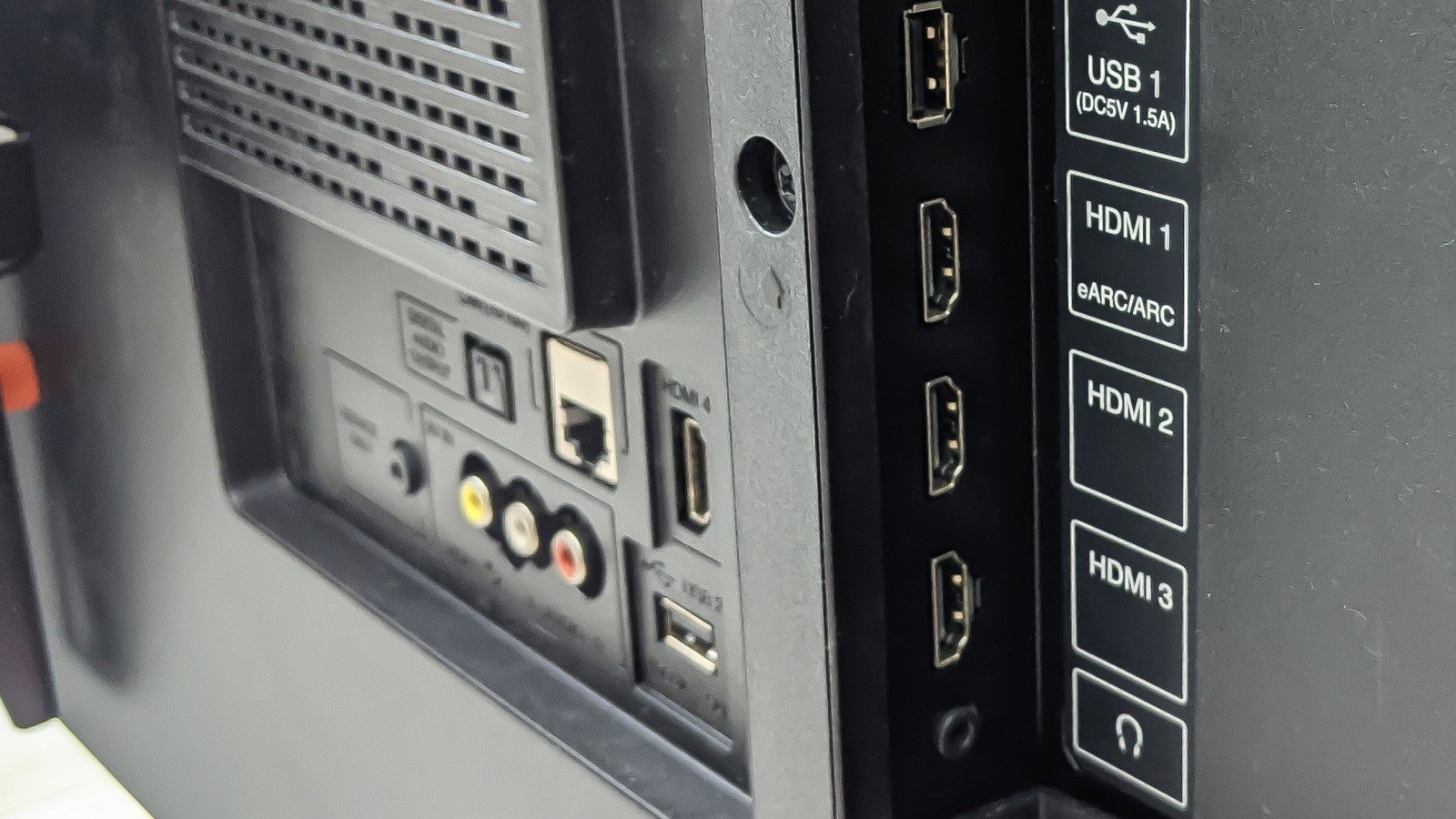
    If you bought a mid-range or premium 4K TV in the last few years, there’s a good chance your HDMI ports can do far more than just display a picture. Modern TVs are packed with hidden features designed to improve gaming, sports, and movie watching, but many of them are tucked away in settings menus or only work when the right HDMI options are enabled. And if you don’t know about them, that means there’s functionality that you’ve already paid for that you’re not benefiting from. Your HDMI ports can not only increase your TV’s image quality, but also provide smoother motion and cinema-quality sound.

    HDMI cables play a role, too. If you’ve enabled everything and you’re still not getting the performance you want, it’s worth checking your cables. Most TVs don’t come with cables in the box, and old ones can limit fancier features. If your cable is older than your television, look at upgrading it to one labeled “Premium High Speed” for standard 4K setups, or “Ultra High Speed” if you’re using newer features like 4K at 120Hz, advanced HDR, or next-gen gaming consoles.

    When putting together this list of HDMI features, we’ve focused on TVs, but many of them also apply to computers, game consoles, and streaming devices. HDMI ports on PCs, for example, can deliver higher refresh rates, HDR, and surround sound in the same way as your television, as long as the port, cable, and display all support the same features.

    Your HDMI Port Might Have a Hidden Performance Mode

    When you watch content from devices like game consoles, streaming boxes, and Blu-ray players plugged into your TV, they’re coming through an HDMI port, and the quality of the picture will depend on what port you use and how its settings are configured. On many TVs, you’ll need to adjust HDMI settings to ensure that you are getting the best possible picture. Most TV brands have some kind of enhanced option, but these are often disabled by default. When turned on, it unlocks the full capabilities of the HDMI port, and the TV can accept higher-quality signals from HDMI-connected devices. The reason that enhanced settings are optional is to maintain compatibility with older devices, but as long as your source supports it, it’s worth enabling.

    Different TV brands refer to enhanced settings by different names. Sony TVs have several enhanced format options, such as Enhanced Format (Dolby Vision) and Enhanced Format (8K), which you can enable by going to the HDMI signal format option in Settings. On LG televisions, you’ll need to go to the general menu and select HDMI Ultra HD Deep Color from the list. To change the settings on a Hisense TV, go to Channels & Inputs in the settings menu, and choose Enhanced Format as your preferred HDMI Format. If you have a different brand of television, have a look at the menu options for something similar or consult your user manual.

    Your TV Can Automatically Switch to Game Mode

    Ivan Rodriguez Alba/Getty Images

    If you play games on a console or gaming PC, you’ve probably heard about “Game Mode.” This setting reduces input lag, which is the delay between pressing a button and seeing the action on screen. What many people don’t know is that newer HDMI ports can switch this mode on and off automatically.

    This feature is known as Auto Low Latency Mode (ALLM) and was introduced with version 2.1 of the HDMI specs. When a compatible console like a PlayStation or Xbox is connected, the TV detects the signal and automatically switches into its low-latency picture mode. When you stop gaming and switch back to a movie or streaming app, the TV returns to its normal picture settings on its own.

    For gamers, this makes a noticeable difference. Controls feel more responsive, and fast-paced games become easier to play, which is why you should always plug your game console into your TV’s HDMI 2.1 port. On many modern TVs, ALLM works straight out of the box when you first plug in your game console. If you do need to manually enable it the first time, look for something like “Instant Game Response” or “Game Optimizer” in the settings.

    Your HDMI Port Can Make Sports and Games Look Smoother

    Miljan Zivkovic/Shutterstock

    Another hidden advantage of modern HDMI ports is the ability to handle higher refresh rates and dynamic frame syncing. These features are part of the HDMI 2.1 standard and include things like 4K at 120Hz and Variable Refresh Rate (VRR). A higher refresh rate means the TV can show more frames every second. This results in smoother motion, which is especially noticeable in fast-moving scenes. If you’re watching sports, that might mean clearer action during a game or less blur when the camera pans across the field. It’s especially handy for gaming as it makes movement feel more fluid and responsive. 

    VRR takes this a step further by synchronizing the TV’s refresh rate with the output of the console or PC. This reduces screen tearing and stuttering, creating a more consistent and comfortable viewing experience. Instead of the image breaking apart during fast motion, everything stays smooth and stable. Many modern consoles and gaming PCs already support these features, but they only work if the TV’s HDMI port can handle them. The HDMI port you use matters, and this is another reason to use the HDMI 2.1 port for your gaming console.

    One HDMI Cable Can Deliver Cinema-Quality Sound

    Simpson33/Getty Images

    Many people think of HDMI as a way to send video to a TV, but some HDMI ports can also send high-quality audio back out. This feature is called eARC, which stands for enhanced Audio Return Channel. It allows your TV to pass full-quality sound from built-in apps or connected devices to a soundbar or AV receiver using a single HDMI cable.

    Without eARC, you might be limited to compressed audio formats or need extra cables to get the best sound. Earlier versions of this feature, called ARC, were restricted to more basic surround sound. eARC removes those limits, allowing full-quality formats like Dolby TrueHD to pass through the cable without being compressed. Many TVs and soundbars already support eARC, but people often don’t realize they need to always plug these devices into their TV’s HDMI eARC port. If your soundbar is connected to the wrong input, you won’t get the full audio experience your equipment is capable of. 

    Share. Facebook Twitter Pinterest LinkedIn Reddit WhatsApp Telegram Email
    Previous ArticleThe FBI Says These Wi-Fi Routers Are Unsafe, And Here’s Why
    Next Article A Knight of the Seven Kingdoms season 1 ending explained: what happens to Dunk and Egg, will there be a season 2, and more
    TechAiVerse
    • Website

    Jonathan is a tech enthusiast and the mind behind Tech AI Verse. With a passion for artificial intelligence, consumer tech, and emerging innovations, he deliver clear, insightful content to keep readers informed. From cutting-edge gadgets to AI advancements and cryptocurrency trends, Jonathan breaks down complex topics to make technology accessible to all.

    Related Posts

    Google is sunsetting the weather app on Android

    February 23, 2026

    Nvidia could launch its first laptops with its own processors later this year

    February 23, 2026

    AMD reportedly pauses Ryzen Z1 drivers for gaming handhelds

    February 23, 2026
    Leave A Reply Cancel Reply

    Top Posts

    Ping, You’ve Got Whale: AI detection system alerts ships of whales in their path

    April 22, 2025690 Views

    Lumo vs. Duck AI: Which AI is Better for Your Privacy?

    July 31, 2025278 Views

    6.7 Cummins Lifter Failure: What Years Are Affected (And Possible Fixes)

    April 14, 2025159 Views

    6 Best MagSafe Phone Grips (2025), Tested and Reviewed

    April 6, 2025120 Views
    Don't Miss
    Technology February 23, 2026

    Google is sunsetting the weather app on Android

    Google is sunsetting the weather app on Android Google is replacing the long-standing shortcut with…

    Nvidia could launch its first laptops with its own processors later this year

    AMD reportedly pauses Ryzen Z1 drivers for gaming handhelds

    Here’s your chance to grab a cheaper Cybertruck but you have to hurry

    Stay In Touch
    • Facebook
    • Twitter
    • Pinterest
    • Instagram
    • YouTube
    • Vimeo

    Subscribe to Updates

    Get the latest creative news from SmartMag about art & design.

    About Us
    About Us

    Welcome to Tech AI Verse, your go-to destination for everything technology! We bring you the latest news, trends, and insights from the ever-evolving world of tech. Our coverage spans across global technology industry updates, artificial intelligence advancements, machine learning ethics, and automation innovations. Stay connected with us as we explore the limitless possibilities of technology!

    Facebook X (Twitter) Pinterest YouTube WhatsApp
    Our Picks

    Google is sunsetting the weather app on Android

    February 23, 20262 Views

    Nvidia could launch its first laptops with its own processors later this year

    February 23, 20261 Views

    AMD reportedly pauses Ryzen Z1 drivers for gaming handhelds

    February 23, 20262 Views
    Most Popular

    7 Best Kids Bikes (2025): Mountain, Balance, Pedal, Coaster

    March 13, 20250 Views

    VTOMAN FlashSpeed 1500: Plenty Of Power For All Your Gear

    March 13, 20250 Views

    This new Roomba finally solves the big problem I have with robot vacuums

    March 13, 20250 Views
    © 2026 TechAiVerse. Designed by Divya Tech.
    • Home
    • About Us
    • Contact Us
    • Privacy Policy
    • Terms & Conditions

    Type above and press Enter to search. Press Esc to cancel.