

Apple’s Craig Federighi on the long road to the iPad’s Mac-like multitasking
CUPERTINO, Calif.—When Apple Senior Vice President of Software Engineering Craig Federighi introduced the new multitasking UI in iPadOS 26 at the company’s Worldwide Developers Conference this week, he did it the same way he introduced the Calculator app for the iPad last year, or timers in the iPad’s Clock app the year before—with a hint of sarcasm.
“Wow,” Federighi enthuses in a lightly exaggerated tone about an hour and 19 minutes into a 90-minute presentation. “More windows, a pointier pointer, and a menu bar? Who would’ve thought? We’ve truly pulled off a mind-blowing release!”
This elicits a sensible chuckle from the gathered audience of developers, media, and Apple employees watching the keynote on the Apple Park campus, where I have grabbed myself a good-not-great seat to watch the largely pre-recorded keynote on a gigantic outdoor screen.
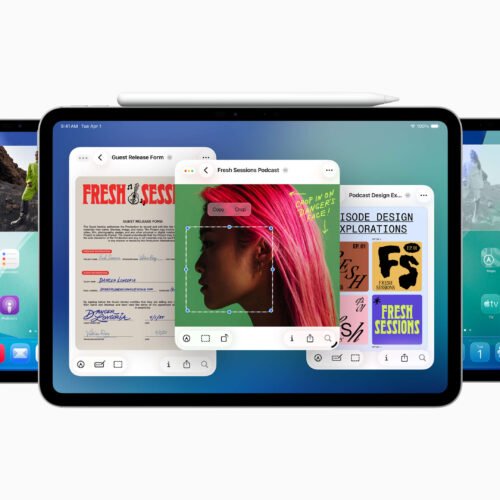
Federighi is acknowledging—and lightly poking fun at—the audience of developers, pro users, and media personalities who have been asking for years that Apple’s iPad behave more like a traditional computer. And after many incremental steps, including a big swing and partial miss with the buggy, limited Stage Manager interface a couple of years ago, Apple has finally responded to requests for Mac-like multitasking with a distinctly Mac-like interface, an improved file manager, and better support for running tasks in the background.
But if this move was so forehead-slappingly obvious, why did it take so long to get here? This is one of the questions we dug into when we sat down with Federighi and Senior Vice President of Worldwide Marketing Greg Joswiak for a post-keynote chat earlier this week.
It used to be about hardware restrictions
People have been trying to use iPads (and make a philosophical case for them) as quote-unquote real computers practically from the moment they were introduced 15 years ago.
But those early iPads lacked so much of what we expect from modern PCs and Macs, most notably robust multi-window multitasking and the ability for third-party apps to exchange data. The first iPads were almost literally just iPhone internals connected to big screens, with just a fraction of the RAM and storage available in the Macs of the day; that necessitated the use of a blown-up version of the iPhone’s operating system and the iPhone’s one-full-screen-app-at-a-time interface.
“If you want to rewind all the way to the time we introduced Split View and Slide Over [in iOS 9], you have to start with the grounding that the iPad is a direct manipulation touch-first device,” Federighi told Ars. “It is a foundational requirement that if you touch the screen and start to move something that it responds. Otherwise, the entire interaction model is broken—it’s a psychic break with your contract with the device.”
Mac users, Federighi said, were more tolerant of small latency on their devices because they were already manipulating apps on the screen indirectly, but the iPads of a decade or so ago “didn’t have the capacity to run an unlimited number of windowed apps with perfect responsiveness.”
It’s also worth noting the technical limitations of iPhone and iPad apps at the time, which up until then had mostly been designed and coded to match the specific screen sizes and resolutions of the (then-manageable) number of iDevices that existed. It simply wasn’t possible for the apps of the day to be dynamically resized as desktop windows are, because no one was coding their apps that way.
Apple’s iPad Pros—and, later, the iPad Airs—have gradually adopted hardware and software features that make them more Mac-like.
Credit:
Andrew Cunningham
Of course, those hardware limitations no longer exist. Apple’s iPad Pros started boosting the tablets’ processing power, RAM, and storage in earnest in the late 2010s, and Apple introduced a Microsoft Surface-like keyboard and stylus accessories that moved the iPad away from its role as a content consumption device. For years now, Apple’s faster tablets have been based on the same hardware as its slower Macs—we know the hardware can do more because Apple is already doing more with it elsewhere.
“Over time the iPad’s gotten more powerful, the screens have gotten larger, the user base has shifted into a mode where there is a little bit more trackpad and keyboard use in how many people use the device,” Federighi told Ars. “And so the stars kind of aligned to where many of the things that you traditionally do with a Mac were possible to do on an iPad for the first time and still meet iPad’s basic contract.”
On correcting some of Stage Manager’s problems
More multitasking in iPadOS 26.
Credit:
Apple
Apple has already tried a windowed multitasking system on modern iPads once this decade, of course, with iPadOS 16’s Stage Manager interface.
Any first crack at windowed multitasking on the iPad was going to have a steep climb. This was the first time Apple or its developers had needed to content with truly dynamically resizable app windows in iOS or iPadOS, the first time Apple had implemented a virtual memory system on the iPad, and the first time Apple had tried true multi-monitor support. Stage Manager was in such rough shape that Apple delayed that year’s iPadOS release to keep working on it.
But the biggest problem with Stage Manager was actually that it just didn’t work on a whole bunch of iPads. You could only use it on new expensive models—if you had a new cheap model or even an older expensive model, your iPad was stuck with the older Slide Over and Split View modes that had been designed around the hardware limitations of mid-2010s iPads.
“We wanted to offer a new baseline of a totally consistent experience of what it meant to have Stage Manager,” Federighi told Ars. “And for us, that meant four simultaneous apps on the internal display and an external display with four simultaneous apps. So, eight apps running at once. And we said that’s the baseline, and that’s what it means to be Stage Manager; we didn’t want to say ‘you get Stage Manager, but you get Stage Manager-lite here or something like that. And so immediately that established a floor for how low we could go.”
Fixing that was one of the primary goals of the new windowing system.
“We decided this time: make everything we can make available,” said Federighi, “even if it has some nuances on older hardware, because we saw so much demand [for Stage Manager].”
That slight change in approach, combined with other behind-the-scenes optimizations, makes the new multitasking model more widely compatible than Stage Manager is. There are still limits on those devices—not to the number of windows you can open, but to how many of those windows can be active and up-to-date at once. And true multi-monitor support would remain the purview of the faster, more-expensive models.
“We have discovered many, many optimizations,” Federighi said. “We re-architected our windowing system and we re-architected the way that we manage background tasks, background processing, that enabled us to squeeze more out of other devices than we were able to do at the time we introduced Stage Manager.”
Stage Manager still exists in iPadOS 26, but as an optional extra multitasking mode that you have to choose to enable instead of the new windowed multitasking system. You can also choose to turn both multitasking systems off entirely, preserving the iPad’s traditional big-iPhone-for-watching-Netflix interface for the people who prefer it.
“iPad’s gonna be iPad”
The $349 base-model iPad is one that stands to gain the most from iPadOS 26.
Credit:
Andrew Cunningham
However, while the new iPadOS 26 UI takes big steps toward the Mac’s interface, the company still tries to treat them as different products with different priorities. To date, that has meant no touch screens on the Mac (despite years of rumors), and it will continue to mean that there are some Mac things that the iPad will remain unable to do.
“But we’ve looked and said, as [the iPad and Mac] come together, where on the iPad the Mac idiom for doing something, like where we put the window close controls and maximize controls, what color are they—we’ve said why not, where it makes sense, use a converged design for those things so it’s familiar and comfortable,” Federighi told Ars. “But where it doesn’t make sense, iPad’s gonna be iPad.”
There will still be limitations and frustrations when trying to fit an iPad into a Mac-shaped hole in your computing setup. While tasks can run in the background, for example, Apple only allows apps to run workloads with a definitive endpoint, things like a video export or a file transfer. System agents or other apps that perform some routine on-and-off tasks continuously in the background aren’t supported. All the demos we’ve seen so far are also on new, high-end iPad hardware, and it remains to be seen how well the new features behave on low-end tablets like the 11th-generation A16 iPad, or old 2019-era hardware like the iPad Air 3.
But it does feel like Apple has finally settled on a design that might stick, and that adds capability to the iPad without wrecking its simplicity for the people who still just want a big screen for reading and streaming.
Andrew is a Senior Technology Reporter at Ars Technica, with a focus on consumer tech including computer hardware and in-depth reviews of operating systems like Windows and macOS. Andrew lives in Philadelphia and co-hosts a weekly book podcast called Overdue.
