Close Menu

    Subscribe to Updates

    Get the latest creative news from FooBar about art, design and business.

    What's Hot

    Honda CR-V Hybrid Lineup Expanded in Malaysia From RM178,200

    vivo V70 – Top 7 Flagship Features You Will Love

    Apple iPad Air with M4 Officially Launches in Malaysia From RM2,799

    Facebook X (Twitter) Instagram
    • Artificial Intelligence
    • Business Technology
    • Cryptocurrency
    • Gadgets
    • Gaming
    • Health
    • Software and Apps
    • Technology
    Facebook X (Twitter) Instagram Pinterest Vimeo
    Tech AI Verse
    • Home
    • Artificial Intelligence

      What the polls say about how Americans are using AI

      February 27, 2026

      Tensions between the Pentagon and AI giant Anthropic reach a boiling point

      February 21, 2026

      Read the extended transcript: President Donald Trump interviewed by ‘NBC Nightly News’ anchor Tom Llamas

      February 6, 2026

      Stocks and bitcoin sink as investors dump software company shares

      February 4, 2026

      AI, crypto and Trump super PACs stash millions to spend on the midterms

      February 2, 2026
    • Business

      Weighing up the enterprise risks of neocloud providers

      March 3, 2026

      A stolen Gemini API key turned a $180 bill into $82,000 in two days

      March 3, 2026

      These ultra-budget laptops “include” 1.2TB storage, but most of it is OneDrive trial space

      March 1, 2026

      FCC approves the merger of cable giants Cox and Charter

      February 28, 2026

      Finding value with AI and Industry 5.0 transformation

      February 28, 2026
    • Crypto

      Strait of Hormuz Shutdown Shakes Asian Energy Markets

      March 3, 2026

      Wall Street’s Inflation Alarm From Iran — What It Means for Crypto

      March 3, 2026

      Ethereum Price Prediction: What To Expect From ETH In March 2026

      March 3, 2026

      Was Bitcoin Hijacked? How Institutional Interests Shaped Its Narrative Since 2015

      March 3, 2026

      XRP Whales Now Hold 83.7% of All Supply – What’s Next For Price?

      March 3, 2026
    • Technology

      Spotify’s new feature makes it easier to find popular audiobooks

      March 3, 2026

      This portable JBL Grip Bluetooth speaker is so good at 20% off

      March 3, 2026

      ‘AI’ could dox your anonymous posts

      March 3, 2026

      Microsoft says new Teams location feature isn’t for ’employee tracking’

      March 3, 2026

      OpenAI got ‘sloppy’ about the wrong thing

      March 3, 2026
    • Others
      • Gadgets
      • Gaming
      • Health
      • Software and Apps
    Check BMI
    Tech AI Verse
    You are at:Home»Technology»iMessage Activation Errors Explained, Plus Easy Fixes
    Technology

    iMessage Activation Errors Explained, Plus Easy Fixes

    TechAiVerseBy TechAiVerseJanuary 13, 2026No Comments6 Mins Read0 Views
    Facebook Twitter Pinterest Telegram LinkedIn Tumblr Email Reddit
    iMessage Activation Errors Explained, Plus Easy Fixes
    Share
    Facebook Twitter LinkedIn Pinterest WhatsApp Email

    iMessage Activation Errors Explained, Plus Easy Fixes

    iMessage Activation Errors Explained, Plus Easy Fixes

    Why your blue bubbles disappeared and how to get them back quickly

    Updated on January 12, 2026

    The Download

    • Make sure your iPhone is connected to the internet and that iMessage is turned on.
    • Restart your iPhone and check if Apple’s servers are working to fix iMessage activation errors.
    • If your iMessage isn’t working, updating your iPhone or adjusting time settings might help.

    This article helps you troubleshoot iMessage Activation errors. It’s difficult to pinpoint an error until it is resolved, but the tips below should return your blue bubbles swiftly.

    How to Fix an Unsuccessful Activation in iMessage

    To fix an unsuccessful activation in iMessage and other iMessage activation errors, attempt each of these solutions in order:

    It can take up to 24 hours for the waiting for activation message to go away after the problem has been resolved.

    1. Verify iMessage is on. If iMessage isn’t on, it won’t work.

      This step is likely unnecessary if you received an iMessage activation error, as it suggests that iMessage is turned on, but it’s very easy to verify.

      If you do find that it was off, open Settings > Messages, and check the iMessage toggle. If it’s gray, tap it to turn it on.

    2. Restart your iPhone. This is the simplest fix, so it should be one of the first things you try. If your phone is configured correctly and there’s no problem with Apple’s servers, then restarting will typically fix the problem.

      • iPhone X and later: Press and hold the Side and Volume Down buttons simultaneously until the Power Off slider appears.
      • Earlier models: Press and hold the Sleep/Wake, button until the Power Off slider appears.
    3. Check Apple’s server status page. This page displays various Apple services’ current status and information about scheduled maintenance periods.

      If iMessage is listed as unavailable or down, all you can do is wait for Apple to resolve the problem. You may need to restart your phone after the servers have come back up.

    4. Check your iPhone’s internet connection. If you find a connectivity problem, you’ll need to fix your iPhone’s Wi-Fi connection or figure out why the iPhone has no service, then try iMessage again.

      The solution might be as simple as switching Wi-Fi and cellular data off and then on again in the Control Center or turning off airplane mode.

    5. Refresh your iMessage connection. If iMessage has worked in the past, you may be able to fix the problem by refreshing your connection. You’ll need to turn off iMessage, restart your phone, and turn it back on.

      Start by opening Settings > Messages, and tap the iMessage toggle to turn it off. Then restart your phone, open Settings > Messages again, and tap the iMessage toggle to turn it back on.

    6. Sign out of Apple ID/Apple Account, then sign back in. Signing out of Apple Account on your phone will force iMessage to reconnect when you sign back in, unless there’s another issue preventing it.

      Open Settings, tap your name, and tap Sign Out. Then restart your iPhone, open Settings, and tap Sign in.

    7. Verify your time and date settings. If the time and date on your iPhone aren’t correct, it can prevent iMessage from activating or working correctly. Fix the time and date settings if they’re wrong, then check to see if iMessage works.

      Navigate to Settings > General > Date & Time, and verify that the information is correct. If it isn’t, you can tap the Set Automatically toggle to turn it off and set the time and date manually.

      If the Set Automatically toggle was off, and your time or date was wrong, turning the toggle switch on may fix your problem.

    8. Update your iPhone. If your iPhone’s operating system (iOS) is outdated, that can prevent iMessage from working correctly. Check for any available updates, install, and then check iMessage.

    9. Factory reset your iPhone. This will delete everything on your device, so make sure to try all of the other fixes and then backup your iPhone before you proceed.

      It can take up to 24 hours for the iMessage Activation Error to resolve, so you may want to wait to see if you’ve already fixed the problem before you attempt a factory reset.

    If Apple’s servers are up, and none of the fixes worked for you, you’ll need to contact Apple support or your cellular service provider for additional assistance. The problem is more likely due to an issue with your carrier if you cannot send text messages at all.

    When you experience an iMessage activation error, you’ll typically find that iMessage won’t work and that you’ll only be able to send and receive normal text messages (they’ll have a green SMS bubble rather than the blue iMessage bubble).

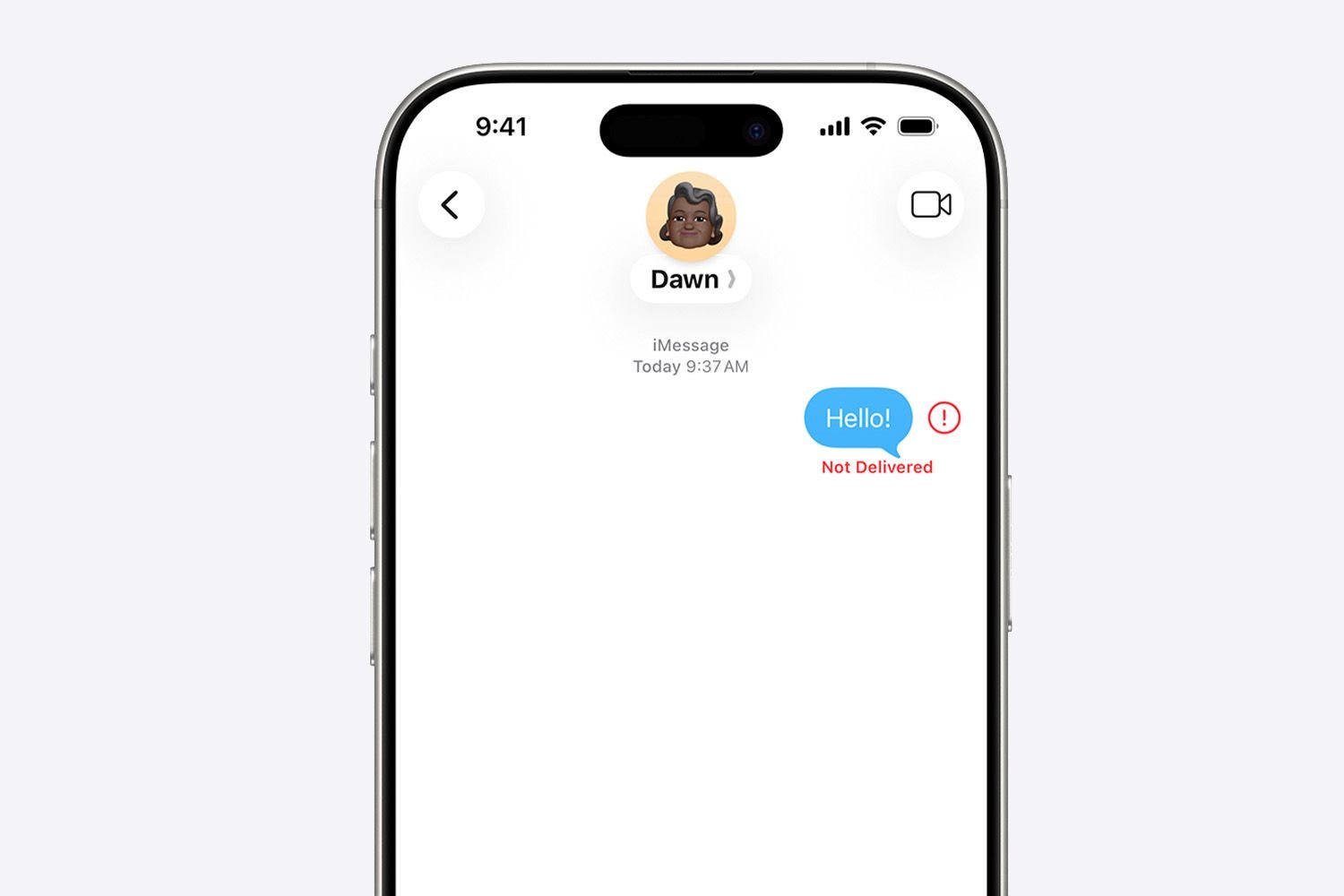
    When you experience an iMessage activation error, you’ll typically see one or more of these things happen:

    • You can’t send or receive text messages at all
    • You can send and receive messages, but your blue text bubbles are green
    • iMessage says that text messages haven’t been delivered

    It’s difficult to pinpoint an error until it is resolved, but the tips below should return your blue bubbles swiftly.

    FAQ

    • If your iPhone text messages are not sending, quit and restart the Messages app, connect to a network, and turn Airplane Mode on and off. If you still have problems, restart the iPhone, check the iMessage system status, and confirm that your message type is supported.

    • To fix the iPhone “Unknown Message Not Found” error, check your mobile reception, then turn iMessage and FaceTime off and on again. If you still have trouble, turn Airplane Mode on and off, update iOS, and restart your iPhone.

    • If you see the “iMessage is signed out” error, check the iMessage server, restart your iPhone, and turn iMessage on and off. If you still have issues, update your phone and check the date, time, and region settings.

    Thanks for letting us know!

    Get the Latest Tech News Delivered Every Day

    Subscribe

    Share. Facebook Twitter Pinterest LinkedIn Reddit WhatsApp Telegram Email
    Previous ArticleDelete iPhone Photos Without Affecting iCloud
    Next Article 507 of Our Favorite Instagram Captions in 2026
    TechAiVerse
    • Website

    Jonathan is a tech enthusiast and the mind behind Tech AI Verse. With a passion for artificial intelligence, consumer tech, and emerging innovations, he deliver clear, insightful content to keep readers informed. From cutting-edge gadgets to AI advancements and cryptocurrency trends, Jonathan breaks down complex topics to make technology accessible to all.

    Related Posts

    Spotify’s new feature makes it easier to find popular audiobooks

    March 3, 2026

    This portable JBL Grip Bluetooth speaker is so good at 20% off

    March 3, 2026

    ‘AI’ could dox your anonymous posts

    March 3, 2026
    Leave A Reply Cancel Reply

    Top Posts

    Ping, You’ve Got Whale: AI detection system alerts ships of whales in their path

    April 22, 2025703 Views

    Lumo vs. Duck AI: Which AI is Better for Your Privacy?

    July 31, 2025286 Views

    6.7 Cummins Lifter Failure: What Years Are Affected (And Possible Fixes)

    April 14, 2025164 Views

    6 Best MagSafe Phone Grips (2025), Tested and Reviewed

    April 6, 2025124 Views
    Don't Miss
    Gadgets March 4, 2026

    Honda CR-V Hybrid Lineup Expanded in Malaysia From RM178,200

    Honda CR-V Hybrid Lineup Expanded in Malaysia From RM178,200 Honda Malaysia has officially launched the…

    vivo V70 – Top 7 Flagship Features You Will Love

    Apple iPad Air with M4 Officially Launches in Malaysia From RM2,799

    Apple Launches iPhone 17e in Malaysia from RM2,999

    Stay In Touch
    • Facebook
    • Twitter
    • Pinterest
    • Instagram
    • YouTube
    • Vimeo

    Subscribe to Updates

    Get the latest creative news from SmartMag about art & design.

    About Us
    About Us

    Welcome to Tech AI Verse, your go-to destination for everything technology! We bring you the latest news, trends, and insights from the ever-evolving world of tech. Our coverage spans across global technology industry updates, artificial intelligence advancements, machine learning ethics, and automation innovations. Stay connected with us as we explore the limitless possibilities of technology!

    Facebook X (Twitter) Pinterest YouTube WhatsApp
    Our Picks

    Honda CR-V Hybrid Lineup Expanded in Malaysia From RM178,200

    March 4, 20262 Views

    vivo V70 – Top 7 Flagship Features You Will Love

    March 4, 20262 Views

    Apple iPad Air with M4 Officially Launches in Malaysia From RM2,799

    March 4, 20262 Views
    Most Popular

    7 Best Kids Bikes (2025): Mountain, Balance, Pedal, Coaster

    March 13, 20250 Views

    VTOMAN FlashSpeed 1500: Plenty Of Power For All Your Gear

    March 13, 20250 Views

    Best TV Antenna of 2025

    March 13, 20250 Views
    © 2026 TechAiVerse. Designed by Divya Tech.
    • Home
    • About Us
    • Contact Us
    • Privacy Policy
    • Terms & Conditions

    Type above and press Enter to search. Press Esc to cancel.