Close Menu

    Subscribe to Updates

    Get the latest creative news from FooBar about art, design and business.

    What's Hot

    Own Microsoft Office and Windows 11 Pro forever for less than $40

    Convert, edit, and OCR PDFs for life for just $30

    HP OmniStudio X AIO PC now $560 off: 4K, 16GB RAM, Intel Core Ultra 7

    Facebook X (Twitter) Instagram
    • Artificial Intelligence
    • Business Technology
    • Cryptocurrency
    • Gadgets
    • Gaming
    • Health
    • Software and Apps
    • Technology
    Facebook X (Twitter) Instagram Pinterest Vimeo
    Tech AI Verse
    • Home
    • Artificial Intelligence

      To avoid accusations of AI cheating, college students are turning to AI

      January 29, 2026

      ChatGPT can embrace authoritarian ideas after just one prompt, researchers say

      January 24, 2026

      Ashley St. Clair, the mother of one of Elon Musk’s children, sues xAI over Grok sexual images

      January 17, 2026

      Anthropic joins OpenAI’s push into health care with new Claude tools

      January 12, 2026

      The mother of one of Elon Musk’s children says his AI bot won’t stop creating sexualized images of her

      January 7, 2026
    • Business

      New VoidLink malware framework targets Linux cloud servers

      January 14, 2026

      Nvidia Rubin’s rack-scale encryption signals a turning point for enterprise AI security

      January 13, 2026

      How KPMG is redefining the future of SAP consulting on a global scale

      January 10, 2026

      Top 10 cloud computing stories of 2025

      December 22, 2025

      Saudia Arabia’s STC commits to five-year network upgrade programme with Ericsson

      December 18, 2025
    • Crypto

      The Binance Playbook: Why Crypto Twitter Hates the Biggest Exchange?

      January 31, 2026

      How Europe’s Right Wing Weaponized Crypto After Trump’s Election

      January 31, 2026

      What Crypto Whales Are Buying For Potential Gains In February 2026

      January 31, 2026

      What to Expect From XRP Price in February 2026

      January 31, 2026

      Who Is Trump’s Fed Chair Pick Kevin Warsh, And Is He Good for Crypto?

      January 31, 2026
    • Technology

      Own Microsoft Office and Windows 11 Pro forever for less than $40

      January 31, 2026

      Convert, edit, and OCR PDFs for life for just $30

      January 31, 2026

      HP OmniStudio X AIO PC now $560 off: 4K, 16GB RAM, Intel Core Ultra 7

      January 31, 2026

      The one feature I consider essential in a gaming mouse

      January 31, 2026

      9 million Android phones were secretly hijacked by proxy network

      January 31, 2026
    • Others
      • Gadgets
      • Gaming
      • Health
      • Software and Apps
    Check BMI
    Tech AI Verse
    You are at:Home»Technology»How to turn on hypertension alerts on Apple Watch
    Technology

    How to turn on hypertension alerts on Apple Watch

    TechAiVerseBy TechAiVerseJanuary 31, 2026No Comments6 Mins Read1 Views
    Facebook Twitter Pinterest Telegram LinkedIn Tumblr Email Reddit
    How to turn on hypertension alerts on Apple Watch
    Share
    Facebook Twitter LinkedIn Pinterest WhatsApp Email

    How to turn on hypertension alerts on Apple Watch

    Apple has steadily expanded the Apple Watch’s health monitoring features over the years, moving beyond fitness tracking into areas that can offer early insight into potential medical concerns. One of the most recent additions is hypertension alerts, which are designed to notify users when their blood pressure trends are elevated over time. While Apple Watches cannot directly measure blood pressure, this feature can still play a useful role in highlighting patterns that may be worth discussing with your doctor. Here, we’ll explain what hypertension alerts do, how they work and how to enable and manage them on the Apple Watch.

    What hypertension alerts do

    Hypertension alerts are designed to identify long-term trends that may indicate elevated blood pressure. Instead of relying on a traditional cuff measurement, the Apple Watch analyzes a combination of health data collected over a 30-day period, including heart rate, movement patterns and other contextual information stored in the Health app. Using this data, the system looks for sustained changes that align with patterns commonly associated with hypertension.

    If your Apple Watch detects a trend suggesting elevated blood pressure over an extended period, it’ll send you a notification. These alerts are not intended to diagnose hypertension or replace medical testing. Instead, they serve as an early signal that something may have changed and that you may want to seek further monitoring or professional advice.

    Apple emphasizes that hypertension alerts are designed for users who have not already been diagnosed with high blood pressure. Instead, they are meant to raise awareness rather than confirm a condition.

    Who can use hypertension alerts

    Hypertension alerts require a compatible Apple Watch model (Apple Watch Series 9 or later, or Apple Watch Ultra 2 or later) paired with a supported iPhone (iPhone 11 or later). The feature also depends on recent versions of watchOS and iOS, as it relies on updated health algorithms and background data analysis. To use hypertension alerts you must be 22 years of age or older, not be pregnant and not have been diagnosed with hypertension. You also need to ensure that your Apple Watch’s Wrist Detection feature is turned on.

    To receive meaningful alerts, your Apple Watch needs sufficient data. This means wearing the watch regularly, including during sleep if sleep tracking is enabled, and keeping health details such as age, sex, height and weight up-to-date in the Health app. The system uses long-term trends, so alerts will not appear immediately after enabling the feature.

    How to turn on hypertension alerts

    Hypertension alerts are managed through the Health app on the paired iPhone. The feature cannot be enabled directly from the watch itself. During setup, the Health app will ask for confirmation that the user has not been diagnosed with hypertension. It may also prompt a review of health details such as date of birth and biological sex, as this information helps improve the accuracy of trend analysis.

    To get started, open the Health app on the iPhone paired with the Apple Watch. From the main Health screen, tap your profile in the top corner. Select Health Checklist from the available Features. Next, you’ll need to tap Hypertension Notifications, confirm your age and whether or not you’ve ever been diagnosed with hypertension. Tap Continue and follow the on-screen prompts for information on how the notifications work. Once you have done this, tap Done and you’ll be all set.

    Once enabled, the feature runs automatically in the background. There is no need to manually start monitoring or interact with the feature daily.

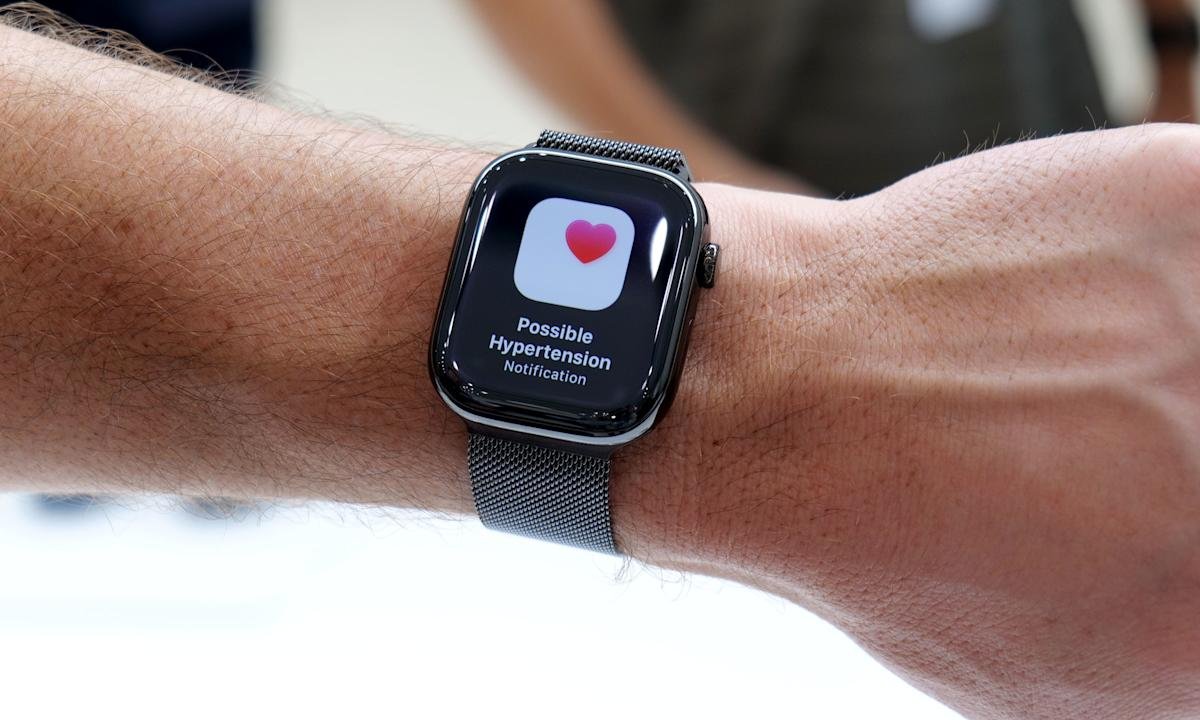
    The new apple watch series 11 can help identify hypertension (Apple)

    Managing notifications and alerts

    When hypertension alerts are turned on, notifications appear on both the Apple Watch and the paired iPhone. These alerts typically explain that a long-term trend suggesting elevated blood pressure has been detected, along with guidance on next steps.

    Users can manage how and when these notifications appear by adjusting notification settings for the Health app. This includes choosing whether alerts appear on the lock screen, in Notification Center or as time-sensitive notifications on Apple Watch.

    Health data related to hypertension alerts can be reviewed at any time in the Health app. While Apple Watch does not display a specific blood pressure number, users can view contextual information and educational material explaining what the alert means and what actions may be appropriate.

    How hypertension alerts can help

    Hypertension often develops gradually and may not cause noticeable symptoms in its early stages. Because of this, many people are unaware of elevated blood pressure until it is identified during a routine medical check.

    Hypertension alerts can let you know of subtle changes that might have otherwise gone unnoticed. For some users, an alert may prompt earlier conversations with a doctor, additional blood pressure monitoring at home or lifestyle changes such as adjustments to diet, activity or sleep habits.

    It is important to treat these notifications as informational rather than diagnostic. Apple Watch does not provide specific blood pressure readings and cannot confirm hypertension on its own.

    What to do if you receive an alert

    Receiving a hypertension alert does not mean that there is an immediate medical emergency. Apple recommends using the alert as a prompt to pay closer attention to your cardiovascular health.

    Many users choose to follow up by measuring blood pressure using a traditional cuff at home or by scheduling a check with a healthcare professional. A doctor can provide proper testing, diagnosis and guidance based on clinical measurements and individual risk factors.

    It is also worth reviewing lifestyle factors that can influence blood pressure, such as physical activity levels, sleep quality, stress and diet. Apple Watch can already help track many of these areas, which may provide useful context when discussing health concerns with a professional.

    Limitations to keep in mind

    Hypertension alerts are not available in all regions and may be subject to regulatory approval. The feature also requires consistent Apple Watch use over time to generate reliable trend data.

    Most importantly, the Apple Watch does not measure blood pressure directly. The alerts are based on correlations and trends rather than direct readings, which means they should not be used as a substitute for medical equipment or professional care.

    Share. Facebook Twitter Pinterest LinkedIn Reddit WhatsApp Telegram Email
    Previous ArticleHighguard, a hyperpop arena shooter and other new indie games worth checking out
    Next Article Blue Origin is pausing its space tourist flights to work on lunar landers for NASA
    TechAiVerse
    • Website

    Jonathan is a tech enthusiast and the mind behind Tech AI Verse. With a passion for artificial intelligence, consumer tech, and emerging innovations, he deliver clear, insightful content to keep readers informed. From cutting-edge gadgets to AI advancements and cryptocurrency trends, Jonathan breaks down complex topics to make technology accessible to all.

    Related Posts

    Own Microsoft Office and Windows 11 Pro forever for less than $40

    January 31, 2026

    Convert, edit, and OCR PDFs for life for just $30

    January 31, 2026

    HP OmniStudio X AIO PC now $560 off: 4K, 16GB RAM, Intel Core Ultra 7

    January 31, 2026
    Leave A Reply Cancel Reply

    Top Posts

    Ping, You’ve Got Whale: AI detection system alerts ships of whales in their path

    April 22, 2025647 Views

    Lumo vs. Duck AI: Which AI is Better for Your Privacy?

    July 31, 2025242 Views

    6.7 Cummins Lifter Failure: What Years Are Affected (And Possible Fixes)

    April 14, 2025143 Views

    6 Best MagSafe Phone Grips (2025), Tested and Reviewed

    April 6, 2025111 Views
    Don't Miss
    Technology January 31, 2026

    Own Microsoft Office and Windows 11 Pro forever for less than $40

    Own Microsoft Office and Windows 11 Pro forever for less than $40 Image: StackCommerce TL;DR: A…

    Convert, edit, and OCR PDFs for life for just $30

    HP OmniStudio X AIO PC now $560 off: 4K, 16GB RAM, Intel Core Ultra 7

    The one feature I consider essential in a gaming mouse

    Stay In Touch
    • Facebook
    • Twitter
    • Pinterest
    • Instagram
    • YouTube
    • Vimeo

    Subscribe to Updates

    Get the latest creative news from SmartMag about art & design.

    About Us
    About Us

    Welcome to Tech AI Verse, your go-to destination for everything technology! We bring you the latest news, trends, and insights from the ever-evolving world of tech. Our coverage spans across global technology industry updates, artificial intelligence advancements, machine learning ethics, and automation innovations. Stay connected with us as we explore the limitless possibilities of technology!

    Facebook X (Twitter) Pinterest YouTube WhatsApp
    Our Picks

    Own Microsoft Office and Windows 11 Pro forever for less than $40

    January 31, 20262 Views

    Convert, edit, and OCR PDFs for life for just $30

    January 31, 20261 Views

    HP OmniStudio X AIO PC now $560 off: 4K, 16GB RAM, Intel Core Ultra 7

    January 31, 20261 Views
    Most Popular

    A Team of Female Founders Is Launching Cloud Security Tech That Could Overhaul AI Protection

    March 12, 20250 Views

    7 Best Kids Bikes (2025): Mountain, Balance, Pedal, Coaster

    March 13, 20250 Views

    VTOMAN FlashSpeed 1500: Plenty Of Power For All Your Gear

    March 13, 20250 Views
    © 2026 TechAiVerse. Designed by Divya Tech.
    • Home
    • About Us
    • Contact Us
    • Privacy Policy
    • Terms & Conditions

    Type above and press Enter to search. Press Esc to cancel.