Close Menu

    Subscribe to Updates

    Get the latest creative news from FooBar about art, design and business.

    What's Hot

    ‘Less pitching, more listening’: What Amazon is really doing at CES

    The definitive Digiday guide to what’s in and out for advertising in 2026

    Omnicom Media kicks off CES with a Google search partner that drills deeper into intent

    Facebook X (Twitter) Instagram
    • Artificial Intelligence
    • Business Technology
    • Cryptocurrency
    • Gadgets
    • Gaming
    • Health
    • Software and Apps
    • Technology
    Facebook X (Twitter) Instagram Pinterest Vimeo
    Tech AI Verse
    • Home
    • Artificial Intelligence

      A new pope, political shake-ups and celebs in space: The 2025-in-review news quiz

      December 31, 2025

      AI has become the norm for students. Teachers are playing catch-up.

      December 23, 2025

      Trump signs executive order seeking to ban states from regulating AI companies

      December 13, 2025

      Apple’s AI chief abruptly steps down

      December 3, 2025

      The issue that’s scrambling both parties: From the Politics Desk

      December 3, 2025
    • Business

      Top 10 cloud computing stories of 2025

      December 22, 2025

      Saudia Arabia’s STC commits to five-year network upgrade programme with Ericsson

      December 18, 2025

      Zeroday Cloud hacking event awards $320,0000 for 11 zero days

      December 18, 2025

      Amazon: Ongoing cryptomining campaign uses hacked AWS accounts

      December 18, 2025

      Want to back up your iPhone securely without paying the Apple tax? There’s a hack for that, but it isn’t for everyone… yet

      December 16, 2025
    • Crypto

      Aave Price Jumps Amid Revenue Sharing Plans With Token Holders

      January 3, 2026

      Grayscale Predicts Bitcoin Will Reach New All-Time High by March 2026

      January 3, 2026

      Tom Lee Pushes for Big Share Increase as BitMine Closely Tracks Ethereum Price

      January 3, 2026

      Bitfinex Hacker Out of Prison After a Year Due to President Trump’s First Step Act

      January 3, 2026

      Will 2026 Deliver an Extreme Crypto Bear Market? Experts Weigh In

      January 3, 2026
    • Technology

      ‘Less pitching, more listening’: What Amazon is really doing at CES

      January 5, 2026

      The definitive Digiday guide to what’s in and out for advertising in 2026

      January 5, 2026

      Omnicom Media kicks off CES with a Google search partner that drills deeper into intent

      January 5, 2026

      The accidental guardian: How Cloudflare’s Matthew Prince became publishing’s unexpected defender

      January 5, 2026

      The AI hype cycle is rewriting ad tech’s M&A math

      January 5, 2026
    • Others
      • Gadgets
      • Gaming
      • Health
      • Software and Apps
    Check BMI
    Tech AI Verse
    You are at:Home»Technology»Never Plug These Devices Into Your Monitor’s USB Ports
    Technology

    Never Plug These Devices Into Your Monitor’s USB Ports

    TechAiVerseBy TechAiVerseJanuary 3, 2026No Comments5 Mins Read1 Views
    Facebook Twitter Pinterest Telegram LinkedIn Tumblr Email Reddit
    Never Plug These Devices Into Your Monitor’s USB Ports
    Share
    Facebook Twitter LinkedIn Pinterest WhatsApp Email

    Never Plug These Devices Into Your Monitor’s USB Ports

    VIVEK PAYGUDE/Shutterstock

    We may receive a commission on purchases made from links.

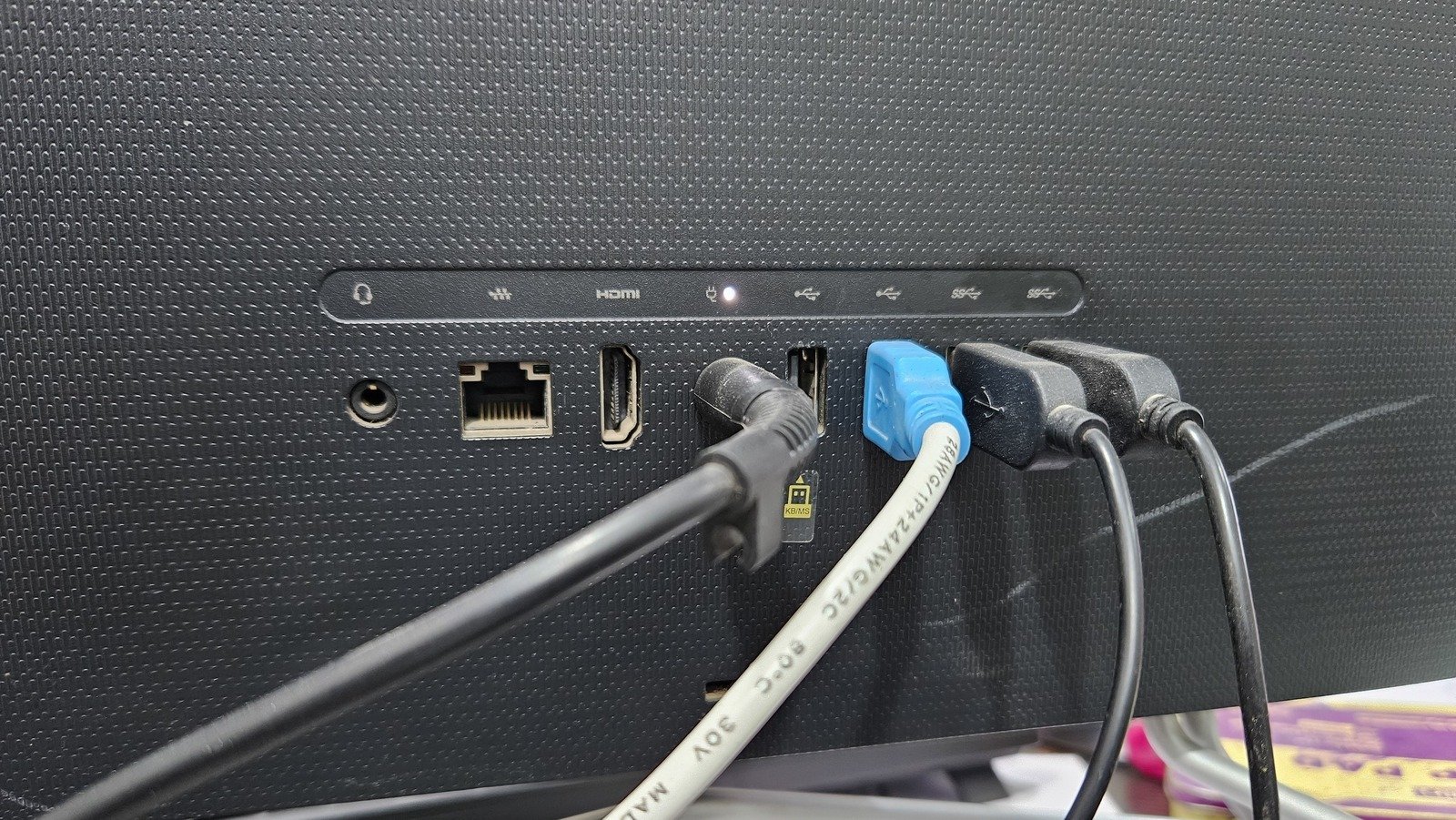
    Monitor USB ports can easily be overlooked by many people. They offer an easy way to expand your computer’s connectivity, often allowing you to plug in more devices at once. However, it can be difficult to gauge what you should or shouldn’t plug into monitors, especially when a large number of them don’t even have USB capability in the first place. Having those plugs might seem like a universal boon, but there are some devices that should never be plugged into a monitor’s USB ports.

    If you’re already aware of the things you should never plug into your Chromebook’s USB ports, you probably know not to plug them into your monitor, either. Additionally, many users have found that there’s no need to worry about damaging their monitor or devices by plugging in something that draws a lot of power. While some discussions point out the possibility of damage, well-designed connectors often come with overcurrent protection to prevent this. As such, this article will focus more on devices whose functionality is hindered by being plugged into the monitor rather than the computer itself.

    High-speed data devices

    It’s not exactly a terrible idea to plug some of the largest external USB drives you can buy into your monitor. But depending on what interface that monitor supports, you could be limited in how fast those drives can go. A SanDisk Extreme PRO portable SSD, for example, is able to support USB4 — allowing users to transfer multiple gigabytes of data in just one second. Unfortunately, most monitors only support USB 3.2 or lower; you’ll struggle to find anything better even at a budget of over $1,000.

    This isn’t an exceptionally massive issue, as USB 3.2 speeds are still quite fast. However, if you’ve been able to keep a particularly old monitor running for some time, you could be limited to just USB 2.0 speeds, which will make most modern data transfers move at a snail’s pace. Unfortunately, there’s no real way to resolve this beyond upgrading your monitor or simply dealing with the slower speeds. You could also just save your money and use a cheaper device with a slower interface — though you shouldn’t expect to move around large files on it very quickly, of course.

    USB hubs

    A monitor’s USB ports can act as a sort of hub, splitting one connection into multiple. This comes with the obvious drawback of the original USB port losing out on its maximum capability — which is why, in the past, Dell has recommended against plugging additional hubs into monitors. This isn’t helped by certain examples, such as UGREEN’s four-port splitter, being powered entirely through the single USB connection. Having both power and data going through the same cable will only invite further instability, especially since a monitor usually doesn’t have great power delivery on its own.

    This isn’t quite as much of an issue if your monitor has a USB-C port, rather than the standard rectangular shape you’re probably familiar with. USB Type-C can do many things that normal USB-A devices can’t, and that allows a wider array of devices to be plugged in. This still carries the problem of data speeds being split between more devices than a monitor is normally capable of, though. As a result, you’re still likely to run into more issues than you would from just plugging such a hub into your computer directly.

    USB-to-HDMI/DisplayPort adapter

    Laptop users might already be familiar with USB-to-HDMI adapters made by brands like j5create. Unfortunately, you aren’t going to get much luck out of using them for a monitor daisy-chain. The USB-A ports on a monitor often cannot send video signals, preventing any sort of benefit an adapter like this can offer. You’ll have to directly connect it to your PC if you want to use it.

    Once again, though, this isn’t a problem if you have a USB-C port. Connecting another monitor to one of those is a great way to use your monitor’s USB ports, though you probably won’t need any adapter for this method in the first place. Type-C is simply much more capable in the long run, allowing for many functions with just a single plug. That being said, USB ports in general are fairly uncommon on monitors, and Type-C ports are even rarer — so it might be easy for some to feel tempted to get an adapter that won’t actually work.

    Other USB devices (with certain ports)

    If you aren’t already familiar with monitoring USB connections, you might wonder what upstream and downstream ports mean. Simply put, an upstream port connects to the computer so downstream ports can send and receive data. No data will actually reach your computer if you plug your devices into an upstream port; that one should always be reserved for a direct monitor-to-PC connection. There’s also no point in plugging any USB device into a monitor if the upstream port isn’t in use, as — again — no data from it will actually be received.

    Additionally, monitors like the Samsung Odyssey G5 only have a single USB port with a “service” label. As the name implies, this is only used for the monitor’s maintenance, which means the only thing that should be plugged in there should be a flash drive loaded with monitor-specific software updates. Unless it also has one of the other USB port symbols and icons alongside it, no other devices should go there. If you have a single USB port on your monitor and you’ve been itching to complain about it being broken or faulty, it was likely never meant to work with whatever you’ve been trying to use it for.

    Share. Facebook Twitter Pinterest LinkedIn Reddit WhatsApp Telegram Email
    Previous Article5 Used EVs With Supercar Acceleration You Can Find For Under $35K
    Next Article How to watch Gian van Veen vs Gary Anderson: live stream 2026 PDC World Darts Championship semifinal online for *FREE*
    TechAiVerse
    • Website

    Jonathan is a tech enthusiast and the mind behind Tech AI Verse. With a passion for artificial intelligence, consumer tech, and emerging innovations, he deliver clear, insightful content to keep readers informed. From cutting-edge gadgets to AI advancements and cryptocurrency trends, Jonathan breaks down complex topics to make technology accessible to all.

    Related Posts

    ‘Less pitching, more listening’: What Amazon is really doing at CES

    January 5, 2026

    The definitive Digiday guide to what’s in and out for advertising in 2026

    January 5, 2026

    Omnicom Media kicks off CES with a Google search partner that drills deeper into intent

    January 5, 2026
    Leave A Reply Cancel Reply

    Top Posts

    Ping, You’ve Got Whale: AI detection system alerts ships of whales in their path

    April 22, 2025579 Views

    Lumo vs. Duck AI: Which AI is Better for Your Privacy?

    July 31, 2025220 Views

    6.7 Cummins Lifter Failure: What Years Are Affected (And Possible Fixes)

    April 14, 2025121 Views

    6 Best MagSafe Phone Grips (2025), Tested and Reviewed

    April 6, 2025107 Views
    Don't Miss
    Technology January 5, 2026

    ‘Less pitching, more listening’: What Amazon is really doing at CES

    ‘Less pitching, more listening’: What Amazon is really doing at CES By Seb Joseph  • …

    The definitive Digiday guide to what’s in and out for advertising in 2026

    Omnicom Media kicks off CES with a Google search partner that drills deeper into intent

    The accidental guardian: How Cloudflare’s Matthew Prince became publishing’s unexpected defender

    Stay In Touch
    • Facebook
    • Twitter
    • Pinterest
    • Instagram
    • YouTube
    • Vimeo

    Subscribe to Updates

    Get the latest creative news from SmartMag about art & design.

    About Us
    About Us

    Welcome to Tech AI Verse, your go-to destination for everything technology! We bring you the latest news, trends, and insights from the ever-evolving world of tech. Our coverage spans across global technology industry updates, artificial intelligence advancements, machine learning ethics, and automation innovations. Stay connected with us as we explore the limitless possibilities of technology!

    Facebook X (Twitter) Pinterest YouTube WhatsApp
    Our Picks

    ‘Less pitching, more listening’: What Amazon is really doing at CES

    January 5, 20262 Views

    The definitive Digiday guide to what’s in and out for advertising in 2026

    January 5, 20260 Views

    Omnicom Media kicks off CES with a Google search partner that drills deeper into intent

    January 5, 20262 Views
    Most Popular

    What to Know and Where to Find Apple Intelligence Summaries on iPhone

    March 12, 20250 Views

    A Team of Female Founders Is Launching Cloud Security Tech That Could Overhaul AI Protection

    March 12, 20250 Views

    Senua’s Saga: Hellblade 2 leads BAFTA Game Awards 2025 nominations

    March 12, 20250 Views
    © 2026 TechAiVerse. Designed by Divya Tech.
    • Home
    • About Us
    • Contact Us
    • Privacy Policy
    • Terms & Conditions

    Type above and press Enter to search. Press Esc to cancel.