

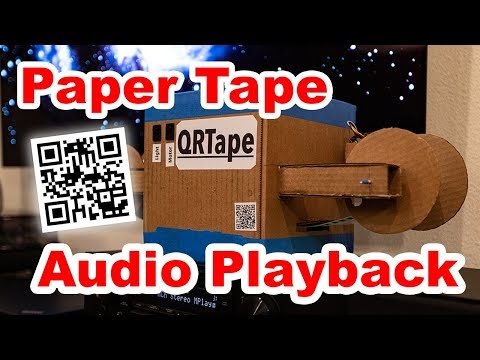
QRTape – Audio Playback from Paper Tape with Computer Vision (2021)
Here is a project that I have been tossing around in my head for at least a year or two now. Given advances in audio compression algorithms and computer vision: could reasonably high-quality audio be stored on a paper tape?
This is a fascinating concept to me. When considering the complete history of storage media from early cylindrical engraved records through to magnetic tape it is evident that achieving high quality and reliable data storage is both challenging and expensive. When specifically considering magnetic tape, the challenges surrounding complex mechanical tape transports and sensitive electronics highlight some of the difficulties that engineers have faced in the past.
| QRTape |
In this blog I demonstrate a system that exploits modern computer vision and audio compression to replace the complex mechanical tape transports of the past. In fact, my tape transport is made entirely from paper and cardboard (excluding some electronics, of course). I have decided to call this system QRTape.
Under the QRTape system, data is encoded by a series of QR codes that are printed on a continuous strip of paper. This strip of paper is fed from one spool through a crude tape transport, past a webcam and onto a take-up spool. The paper is advanced by a small stepper motor driven by a cheap Arduino. The rest is pure software magic.
Hardware
The goal of this project is to encode data on a continuous strip of paper and read it using a standard off-the-shelf webcam. In order to support this, I needed to design a simplistic tape transport to move the paper tape past a camera continuously so that it can be read in sequence.
| QRTape Closeup |
I decided to prototype this using simple cardboard, tape and hot-glue. The first component of the system are the spools. The media is loaded on the left side of the player and pulled through a cardboard box where the camera and a light source are mounted. The spool is simply constructed from a paper towel core cut down to size with cardboard end caps hot-glued on.
| QRTape Source Spool |
The tape passes through a box that provides a stage to flatten the tape, a light source and the camera. A small strip of paper flattens the tape as it enters the box and provides a source of tension to keep it flat. This job would typically be performed by a pinch-roller in a magnetic tape system.
| QRTape Player Scanning Stage |
On the other side of the box is the take-up spool that the tape is pulled onto by a small stepper motor. This stepper motor drives the take-up spool through a 1:1 pulley drive where a rubber-band is employed as a belt. This works surprisingly well given how simple it is. The stepper is driven by a very simple Arduino module that simply runs the motor at constant speed such that 1-2 QR codes pass in front of the camera per second.
| Stepper Motor Drive |
There are numerous opportunities for improvements in terms of hardware. The simplest would be a centering mechanism for the tape to reduce lateral motion while pulled across the scanning stage. A more sophisticated system would have motors on both sides of the tape transport to allow rewinding the tape. In a perfect world the playback software would perform closed-loop motor control to ensure that codes are read at the correct rate and scanning errors are resolved by rewinding the tape to allow a second read, if needed.
Software
As with most projects, the software is the star of the show. I have employed a number of off-the-shelf software packages to make this work. The first is the fantastic ZBar barcode scanning library and supporting tools. The second is the highly efficient Opus audio coding format which allows a very small 16kbps stream to produce tremendous results. Here is a video demonstrating the quality differences between the outdated MP3 codec and OPUS.
In addition to off-the-shelf software, I wrote a small tool called qrtape that takes an input file and formats it into a series of QR codes, adding a sequence number and CRC16 to each code as a second-line defense against corrupted reads. I have released the code on my GitHub if you are interested in checking it out.
Audio Compression
If using QRTape to encode audio data, the first step is to compress with the OPUS codec. I use the variable-bitrate form of the codec. This allows the quiet sections of source material to be compressed more efficiently while allowing the codec to exceed the nominal bitrate during periods of high entropy to provide a better quality result.
# Encode source FLAC file with 12kbps, VBR stereo OPUS.
aarossig@lithium:~/qrtape$ opusenc --discard-comments --discard-pictures
    --framesize 60 --bitrate 12
    equalizer.flac equalizer-12k-stereo-vbr.opus
Encoding using libopus 1.3.1 (audio)
-----------------------------------------------------
   Input: 44.1kHz 2 channels
  Output: 2 channels (2 coupled)
          60ms packets, 12kbit/sec VBR
 Preskip: 312

Encoding complete
-----------------------------------------------------
       Encoded: 4 minutes and 21.84 seconds
       Runtime: 5 seconds
                (52.37x realtime)
         Wrote: 363551 bytes, 4364 packets, 275 pages
       Bitrate: 10.7233kbit/s (without overhead)
 Instant rates: 2.66667kbit/s to 14.6667kbit/s
                (20 to 110 bytes per packet)
      Overhead: 3.46% (container+metadata)
The resulting file is only 355kB in size for a 4 minute 21 second audio file. That is incredible!
Sharding
The next step is to shard the input file into pieces. This is done using the qrtape tool that I wrote. This takes the file and splits it into pieces. All pieces are the same size and the last QR code will be padded with zero bytes if does not use all available space. This makes decoding and reassembly simpler.
The format of files produced by qrtape is very simple. The first two bytes encode a sequence ID to allow detecting duplicates/gaps in the stream of codes. The second two bytes encode the size of the chunk. This will be the same for all barcodes except potentially for the last if padding is applied. The following bytes are the data to be transmitted and the final two bytes are a CRC16 of the entire message. This is a second-line defense against a corrupted read. QR codes employ their own form of Error Correction Capability (ECC), but in the event that a mis-read happens, the CRC helps to avoid that data from making it to the application software. A CRC16 is small relative to the payload encoded in each code so the overhead is justified.
# Break the source file into 2331 byte chunks.
aarossig@lithium:~/qrtape$ qrtape --encode -s 2331
    --input equalizer-12k-stereo-vbr.opus -p equalizer_
Generating files from 'equalizer-12k-stereo-vbr.opus' in 2325 byte chunks
Generating chunk 0: offset 0, size 2325, filename 'equalizer_0.bin'
Generating chunk 1: offset 2325, size 2325, filename 'equalizer_1.bin'
Generating chunk 2: offset 4650, size 2325, filename 'equalizer_2.bin'
Generating chunk 3: offset 6975, size 2325, filename 'equalizer_3.bin'
...
Generating chunk 154: offset 358050, size 2325, filename 'equalizer_154.bin'
Generating chunk 155: offset 360375, size 2325, filename 'equalizer_155.bin'
Generating chunk 156: offset 362700, size 851, filename 'equalizer_156.bin'
Finished generating chunks
Above is the command to split the input file into pieces. The specific size 2331 is chosen because it allows Medium ECC checking to be enabled for the largest size QR code (177×177 dots). The result is 157 files that can be then transformed into QR codes. Further information about QR code capacities are available online.
QR Coding
The next step is to encode these bin files into QR codes. This is done using the qrencode command.
# Encode QR codes with medium ECC.
aarossig@lithium:~/qrtape$ for i in {0..156}; do
    qrencode -8 -m 0 -s 16 -l M
    -r equalizer_$i.bin -o equalizer_$i.png;
done
This is probably the simplest step of this process. The notable flags here are that the QR code is encoded using binary mode, borders are disabled, the dot size is increased to allow crisper printing and medium ECC is enabled. The result is a 2953 byte QR code with 2331 bytes of content.
Printing
The final step is printing. I have a Brother QL-700 printer that I use for hobby projects. There is a fantastic brother_ql package available that supports printing to this printer without use of cups. This simplifies the entire process. With that package installed, the printing process is as simple as printing each barcode sequentially, with the cutting function of the printer disabled. A delay is introduced between each code to prevent the printer from overheating.
# Print QR codes in order, in high-dpi mode.
# Leave time for the printer to cool between prints.
aarossig@lithium:~/qrtape$ for i in {0..156}; do
    echo printing $i;
    sudo brother_ql -b pyusb -m QL-700 -p usb://0x04f9:0x2042
        print -l 62 --600dpi --no-cut equalizer_$i.png;
    sleep 12;
done
Playback
Playback of audio is done with a single pipeline command. No files are written to disk and only a small mount of buffering is done in memory. The qrtape command includes a decode function that reads barcodes from stdin and outputs their contents to stdout. The barcodes are read using a tool called zbarcam which has a mode that terminates each code with a newline command and otherwise emits binary data to stdout. These two commands are combined to provide audio data to mplayer for playback.
# Playback audio through a decode pipeline with mplayer.
aarossig@cobalt:~$ zbarcam /dev/video0 --prescale=1920x1080
    --raw -Sdisable -Sqrcode.enable -Sbinary
    | ./qrtape/qrtape -d -s 2331 --allow-skip
    | tee equalizer.opus
    | mplayer -
The first stage of the pipeline reads barcodes from a USB webcam with zbarcam. I used a Logitech C920 which supports a very low minimum focusing distance. The second stage decodes the barcodes using qrtape. The qrtape utility is permitted to skip a barcode. For audio, this is acceptable and it manifests itself as a small jump in time. This can happen if the QR code reader happens to miss a read. The next step writes the file to disk using tee and finally mplayer performs decode from stdin. The file written to disk is nice for experimenting with the file after playback has completed.
Closing Remarks
This project is par for the course for my blog. If there is something interesting that I can do by smashing two pieces of unrelated technology together, you can bet that I will. I am impressed with the results. The barcode is not moving very quickly and the system is easily capable of playing back pretty decent quality audio.
QR codes are a simple way to encode data into an image and there is a wide variety of software available to decode them. I am not convinced that it is the most efficient coding given the constraints of the problem and suspect that much higher bandwidth could be achieved with something that is more tailored to this application. In this setup, the lighting is constrained and the camera is a known quantity. I suspect this means that more data could be crammed into a given surface area, along with eliminating gaps between the codes.
Special thanks to Ryan from Fabrik8 for the afternoon of hacking on the stepper motor drive. Also thanks to Espen Kraft for allowing me to use the instrumental track Equalizer in my video as demo material.


